当前位置:网站首页>ROS packages visualization
ROS packages visualization
2022-08-04 21:32:00 【moneymyone】
ROSInformation package visual
文章目录
1. 循环播放rosbag
A terminal to startroscore
roscore
Another terminal playrosbag
rosbag play 2022-01-24.bag -l

rosbag play 2022-01-24.bag -l
[ INFO] [1656915294.661470192]: Opening 2022-01-24.bag

Waiting 0.2 seconds after advertising topics... done.

Hit space to toggle paused, or 's' to step.
 [RUNNING]  Bag Time: 1517156370.912962   Duration: 2.746406 / 2.873530
2.rviz打开
点击Add->添加topic

会显示fixed frame不正确,来看看该rosbag包中frame_id是什么,And what is defined as?
查看rosbag对应topic的fixed frame
[email protected]:~$ rostopic echo /front/M1/rslidar_points | grep frame_id
  frame_id: "/rslidar"
  frame_id: "/rslidar"
  frame_id: "/rslidar"
  frame_id: "/rslidar"
  frame_id: "/rslidar"
Fixed Frame
The Fixed Frame/固定参考系
The more-important of the two frames is the fixed frame. The fixed frame is the reference frame used to denote the “world” frame. This is usually the “map”, or “world”, or something similar, but can also be, for example, your odometry frame.
If the fixed frame is erroneously set to, say, the base of the robot, then all the objects the robot has ever seen will appear in front of the robot, at the position relative to the robot at which they were detected.
For correct results, the fixed frame should not be moving relative to the world.
If you change the fixed frame, all data currently being shown is cleared rather than re-transformed.
The Target Frame
The target frame is the reference frame for the camera view. For example, if your target frame is the map, you’ll see the robot driving around the map. If your target frame is the base of the robot, the robot will stay in the same place while everything else moves relative to it.
消息的头std_msgs/Header headerTypically this information.
Standard header information mainly include:
seqIs a message in the order of logo,不需要手动设置,Published nodes in the news,会自动累加.timestampIs the message that is associated with the data of the time stamp,The laser data, for example,Timestamp corresponding laser data collection point in time.frame_idIs the message that is associated with the data of the reference frameid,For example in the laser data,frame_idCorresponding to the laser data acquisition reference.
例如LaserScan消息结构:
std_msgs/Header header    # Standard header information
uint32 seq
time stamp
string frame_id        # in frame frame_id, angles are measured around the positive Z axis (counterclockwise, if Z is up) with zero angle being forward along the x axis
float32 angle_min        # start angle of the scan [rad]
float32 angle_max        # end angle of the scan [rad]
float32 angle_increment  # angular distance between measurements [rad]
float32 time_increment   # time between measurements [seconds] - if your scanner
                         # is moving, this will be used in interpolating position of 3d points
float32 scan_time        # time between scans [seconds
float32 range_min        # minimum range value [m]
float32 range_max        # maximum range value [m]
float32[] ranges         # range data [m] (Note: values < range_min or > range_max should be discarded)
float32[] intensities    # intensity data [device-specific units]. If your device does not provide intensities, please leave the array empty.
修改为正确的frame_id, Then can display properly:

Code to broadcast
#include "ros/ros.h"
#include"std_msgs/Int32.h"
#include <iostream>

int main(int argc, char **argv)
{
    ros::init(argc, argv, "demo_topic_publisher");
    ros::NodeHandle node_obj;
    ros::Publisher number_publisher = node_obj.advertise<std_msgs::Int32>("/numbers",10); // topic
    ros::Rate loop_rate(10);

    int number_count = 0;
    while(ros::ok()) {
        std_msgs::Int32 msg;
        msg.data = number_count;
        ROS_INFO("%d",msg.data);
        number_publisher.publish(msg);
        ros::spinOnce();
        loop_rate.sleep();
        ++number_count;
    }
    return 0;
}
rosWould a live Numbers
[ INFO] [1657537136.415226386]: 977
[ INFO] [1657537136.515237562]: 978
[ INFO] [1657537136.615177688]: 979
[ INFO] [1657537136.715232163]: 980
[ INFO] [1657537136.815237120]: 981
[ INFO] [1657537136.915179913]: 982
[ INFO] [1657537137.015181264]: 983
[ INFO] [1657537137.115259284]: 984
查看topic及信息
$ rostopic list
/clock
/numbers
/points_raw
/pose
/rosout
/rosout_agg
$ rostopic echo  /numbers
data: 388
---
data: 389
---
data: 390
---
data: 391
---
data: 392
---
data: 393
---
Reference
- http://wiki.ros.org/rviz/UserGuide#Coordinate_Frames
- The frame_id in a message specifies the point of reference for data contained in that message: https://blog.csdn.net/xu_fengyu/article/details/86562827
边栏推荐
- 8 年产品经验,我总结了这些持续高效研发实践经验 · 协同篇
- 开发deepstram的自定义插件,使用gst-dseaxmple插件进行扩充,实现deepstream图像输出前的预处理,实现图像自定义绘制图(精四)
- JWT主动校验Token是否过期
- 【线性代数02】AX=b的2种解释和矩阵乘法的5种视角
- Three ways to set a specific device UWP XAML view
- LayaBox---TypeScript---Problems encountered at first contact
- ROS播包可视化
- 如何一键重装Win11系统 一键重装系统方法
- Red team kill-free development practice of simulated confrontation
- Spss-系统聚类软件实操
猜你喜欢
![[2022 Hangzhou Electric Multi-School 5 1003 Slipper] Multiple Super Source Points + Shortest Path](/img/78/054329dec6a6faea5e9d583b6a8da5.png)
[2022 Hangzhou Electric Multi-School 5 1003 Slipper] Multiple Super Source Points + Shortest Path
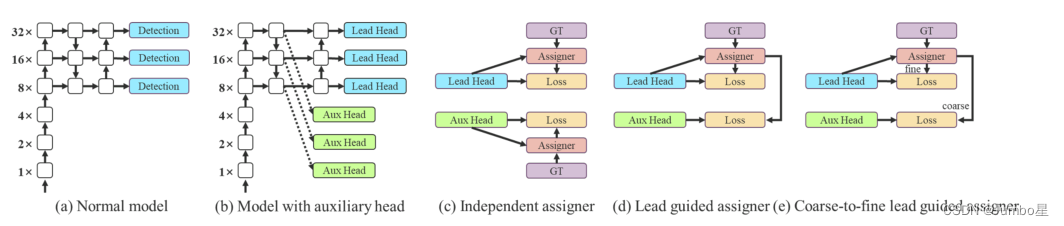
Yolov7:Trainable bag-of-freebies sets new state-of-the-art for real-time objectdetectors

数电快速入门(三)(卡诺图化简法的介绍)

【2022牛客多校5 A题 Don‘t Starve】DP

模拟对抗之红队免杀开发实践
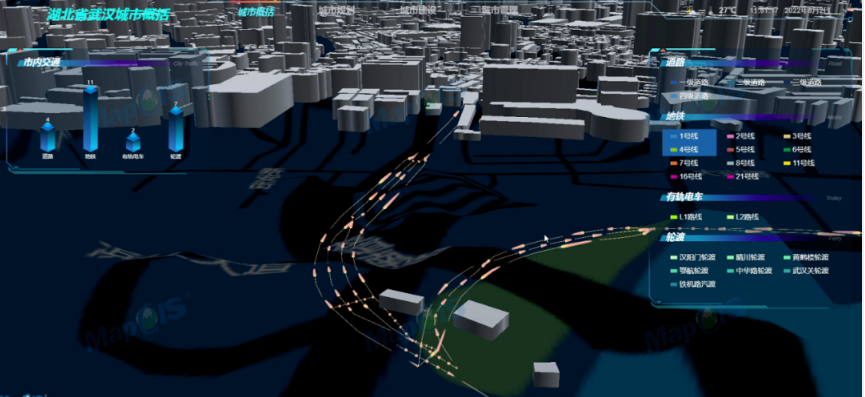
数字重塑客观世界,全空间GIS发展正当其时

搬走地下空间开发利用“绊脚石” 中地数码取得地下空间透明化技术突破

PRIMAL: Pathfinding via Reinforcement and Imitation Multi-Agent Learning 代码解析

C语言知识大全(一)——C语言概述,数据类型

用Tesseract开发一个你自己的文字识别应用
随机推荐
Yolov7:Trainable bag-of-freebies sets new state-of-the-art for real-time objectdetectors
【Programming Ideas】
热力学相关的两个定律
PowerCLi 批量配置NTP
【编程思想】
【ubuntu20.04安装MySQL以及MySQL-workbench可视化工具】
LayaBox---TypeScript---首次接触遇到的问题
Spss-一元回归实操
【2022杭电多校5 1012题 Buy Figurines】STL的运用
dotnet 启动 JIT 多核心编译提升启动性能
1319_STM32F103串口BootLoader移植
【QT】回调函数的实现
matlab drawing
Pinduoduo open platform order information query interface [pdd.order.basic.list.get order basic information list query interface (according to transaction time)] code docking tutorial
milvus配置相关
搬走地下空间开发利用“绊脚石” 中地数码取得地下空间透明化技术突破
STM32MP157A驱动开发 | 01- 板载LED作为系统心跳指示灯
拼多多开放平台订单信息查询接口【pdd.order.basic.list.get订单基础信息列表查询接口(根据成交时间)】代码对接教程
win10 uwp 使用 WinDbg 调试
How to solve the problem that the alarm information cannot be transmitted after EasyGBS is connected to the latest version of Hikvision camera?