当前位置:网站首页>Flutter series: wrap in flutter
Flutter series: wrap in flutter
2022-06-23 10:41:00 【Procedural stuff】
brief introduction
We are flutter Can contain multiple child Of widget When , We often encounter situations beyond the boundary , Especially in Column and Row Under the circumstances , So do we have any good solutions ? The answer is what we are going to talk about today Wrap.
Row and Column Plight
Row and Column Can contain more than one child widget, If son widget Beyond the Row perhaps Column What will happen to the scope of ?
We use Row For example :
  Widget build(BuildContext context) {
    return Row(
      textDirection: TextDirection.ltr,
      mainAxisAlignment: MainAxisAlignment.spaceEvenly,
      children: [
        YellowBox(),
        YellowBox(),
        Expanded(
          child: YellowBox(),
        ),
        YellowBox(),
      ],
    );
  }
In the example above , We are Row Added a few YellowBox,YellowBox It's a width=100,height=50 The rectangle of :
  Widget build(BuildContext context) {
    return Container(
      width: 100,
      height: 50,
      decoration: BoxDecoration(
        color: Colors.yellow,
        border: Border.all(),
      ),
    );
  }
Run the above code , We can get such an interface :

If in Row Add more in YellowBox What effect will it have ?
We're up there Row Add one more yellowBox:
  Widget build(BuildContext context) {
    return Row(
      textDirection: TextDirection.ltr,
      mainAxisAlignment: MainAxisAlignment.spaceEvenly,
      children: [
        YellowBox(),
        YellowBox(),
        Expanded(
          child: YellowBox(),
        ),
        YellowBox(),
        YellowBox(),
      ],
    );
  }
Run to get the following interface :
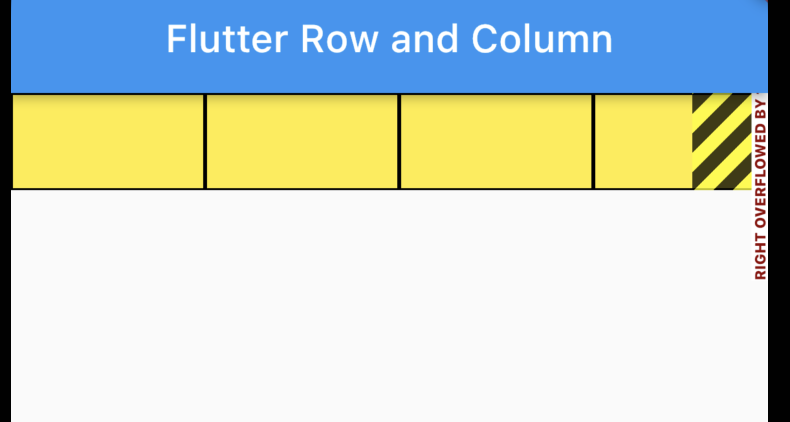
You can see , because Row The son of widget That's too much , It's over Row The scope of the , An error has been reported on the interface .
To solve this problem , You need to use it Wrap Components .
Wrap The component,
Let's start with Wrap The definition of :
class Wrap extends MultiChildRenderObjectWidget
Wrap Inherited from MultiChildRenderObjectWidget, The representation can contain multiple children child.
Next is Wrap Constructor for :
  Wrap({
    Key? key,
    this.direction = Axis.horizontal,
    this.alignment = WrapAlignment.start,
    this.spacing = 0.0,
    this.runAlignment = WrapAlignment.start,
    this.runSpacing = 0.0,
    this.crossAxisAlignment = WrapCrossAlignment.start,
    this.textDirection,
    this.verticalDirection = VerticalDirection.down,
    this.clipBehavior = Clip.none,
    List<Widget> children = const <Widget>[],
  }) : assert(clipBehavior != null), super(key: key, children: children);
The constructor lists Wrap Properties commonly used in .
among direction Indicates the arrangement direction of sub components .alignment Represents the way a sub component is aligned with it .spacing Represents the interval between subcomponents .
Follow spacing There's a similar one runSpacing attribute , What's the difference between the two ? Let's take a concrete example to see .
  Widget build(BuildContext context) {
    return Wrap(
      direction: Axis.horizontal,
      textDirection: TextDirection.ltr,
      children: [
        YellowBox(),
        YellowBox(),
        // Expanded(
        //   child: YellowBox(),
        // ),
        YellowBox(),
        YellowBox(),
        YellowBox(),
      ],
    );
Or the example above , Here we use Wrap To replace Row, Here we use direction Options , Indicates that it is in the horizontal direction Wrap.
And then in children Added in 5 individual YellowBox.
Be careful , Not available here Expanded, Otherwise, an error will be reported , So we put Expanded Commented out , Run to get the following interface :
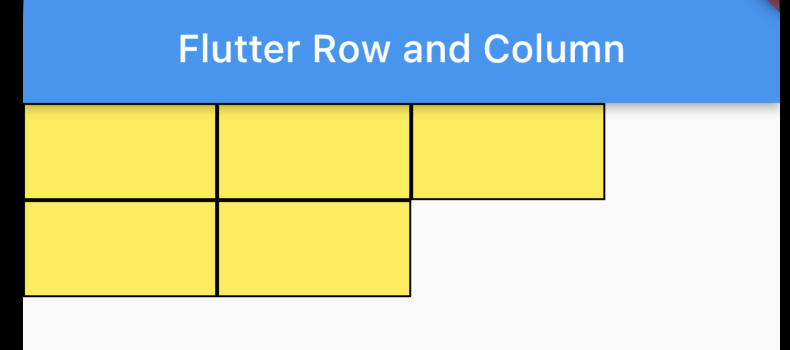
You can see YellowBox It is arranged in the direction of the row , If it exceeds the range of one line, it will wrap automatically , This is the same. Wrap The function of .
We are explaining Wrap When , There are also two properties mentioned , Namely spacing and runSpacing. What's the difference between the two ?
Let's take a look at spacing:
  Widget build(BuildContext context) {
    return Wrap(
      direction: Axis.horizontal,
      spacing: 10,
      textDirection: TextDirection.ltr,
      children: [
        YellowBox(),
        YellowBox(),
        // Expanded(
        //   child: YellowBox(),
        // ),
        YellowBox(),
        YellowBox(),
        YellowBox(),
      ],
    );
  }
Let's give it first Wrap add to spacing attribute , Run to get the following interface :

You can see YellowBox Between is to use spacing For segmentation .
So if we want to Wrap When I change lines , There is also some space between two lines. What should I do ?
It's needed at this time runSpacing The attribute is :
  Widget build(BuildContext context) {
    return Wrap(
      direction: Axis.horizontal,
      spacing: 10,
      runSpacing: 10,
      textDirection: TextDirection.ltr,
      children: [
        YellowBox(),
        YellowBox(),
        // Expanded(
        //   child: YellowBox(),
        // ),
        YellowBox(),
        YellowBox(),
        YellowBox(),
      ],
    );
  }
Run to get the following interface :
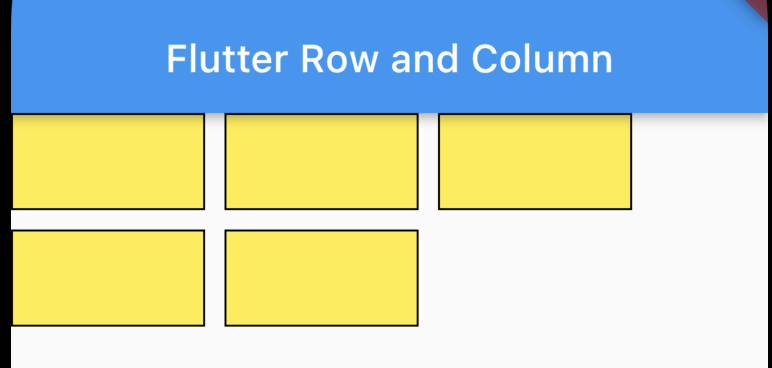
Wrap It has run perfectly .
summary
Wrap You can use different direction To replace Row perhaps Column, When components may be out of range , You can consider using it Wrap 了 .
Examples of this article :https://github.com/ddean2009/learn-flutter.git
Please refer to www.flydean.com
The most popular interpretation , The deepest dry goods , The most concise tutorial , There are so many tricks you don't know about waiting for you to discover !
Welcome to my official account. :「 Program those things 」, Know technology , Know you better !
边栏推荐
- Mathematical analysis_ Notes_ Chapter 2: real and plural numbers
- NOI OJ 1.3 20:计算2的幂 C语言
- 2021-04-16 array
- NOI OJ 1.4 04:奇偶ASCII值判断 C语言
- Noi OJ 1.3 05: floating point numeric C language for calculating fractions
- MySQL-01.工作中数据库优化和explain字段知识的总结
- 证券开户网上安全度高吗
- Noi OJ 1.3 14: elephant drinking water C language
- 开源二进制文件静态漏洞分析工具BinAbsInspector安装使用
- Analysis of LinkedList source code
猜你喜欢


随机推荐
Interview Manual of social recruitment Tencent high P (Senior Product Manager)
Spring recruitment interview experience summary (technical post)
Solve the problem of invalid audio autoplay
Golang quick start (1)
最简单DIY基于C#和51单片机上下位机一体化的PCA9685舵机控制程序
TTY驱动框架
实现领域驱动设计 - 使用ABP框架 - 通用准则
Parity of UART
What is a good quick development framework like?
NOI OJ 1.3 14:大象喝水 C语言
2021-04-27 classes and objects
Why does the pointer not change the corresponding value as a formal parameter
NOI OJ 1.4 04:奇偶ASCII值判断 C语言
2021-05-10 method rewrite polymorphism considerations
5 login failures, limiting login practice
Numerical calculation method
php反射类使用
UART的奇偶校验
MySQL-01. Summary of database optimization and explain field knowledge in work
最简单DIY基于STM32F407探索者开发板的MPU6050陀螺仪姿态控制舵机程序