当前位置:网站首页>SmobilerService 推送实现
SmobilerService 推送实现
2022-08-03 11:04:00 【51CTO】
SmobilerService 推送实现
SmobilerService 社区版、专业版、标准版都支持推送服务,那怎么能实现呢?

安装SmobilerService
在 https://www.smobiler.com/service/serviceInstall.html 上下载安装包并安装,安装后使用浏览器访问 http://localhost:15486 ,输入默认登陆名 admin 与默认密码 admin ,登陆并立即开始使用。
Ps:打不开 http://localhost:15486 则参考 https://wiki.smobiler.com/wiki/103 排查
在云平台上创建应用
登录云平台 https://cloud.smobiler.com/ ,点击【创建】

创建一个新应用


在vs中创建服务端程序,并通过SmobilerService部署
前提:需要有 安装 VS以及SmobilerDesigner
1. 创建一个SmobilerApplicants项目

2. 在SmobilerForm1中拖入两个button和两个label,布局如图

并在SmobilerForm1中写入下方代码:
3. 将项目的输出改成类库,重新生产项目,并部署到smobilerservce上去。

Ps:部署方法参考 https://www.smobiler.com/service/serviceHelpDoc.html?isExpand=yes#cloud
若是手机app打开出现“未配置业务地址xxx.xxx.xxx” 点击【许可证】-【同步】
在云平台上打包应用
点击应用打包

选择【Android】,并添加内网推送插件

1883是SmobilerService默认的推送端口
192.168.9.113 是服务端的ip
Ps:默认推送端口可以在SmobilerService 中修改

打包完成后,下载apk安装到手机上
效果演示
1. 通过SmobilerService推送
点击【推送】,输入推送消息后,点击【选择设备并推送】


手机端显示

2. 通过代码推送
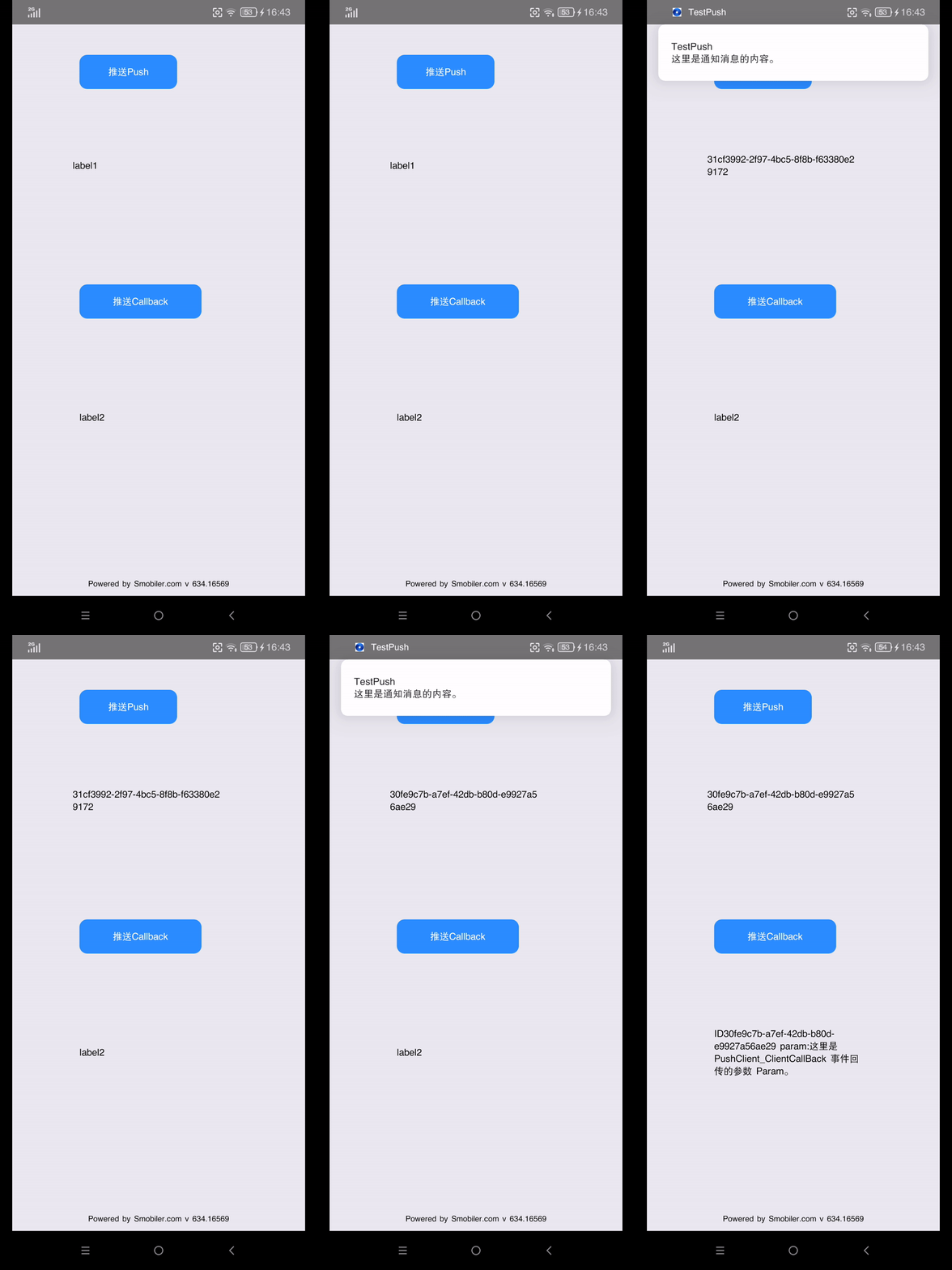
点击app里的推送按钮,效果如图
边栏推荐
- 二叉搜索树(搜索二叉树)模拟实现(有递归版本)
- Boolean 与numeric 无法互转
- 通过GBase 8c Platform安装数据库集群时报错
- MySQL数据库高级使用
- 【二分查找详解外加递归写法】附有全部代码
- 【TypeScript】为什么要选择 TypeScript?
- 浅谈SVN备份
- Question G: Word Analysis ← Questions for the second provincial competition of the 11th Blue Bridge Cup Competition
- Analysis of the idea of the complete knapsack problem
- 【AppCube】数字孪生万物可视 | 联接现实世界与数字空间
猜你喜欢


![[Star Project] Little Hat Plane Battle (9)](/img/e3/c7d2728080bcdccc181a7e5c50ee6f.png)


随机推荐
numpy
What is a smart contract?
JS快速高效开发技巧指南(持续更新)
Machine Learning (Chapter 1) - Feature Engineering
Classical Architecture and Memory Classification of Embedded Software Components
RecyclerView的item高度自适应
Dva.js 新手入门指南
关于OPENSSL的问题
LyScript implements memory stack scanning
【二分查找详解外加递归写法】附有全部代码
代码分析Objective-C中的深拷贝与浅拷贝
【JS 逆向百例】某网站加速乐 Cookie 混淆逆向详解
QT with OpenGL(Shadow Mapping)(面光源篇)
redis基础知识总结——数据类型(字符串,列表,集合,哈希,集合)
XDR平台架构与关键技术解析
「全球数字经济大会」登陆 N 世界,融云提供通信云服务支持
for in 和 for of的区别
C#+WPF 单元测试项目类高级程序员必知必会
Android 技术面试准备(含面试题及答案)
微信多开批处理(自动获取安装路径)