当前位置:网站首页>抖音实战~实现App端视频上传与发布
抖音实战~实现App端视频上传与发布
2022-06-24 19:45:00 【gblfy】

文章目录
一、API阅读
1. 选择或拍摄视频
找到uni.chooseVideo(OBJECT)API,
选择或拍摄视频文件:https://uniapp.dcloud.net.cn/api/media/video.html#choosevideo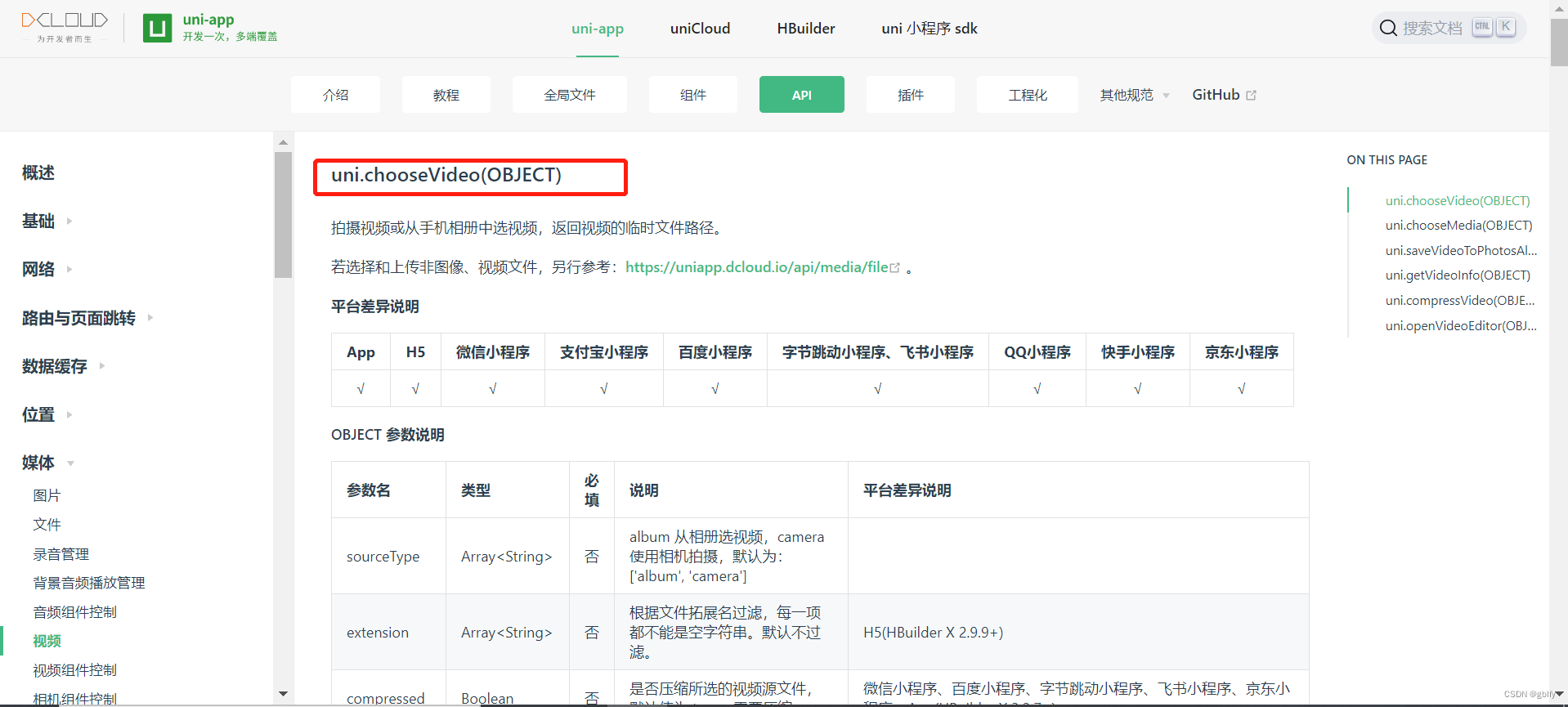
2. 云函数API~文件上传
用到的api:uniCloud.uploadFile(Object uploadFileOptions)
uniCloud API文档

3. 视频截帧
用途:视频截帧当视频封面
视频截帧阿里云服务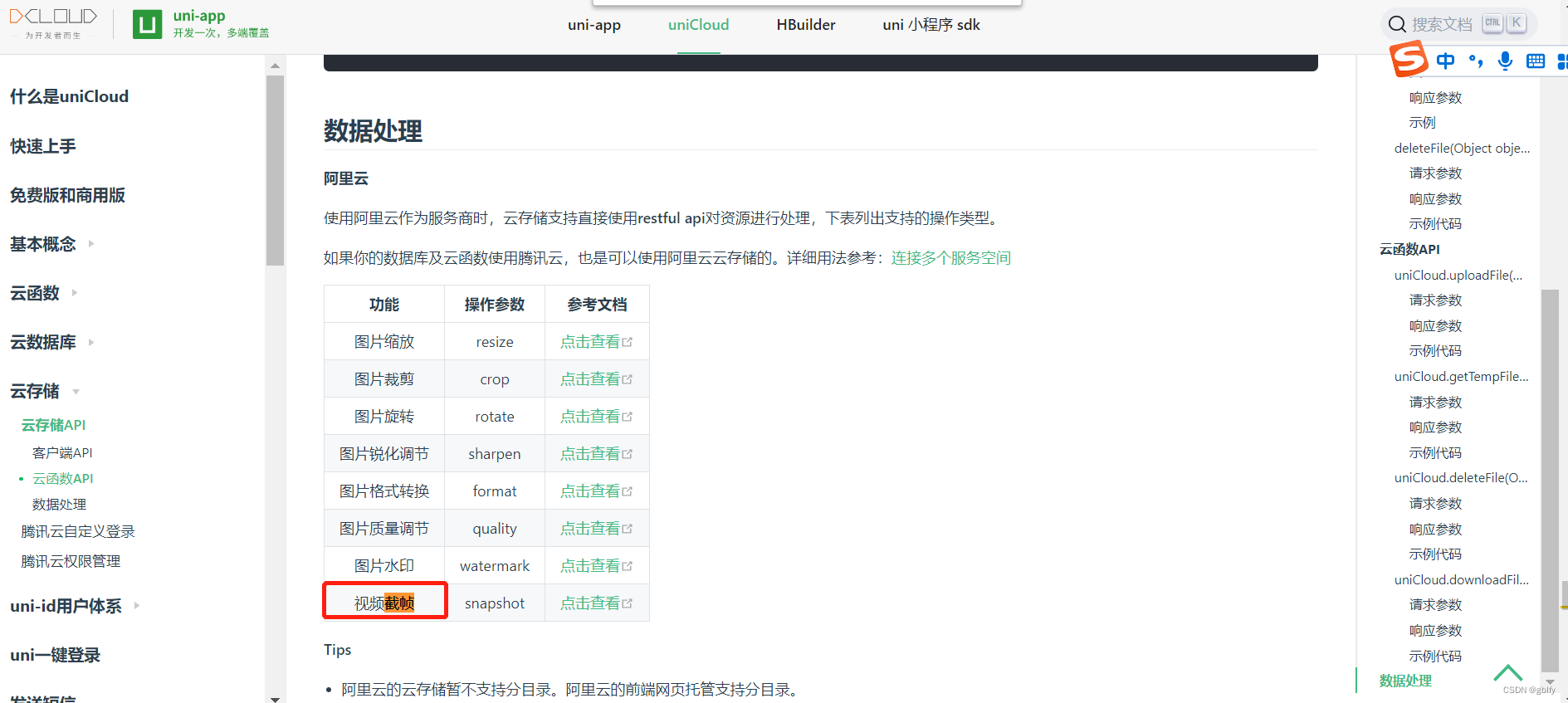
视频截帧服务
阿里云视频截帧
二、App端视频上传流程
2.1. 上传流程图

2.2. 流程简述
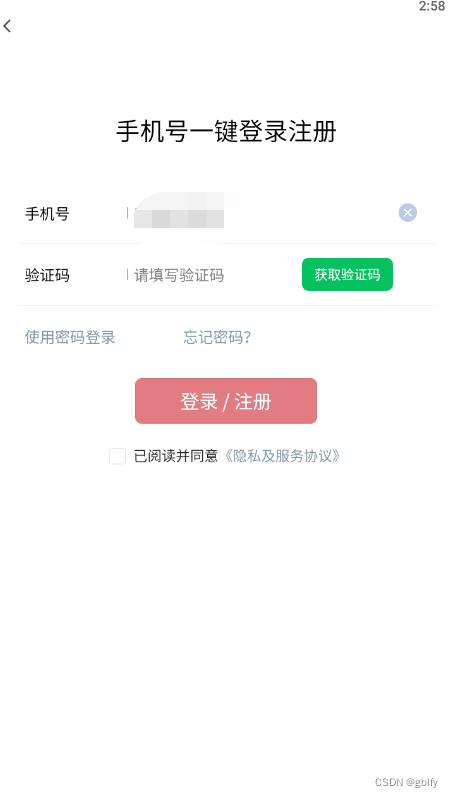
- 1.校验用户登录状态,未登录,则跳转登录页面进行登录,登录流程继续。
- 2.点击中间发布按钮
- 3.选择或拍摄视频,点击确认
- 4.携带文件信息跳转短视频发布页面
- 5.短视频发布页面加载时,接收视频文件信息,解析文件信息
- 6.配置文件路径和云端文件名称
- 7.调用云函数,执行短视频云端上传
- 8.短视频上传过程中,进度条根据实际上传进度动态展示
- 9.短视频上传完成,调用阿里云视频截帧服务,进行视频截帧封面制作
- 10.短视频信息封装
- 11.补充上传内容
- 12.发布短视频,调用后端接口服务
- 13.短视频文件信息,简要处理,执行落库处理
三、前端源码实战
3.1. 选择/拍摄短视频
			// 监听中间按钮的点击事件
			uni.onTabBarMidButtonTap(()=>{


				// 未登录不能发布视频
				var myUserInfo = getApp().getUserInfoSession();
				if (myUserInfo == null) {

					uni.showToast({

						duration: 3000,
						title: "请登录~",
						icon: "none"
					});
					uni.navigateTo({

						url: "../loginRegist/loginRegist",
						animationType: "slide-in-bottom",
						success() {

							me.loginWords = "请登录"
						}
					});
					return;
				}

				// console.log('onTabBarMidButtonTap');
				uni.switchTab({

					url: "../me/me"
				});

				uni.chooseVideo({

					sourceType: ['album'],
					success(e) {

						uni.navigateTo({

							url: "/pages/publish/publish?fileObjectEvent=" + JSON.stringify(e)
						})

						/** * 或者采用uniCloud,在客户端完成上传,减少链路,因为文件大,通信链路和耗时是双倍的 */
						var times = new Date().getTime();
					}
				})

			});
3.2. 短视频上传
	// 当前页面加载时触发
		onLoad(params) {

			var me = this;
			this.statusBarHeight = system.statusBarHeight;
			this.screenWidth = system.screenWidth;

			// 上个页面传过来的文件事件对象,其中包含了相册中选择的视频内容
			var fileObjectEvent = JSON.parse(params.fileObjectEvent);
			var times = new Date().getTime();
			uniCloud.uploadFile({

				// 要上传的文件对象 ->获取视频临时路径
				filePath: fileObjectEvent.tempFilePath,
				// 使用阿里云时,cloudPath为云端文件名
				//根据具体业务自定义
				cloudPath: times + '.mp4',

				// 进度条事件
				onUploadProgress(progressEvent) {

					var percentCompleted = Math.round((progressEvent.loaded * 100) / progressEvent.total);
					// 这个数值在视频上传过程中是动态变化的百分比,以此来展示上传的具体进度
					me.percentCompleted = percentCompleted;
				},
				// 上传完成后的流程操作
				success(f) {

					// 获取视频路径
					var videoUrlTemp = f.filePath;
					// 获取视频ID
					var videoUrl = f.fileID;

					// 获得视频参数
					me.tempFilePath = videoUrlTemp;
					me.videoUrl = videoUrl;
					me.tempCover = videoUrl + "?x-oss-process=video/snapshot,t_1,f_jpg,ar_auto"; // 截帧
					me.width = fileObjectEvent.width;
					me.height = fileObjectEvent.height;
				}
			});
		},
3.3. 进度条页面
<!-- 进度条 -->
		<view style="marginTop:60rpx;display: flex;flex-direction: column;justify-content: center;"
			v-if="percentCompleted != 100">
			<progress :percent="percentCompleted" stroke-width="3" activeColor="#ef274d" backgroundColor="#F1F1F1"
				:style="{screenWidth: screenWidth + 'px'}" />
			<text style="color: #F1F1F1;font-size: 16px;text-align: center;margin-top: 20px;"
				:style="{screenWidth: screenWidth + 'px'}">视频上传中~ 请耐心等待~~</text>
			<image mode="aspectFit" src="../../static/images/loading-4.gif"
				style="width: 600rpx;height: 600rpx;align-self: center;">
		</view>
3.4. 补充短视频内容
<textarea class="vlog-content" placeholder-style="color: #9798a0;" placeholder="添加合适的标题内容" :value="title"
				:model="title" maxlength="60" @input="typingContent" confirm-type="done"></textarea>
3.5. 视频发布
			<view :class="{'btn-publish':!publichTouched, 'btn-publish-touched': publichTouched}"
				style="margin-top: 30rpx;height: 90rpx;display: flex;justify-content: center;border-radius: 20px;"
				@touchstart="touchstartPublich" @touchend="touchendPublich" @click="doPublich">
				<text style="color: #e6e6e6;font-size: 18px;align-self: center;font-weight: 500;">发布 Vlog</text>
			</view>
	doPublich() {

				var me = this;
				var userId = getApp().getUserInfoSession().id;

				var vlog = {

					"vlogerId": userId,
					"url": me.videoUrl,
					"cover": me.tempCover,
					"title": me.title,
					"width": me.width,
					"height": me.height
				};

				// 发布视频
				var serverUrl = app.globalData.serverUrl;
				uni.request({

					method: "POST",
					header: {

						headerUserId: userId,
						headerUserToken: app.getUserSessionToken()
					},
					url: serverUrl + "/vlog/publish",
					data: vlog,
					success(result) {


						if (result.data.status == 200) {

							uni.showToast({

								title: "发布成功!",
								icon: "none"
							})

							uni.navigateBack({

								delta: 1,
								animationType: 'zoom-fade-in',
								animationDuration: 1000
							});

							uni.switchTab({

								url: "../me/me"
							})
						} else {

							uni.showToast({

								title: result.data.msg,
								icon: "none",
								duration: 3000
							});
						}

					}
				});

			},
3.6. 视频预览
	preview() {

				uni.navigateTo({

					url: "/pages/publish/preview?videoUrl=" + this.videoUrl + "&width=" + this.width + "&height=" +
						this.height,
					animationType: 'slide-in-bottom',
					animationDuration: 500
				})
			},
四、后端源码实战
4.1. 短视频发布
 /** * 发布vlog视频 * * @param vlogBO * @return */
    @PostMapping("publish")
    public GraceJSONResult publish(@RequestBody VlogBO vlogBO) {

        vlogService.createVlog(vlogBO);
        return GraceJSONResult.ok();
    }
4.2. 逻辑处理
    /** * 发布vlog视频 * * @param vlogBO */
    @Transactional
    @Override
    public void createVlog(VlogBO vlogBO) {


        //视频ID
        String vid = sid.nextShort();

        Vlog vlog = new Vlog();
        BeanUtils.copyProperties(vlogBO, vlog);

        vlog.setId(vid);

        vlog.setLikeCounts(0);
        vlog.setCommentsCounts(0);
        vlog.setIsPrivate(YesOrNo.NO.type);

        vlog.setCreatedTime(new Date());
        vlog.setUpdatedTime(new Date());

        vlogMapper.insert(vlog);
    }
五、效果图鉴赏
5.1.

边栏推荐
- 7-7 digital triangle
- MySQL semi sync replication
- 如何化解35岁危机?华为云数据库首席架构师20年技术经验分享
- 华为机器学习服务语音识别功能,让应用绘“声”绘色
- [JS] - [array, Stack, queue, Link List basis] - Notes
- OpenSSL SSL_ read: Connection was reset, errno 10054
- The R language uses the matchit package for propensity matching analysis and match The data function constructs the matched sample set, and judges the balance of all covariates in the sample after the
- Volcano成Spark默认batch调度器
- 当初吃土建起来的“中台”,现在为啥不香了?
- 还在用 SimpleDateFormat 做时间格式化?小心项目崩掉
猜你喜欢

Morris traversal

选择类排序法
![[JS] - [array, Stack, queue, Link List basis] - Notes](/img/c6/a1bd3b8ef6476d7d549abcb442949a.png)
[JS] - [array, Stack, queue, Link List basis] - Notes
国内有哪些好的智能家居品牌支持homekit?

还在用 SimpleDateFormat 做时间格式化?小心项目崩掉

Installation and deployment of ganglia

【UVM入门 ===> Episode_8 】~ Sequence 和 Sequencer、Sequence 层次化
![[JS] - [tree] - learning notes](/img/62/de4fa2a7c5e52c461b8be4a884a395.png)
[JS] - [tree] - learning notes

明天就是PMP考试了(6月25日),这些大家都了解了吗?

File contains vulnerability issues
随机推荐
Tomorrow is the PMP Exam (June 25). Have you understood all this?
QT to place the form in the lower right corner of the desktop
R language uses the polR function of mass package to build an ordered multi classification logistic regression model, and uses exp function, confint function and coef function to obtain the confidence
还在用 SimpleDateFormat 做时间格式化?小心项目崩掉
Still using simpledateformat for time formatting? Be careful of project collapse
Actipro WPF Controls 2022.1.2
[JS] - [linked list - application] - learning notes
7-5 maximal submatrix sum problem
378. Knight placement
年薪百万,7年测试经验:守在一个还算不错的赛道,慢慢积累,等风来
idea创建模块提示已存在
websocket长链接压测
一文理解OpenStack网络
Installing IBM CPLEX academic edition | CONDA installing CPLEX
UNION ALL UNION FULL JOIN
MySQL 表的增删查改
#22Map介绍与API
[introduction to UVM== > episode_8] ~ sequence and sequencer, sequence hierarchy
7-2 solving the stock buying problem
SimpleDateFormat 格式化和解析日期的具体类