当前位置:网站首页>OSPF comprehensive experimental configuration
OSPF comprehensive experimental configuration
2022-07-24 03:04:00 【Oranges love oranges】
List of articles
- One 、 Subject requirements
- Two 、IP Address assignment
- 3、 ... and 、IP Address and its related configuration
- Four 、 build MGRE Environmental Science
- 5、 ... and 、 start-up OSPF The protocol and RIP agreement
- 6、 ... and 、 Reduce LSA Update quantity of ( Summarize and make special areas )
- 7、 ... and 、 Speed up convergence ( You can modify hello Time , Time of death with hello Time changes )
- 8、 ... and 、 To configure NAT Environmental Science , Complete all device access R4 Loopback
- Nine 、 To ensure the security of updates , Network wide accessibility
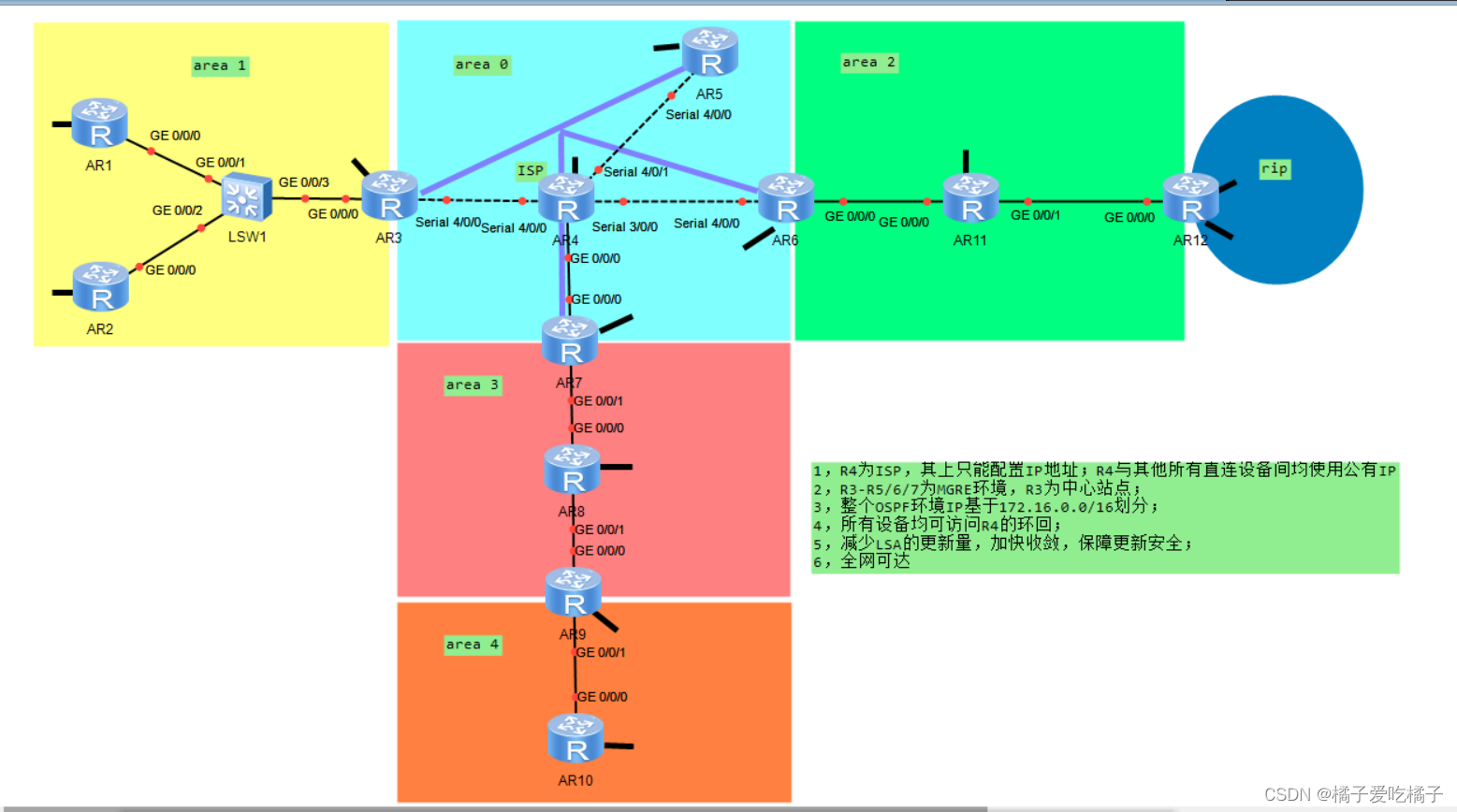
One 、 Subject requirements
- R4 by ISP, Can only be configured on it IP Address ;R4 Public equipment is used with all other directly connected equipment IP
- R3-R5/R6/R7 by MGRE Environmental Science ,R3 For the central site ;
- Whole OSPF Environmental Science IP be based on 172.16.0.0/16 Divide ;
- All devices are accessible R4 The loopback of ;
- Reduce LSA Update quantity of , Speed up convergence , To ensure the security of updates ;
- Network wide accessibility
Two 、IP Address assignment
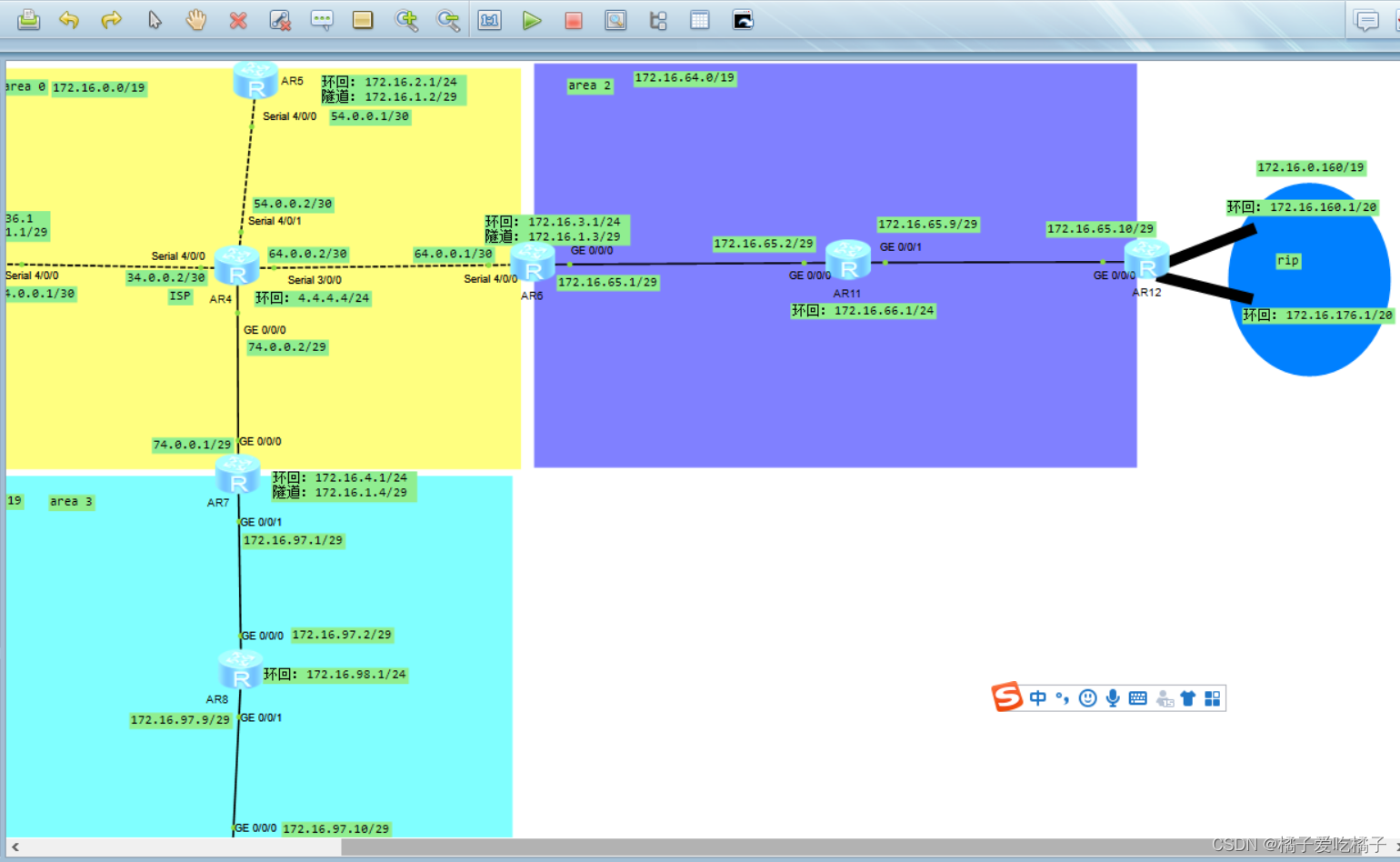
Divide ideas :
One 、 First, divide based on Network Protocol , There are several, probably divided into several .
Two 、 If there is a user network segment, it is generally given 24 、 25、26 A host
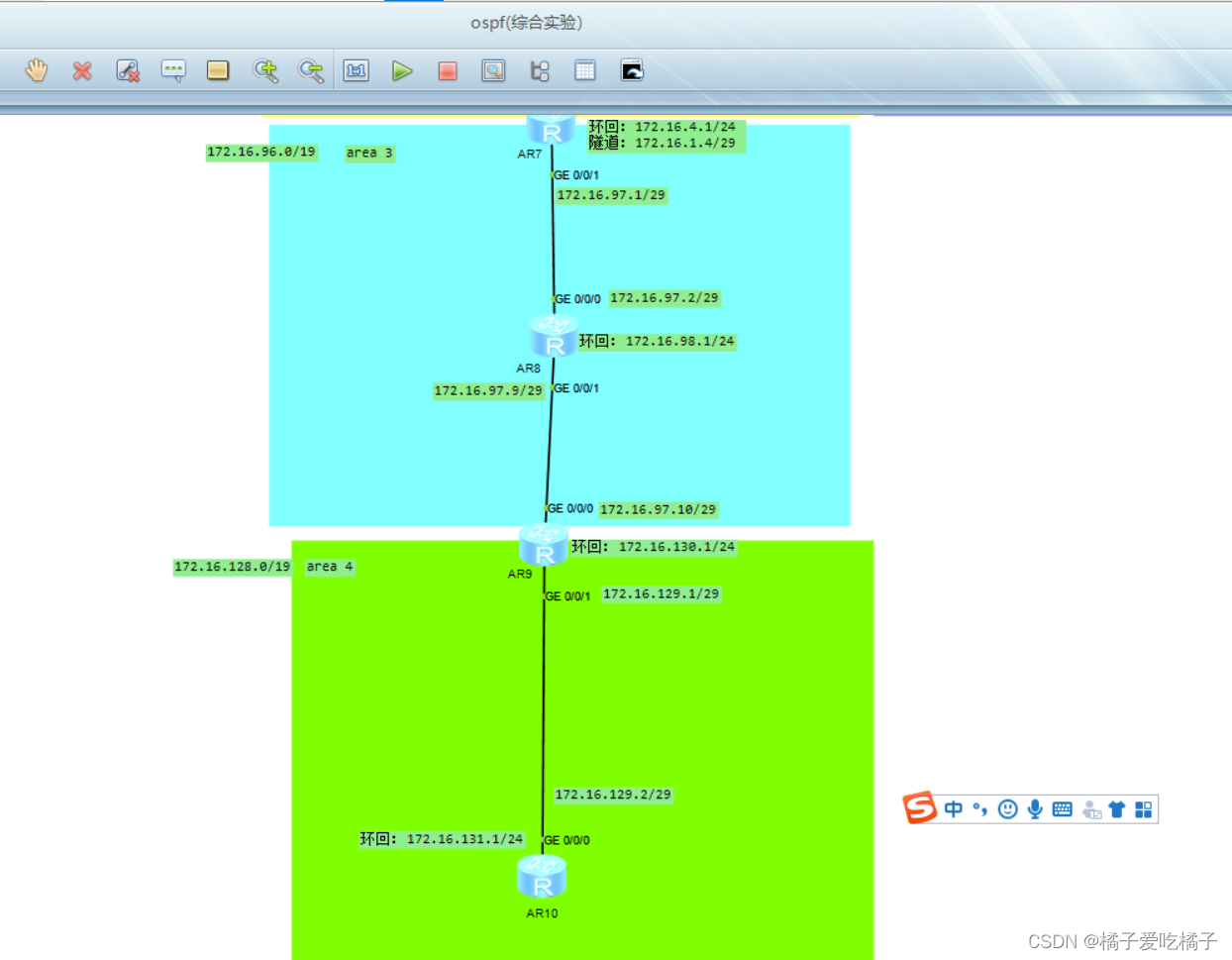
172.16.0.0/16: It is roughly divided into eight areas , The remaining two areas are used as spare areas
 Area 0---- 172.16.0.0/19
   172.16.0.0/24-----P2P The backbone of
       172.16.0.0/30
       172.16.0.4/30
       172.16.0.8/30
       .....
       172.16.0.63/30
   172.16.1.0/24----MA The backbone of
       172.16.1.0/29
       172.168.1.8/29
       172.16.1.16/29
       ....
   172.16.2.0/24---- User network segment
   .......
   172.16.31.0/24
 Area 1---- 172.16.32.0/19
    172.16.32.0/24-----P2P The backbone of
         172.16.32.0/30
         172.16.32.4/30
         172.16.32.8/30
    172.16.33.0/24----MA The backbone of
         172.16.33.0/29
         172.16.33.8/29
         172.16.33.16/29
    172.16.34.0/24
    ......
    172.16.63.0/24
 Area 2---- 172.16.64.0/19
 Area 3---- 172.16.96.0/19
 Area 4---- 172.16.128.0/19
RIP Area ---- 172.16.160.0/19
 Standby area :
172.16.192.0/19
172.16.224.0/19
 And then in the above 6 Areas are divided in turn , I won't describe it here , The division results are shown in the figure below :

3、 ... and 、IP Address and its related configuration
R1
[r1]int g 0/0/0
[r1-GigabitEthernet0/0/0]ip address 172.16.33.1 29
[r1-LoopBack0]ip address 172.16.34.1 24
R2
[r2]int g 0/0/0
[r2-GigabitEthernet0/0/0]ip address 172.16.33.2 29
[r2-GigabitEthernet0/0/0]int lo0
[r2-LoopBack0]ip address 172.16.35.1 24
R3
[r3]int s 4/0/0
[r3-Serial4/0/0]ip address 34.0.0.1 24
[r3-Serial4/0/0]

[r3]ip route-static 0.0.0.0 0 34.0.0.2---- default
R4
[isp]int Serial 4/0/0
[isp-Serial4/0/0]ip address 34.0.0.2 24
[isp-Serial4/0/0]int s 4/0/1
[isp-Serial4/0/1]ip address 54.0.0.2 24
[isp-Serial4/0/1]int s 3/0/0
[isp-Serial3/0/0]ip address 64.0.0.2 24
[isp-Serial3/0/0]int g 0/0/0
[isp-GigabitEthernet0/0/0]ip address 74.0.0.2 24
R5
[r5]int s 4/0/0
[r5-Serial4/0/0]ip address 54.0.0.1 24

[r5]ip route-static 0.0.0.0 0 54.0.0.2---- default
R6
[r6]int s 4/0/0
[r6-Serial4/0/0]ip address 64.0.0.1 24
[r6-Serial4/0/0]
[r6-LoopBack0]int g 0/0/0
[r6-GigabitEthernet0/0/0]ip address 172.16.65.1 29

[r6]ip route-static 0.0.0.0 0 64.0.0.2--- default
R7
[r7]int g 0/0/0
[r7-GigabitEthernet0/0/0]ip address 74.0.0.1 24
[r7-GigabitEthernet0/0/0]
[r7]int g 0/0/1
[r7-GigabitEthernet0/0/1]ip address 172.16.97.1 29

[r7]ip route-static  0.0.0.0 0 74.0.0.2--- default
R8
[r8]int g 0/0/0
[r8-GigabitEthernet0/0/0]ip address 172.16.97.2 29
[r8-GigabitEthernet0/0/0]int lo0
[r8-LoopBack0]ip address 172.16.98.1 24
[r8-LoopBack0]int g 0/0/1
[r8-GigabitEthernet0/0/1]ip address 172.16.97.9 29
[r8-GigabitEthernet0/0/1]
R9
[r9]int g 0/0/0
[r9-GigabitEthernet0/0/0]ip ad
[r9-GigabitEthernet0/0/0]ip address 172.16.97.10 29
[r9-GigabitEthernet0/0/0]int g 0/0/1
[r9-GigabitEthernet0/0/1]ip address 172.16.129.1 29
[r9-GigabitEthernet0/0/1]int lo0
[r9-LoopBack0]ip address 172.16.130.1 24
[r9-LoopBack0]
R10
[r10]int g 0/0/0
[r10-GigabitEthernet0/0/0]ip address 172.16.129.2 29
[r10-GigabitEthernet0/0/0]int lo0
[r10-LoopBack0]ip address 172.16.131.1 24
[r10-LoopBack0]
R11
[r11]int g 0/0/0
[r11-GigabitEthernet0/0/0]ip address 172.16.65.2 29
[r11-GigabitEthernet0/0/0]int lo0
[r11-LoopBack0]ip address 172.16.66.1 24
[r11-LoopBack0]int g 0/0/1
[r11-GigabitEthernet0/0/1]ip address 172.16.65.9 29
R12
[r12]int g 0/0/0
[r12-GigabitEthernet0/0/0]ip address 172.16.65.10 29
[r12-LoopBack0]int lo1
[r12-LoopBack1]ip address 172.16.176.1 20
[r12-LoopBack1]int lo0
[r12-LoopBack0]undo ip address 172.16.160.1 24
[r12-LoopBack0]ip address 172.16.160.1 20
Four 、 build MGRE Environmental Science
R3
[r3]int t 0/0/0--- Tunnel interface 、 Define the encapsulation type ,R3 As a site
[r3-Tunnel0/0/0]ip address 172.16.1.1 29
[r3-Tunnel0/0/0]tunnel-protocol gre p2mp--- Define the encapsulation type
[r3-Tunnel0/0/0]source 34.0.0.1
[r3-Tunnel0/0/0]nhrp network-id 100
[r3-Tunnel0/0/0]nhrp entry multicast dynamic---- Enable pseudo broadcast
R5
[r5]int t 0/0/0----- Define tunnel interface
[r5-Tunnel0/0/0]ip address 172.16.1.2 29
[r5-Tunnel0/0/0]tunnel-protocol gre p2mp--- Define the encapsulation type
[r5-Tunnel0/0/0]source Serial 4/0/0
[r5-Tunnel0/0/0]nhrp network-id 100
[r5-Tunnel0/0/0]nhrp entry 172.16.1.1 34.0.0.1 register--- towards R3 To register

[r5]int lo0---- Simulate user network segment ( Loopback )
[r5-LoopBack0]ip address 172.16.2.1 24
R6
[r6-Tunnel0/0/0]ip address 172.16.1.3 29
[r6-Tunnel0/0/0]tunnel-protocol gre p2mp---- Define the encapsulation type
[r6-Tunnel0/0/0]source Serial 4/0/0
[r6-Tunnel0/0/0]nhrp network-id 100
[r6-Tunnel0/0/0]nhrp entry 172.16.1.1 34.0.0.1 register
[r6-Tunnel0/0/0]


[r6-LoopBack0]ip address 172.16.3.1 24--- Loopback
R7
[r7]int t 0/0/0
[r7-Tunnel0/0/0]ip address 172.16.1.4 29
[r7-Tunnel0/0/0]tunnel-protocol gre p2mp
[r7-Tunnel0/0/0]source g 0/0/0
[r7-Tunnel0/0/0]nhrp network-id 100
[r7-Tunnel0/0/0]nhrp entry 172.16.1.1 34.0.0.1 register
[r7-LoopBack0]ip address 172.16.4.1 24
[r7-LoopBack0]
see MGRE Environment screenshot 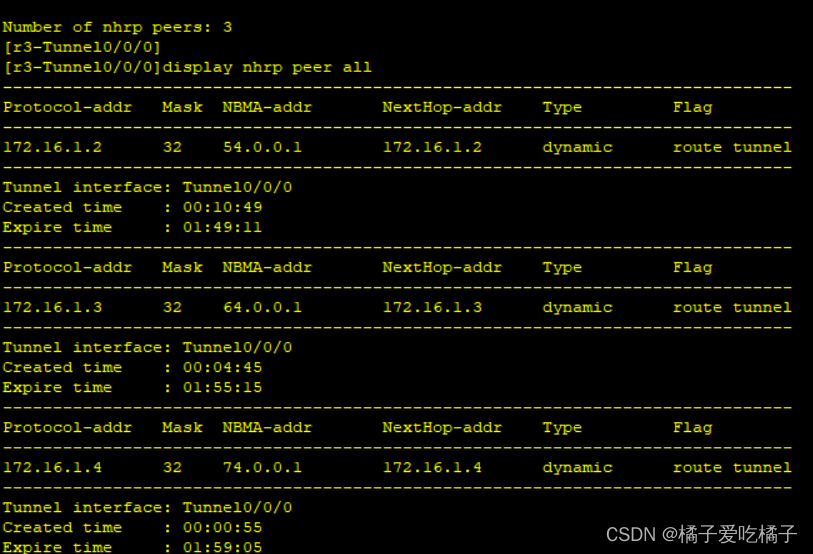

5、 ... and 、 start-up OSPF The protocol and RIP agreement
R1
[r1]ospf 1 router-id 1.1.1.1
[r1-ospf-1]area 1
[r1-ospf-1-area-0.0.0.1]network 172.16.0.0 0.0.255.255
[r1-ospf-1-area-0.0.0.1]
R2
[r2]ospf 1 router-id 2.2.2.2
[r2-ospf-1]area 1
[r2-ospf-1-area-0.0.0.1]network 172.16.0.0 0.0.255.255
[r2-ospf-1-area-0.0.0.1]
R3
[r3]ospf 1 ro
[r3]ospf 1 router-id 3.3.3.3
[r3-ospf-1]a 1
[r3-ospf-1-area-0.0.0.1]network 172.16.33.3 0.0.0.0
[r3-ospf-1-area-0.0.0.1]network 172.16.36.1 0.0.0.0
[r3-ospf-1-area-0.0.0.0]network 34.0.0.1 0.0.0.0

[r3]int t  0/0/0----- Change the interface type --- Because of our MGRE The environment is P2P type ,
 It cannot establish a neighbor relationship with other routers , So we need to modify the network interface type ,
 If you change one of them , All other interfaces should be changed
[r3-Tunnel0/0/0]ospf network-type p2mp
R5
[r5]ospf 1 router-id 5.5.5.5
[r5-ospf-1]a 0
[r5-ospf-1-area-0.0.0.0]network 172.16.0.0 0.0.255.255
[r5-ospf-1-area-0.0.0.0]

[r5-ospf-1-area-0.0.0.0]int t 0/0/0----- Change the interface type
[r5-Tunnel0/0/0]ospf network-type p2mp
R6
[r6]ospf 1 router-id 6.6.6.6
[r6-ospf-1]a 0
[r6-ospf-1-area-0.0.0.0]network 172.16.0.0 0.0.3.255

[r6-ospf-1]a 2
[r6-ospf-1-area-0.0.0.2]network 172.16.65.1 0.0.0.0
[r6-ospf-1-area-0.0.0.2]


[r6-ospf-1-area-0.0.0.2]int t 0/0/0----- Change the interface type
[r6-Tunnel0/0/0]ospf network-type p2mp
R7
[r7]ospf 1 ro
[r7]ospf 1 router-id 7.7.7.7
[r7-ospf-1]area 0
[r7-ospf-1-area-0.0.0.0]network 74.0.0.1 0.0.0.0
[r7-ospf-1-area-0.0.0.0]network 172.16.4.1 0.0.0.0
[r7-ospf-1-area-0.0.0.0]network 172.16.1.4 0.0.0.0
[r7-ospf-1-area-0.0.0.0]

[r7-ospf-1]a 3
[r7-ospf-1-area-0.0.0.3]network 172.16.97.1 0.0.0.0

[r7-ospf-1-area-0.0.0.3]int t 0/0/0----- Change the interface type
[r7-Tunnel0/0/0]ospf network-type p2mp
R8
[r8]ospf 1 router-id 8.8.8.8
[r8-ospf-1]a 3
[r8-ospf-1-area-0.0.0.3]network 172.16.97.2 0.0.0.0
[r8-ospf-1-area-0.0.0.3]network 172.16.97.9 0.0.0.0
[r8-ospf-1-area-0.0.0.3]network 172.16.98.1 0.0.0.0
[r8-ospf-1-area-0.0.0.3]
R9
[r9]ospf 1 ro
[r9]ospf 1 router-id 9.9.9.9
[r9-ospf-1]area 3
[r9-ospf-1-area-0.0.0.3]172.16.97.10 0.0.0.0
[r9-ospf-1-area-0.0.0.3]network 172.16.97.10 0.0.0.0

[r9-ospf-1]area 4
[r9-ospf-1-area-0.0.0.4]network  172.16.129.1 0.0.0.0
[r9-ospf-1-area-0.0.0.4]network 172.16.130.1 0.0.0.0
[r9-ospf-1-area-0.0.0.4]
R10
[r10]ospf 1 router-id 10.10.10.10
[r10-ospf-1]a 4
[r10-ospf-1-area-0.0.0.4]network  172.16.129.2 0.0.0.0
[r10-ospf-1-area-0.0.0.4]network 172.16.131.1 0.0.0.0
R11
[r11]ospf 1 router-id 11.11.11.11
[r11-ospf-1]a 2
[r11-ospf-1-area-0.0.0.2]network 172.16.65.2 0.0.0.0
[r11-ospf-1-area-0.0.0.2]network 172.16.65.9 0.0.0.0
[r11-ospf-1-area-0.0.0.2]network 172.16.66.1 0.0.0.0
[r11-ospf-1-area-0.0.0.2]
R12
[r12]ospf 1 router-id 12.12.12.12
[r12-ospf-1]a 2
[r12-ospf-1-area-0.0.0.2]network 172.16.65.10 0.0.0.0
RIP
[r12]rip
[r12-rip-1]v 2
[r12-rip-1]network 172.16.0.0
[r12-rip-1]
Conduct the republishing process ,, take rip Network import to ospf in , Let two different networks communicate
Because the router lacks area 4 Areas and rip Regional routing , You can use republish to import .
[r12]ospf 1
[r12-ospf-1]import-route rip 1
[r12-ospf-1]
Delete area 4, Recreate OSPF2 Area
[r9]ospf 2 router-id 19.19.19.19
[r9-ospf-2]a 4
[r9-ospf-2-area-0.0.0.4]network 172.16.130.1 0.0.0.0
[r9-ospf-2-area-0.0.0.4]network 172.16.129.1 0.0.0.0

Reissue ospf2
[r9]ospf 1
[r9-ospf-1]import-route ospf 2
[r9-ospf-1]

6、 ... and 、 Reduce LSA Update quantity of ( Summarize and make special areas )
Summarizing can reduce the routing information received by the backbone area .
In order to avoid circuit looping , We can configure empty interface routing .
Inter domain routing summary :
R3
When the backbone area sends routing information , take LSA Put it together 3 class LSA
[r3]ospf 1
[r3-ospf-1]a 1
[r3-ospf-1-area-0.0.0.1]abr-summary 172.16.32.0 255.255.224.0
[r3]ip route-static 172.16.32.0 19 NULL 0----- Air interface anti ring
R6
[r6]ospf 1
[r6-ospf-1]a 2
[r6-ospf-1-area-0.0.0.2]abr-summary 172.16.64.0 255.255.224.0
[r6]ip route-static 172.16.64.0 19 NULL 0
R7
[r7]ospf 1
[r7-ospf-1]a 3
[r7-ospf-1-area-0.0.0.3]abr-summary 172.16.96.0 255.255.224.0
[r7]ip route-static 172.16.96.0 19 NULL 0
R9
[r9]ospf 1
[r9-ospf-1]asbr-summary 172.16.128.0 255.255.224.0
[r9]ip route-static 172.16.128.0 19 NULL 0
R12
[r12]ospf 1
[r12-ospf-1]asbr-summary 172.16.160.0 255.255.224.0
[r9]ip route-static 172.16.160.0  19 NULL 0
Area 1 Configure the full end area :
[r1-ospf-1]a 1
[r1-ospf-1-area-0.0.0.1]stub

[r2-ospf-1]a 1
[r2-ospf-1-area-0.0.0.1]stub

[r3-ospf-1]a 1
[r3-ospf-1-area-0.0.0.1]stub  no-summary
Area 2 :
[r6-ospf-1]a 2
[r6-ospf-1-area-0.0.0.2]nssa no-summary

[r11-ospf-1]a 2
[r11-ospf-1-area-0.0.0.2]nssa

[r12-ospf-1]a 2
[r12-ospf-1-area-0.0.0.2]nssa
Area 3:
[r7-ospf-1]a 3
[r7-ospf-1-area-0.0.0.3]nssa no-summary

[r8-ospf-1]a 3
[r8-ospf-1-area-0.0.0.3]nssa

[r9-ospf-1]a 3
[r9-ospf-1-area-0.0.0.3]nssa
Results screenshots :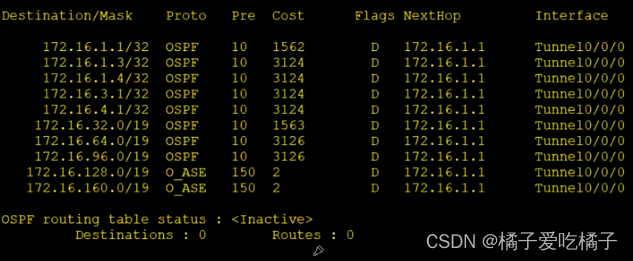
because R10 There is no routing information in it , So we can R9 Configure a default route on , Thus, the whole network can reach .
[r9]os
[r9]ospf 2
[r9-ospf-2]default-route-advertise
7、 ... and 、 Speed up convergence ( You can modify hello Time , Time of death with hello Time changes )
[r3]int t 0/0/0
[r3-Tunnel0/0/0]ospf timer hello 10

[r5]int t 0/0/0
[r5-Tunnel0/0/0]ospf timer hello 10
[r5-Tunnel0/0/0]

[r6]int t 0/0/0
[r6-Tunnel0/0/0]ospf timer hello 10

[r7]int t 0/0/0
[r7-Tunnel0/0/0]ospf timer hello 10
8、 ... and 、 To configure NAT Environmental Science , Complete all device access R4 Loopback
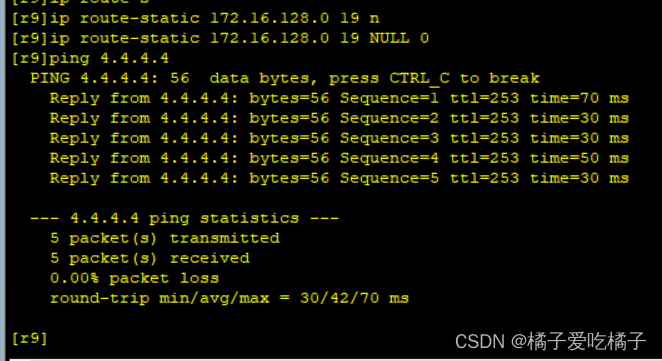
because R4 There are only R3、R6、R7 Three devices , So we only need to do it on these three devices NAT Port mapping is enough , The source address is R4 The network segment
[r3]acl 2000
[r3-acl-basic-2000]rule permit source 172.16.0.0 0.0.255.255----R4 Loopback address
[r3]int s 4/0/0
[r3-Serial4/0/0]nat outbound 2000
[r3-Serial4/0/0]

[r6]acl 2000
[r6-acl-basic-2000]rule permit source 172.16.0.0 0.0.255.255
[r6-acl-basic-2000]int s 4/0/0
[r6-Serial4/0/0]nat outbound 2000

[r7]acl 2000
[r7-acl-basic-2000]rule permit source 172.16.0.0 0.0.255.255
[r7]int g 0/0/0
[r7-GigabitEthernet0/0/0]nat outbound 2000
[r7-GigabitEthernet0/0/0]

Other device access R4 Screenshot ( part )

Nine 、 To ensure the security of updates , Network wide accessibility
1、 Manual certification
2、 Virtual link authentication
3、 Regional certification
Just choose one of the three methods , Here I choose regional certification , That is, interface authentication .
[r1]ospf 1
[r1-ospf-1]a 1
[r1-ospf-1-area-0.0.0.1]authentication-mode md5 1 cipher 123456
[r1-ospf-1-area-0.0.0.1]


[r2]ospf 1
[r2-ospf-1]a 1
[r2-ospf-1-area-0.0.0.1]authentication-mode md5 1 cipher 123456
[r2-ospf-1-area-0.0.0.1]

[r3]ospf 1
[r3-ospf-1]a 1
[r3-ospf-1-area-0.0.0.1]authentication-mode md5 1 cipher 123456
[r3-ospf-1-area-0.0.0.1]
Theoretically, it can work , But my R6 When the router is doing experiments Pail running away 了 , The whole network can't be reached here …
边栏推荐
- Ways to improve the utilization of openeuler resources 01: Introduction
- summernote富文本编辑器
- c语言小练习
- Data Lake (XV): spark and iceberg integrate write operations
- go strconv
- [AMC] federal quantification
- Basic knowledge of trigger (Part 2)
- Generate 13 bit barcode
- [brother hero July training] day 23: dictionary tree
- kettle
猜你喜欢
 [email protected] Principle of use"/>
(6) Decorator extension [email protected] Principle of use

Open source embedded sig in the openeuler community. Let's talk about its multi OS hybrid deployment framework

CMT registration - Google Scholar ID, semantic scholar ID, and DBLP ID

攻防世界WEB练习区(weak_auth、simple_php、xff_referer)

Lumberyard game engine of o3de

The simple use of ADB command combined with monkey is super detailed
508. The subtree element with the most occurrences and the pure C implementation of hash table method

Ugui source code analysis - imaskable
The function of SIP account - tell you what is SIP line

Dynamic programming-01 knapsack problem
随机推荐
SIGIR‘22 推荐系统论文之多样性篇
Connected graph (day 72)
uva11389
go strconv
summernote富文本编辑器
go IO操作-文件写
Nirvana rebirth! Byte Daniel recommends a large distributed manual, and the Phoenix architecture makes you become a God in fire
Nodejs builds cloud native microservice applications based on dapr, a quick start guide from 0 to 1
Babylon.js cool canvas background animation JS special effects
Honey, we are homeless now
Liveqing live RTMP on demand video streaming platform how to carry the Sid and token returned by the login interface to call authentication streamtoken video streaming authentication
In the future, when the interviewer asks why you don't recommend using select *, please answer him loudly!
Relational expression greater than > less than < congruence = = = Nan isnan() logical operator double sense exclamation point!! & |% +-- Short circuit calculation assignment expression shortcut operat
322. Change
198. House raiding
JVM初始
Do securities companies really have principal guaranteed financial products?
动态规划-01背包问题
Customize the default width and height of kindeditor rich text
Hcip --- BGP comprehensive experiment