当前位置:网站首页>[wechat applet] detailed explanation of applet host environment
[wechat applet] detailed explanation of applet host environment
2022-07-25 16:02:00 【Oranges!】
Learning objectives of this section :
In depth understanding of the host environment composition of applets
List of articles
1. The host environment of the applet
Mobile wechat is the host environment of small programs , Applets take advantage of the capabilities provided by the host environment , It can realize many functions that ordinary web pages cannot complete . for example : The applet calls the... Provided by wechat API Realize code scanning , Payment and other functions .
The content contained in the hosting environment of the applet :
- Communication model
- Operating mechanism
- Components
- API
2. Communication model
1. The subject of communication
The main body of communication in the applet is Render layer and Logic layer , among :
- WXML Templates and WXSS Styles work in the render layer
- JS Scripts work at the logical level
2. Communication model of applet
The communication model of the applet is divided into two parts :
- Render layer and Logic layer Communication between
- Logic layer and Third party servers Communication between
Both are forwarded through wechat clients
3. Operating mechanism
1. The startup process of the applet
- Download the code package of the applet to the local
- analysis app.json Global profile
- perform app.js Applet entry file , call App() Create an instance of the applet
- Rendering applet home page
- Applet startup completed

2. The process of page rendering
- Load the of the parsing page .json The configuration file
- To load a page .wxml Templates and .wxss style
- Execute the .js file , call Page() Create page instances
- Page rendering complete
4. Components
1. Classification of components in applet :
The components in the applet are also composed of Host environment Provided , Developers can quickly build a beautiful page structure based on components . Officials divide the components of small programs into 9 Categories: , Namely :
- View container
- Basic content
- Form components
- Navigation components
- Body assembly
- map Map components
- canvas Canvas components
- Opening ability
- Accessibility
2. Common view container class components
view
- Normal view area
- Be similar to HTML Medium div, Is a block level element
- Commonly used to achieve the layout effect of the page
for example : Use flex Achieve horizontal layout .
wxml Code :
<view class="container1">
<view>A</view>
<view>B</view>
<view>C</view>
</view>
wxss Code :
.container1 view{

  width:100px;
  height:100px;
  text-align: center;
  line-height: 100px;
}

.container1 view:nth-child(1){

  background-color: aquamarine;
}
.container1 view:nth-child(2){

  background-color: azure;
}
.container1 view:nth-child(3){

  background-color: darkorange;
}

.container1 {

  display: flex;
  justify-content: space-around;
}
Realization effect :
scroll-view
- Scrollable view area
- It is often used to achieve the effect of scrolling lists
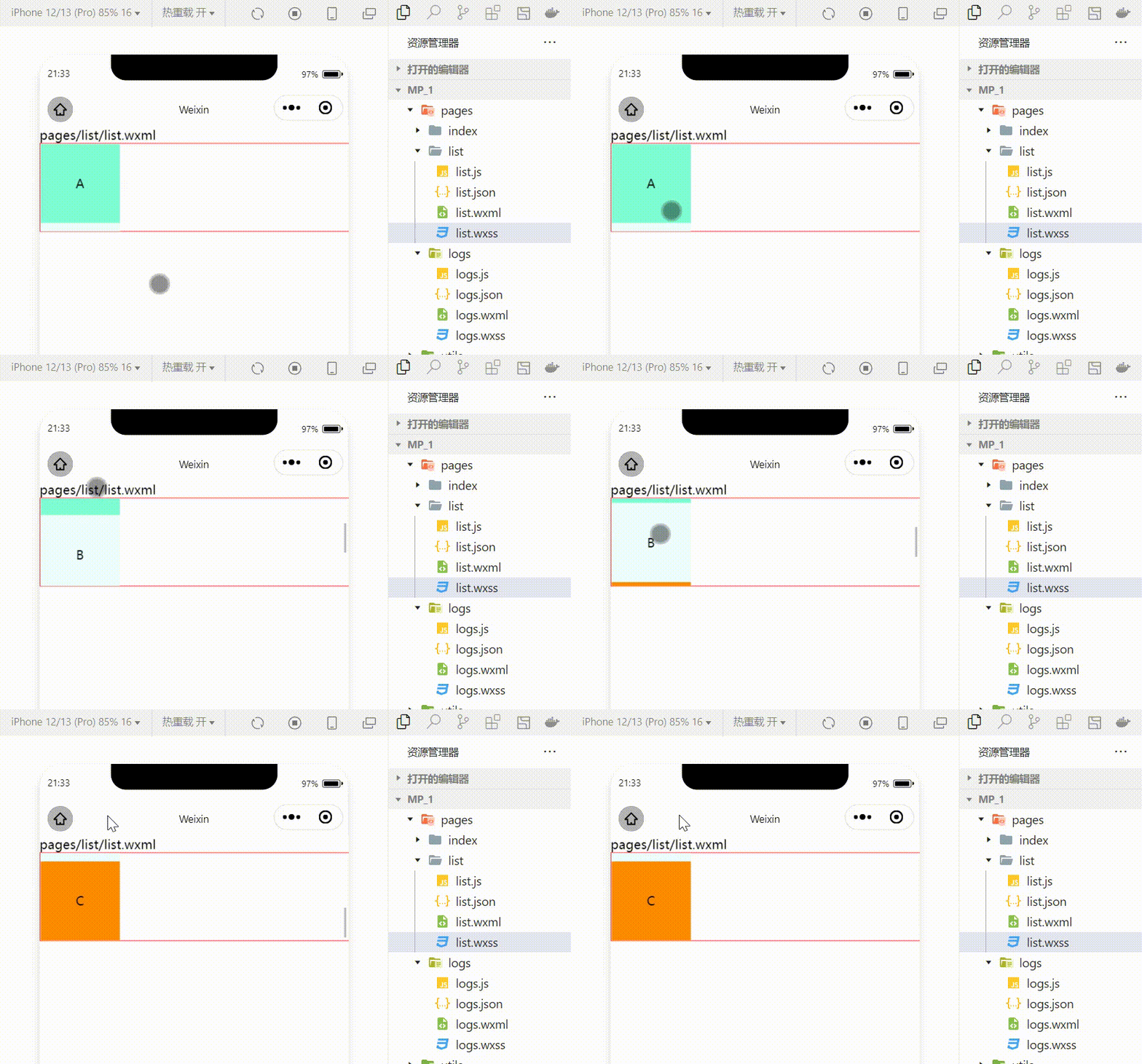
utilize scroll-view Achieve the effect of scrolling up and down
wxml Code :
<scroll-view class="container1" scroll-y>
<view>A</view>
<view>B</view>
<view>C</view>
</scroll-view>
Modified wxss Code :
.container1 {

  border:1px solid red;
  height:110px;
  /* Use scroll-view Set a fixed height */
Realization effect :
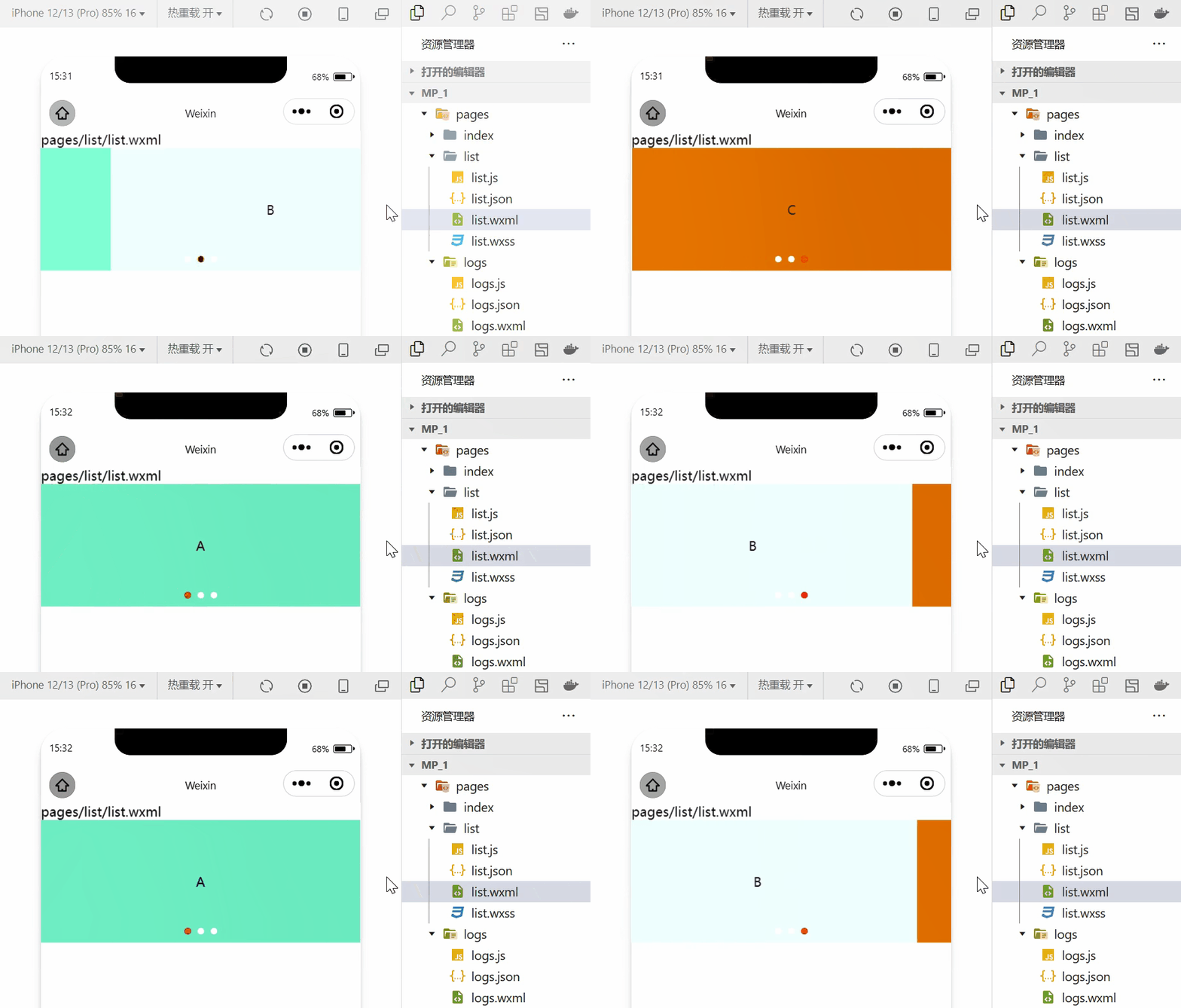
swiper and swiper-item
- Carousel map container assembly and Shuffling figure item Components
Using these two components can achieve the effect of rotating pictures :
wxml Code :
<swiper class="swiper-container" indicator-dots="true" indicator-color="white" indicator-active-color="red" autoplay="true" interval="1000" circular>
<swiper-item>
<view class="item">A</view>
</swiper-item>
<swiper-item>
  <view class="item">B</view>
</swiper-item>
<swiper-item>
  <view class="item">C</view>
</swiper-item>
</swiper>
wxss Code :
.swiper-container{

  height:150px;
}
.item{

  height:100%;
  line-height: 150px;
  text-align: center;
}

swiper-item:nth-child(1) .item{

  background-color: aquamarine;
}
swiper-item:nth-child(2) .item{

  background-color: azure;
}
swiper-item:nth-child(3) .item{

  background-color: darkorange;
}
Realization effect :
3. Common basic content components
text
- Text component
- Be similar to HTML Medium span label , It's an in-line element
Long press the selected text content
<view>
 Long press to select the text content :
<text user-select>HelloWorld!</text>
</view>

rich-text
- Rich text component
- Support HTML The string is rendered as WXML structure
hold HTML The string is rendered as the corresponding UI structure
<rich-text nodes="<h1 style='color:red'> title </h1>"> </rich-text>

4. Other common components
button
- Button components
- Functional ratio HTML Medium button Rich buttons
- adopt open-type Attribute can call various functions provided by wechat ( Customer service 、 forward 、 Get user authorization 、 Access to user information, etc )
image
- Picture components
- image The default width of the component is about 300px、 The height is about 240px
navigator
- Page navigation component
- Be similar to HTML Medium a link , Realize page Jump
5.API
In the applet API Is provided by the host environment , Through these rich applets API, Developers can easily call the capabilities provided by wechat , for example : Realize payment , Scan code and other functions .
Applet API Of 3 Big classification :
Event monitoring API
- characteristic : With on start , Used to monitor the trigger of some events
- give an example :wx.onWindowResize(function callback) Listen for window size changes
Sync API
- characteristic 1: With Sync At the end of the API It's all synchronous API
- characteristic 2: Sync API The results of the implementation of , You can get directly through the return value of the function , If the execution fails, an exception will be thrown
- give an example :wx.setStorageSync(‘key’, ‘value’) Write content to local storage
asynchronous API
- characteristic : Be similar to jQuery Medium $.ajax(options) function , Need to pass through success、fail、complete Receive the result of the call
- give an example :wx.request() Initiate a network data request , adopt success The callback function receives data
6. summary
In this section, we learned about the hosting environment of the applet and the specific contents of the hosting environment of the applet .
边栏推荐
- Circulaindicator component, which makes the indicator style more diversified
- Wavelet transform --dwt2 and wavedec2
- 排他锁(EXclusive Lock)
- MySQL教程71-WHERE 条件查询数据
- 活动回顾|7月6日安远AI x 机器之心系列讲座第2期|麻省理工教授Max Tegmark分享「人类与AI的共生演化 」
- Leetcode - 677 key value mapping (Design)*
- 开发者如何为React Native选择合适的数据库
- MySQL - Summary of common SQL statements
- How matlab produces random complex sequences
- Basic usage of MFC thread afxbeginthread, passing multiple parameters
猜你喜欢

ML - Speech - Introduction to speech processing

Ice 100g network card fragment message hash problem

HDD杭州站·HarmonyOS技术专家分享HUAWEI DevEco Studio特色功能

十字链表的存储结构

开发者如何为React Native选择合适的数据库

Leetcode - 677 key value mapping (Design)*

MySQL - Summary of common SQL statements

Pytoch learning notes advanced_ CNN (using perception_module) implements MNIST dataset classification - (comments and results)

Circulaindicator component, which makes the indicator style more diversified
LeetCode - 359 日志速率限制器 (设计)
随机推荐
Leetcode - 707 design linked list (Design)
[IJCAI 2022] parameter efficient large model sparse training method, which greatly reduces the resources required for sparse training
Matlab simulation of BPSK modulation system (1)
没错,请求DNS服务器还可以使用UDP协议
Ml image depth learning and convolution neural network
ServletConfig 类和ServletContext 类
Pytoch learning notes -- Summary of common functions 3
Leetcode - 677 key value mapping (Design)*
mysql 查看是否锁表
PageHelper.startPage没有生效问题
Beyond Compare 4 实现class文件对比【最新】
How matlab saves all the data after running
Huawei 2023 starts to warm up in advance! Zuo Shen's program code interview guide comes in handy
如何构建面向海量数据、高实时要求的企业级OLAP数据引擎?
The difference between VaR, let and Const
Gap Locks(间隙锁)
Baseband simulation system experiment of 4pam in Gaussian channel and Rayleigh channel
Window system black window redis error 20creating server TCP listening socket *: 6379: listen: unknown error19-07-28
Endnote add Chinese gbt7714 style how to quote documents in word
开发者如何为React Native选择合适的数据库