当前位置:网站首页>Flow control statement of avascript
Flow control statement of avascript
2022-07-24 07:10:00 【Mushroom poison】
JavaScript Process control statement of
1. if Judgment statement
if Statement is the most commonly used conditional selection statement , Every programming language has one or more forms if sentence ;
if The syntax of the statement is as follows :
if( Conditional statements ){

	 Execute statement ;
	}
Conditional statements It can be any kind of logical expression , if Conditional statements The return result of is TRUE, Then the program executes first followed by braces { } Right Execute statement , Then execute other subsequent statements ;
if Conditional statements The return result of is FALSE, Then the program code skips Conditional statements , Directly execute other statements after the program code ;
Curly braces { } The function of is to combine multiple statements into a compound statement , Deal with as a whole , If there is only one statement in braces , Braces can be omitted { };
Example 1:
<!DOCTYPE html>
<html>
	<head>
		<meta charset="utf-8">
		<title></title>
	</head>
	<body>
		<script> var b = 5; if(b>4) alert("b>4"); </script>
	</body>
</html>
 if The statement will first judge b Is the value greater than 4, If the condition holds , eject “b>4” A hint of , Otherwise nothing will be carried out ;
2. if…else sentence
if…else Statement is usually used when a condition requires two program branches to execute ;
The syntax format is as follows :
if( Conditional statements )
{
	 Execute statement  1;
}
else
{
	 Execute statement  2;
}
stay if Add a else clause , In this way, when the return result of the conditional statement is FALSE when , perform else The code after the clause ;
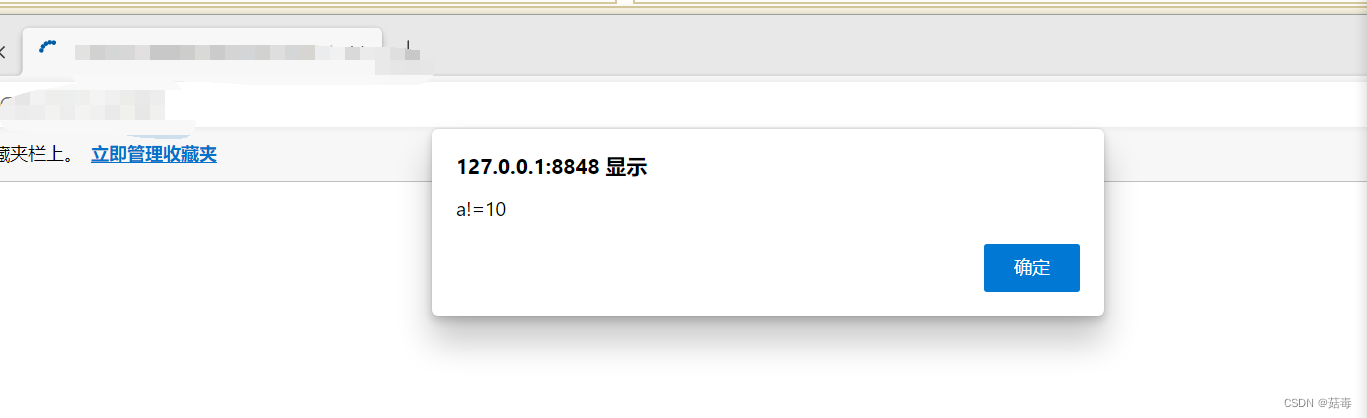
Example 2:
<html>
	<head>
		<meta charset="utf-8">
		<title></title>
	</head>
	<body>
	<script> var a =12; if(a==10) {
       alert("a==10"); } else {
       alert("a!=10"); } </script>
	</body>
</html>
3. switch Select statement
switch Selection statements are often used to compare the result of an expression with multiple values , And select the execution statement according to the comparison result ;
The syntax format is as follows :
switch( expression )
{
	case  Value  1 :
		 sentence  1;
		break;
	case  Value  2 :
		 sentence  2;
		break;
	...
	case  Value  n :
		 sentence  n;
		break;
		default :
			 Sentence block  n+1;
}
Example 3:
<html>
<head>
<meta charset="utf-8">
<title>switch Application of selection statement </title>
<script type="text/javascript"> function btnOK(){
var txtBookId = document.all.txtBookId.value; txtBookId = parseInt(txtBookId); switch(txtBookId) {
case 1: window.alert(" Your chosen major is : Civil engineering !"); break case 2: window.alert(" Your chosen major is : Computer !"); break case 3: window.alert(" Your chosen major is : Preschool education !"); break case 4: window.alert(" Your chosen major is : Marketing Management !"); break default: window.alert(" Please enter the correct serial number !") document.all.txtBookId.focus(); } } </script>
</head>
<body>
<form action="#" name="frmSwitch">
<table align="center" width=100% border="1" cellspacing="0">
<tr>
<td colspan="2"> Enter the group purchase commodity number :</td>
</tr>
<tr>
<td>1: Civil engineering </td>
<td>2: Computer </td>
</tr>
<tr>
<td>3: Preschool education </td>
<td>4: Marketing Management </td>
</tr>
<tr>
<td colspan="2">
<input type="text" name="txtBookId">
<input type="button" value=" choice " onclick="btnOK()">
</td>
</tr>
</table>
</form>
</body>

4. while sentence
while Statement is a circular statement , It is also a judgment sentence ;
The syntax format is as follows :
while( Conditional expression statements )
{
	 Execute statement ;
}
When Conditional expression statements The return value of is TRUE when , Then execute braces { } The statement in , When the braces are executed { } After the statement in , Check the conditional expression again , If the return value is TRUE, Then repeat the brace { } The statement in , Know that the return value is FALSE, End the cycle , And then go on while The program code after the statement segment ;
Example 4:
<html>
	<head>
		<meta charset="utf-8">
		<title></title>
	</head>
	<body>
		<table width=50% border="1">
			<script> var n=1; while (n<=8) // loop 8 Time  {
       "<tr>" document.write("<td align=center>"+" The first  "+n+"  Column </td>"); n++; } "</tr>" </script>
		</table>
	</body>
</html>

5. do…while sentence
do…while The function of the statement is similar to while Statement rice , However, it only detects after the first cycle Conditional expression Value , That is, the statement contained in braces must be executed at least once ;
do…while At the end of the statement while There is a semicolon after the parenthesis of the conditional statement “;”;
The syntax format is as follows :
do
{
	 Execute statement
}
while( Conditional expression statement );
Example 5:
<html>
	<head>
		<meta charset="utf-8">
		<title></title>
	</head>
	<body>
		<script> var m=1; do {
       document.write("<p> This is the first "+m+" individual "); m++; }while(m<=8); </script>
	</body>
</html>

6. for sentence
for The statement consists of two parts , One part is the condition control part , Part is the circulation part ;
The syntax is as follows :
for( Initialization expression ; Loop condition expression ; Operation expression after loop )
{
	 Execute statement ;
}
Use for Set a counter number before cycling , Can be found in for Set before loop , It can also be defined in use ;
Initialization expression Indicates the initial value of the counter variable ;
Loop condition expression Is an expression of a counter variable , Determines the maximum value of the counter ;
The expression of Cao group after the loop Represents the step size of the loop , That is, not once , Change of counter quantity value , The change can be increased , Or reduced , Or other operations ;
for Loops can be nested ;
Example 6:
<html>
<head>
<meta charset="utf-8">
<title>for Statement example </title>
</head>
<body>
<script> for(var m=9;m>=1;m--) {
for (var n=9;n>=m;n--) {
if(n*m<10) {
document.write(" "); } document.write(n*m+" "); } document.write("<br>") } </script>
</body>
</html>

边栏推荐
- Day (0~6) represents the starting position of the first day of each month, stop represents the number of days of each month, and there are two blank spaces between each day. Input different days and s
- Never lose yourself!
- Don't care too much about what others think of you
- Who you are is up to you!
- GDB debug core/dump
- 不去和谁比较,只需做好自己
- SPI——发送16位和8位数据
- 不要太在意别人对你的看法
- 记账APP:小哈记账1——欢迎页的制作
- 【杂论:离散化】
猜你喜欢

一个怎样的模式能让平台用户发生自助裂变?-链动2+1

在线问题反馈模块实战(十二):实现图片删除功能

In the era of e-commerce, what should enterprises do in the transformation of social e-commerce?

重磅直播 | ORB-SLAM3系列代码讲解地图点(专题二)

STM32H750VBT6驱动程控增益放大模块PGA113——基于CubeMX的Hal库
Redis fragment cluster

【时序逻辑电路】——寄存器

变量和数据类型(04)完结

Sparksql core usage, 220724,

JMeter笔记2 | JMeter原理及测试计划要素
随机推荐
Cmake notes
永远不要迷失自我!
Sparksql core usage, 220724,
一个怎样的模式能让平台用户发生自助裂变?-链动2+1
C language from entry to Earth - array
你就是你,没有人可以取代
(note sorting is not completed) [graph theory: find the shortest path of single source]
Don't care too much about what others think of you
MongoDB应用场景及选型(海量数据存储选型)
Input the names of 10 people and output them in descending order
Vs debugging
【LeetCode】444. 序列重建
Penetration learning - SQL injection - shooting range - installation and bypass experiment of safety dog (it will be updated later)
【Tips】创建版本控制项目的简单方法
Tensorflow Einstein function
Part II - C language improvement_ 4. Secondary pointer
vs2019配置运行open3d例子
What kind of mode can make platform users self-help fission- Chain 2+1
Aggregated new ecological model - sharing purchase, membership and reward system
Accumulation of project problems