当前位置:网站首页>Assembly learning Chapter 4 of assembly language (Third Edition) written by Wang Shuang
Assembly learning Chapter 4 of assembly language (Third Edition) written by Wang Shuang
2022-06-22 07:05:00 【starmultiple】
Chapter four The first program
4.1 The process of a source program from writing to execution
- First step : Write assembly source program .( Text editor Edit、 Notepad, etc ) Generate a text file that stores the source program .
- The second step : Compile and connect the source program . Use assembly language compiler to compile the source program in the source program file , Generate target file ; Then connect the object file with the linker , Generate executable files that can be run directly in the operating system ( Including procedures and data , And related description information ).
- The third step : Execute the program in the executable file .
4.2 Source program
1. Pseudo instruction
Here is an example of a source program 4.2.1( Get into DOS, Use Eidt see 4.3 Edit the source program )
assume cs:codesg

codesg segment

             mov ax,0123H
             mov bx,0456H
             add ax,bx
             add ax,ax

             mov ax,4c00H
             int 21H
codesg ends

end
Above appear 3 A pseudo instruction
(1)XXX segment
XXX ends
segment and end When writing an assembler that can be compiled by the compiler , A pair of pseudo instructions that must be used .
codesg segment  ; Define a segment , The name of the segment is “codesg”, This section starts from here
      :
codesg ends     ; The name is “codesg” That's the end of the paragraph
(2)end
end Is the end of an assembler , In the process of compiling an assembler , If you run into a fake command end Just finish compiling the source code . therefore , When we write a program, we add pseudo instructions at the end end.
(3)assume
assume( hypothesis ). It assumes that a segment of a register and a program use segment…ends The defined segment is associated with . adopt assume Explain the connection , In case of need , The compiler can associate a segment register with a specific segment .
2. In the source program “ Program ”
A program written in assembly language , Including pseudo instructions and assembly instructions , The ultimate goal of our programming is to let the computer complete certain tasks . The assembly instructions in the source program make up the program that is finally executed by the computer , The pseudo instructions in the source program are handled by the compiler , They don't achieve the ultimate goal of our programming .
In the future, all the contents in the source program file can be called source program , The source program is finally executed by the computer 、 Processing instructions or data , It's called procedure . The program first exists in the source program in the form of assembly instructions , Compiled 、 Connect and change to machine code , Stored in an executable file
[ Failed to transfer the external chain picture , The origin station may have anti-theft chain mechanism , It is suggested to save the pictures and upload them directly (img-IinrZ0pZ-1655781089521)(C:\Users\ Zhong Yixin \AppData\Roaming\Typora\typora-user-images\image-20220620162502386.png)]
3. label
Assembly source program , In addition to assembly instructions and pseudo instructions , There are also some labels , such as “codesg”. A label refers to an address . such as codesg stay segment In front of , As the name of a segment , The name of this section will eventually compile the program 、 The linker processes as a segment address
4. Program structure
Let's now discuss the structure of the assembler . before 3 In this chapter, we all Debug Write such as assembly instructions to write assembler , This is really convenient for very short programs . But for freshman programs, we write source programs that can be compiled by the compiler .
The source program is made up of segments . We can store code in these segments 、 data 、 Or treat a segment as a stack space . Now let's finish a small program step by step , Experience simple frameworks .
Mission : Programming operations 2^3. How to write the source program ?
(1) We need to define a segment , The name is abc.
abc segment
    :
abc ends
(2) Write assembly instructions in this section , To fulfill our mission .
abc segment

    mov ax,2
    add ax,ax
    add ax,ax

abc ends
(3) then , Point out where the program ends
abc segment

    mov ax,2
    add ax,ax
    add ax,ax

abc ends

end
(4)abc Used as a code snippet , therefore , Should be abc and cs Connect .( Of course , For this program , It's not necessary to do this .)
Named as an example 4.2.4( We'll use that later )
assume cs:abc

abc seqment

       mov ax,2
       add ax,ax
       add ax,ax

abc ends

end
5. Program return
Our program was first stored in the source program in the form of assembly instructions , Compiled 、 Connect and change to machine code , Stored in an executable file , that , How does it work ?
below , We are DOS( A single task operating system ) On the basis of , Briefly discuss this problem .
A journey P2 In the executable , Then there must be a running program P1, take P2 After loading from the executable file, such as memory , take CPU Give control of to P2, such P2 To run .P2 After starting operation P1 Pause .
and P2 After running , Should be CPU Control of the is returned to the program that makes it work , We call this process : Program return .( That is, add the returned program segment at the end of the program )
When we look at it 4.2.1 Examples of pseudo instructions in
mov ax,4c00H
int 21H
The function of these two instructions is program return .
The following table shows the concepts related to closure
| Purpose | Related instructions | The nature of the instruction | Instruction executor |
|---|---|---|---|
| Notifies the compiler of the end of a segment | Disnomer ends | Pseudo instruction | Compile time , By compiler |
| Notifies the compiler that the program is finished | end | Pseudo instruction | Compile time , By compiler |
| Program return | mov ax,4c00H int21H | Assembly instruction | Execution time , from CPU perform |
6. Grammatical and logical errors
After the source program is compiled , The error that occurs at run time is a logic error . Grammatical errors are easy to find , It's also easy to find , It's also easy to solve . And logic errors are usually not easy to detect .
Program 4.2.4 There will be some problems at runtime , Because the program did not return , Of course , This error cannot be shown when compiling , in other words , Program 4.2.4 The right program for the compiler .
Next 4.2.4 rewrite , A syntax error has occurred :
aume cs:abc

abc segment

    mov ax,2
    add ax,ax
    add ax,ax

end
aume Not recognized , And the compiler can't know in the process of compiling abc Where does the paragraph end .
We will correct the above procedure :
assume cs:abc

abc segment

    mov ax,2
    add ax,ax
    add ax,ax

    mov ax,4cooH
    int 21H
abc ends
4.3 Edit the source program
You can use any text editor to edit the source program , As long as it is finally saved as a plain text file . In our course , Use DOS Under the Edit.
The process is as follows
(1) Get into DOS The way , function Edit 
(2) stay Edit Edit program in , Pictured 
And name f:\1.asm
4.4 compile
stay 4.3 After editing the source program in , Get a source program file f:\1.asm. It can be compiled , Generate an object file containing machine code .
Before compiling a source program, we must first find a corresponding compiler . In our course , Using Microsoft masm5.10 Assembly compiler , The file named masm.exe. Suppose the assembler is in F:\ASM Under the table of contents . You can follow the following procedure to compile the source program , With f:\1.asm For example .
(1) Get into DOS The way , Get into F:\ASM Catalog , function masm.exe, Pictured  In the figure , function masm after , First, some version information is displayed , Then prompt for the name of the source program file to be compiled . Be careful ,“[.ASM]” Prompt us , The default file extension is asm, such as , The file name of the source program to be compiled is “p1.asm”, Just type... At the end “p1” that will do . But if the source file is not in asm For extension , Just enter its full name . For example, the source file name is “p1.txt”, Just enter the full name .
When you enter the source program file name, be sure to indicate the path it is in . If the file is in the current path , Just enter the file name , But if the file is in another directory , Enter the path , such as , Files to compile p1.txt stay “c:\windows\desktop” Next , Enter “c:\windows\desktop” Next , Enter “c:\windows\desktop\p1.txt”.
here , The file we're going to compile is c Under the packing directory 1.asm, So enter here “c:\1.asm”
(2) Enter the name of the source program to compile , Press Enter key , Screen display  In the figure , After entering the source program file name , The program continues to prompt us to enter the name of the target file to be compiled , The object file is the final result of compiling a source program . Notice what's on the screen :“[1.OBJ]”, Because we have entered the source program file named 1.asm, By default, the compiler will output a target file named 1.obj, So you don't have to specify another file name . Directly by Enter key , The compiler will generate... In the current directory 1.obj file .
here , You can also specify the directory where the generated target file is located , such as , I want the compiler to be in “c:\windows\desktop” Generate the target file under 1.obj. You can enter “c:\windows\destop\1”.
Let's press Enter key , Use the target file name set by the compiler .
(3) After determining the name of the target file , The screen displays as shown in the figure
 In the figure , The compiler prompts for the name of the list file , This file is the intermediate result produced by the compiler in the process of compiling the source program into the object file . You can have the compiler not generate this file , Directly by Enter Press the key .
(4) After ignoring the list file generation , Screen display  In the figure , The compiler prompts for the name of the cross reference file , This file is the same as the list file , It is the intermediate result produced by the compiler in the process of compiling the source program into the object file . You can have the compiler not generate this file , direct enter
(5) After ignoring the generation of cross reference file , Pictured  In the figure , The compilation of the program is over , The last two lines of compiler output tell us that the source program has no warning errors and errors that must be corrected .
Above we compile , In compiler masm.exe Current path to run , A new file will appear :1.obj, This is for the program 1.asm The result of compiling . Of course , If an error occurs during compilation , Then you will not get the target file . In general, there are two types of errors that prevent us from getting the desired object file :
(1) In the program “Severe Errors”:
(2) The given source file cannot be found .
( During the compilation process , We provide an input , Both source program files , The best you can get is 3 Outputs : Target file .obj、 List file .lst、 Cross references .crf, This article only discusses the object file )
4.5 Connect
After compiling the source program to get the object file , We need to connect to the target file , So you get the executable file . Continue the process of the previous section , We're right f:\1.asm Compile to get f:\1.asm\1.obj, Now I will f:\1.asm\1.obj Connect as c:\masm\1.exe.
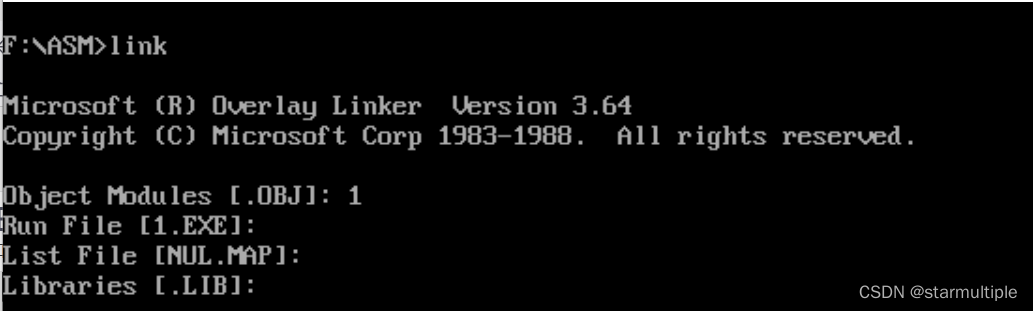
(1) We use Microsoft's Overlay Linker3.64 The connector , The file named link.exe, The following is an example
Be careful ,“[.OBJ]” Prompt us , The default file extension is obj, For example, the target file name to connect to is “p1.obj”, Just type in here “p1” that will do . But if the file is not obj Extension name , Just enter its full name . For example, the target file name is “p1.bin”, Just enter the full name .
When entering the target file name , Be careful to point out where it's going . here , The file to be connected is in the current directory 1.obj, So enter here “1”.
(2) After entering the name of the target file to connect to , Press Enter key , The screen displays as shown in the figure  chart in , After entering the target file name , The program continues to prompt us to enter the name of the executable file to be generated , The executable file is the final result of our connection to the next program . Notice what's on the screen :“[1.EXE]", Because the target file name has been determined as 1.obj, The default executable file name of the program is 1.EXE, So you don't have to specify another file name . Directly by Enter key , The compiler will be in the current directory , Generate 1.EXE file .
here , You can also specify the directory where the generated executable file is located , such as , I want the linker to be in “c:\windows\desktop" Generate executable file under 1.EXE, You can enter “c:lwindowsIdesktoplI".
Let's press Enter key , Use the executable file name set by the linker .
(3) After determining the name of the executable file , The screen display is shown in the following figure .
 Upper figure in , The connector prompts for the name of the image file , This file is the intermediate result of the linker connecting the object file to an executable file , You can make the linker not generate this file , Directly by Enter Press the key .
(4) Ignored After the image file is generated , The screen displays as shown in the figure 4.13 Shown .
chart 4.13 in , The linker prompts for the name of the library file . The library file contains some subroutines that can be called , If the program calls a subroutine in a library file , It needs to be connected , Put this library file
Connect to the target file , Generate executable files . however , No subroutines are called in this program , therefore , The input of the library file name is ignored here , Directly by Enter Press the key .
 (5) After ignoring the connection of library files , Show
error : No stack segments , No explanation here
summary :
The function of connection
(1) When the source is large , It can be divided into multiple source files to compile , After each source program is compiled into an object file , And then connect them together with a linker , Generate an executable file :
(2) A subroutine in a library file is invoked in the program , You need to connect this library file with the object file generated by the program , Generate an executable file ;
(3) After a source program is compiled , Get the object file with machine code , Some contents in the target file can not be directly used to generate executable files , The linker processes this into the final executable information . therefore , In only one source file , Without calling a subroutine in a library , You must also use the linker to process the target file , Generate executable files .
Be careful , For the connection process , The executable is the end result we want to get .
4.6 Compile and connect in a simplified way
In the previous content , How to use masm and link Compile and connect . It can be seen that , We compile 、 The ultimate goal of connection is to generate executable files from source program files . The intermediate files generated in this process can be ignored . The following is a simple compilation 、 How to connect .
- compile
 2. Connect
4.7 Tracking of program execution process
It can be used Debug To track the running process of a program ,
Here is the executable file generated in the previous content 1.exe For example , Explain how to use Debug Track the execution process of the program .
Now we know that , stay DOS When running a program in , By command Load a program from an executable file into memory , And make it work . however , In this way, we can't see the execution process of the program one by one , because command The program load , Set up CS:IP The operation to the entry of the program is continuous , And when CS:IP Point to the entry to the program ,command Gave up CPU Control right ,CPU Start running the program immediately , Until the end of the program .
In order to observe the running process of the program , have access to Debug. Debug You can load the program into memory , Set up CS:IP Point to the entry to the program , but Debug Don't give up on CPU The control of , such , We can use Debug To step through the program , View each The execution result of an instruction . cx The length of the program is stored in .
边栏推荐
- ROS Qt环境搭建
- Programming problem: removing elements from an array (JS Implementation)
- OpenGL - Draw Triangle
- [rust notes] 04 expression
- PDF转图片实现方式
- Error when connecting MySQL with dbeaver for the first time
- Introduction to 51 single chip microcomputer - matrix key
- Introduction and use of cookies
- Article editing test of CSDN
- About structure (notes, for personal use)
猜你喜欢

Introduction to 51 Single Chip Microcomputer -- the use of Keil uvision4
![[out of distribution detection] deep analog detection with outlier exposure ICLR '19](/img/65/4f974a33c1d76be97b131397de0fee.jpg)
[out of distribution detection] deep analog detection with outlier exposure ICLR '19

6. 安装ssh连接工具(用于我们连接实验室的服务器)

从暴力递归到动态规划

Qt development simple Bluetooth debugging assistant (low power Bluetooth)

Introduction to 51 Single Chip Microcomputer -- the use of Proteus 8 professional

自然语言处理理论和应用

leetcode:面试题 08.12. 八皇后【dfs + backtrack】
![[internship] cross domain problems](/img/0c/48b3138eb153cf4402017924e564a0.jpg)
[internship] cross domain problems

Thousands of sails pass by the side of the sunken boat, and thousands of trees spring before the diseased tree
随机推荐
The journey of an operator in the framework of deep learning
Article editing test of CSDN
2022-06-21:golang选择题,以下golang代码输出什么?A:3;B:4;C:100;D:编译失败。 package main import ( “fmt“ ) func
sessionStorage 和 localStorage 的使用
首次用DBeaver连接mysql报错
JDBC query result set, which is converted into a table
Map of STL knowledge summary
圣杯布局和双飞翼布局的区别
Jupyter notebook file storage location
QT connect to Alibaba cloud using mqtt protocol
How to prevent event propagation in JS
Data security practice guide - data collection security management
[out of distribution detection] energy based out of distribution detection nips' 20
PDF转图片实现方式
OpenGL - Textures
June 21, 2022: golang multiple choice question, what does the following golang code output? A:3; B:4; C:100; D: Compilation failed. package main import ( “fmt“ ) func
[Gan] Introduction to Gan basics and dcgan
Advanced usage of setting breakpoints during keil debugging
[out of distribution detection] learning confidence for out of distribution detection in neural networks arXiv '18
Dijin introduces digi connectcore voice control software for connectcore system module