当前位置:网站首页>Unity开发类似Profile那样的数据分析工具
Unity开发类似Profile那样的数据分析工具
2022-08-04 05:25:00 【丁小未】
前言
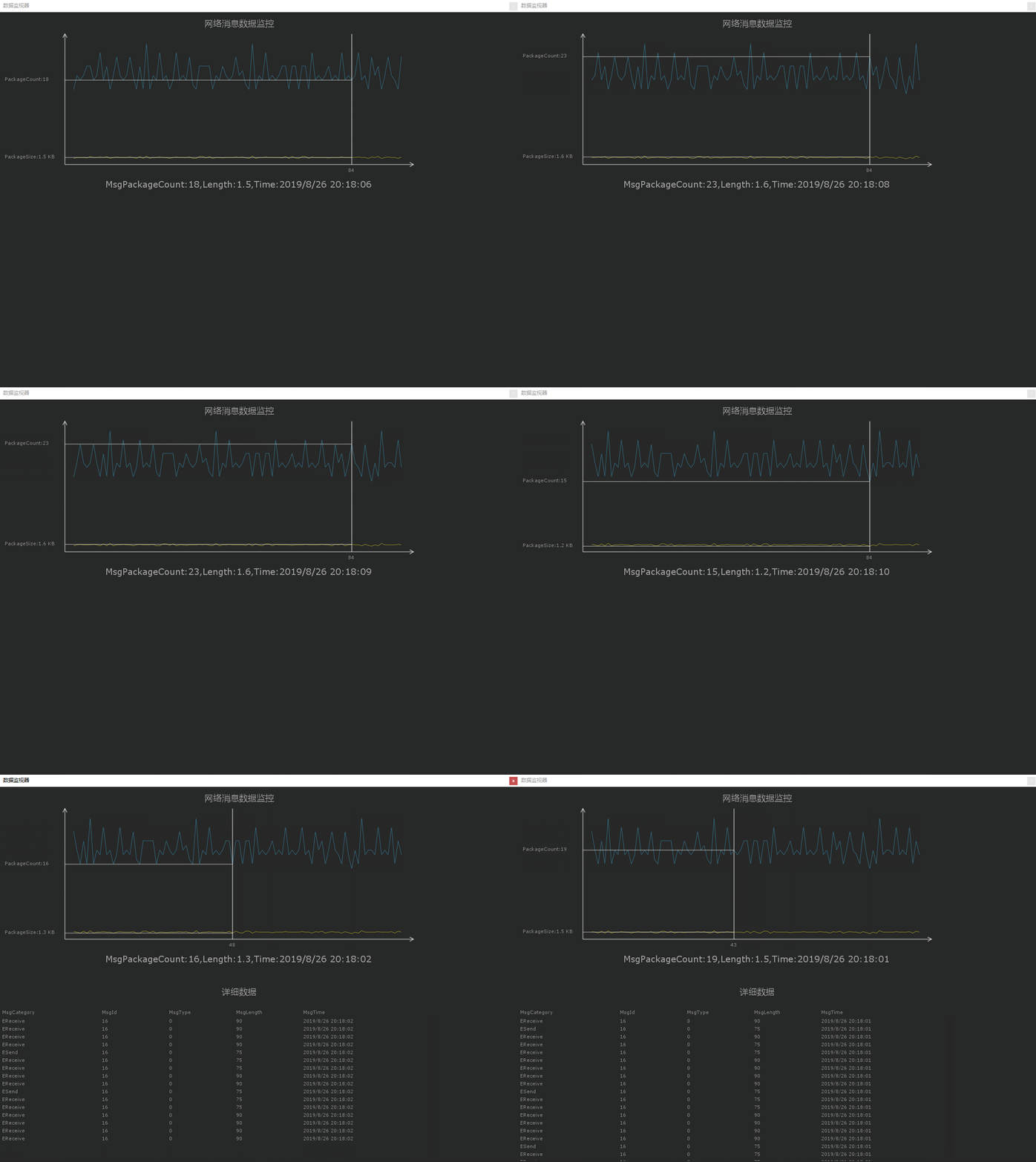
Unity开发者对Profile并不会陌生,我们如何开发一个类似Profile的Editor工具来实现我们想要监控的数据呢,这里以监控网络消息包数据为例,开发一个数据监控工具。
思路
主要就是采集数据和数据的表格化,采集数据我是以200毫秒时间内搜集收发的数据列表做成一个数据包,表格绘制采用Handles.DrawAAPolyLine接口来绘制。
效果图
代码
#if UNITY_EDITOR
using BayatGames.SaveGamePro;
using System;
using System.Collections;
using System.Collections.Generic;
using UnityEngine;
using UnityEngine.Events;

namespace Base.Framework.Tools
{
    public class MessageMonitorManager : RootMotion.Singleton<MessageMonitorManager>
    {
        private System.DateTime mTime = default(System.DateTime);
        private MessageMonitorPacketGroup mCurretnMonitorPackageGroup;
        private int mMillisecond = 200;//间隔200毫秒搜集时间
        Queue<MessageMonitorPacket> mMessages = new Queue<MessageMonitorPacket>();
        Queue<MessageMonitorPacketGroup> mMessageGroup = new Queue<MessageMonitorPacketGroup>();

        private bool mBeginCollectData = false;
        //同步到本地的数据
        List<MessageMonitorPacket> mSyncDatas = new List<MessageMonitorPacket>();
        public bool CollectData
        {
            get
            {
                return mBeginCollectData;
            }
            set
            {
                if (!value)
                {
                    SaveDataToLocal();
                }
                else
                {
                    mMessageGroup.Clear();
                    mSyncDatas.Clear();
                    mMessages.Clear();
                    mMessageGroup.Clear();
                    mCurretnMonitorPackageGroup = null;
                }
                mBeginCollectData = value;
            }
        }

        public UnityAction<MessageMonitorPacketGroup> MessageMonitorPackGroupEvent;

        MessageMonitorPacket DequeMessage()
        {
            return mMessages.Dequeue();
        }

        public void EnqueueMessage(MessageMonitorPacket msg)
        {
            mMessages.Enqueue(msg);
            mSyncDatas.Add(msg);

            if (mTime == default(DateTime))
                mTime = msg.MsgTime;

            TimeSpan ts = msg.MsgTime - mTime;
            if (ts.Milliseconds < mMillisecond)
            {
                CollectMessageMonitorPackGroup(msg);
            }
            else
            {
                EnqueueMessageGroup();
                mTime = msg.MsgTime;
                mCurretnMonitorPackageGroup = null;
                CollectMessageMonitorPackGroup(msg);
            }
        }

        void CollectMessageMonitorPackGroup(MessageMonitorPacket msg)
        {
            if (mCurretnMonitorPackageGroup != null)
            {
                mCurretnMonitorPackageGroup.Msgs.Add(msg);
                mCurretnMonitorPackageGroup.MsgLength += msg.MsgLength;
            }
            else
            {
                mCurretnMonitorPackageGroup = new MessageMonitorPacketGroup();
                mCurretnMonitorPackageGroup.MsgBeginTime = msg.MsgTime;
                mCurretnMonitorPackageGroup.Msgs.Add(msg);
                mCurretnMonitorPackageGroup.MsgLength += msg.MsgLength;
            }
        }

        void EnqueueMessageGroup()
        {
            mMessageGroup.Enqueue(mCurretnMonitorPackageGroup);
            if (EditorPlayMode._currentState == PlayModeState.Playing)
            {
                var msg = DequeueMessageGroup();
                var floatValue = (float)(msg.MsgLength / 1024f);
                msg.MsgKBLength = (float)Math.Round((double)floatValue, 1);
                MessageMonitorPackGroupEvent?.Invoke(msg);
            }
        }

        MessageMonitorPacketGroup DequeueMessageGroup()
        {
            return mMessageGroup.Dequeue();
        }

        void SaveDataToLocal()
        {
            if (mSyncDatas.Count > 0)
            {
                List<MessageMonitorPacket> datas = new List<MessageMonitorPacket>();
                datas.AddRange(mSyncDatas);
                SaveGame.SaveAsync<List<MessageMonitorPacket>>("NetMsgMonitorDatas.dat", datas);
            }
        }
    }
}
#endif
using System.Collections;
using System.Collections.Generic;
using UnityEngine;
using UnityEditor;
using Base.Framework.Tools;
using System.Linq;
using System.Reflection;

public class DataAnalyzerTool : EditorWindow
{
    static EditorWindow mWindow;
    [UnityEditor.MenuItem("Tools/DataAnalyzer")]
    private static void Open()
    {
        mWindow = EditorWindow.GetWindow(typeof(DataAnalyzerTool), true, "数据监视器", true);
        mWindow.Show();
        mWindow.Focus();
        mWindow.position = new Rect(300, 50, 1190, 860);
    }
    const int LAYERS = 2;
    //绘制参数
    private GUIStyle mHeadStyle;
    private Material mGraphMaterial;
    private Vector2 scrollPos;
    private Rect mAxisRect = new Rect(150, 50, 800, 300);
    private Rect mGraphRect = new Rect(170, 70, 760, 280);
    private Rect mGraphContentRect = new Rect(170, 70, 760, 280);
    private Color[] mLayerColors = new Color[LAYERS]
    {
        new Color(190f / 255f, 192f / 255f, 40f / 255f),
        new Color(54f / 255f, 137f / 255f, 168f / 255f),
    };
    private bool mClickGraph;
    private int mCurrent;
    private const int mSampleCount = 100;
    private List<MessageMonitorPacketGroup> mSamples = new List<MessageMonitorPacketGroup>();
    private Vector3[][] mPoints = new Vector3[LAYERS][];
    PropertyInfo[] mProperties;
    List<int> mWidths = new List<int>();
    private void OnEnable()
    {
        mProperties = typeof(MessageMonitorPacket).GetProperties();
        MessageMonitorManager.sInstance.CollectData = true;
        InitDefaultData();

        MessageMonitorManager.sInstance.MessageMonitorPackGroupEvent += OnMessageMonitorPackGroupCollected;
    }

    private void OnDisable()
    {
        MessageMonitorManager.sInstance.CollectData = false;
        MessageMonitorManager.sInstance.MessageMonitorPackGroupEvent -= OnMessageMonitorPackGroupCollected;
    }

    private void OnMessageMonitorPackGroupCollected(MessageMonitorPacketGroup msg)
    {
        mSamples.RemoveAt(0);
        mSamples.Add(msg);
    }

    private void OnInspectorUpdate()
    {
        if (EditorPlayMode._currentState == PlayModeState.Playing)
            mWindow?.Repaint();
    }

    private MessageMonitorPacketGroup DefaultMessagePacket()
    {
        var msg = new MessageMonitorPacketGroup();
        msg.MsgLength = 0;
        msg.MsgKBLength = 0f;
        msg.MsgBeginTime = System.DateTime.Now;
        msg.Msgs = new List<MessageMonitorPacket>();
        return msg;
    }

    private void InitDefaultData()
    {
        mSamples.Clear();
        for (int i = 0; i < mSampleCount; i++)
        {
            mSamples.Add(DefaultMessagePacket());
        }
    }

    private void OnGUI()
    {
        if (mHeadStyle == null)
        {
            mHeadStyle = new GUIStyle();
            mHeadStyle.fontSize = 20;
            mHeadStyle.alignment = TextAnchor.MiddleCenter;
            mHeadStyle.normal.textColor = new Color(0.8f, 0.8f, 0.8f);
        }
        if (mGraphMaterial == null)
        {
            mGraphMaterial = new Material(Shader.Find("Hidden/Internal-Colored"));
            mGraphMaterial.SetInt("_SrcBlend", (int)UnityEngine.Rendering.BlendMode.SrcAlpha);
            mGraphMaterial.SetInt("_DstBlend", (int)UnityEngine.Rendering.BlendMode.OneMinusSrcAlpha);
            mGraphMaterial.SetInt("_Cull", (int)UnityEngine.Rendering.CullMode.Off);
            mGraphMaterial.SetInt("_ZWrite", 0);
        }

        if (EditorApplication.isPlaying)
        {
            if (mSamples.Count > 0)
                DrawGraph();
            HandleEvent();
        }

        //显示数据列表
        if (EditorPlayMode._currentState == PlayModeState.Paused && mCurrent != 0)
        {
            GUI.Label(new Rect(250, 450, 600, 40), "详细数据", mHeadStyle);
            GUILayout.Space(510);
            DrawDetailInfos();
        }
    }

    private void DrawDetailInfos()
    {
        mWidths.Clear();
        EditorGUILayout.BeginHorizontal();
        for (int i = 0; i < mProperties.Length; i++)
        {
            int w = (mProperties[i].Name.Length / 5 + 1) * 75;
            mWidths.Add(w);
            EditorGUILayout.LabelField(mProperties[i].Name, GUILayout.Width(w));
        }
        EditorGUILayout.EndHorizontal();

        scrollPos = EditorGUILayout.BeginScrollView(scrollPos, GUILayout.Width(1000), GUILayout.Height(350));
        var msgs = mSamples[mCurrent]?.Msgs;
        for (int i = 0; i < msgs.Count; i++)
        {
            EditorGUILayout.BeginHorizontal();
            var data = msgs[i];
            for (int j = 0; j < mProperties.Length; j++)
            {
                string showValue = mProperties[j].GetValue(data).ToString();
                if (mProperties[j].Name.Contains("MsgId"))
                {
                    showValue += $"({HotfixMessageIdList.MsgIdToType((ushort)mProperties[j].GetValue(data))})";
                }
                EditorGUILayout.LabelField(showValue, GUILayout.Width(mWidths[j]));
            }
            EditorGUILayout.EndHorizontal();
        }
        EditorGUILayout.EndScrollView();
    }

    private void DrawGraph()
    {
        EditorGUI.LabelField(new Rect(mAxisRect.center.x - 400, mAxisRect.y - 50, 800, 50), "网络消息数据监控", mHeadStyle);

        if (mPoints[0] == null || mPoints[0].Length != mSampleCount)
        {
            for (int layer = 0; layer < LAYERS; ++layer)
                mPoints[layer] = new Vector3[mSampleCount];
        }

        long maxValue = GetListMaxValue(mSamples);
        for (int i = 0; i < mSamples.Count; ++i)
        {
            for (int layer = 0; layer < LAYERS; layer++)
            {
                mPoints[layer][i].x = (float)i / mSampleCount * mGraphContentRect.width + mGraphContentRect.xMin;
                float showData = 0;
                if (layer == 0)
                {
                    showData = (float)mSamples[i].MsgKBLength;
                }
                else if (layer == 1)
                {
                    showData = (float)mSamples[i].Msgs.Count;
                }
                mPoints[layer][i].y = mGraphContentRect.yMax - showData / maxValue * mGraphContentRect.height;
            }
        }

        //画边(这里的作用是去锯齿)
        Handles.BeginGUI();
        for (int layer = 0; layer < LAYERS; ++layer)
        {
            Handles.color = mLayerColors[layer];
            Handles.DrawAAPolyLine(mPoints[layer].Where(p => mGraphRect.Contains(p)).ToArray());
        }
        Handles.EndGUI();

        //定位线
        if (mGraphRect.Contains(mPoints[0][mCurrent]))
        {
            Handles.BeginGUI();
            Handles.color = Color.white;
            Handles.DrawAAPolyLine(3, new Vector2(mPoints[0][mCurrent].x, mAxisRect.yMin), new Vector2(mPoints[0][mCurrent].x, mAxisRect.yMax));
            Handles.DrawAAPolyLine(2, new Vector2(mAxisRect.x, mPoints[0][mCurrent].y), mPoints[0][mCurrent]);
            Handles.DrawAAPolyLine(2, new Vector2(mAxisRect.x, mPoints[1][mCurrent].y), mPoints[1][mCurrent]);
            Handles.EndGUI();
            EditorGUI.LabelField(new Rect(mPoints[0][mCurrent].x - 10, mAxisRect.yMax + 5, 50, 20), mCurrent.ToString());
            EditorGUI.LabelField(new Rect(mAxisRect.xMin - 140, mPoints[0][mCurrent].y - 10, 200, 20), "PackageSize:" + mSamples[mCurrent].MsgKBLength.ToString() + " KB");
            EditorGUI.LabelField(new Rect(mAxisRect.xMin - 140, mPoints[1][mCurrent].y - 10, 200, 20), "PackageCount:" + mSamples[mCurrent].Msgs.Count.ToString());

            //详细数据
            string detail = string.Format($"MsgPackageCount:{mSamples[mCurrent].Msgs.Count},Length:{mSamples[mCurrent].MsgKBLength},Time:{mSamples[mCurrent].MsgBeginTime}");
            EditorGUI.LabelField(new Rect(mAxisRect.center.x - 400, mAxisRect.yMax + 20, 800, 50), detail, mHeadStyle);
        }

        //坐标轴
        DrawArrow(new Vector2(mAxisRect.xMin, mAxisRect.yMax), new Vector2(mAxisRect.xMin, mAxisRect.yMin), Color.white);
        DrawArrow(new Vector2(mAxisRect.xMin, mAxisRect.yMax), new Vector2(mAxisRect.xMax, mAxisRect.yMax), Color.white);
    }

    private void HandleEvent()
    {
        var point = Event.current.mousePosition;
        switch (Event.current.type)
        {
            case EventType.MouseDrag:
                {
                    if (Event.current.button == 0 && mClickGraph)
                    {
                        UpdateCurrentUI();
                        Repaint();
                    }
                    if (Event.current.button == 2 && mClickGraph)
                    {
                        mGraphContentRect.x += Event.current.delta.x;
                        if (mGraphContentRect.x > mGraphRect.x)
                            mGraphContentRect.x = mGraphRect.x;
                        if (mGraphContentRect.xMax < mGraphRect.xMax)
                            mGraphContentRect.x = mGraphRect.xMax - mGraphContentRect.width;
                        Repaint();
                    }
                }
                break;
            case EventType.MouseDown:
                {
                    mClickGraph = mGraphRect.Contains(point);
                    if (mClickGraph)
                        EditorGUI.FocusTextInControl(null);
                    if (Event.current.button == 0 && mClickGraph)
                    {
                        UpdateCurrentUI();
                        Repaint();
                    }
                    if (Event.current.button == 1)
                    {
                        Repaint();
                    }
                    EditorPlayMode.Pause();
                }
                break;
            case EventType.KeyDown:
                {
                    if (Event.current.keyCode == KeyCode.LeftArrow)
                        SetCurrentIndex(mCurrent - 1);
                    if (Event.current.keyCode == KeyCode.RightArrow)
                        SetCurrentIndex(mCurrent + 1);
                    Repaint();
                }
                break;
            case EventType.ScrollWheel:
                {
                    Repaint();
                }
                break;
        }
    }

    private void UpdateCurrentUI()
    {
        float x = Event.current.mousePosition.x;
        float distance = float.MaxValue;
        int index = 0;
        for (int i = 0; i < mPoints[0].Length; ++i)
        {
            if (mGraphRect.Contains(mPoints[0][i]) && Mathf.Abs(x - mPoints[0][i].x) < distance)
            {
                distance = Mathf.Abs(x - mPoints[0][i].x);
                index = i;
            }
        }
        SetCurrentIndex(index);
    }

    private void SetCurrentIndex(int i)
    {
        mCurrent = Mathf.Clamp(i, 0, mSampleCount - 1);
    }

    private string Color2String(Color color)
    {
        string c = "#";
        c += ((int)(color.r * 255)).ToString("X2");
        c += ((int)(color.g * 255)).ToString("X2");
        c += ((int)(color.b * 255)).ToString("X2");
        return c;
    }

    //绘制带箭头的线
    private void DrawArrow(Vector2 from, Vector2 to, Color color)
    {
        Handles.BeginGUI();
        Handles.color = color;
        //绘制线
        Handles.DrawAAPolyLine(3, from, to);

        //箭头
        Vector2 v0 = from - to;
        v0 *= 10 / v0.magnitude;
        Vector2 v1 = new Vector2(v0.x * 0.866f - v0.y * 0.5f, v0.x * 0.5f + v0.y * 0.866f);
        Vector2 v2 = new Vector2(v0.x * 0.866f + v0.y * 0.5f, v0.x * -0.5f + v0.y * 0.866f); ;
        Handles.DrawAAPolyLine(3, to + v1, to, to + v2);
        Handles.EndGUI();
    }

    private long GetListMaxValue(List<MessageMonitorPacketGroup> list)
    {
        List<long> newList = new List<long>();
        for (int i = 0; i < list.Count; i++)
        {
            newList.Add(list[i].Msgs.Count);
        }
        return newList.Max();
    }
}
填充实线
//填充曲线
_graphMaterial.SetPass(0);
for (int layer = 0; layer < LAYERS; ++layer)
{
    GL.Begin(GL.TRIANGLE_STRIP);
    GL.Color(_layerColor[layer]);
    for (int i = 0; i < _samples.Count; ++i)
    {
        if (_graphRect.Contains(_points[layer][i]))
        {
            GL.Vertex(_points[layer][i]);
            if (layer == LAYERS - 1)
                GL.Vertex3(_points[layer][i].x, _graphContentRect.yMax, 0);
            else
                GL.Vertex(_points[layer + 1][i]);
        }
    }
    GL.End();
}
在此思路的基础上耐心扩展,还是可以做成类似Profile那么强大的数据分析工具的,这里只是提供的核心思路。
更多精品教程
边栏推荐
- 企业需要知道的5个 IAM 最佳实践
- el-Select selector bottom fixed
- C Expert Programming Chapter 5 Thinking about Linking 5.3 5 Special Secrets of Library Linking
- C Expert Programming Chapter 4 The Shocking Fact: Arrays and pointers are not the same 4.4 Matching declarations to definitions
- 力扣:63. 不同路径 II
- C Expert Programming Chapter 4 The Shocking Fact: Arrays and pointers are not the same 4.2 Why does my code not work
- The idea setting recognizes the .sql file type and other file types
- 注意!软件供应链安全挑战持续升级
- JS基础--强制类型转换(易错点,自用)
- DP4398:国产兼容替代CS4398立体声24位/192kHz音频解码芯片
猜你喜欢

canal实现mysql数据同步

day13--postman interface test

解决安装nbextensions后使用Jupyter Notebook时出现template_paths相关错误的问题

el-Select selector bottom fixed

MySQL database (basic)

Shocked, 99.9% of the students didn't really understand the immutability of strings

About yolo7 and gpu

Summary of MySQL database interview questions (2022 latest version)

4.3 基于注解的声明式事务和基于XML的声明式事务

编程大杂烩(四)
随机推荐
7. Execution of special SQL
企业需要知道的5个 IAM 最佳实践
C Expert Programming Chapter 4 The Shocking Fact: Arrays and Pointers Are Not the Same 4.3 What is a Declaration and What is a Definition
What is the salary of a software testing student?
想低成本保障软件安全?5大安全任务值得考虑
TensorRT例程解读之语义分割demo
4.2 声明式事务概念
4.2 Declarative Transaction Concept
Summary of MySQL database interview questions (2022 latest version)
败给“MySQL”的第60天,我重振旗鼓,四面拿下蚂蚁金服offer
力扣:746. 使用最小花费爬楼梯
leetcode 12. Integer to Roman numeral
Towards Real-Time Multi-Object Tracking (JDE)
力扣:62.不同路径
C专家编程 第4章 令人震惊的事实:数组和指针并不相同 4.3 什么是声明,什么是定义
入坑软件测试的经验与建议
MySQL log articles, binlog log of MySQL log, detailed explanation of binlog log
嵌入式系统驱动初级【4】——字符设备驱动基础下_并发控制
Uni-app 小程序 App 的广告变现之路:全屏视频广告
力扣:70. 爬楼梯