当前位置:网站首页>VSCode使用 - Remote-SSH 配置说明
VSCode使用 - Remote-SSH 配置说明
2022-06-26 16:51:00 【jackailson】
By: Ailson Jack
Date: 2022.06.17
个人博客:http://www.only2fire.com/
本文在我博客的地址是:http://www.only2fire.com/archives/147.html,排版更好,便于学习,也可以去我博客逛逛,兴许有你想要的内容呢。
我的环境说明:
- 本地环境:Windows 11
- 远端环境:Ubuntu 22.04 LTS(运行在虚拟机中)
Remote-SSH简介
Remote-SSH是一个VSCode的插件,Remote-SSH可以让你使用任何带有SSH服务的远端机器作为你的开发环境。这可以大大简化各种情况下的开发和故障排除。使用了Remote-SSH插件之后,你可以:
- 在您部署的同一操作系统上进行开发,或者使用比本地计算机更大、更快或更专业的硬件。
- 在不同的远程开发环境之间快速切换,并安全地进行更新,而无需担心影响本地计算机。
- 从多台计算机或多个位置访问现有开发环境。
- 调试在其他地方(如客户站点或云中)运行的应用程序。
Remote-SSH安装和环境准备
首先安装VSCode,然后在扩展中搜索"Remote",安装搜索到的"Remote-SSH"和"Remote-Containers","Remote-SSH: Editing Configuration"插件会在安装"Remote-SSH"插件时自动安装:

确保远端环境(Ubuntu 22.04 LTS)中SSH服务可用。
确保本地环境中支持SSH,这个可以通过安装Git来获取SSH功能。
SSH密钥配置
本节将在Windows上生成SSH密钥,然后部署到Ubuntu 22.04 LTS系统中,这样每次重启VSCode之后,使用Remote-SSH访问Ubuntu 22.04 LTS系统中的文件时,不需要手动输入密码了。
生成SSH密钥文件
在Windows系统上执行下述命令生成SSH密钥:
ssh-keygen
输入上述命令之后,遇到等待时,直接按ENTER键保持默认,需要敲击3次ENTER键,然后就会在 C:\Users\AilsonJack\.ssh 目录中产生SSH密钥文件:id_rsa 和 id_rsa.pub。
部署密钥文件到Ubuntu
首先,确保当前用户的用户目录下是否存在 .ssh 目录(我这里的完整路径为:/home/ailsonjack/.ssh ),执行下述命令,查看输出信息中是否有 .ssh 目录:
ls -al ~
如果不存在 .ssh 目录,那么执行下述命令进行创建:
mkdir ~/.ssh
通过FTP,SFTP,samba等方式将生成的 id_rsa.pub 文件传输到Ubuntu 22.04 LTS系统中的 /home/ailsonjack/.ssh 目录中。
生成 authorized_keys 文件
进入 /home/ailsonjack/.ssh 目录,然后使用下述命令,生成 authorized_keys 文件:
cat id_rsa.pub > authorized_keys
Remote-SSH配置
下面将讲述一下Remote-SSH的一些配置,完成Remote-SSH的配置之后,就可以通过Remote-SSH访问Ubuntu 22.04 LTS系统中的文件或者文件夹,就像在本地电脑开发一样。
打开VSCode,然后点击左侧的 “远程资源管理器” 图标,接着点击右上角的小齿轮(设置):

在弹出来的窗口中,选择第一项,打开 config 文件,然后填写配置信息:


配置信息的文字内容如下:
Host Ubuntu22.04
    HostName 192.168.1.5
    User ailsonjack
    IdentityFile C:\Users\AilsonJack\.ssh\id_rsa
上述配置信息的注释如下:
Host <远程主机名称>
    HostName <远程主机IP>
    User <用户名>
    IdentityFile <本机SSH私钥路径>
在完成上述配置之后,进入 “远程资源管理器” 选项,右键点击主机名,然后选择“Connect to Host in Current Window”或者“Connect to Host in New Window”:

如果连接成功,左下角则会显示当前已连接的主机名:
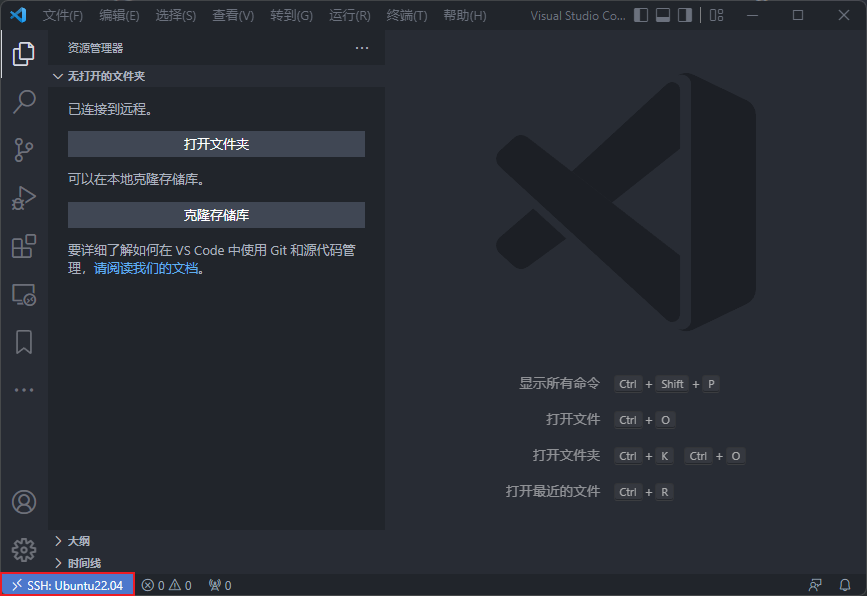
点击“打开文件夹”可以打开Ubuntu系统中的文件夹,我这里打开了Ubuntu系统中的Linux内核文件夹,此时我们就可以在Windows系统中,利用VSCode的Remote-SSH插件阅读Ubuntu系统中的Linux内核源码,是不是很酷:

安装插件到远端系统
当我们完成对Remote-SSH的配置之后,VSCode 支持在 远程服务器 安装插件。此时我们可以根据自己的需求安装插件到远端系统,也可以将本地的插件一键全部安装到远端系统:

点击上图中红色方框的图标,就可以将本地的插件一键全部安装到远端系统。
欢迎关注博主的公众号呀(微信搜索公众号:嵌入式那些事),可以扫描下面的公众号二维码(为防止公众号二维码被CSDN处理掉,二维码图片周围加了些东西,如果公众号图片真被CSDN处理了,也可以直接访问我的个人博客文章获取公众号二维码图片):

如果文中有什么问题欢迎指正,毕竟博主的水平有限。
如果这篇文章对你有帮助,记得点赞和关注博主就行了^_^。
排版更好的内容见我博客的地址:http://www.only2fire.com/archives/147.html
注:转载请注明出处,谢谢!^_^
边栏推荐
- 5g is not flat and 6G is restarted. China leads wireless communication. What is the biggest advantage of 6G?
- Day10 daily 3 questions (2): count the number of the largest groups
- 玩轉Linux,輕松安裝配置MySQL
- Notes on flowus
- C language --- basic function realization of push box 01
- R329 (maix-ii-a (M2A) data summary
- Calculate the average of N numbers in the group indexed by the formal parameter x, move the data less than the average in the group indexed to the front of the array, and move the data greater than or
- Find out the maximum value of each column element of NxN matrix and store it in the one-dimensional array indicated by formal parameter B in order
- Deployment and operation of mongodb partitioned cluster
- Today, I met a "migrant worker" who took out 38K from Tencent, which let me see the ceiling of the foundation
猜你喜欢
Microservice architecture practice: business management background and SSO design, SSO client design

探讨:下一代稳定币

SIGIR 2022 | University of Hong Kong and others proposed the application of hypergraph comparative learning in Recommendation System

数字藏品与NFT到底有何区别

Interpretation of cloud native microservice technology trend
Discussion: the next generation of stable coins

【MATLAB项目实战】基于卷积神经网络与双向长短时(CNN-LSTM)融合的锂离子电池剩余使用寿命预测

Over the weekend: 20000 words! Summary of JVM core knowledge, 18 serial cannons as a gift

Wechat app mall, review products, upload commodity pictures, and score Commodity Services

Redis OM . Net redis object mapping framework
随机推荐
Redis overview
[recommendation system learning] technology stack of recommendation system
Day10 daily 3 questions (3): String Matching in array
Environment setup mongodb
Day10 daily 3 questions (1): sum gradually to get the minimum value of positive numbers
Apache APIs IX has the risk of rewriting the x-real-ip header (cve-2022-24112)
Day10 daily 3 questions (2): count the number of the largest groups
类型多样的石膏PBR多通道贴图素材,速来收藏!
直播预告|程序员进击,如何提升研发效能?6月21日晚视频号、B站同步直播,不见不散!
Over the weekend: 20000 words! Summary of JVM core knowledge, 18 serial cannons as a gift
Teach you to learn dapr - 4 Service invocation
Don't believe it, 98% of programmers are like this
Web3去中心化存储生态图景
[Error] ld returned 1 exit status
Introduction to minimal API
Redis OM . Net redis object mapping framework
Incomplete line spacing adjustment of formula display in word
合约量化系统开发方案详细,量化合约系统开发技术说明
Byte interview: two array interview questions, please accept
Troubleshooting ideas that can solve 80% of faults!