当前位置:网站首页>MySql的开发环境
MySql的开发环境
2022-06-27 03:27:00 【洛洛虎虎生威】
hello,家人们,今天教大家用命令提示符安装MySql,哈哈,跟着我的步骤一步一步来,很容易的,加油!
目录
一.安装mysql5.7.23解压版
1.先在官网下载,然后我们得到的会是一个压缩包,接着我们需要把压缩包全部解压,然后就会是这样

因为我这里的文件夹是安装在E盘的,所以就直接拿我这个举例吧.
2.配置环境变量:
MYSQL_HOME E:\MySql\mysql-5.7.23-winx64
先打开设置

然后打开系统

然后点击右边的高级系统设置

就会进入到上面这个界面,然后点击高级,选择下面的环境变量选项

注:最好在系统变量中配置环境变量
3.编辑path
%MYSQL_HOME%\bin
4.新建my.ini
新建my.ini ,放到MySql文件夹下
[mysqld]
port = 3306
basedir=E:\MySql\mysql-5.7.23-winx64
datadir=E:\MySql\mysql-5.7.23-winx64/data (如果文件目录中有data文件,在这之前删掉)
max_connections=200
character-set-server=utf8
default-storage-engine=INNODB
sql_mode=NO_ENGINE_SUBSTITUTION,STRICT_TRANS_TABLES
[mysql]
default-character-set=utf8

说明:
sql_mode
NO_ENGINE_SUBSTITUTION:mysql 在create table 时可以指定engine子句
STRICT_TRANS_TABLES:对于单个insert操作,无论插入单行或是多行,只要插入数据与字段类型不兼容,则insert操作失败并回滚
与mysql最接近的是mariadb
然后我们为了防止安装错误,利用我们系统中的注册编辑表,然后进入按下导出,然后我们就会生成一个后缀名为.reg的文件,如果到时候MySql不小心装歪了,或者说装失败了,就可以把这个目录删掉,可以保存里面有用的数据剪切一下,然后重新打开我们的注册编辑表,然后把我们之前导出的那个文件重新导入进来,然后重新初始化
好,现在我们开始运用命令提示符操作,先打开cmd命令,然后右击命令提示符,选择以管理员身份运行
需要进入bin目录:
5.安装
mysqld -install

6.初始化
mysqld --initialize-insecure --user=mysql
根据刚刚my.ini文件去初始化,然后会产生一个data文件夹

7.启动
net start mysql

8.设置密码
mysqladmin -u root -p password 新密码

9.Enter password: 旧密码
直接回车,因为初始化直接把mysql的密码设置为空

10.连接
mysql -u root -p
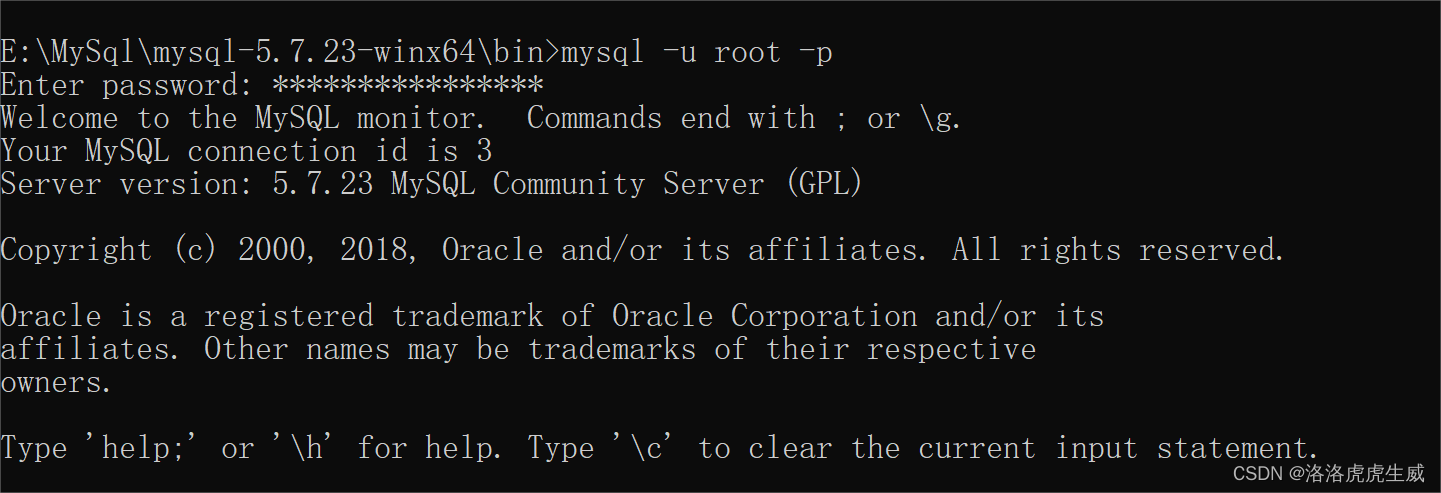
11.测试
显示数据库 show databases;
显示表 show tables;

二、卸载mysql
1 停止服务
net stop mysql
2.删除服务
sc delete mysql 但是服务只是禁用状态,服务还是存在
3.移除服务
mysqld remove 需要进入bin目录,在服务中已经找不到mysql服务了
4.删除注册表信息
- HKEY_LOCAL_MACHINE\SYSTEM\ControlSet001\Services\Eventlog\Application\MySQL
- HKEY_LOCAL_MACHINE\SYSTEM\ControlSet002\Services\Eventlog\Application\MySQL
- HKEY_LOCAL_MACHINE\SYSTEM\CurrentControlSet\Services\Eventlog\Application\MySQL
5.删除mysql的安装目录
打开注册表
regedit
打开服务
services.msc
注意1:有保护关闭,特别是自我保护要关闭,不然没法卸载
注意2:权限问题
三:解决mysql不能远程连接的问题:
1. 在mysql服务器上进入 mysql的命令行
2. 执行如下语句: (注意密码需要根据自己的配置修改)
mysql> grant all privileges on *.* to [email protected]'%' identified by '123456';
mysql> flush privileges;
今天的知识就到这里啦~ 哈哈,咱们下期见
今天也要记得微笑呀.
边栏推荐
- 2021:Beyond Question-Based Biases:Assessing Multimodal Shortcut Learning in Visual Question Answeri
- PAT甲级 1018 Public Bike Management
- Flink learning 4:flink technology stack
- Getting started with Scala_ Immutable list and variable list
- 我是怎样简化开源系统中的接口的开发的?
- Stack overflow vulnerability
- servlet与JSP期末复习考点梳理 42问42答
- 投资理财产品的钱有保障吗?会不会没有了?
- 2021:AdaVQA: Overcoming Language Priors with Adapted Margin Cosine Loss∗自适应的边缘余弦损失解决语言先验
- 学习太极创客 — MQTT 第二章(三)保留消息
猜你喜欢

QIngScan使用

Pat grade a 1023 have fun with numbers

How does source insight (SI) display the full path? (do not display omitted paths) (turn off trim long path names with ellipses)

2019LXMERT:Learning Cross-Modality Encoder Representations from Transformers

学习太极创客 — MQTT(八)ESP8266订阅MQTT主题
![[Shangshui Shuo series] day 6](/img/47/7cd44f4e361af53cac7cea9d0d7ecb.png)
[Shangshui Shuo series] day 6

Solve the problem of error reporting in cherry pick submission

Super détaillé, 20 000 caractères détaillés, mangez à travers es!
Pat grade a 1019 general palindromic number

【数组】剑指 Offer II 012. 左右两边子数组的和相等 | 剑指 Offer II 013. 二维子矩阵的和
随机推荐
Flink learning 4:flink technology stack
Super détaillé, 20 000 caractères détaillés, mangez à travers es!
PAT甲级 1023 Have Fun with Numbers
2021:Graphhopper: Multi-Hop Scene Graph Reasoning for Visual Question Answering
JWT certification process and use cases
pytorch_ grad_ Cam -- visual Library of class activation mapping (CAM) under pytorch
The use and introduction of pytorch 23 hook and the implementation of plug and play dropblock based on hook
静态时序分析-OCV和time derate
Paddlepaddle 20 implementation and use of exponentialmovingaverage (EMA) (support static graph and dynamic graph)
流沙画模拟器源码
JMeter distributed pressure measurement
Learning Tai Chi Maker - mqtt (VII) advanced mqtt theme
Yiwen teaches you Kali information collection
Implementation of window encryption shell
元透实盘周记20220627
PAT甲级 1019 General Palindromic Number
Pat class a 1024 palindromic number
GAMES101作业7提高-微表面材质的实现过程
Learning Tai Chi Maker - mqtt Chapter 2 (II) esp8266 QoS application
SAI钢笔工具如何使用,入门篇