当前位置:网站首页>Actual combat: how to quickly change font color in typera (blog sharing - perfect) -2022.6.25 (solved)
Actual combat: how to quickly change font color in typera (blog sharing - perfect) -2022.6.25 (solved)
2022-06-25 23:04:00 【One thought for a lifetime】

Experimental environment
win10
typora 1.3.7
MyTyporaHotkeyScript.exe 64 Bit system
Experimental software
link :https://pan.baidu.com/s/12ChdWgyL6EPUnz4h2S1QbQ?pwd=18h5
Extraction code :18h52022.6.25-typora Customize color shortcuts - Experimental software

Write it at the front
How to get the beautiful typora The theme , Please see the link below :
https://www.yuque.com/books/share/34a34d43-b80d-47f7-972e-24a888a8fc5e?# 《 Refuse to accept : The best cloud notes in the universe !》

1、 Problem demand
The current theme is set to : Use ctrl b Make the font thicker , The default color is red .
Personal feeling , This way is not very good , It is better to distinguish between bold and color ;

Online problem demand :

2、 To solve the process

zero 、 Conventional text color changing methods
Change font 、 size 、 Color 、 Background color
(1) Change font 、 size 、 Color (font label )
I'm in bold I am Microsoft YaHei I am Caiyun in Chinese I'm red I'm green I'm blue I'm size I'm black , green , Size is 5
<font face=" In black "> I'm in bold </font>
<font face=" Microsoft YaHei "> I am Microsoft YaHei </font>
<font face="STCAIYUN"> I am Caiyun in Chinese </font>

<font color=red> I'm red </font>
<font color=#008000> I'm green </font>
<font color=Blue> I'm blue </font>

<font size=5> I'm size </font>

<font face=" In black " color=green size=5> I'm black , green , Size is 5</font>
(2) Change the background color
01、
| Background color red |
<table><tr><td bgcolor=red> Background color red</td></tr></table>
02、span label
written words
<span style='color:yellow;background:red;font-size: Text size ;font-family: typeface ;'> written words </span>
1、AutoHotKey(.ahk) Shortcut key variant (Windows)
It has been mentioned upstairs .
But the problem is that the color to be changed is already written in the code block . Fast but with few colors .
I'll simplify the process :
1. Download a software
- visit AutoHotkey Home page : https://autohotkey.com/
- Click to download : https://autohotkey.com/download/ahk-install.exe
https://link.zhihu.com/?target=https%3A//autohotkey.com/download/ahk-install.exe

2. Create script
1. New desktop txt file
2. Change suffix to .ahk
3. Rename it to MyTyporaHotkeyScript.ahk
3. Edit script
; Typora
;  Quickly add font color
; SendInput {
    Text}  Solve the problem of Chinese input method  #IfWinActive ahk_exe Typora.exe
{

    ; Ctrl+Alt+o  Orange
    ^!o::addFontColor("orange")

    ; Ctrl+Alt+r  Red
    ^!r::addFontColor("red")

    ; Ctrl+Alt+b  The light blue
    ^!b::addFontColor("cornflowerblue")
}

;  Quickly add font color  addFontColor(color){

    clipboard := "" ;  Clear shear plate  Send {
    ctrl down}c{
    ctrl up} ;  Copy  SendInput {
    TEXT}<font color='%color%'> SendInput {
    ctrl down}v{
    ctrl up} ;  Paste  If(clipboard = ""){

        SendInput {
    TEXT}</font> ; Typora  There is no automatic replenishment here
    }else{

        SendInput {
    TEXT}</ ; Typora Automatically complete the label in
    }
}

4. Run script
1. double-click ahk Script run
2.Typora testing
Ctrl+Alt+O—— Orange Orange
Ctrl+Alt+R—— Red Red
Ctrl+Alt+B—— Blue Blue
Press Ctrl+\ Cancel the pattern !


The specific test results are as follows :
I am orange Orange
I'm red Red
I'm blue Blue
It can have a normal effect ;
5. Custom shortcut
Ctrl+Alt It may not be convenient . Other words , May conflict with
- Shift Tube capital
- Ctrl Number, letter, tube, text style, etc ( Level title )
- Alt Letter tube function , It can be changed to Alt+ Numbers .
Alt+1234567= Red, orange, yellow, green, blue, indigo, purple . It's also convenient .
- red
- orange
- yellow
- green
- blue The blue is too dark , It can be as above cornflowerblue)
- cyan
- purple
- ……
- ……
️ matters needing attention

You can directly copy off the shelf .
	; alt+0  Red
    !0::addFontColor("black")

    ; alt+1  Red
    !1::addFontColor("red")

    ; alt+1  Orange
    !2::addFontColor("orange")

     ; alt+3  yellow
    !3::addFontColor("yellow")

     ; alt+4  green
    !4::addFontColor("green")

    ; alt+5  The light blue
    !5::addFontColor("blue")

     ; alt+6  Cyan
    !6::addFontColor("cyan")

   ; alt+7  violet
    !7::addFontColor("purple")

Show the effect :

️ Be careful :
You can right-click MyHotkeyScript.ahk Script files , Click on Compile Script Compile the script into exe Program , You don't have to download Autohotkey Running on other computers ;

Set up winodws Boot up :


After testing , It can be started and take effect .
6. Box shortcut key
Cursor movement
- Tab—— Quick indent
- Home/End—— Switch to the beginning or end of the current line
- Ctrl+Home/End—— Switch to the beginning or end of the current document
Select... In the cursor box
- Shift+ Up and down left and right direction keys —— You can customize the selected text like a mouse to copy and paste .
- Shift+Home( When the cursor is at the end of the line )—— Choose this trip , With some Ctrl+L almost .
- Shift+End( When the cursor is at the beginning of the line )—— Choose this trip , Same as above .
Content manipulation
- Ctrl+Insert—— Copy
- Shift+Insert—— Paste
2、Alfred Code block variant (Mac OS)( This time is for collection only )

Reference source :
https://blog.csdn.net/qq_43444349/article/details/105716470


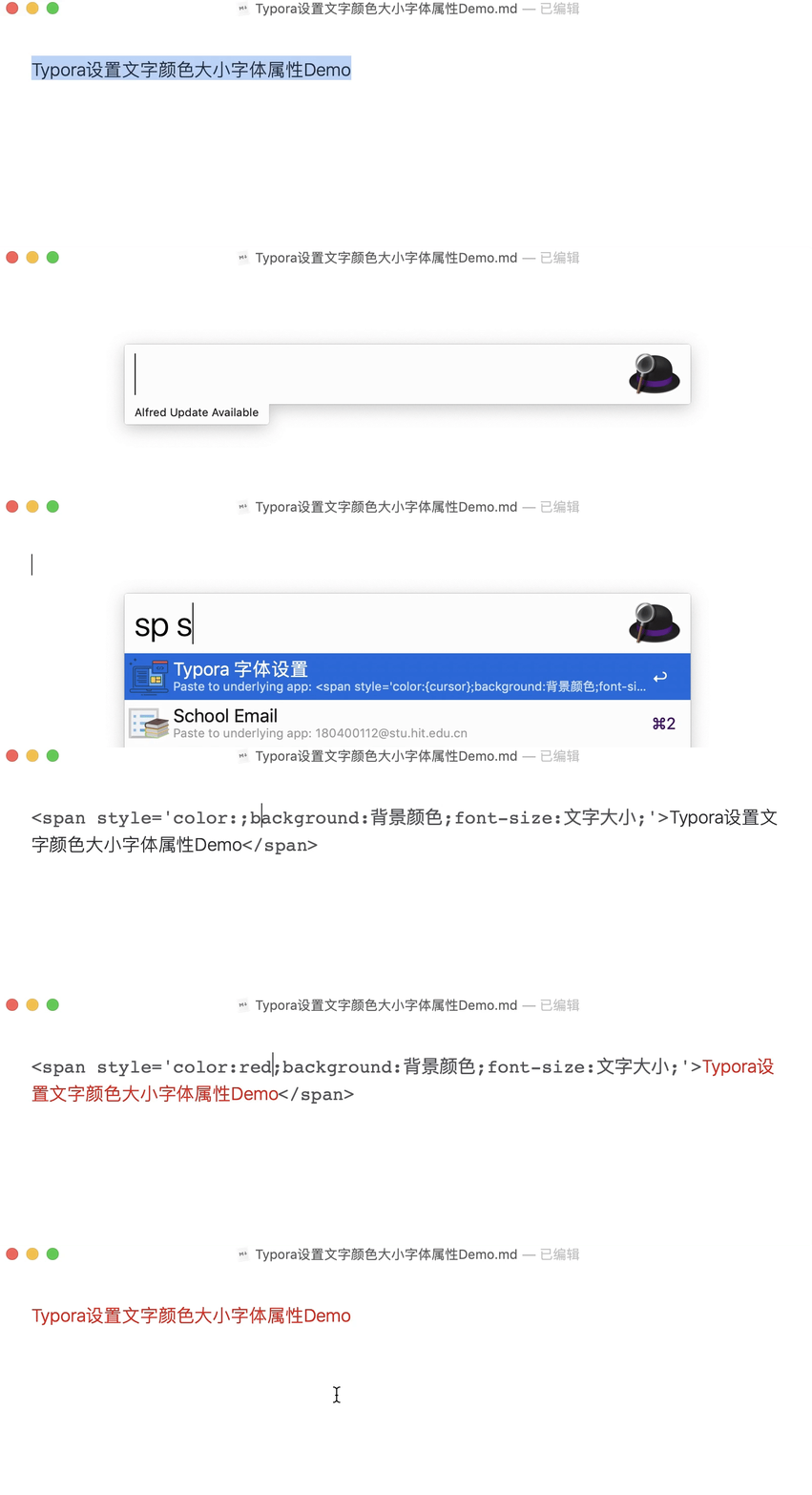


quote
https://www.zhihu.com/question/385854845/answer/1554700610?ivk_sa=1024320u

About me
My blog theme :
- Beautiful layout , The language is refined ;
- Documents are manuals , Step details , Refuse to bury the pit , Provide source code ;
- My actual combat documents are tested successfully , If you have any questions during the actual operation , You can contact me at any time to help you solve the problem , Let's make progress together !
WeChat qr code
x2675263825 ( Willing to part with or use ), qq:2675263825.

WeChat official account
《 Cloud native architect actual combat 》
csdn
https://blog.csdn.net/weixin_39246554?spm=1010.2135.3001.5421

Blog
www.onlyyou520.com

You know
https://www.zhihu.com/people/foryouone

Language sparrow
https://www.yuque.com/books/share/34a34d43-b80d-47f7-972e-24a888a8fc5e?# 《 Refuse to accept : The best cloud notes in the universe !》

Last
Okay , That's all for this time , Thank you for reading , Finally, I wish you all a happy life , Every day is meaningful , See you next time !
边栏推荐
- Unity technical manual - color in life cycle coloroverlifetime-- speed color colorbyspeed
- 2022-2028 global web and browser isolation platform industry research and trend analysis report
- Does jQuery cache any selectors- Does jQuery do any kind of caching of “selectors”?
- New network security competition of the secondary vocational group in 2022
- Simple and easy-to-use cache library gcache
- Travel notes of 2022giao
- Privatization lightweight continuous integration deployment scheme -- 03 deployment of Web services (Part 2)
- Some reflections on preparing for the Blue Bridge Cup
- Tlog helps Pangu framework realize microservice link log tracking
- The new version of Tencent's "peace elite" is coming: add a new account security protection system, and upgrade the detection of in-game violations
猜你喜欢

Cvpr2022 tutorial | machine learning remote sensing processing: agriculture and food security, University of Maryland

不荒唐的茶小程序-规则改动
![Intimacy - [comfortable exit] - final communication to reduce injury](/img/ab/c02d3b4213e1706e379d26073cbf07.jpg)
Intimacy - [comfortable exit] - final communication to reduce injury

Fastjson deserialization randomness failed

Privatization lightweight continuous integration deployment scheme -- 03 deployment of Web services (Part 2)
This 110 year old "longevity" enterprise has been planning for the next century

ES6 - numerical extension and object extension

String deformation (string case switching and realization)

Unity的Ping类使用

Three layer architecture + routing experiment

随机推荐
记|一次exists关键字的学习记录
OSPF - detailed explanation of GRE tunnel (including configuration command)
2022-2028 global industrial touch screen industry research and trend analysis report
[eosio] eos/wax signature error is_ Canonical (c): signature is not canonical
Huawei cloud SRE deterministic operation and maintenance special issue (the first issue)
民航局:到 2025 年我国将初步建成安全、智慧、高效和绿色的航空物流体系
Flex & Bison 开始
Another breakthrough! Alibaba cloud enters the Gartner cloud AI developer service Challenger quadrant
2022-2028 global co extrusion production line industry research and trend analysis report
Use apiccloud AVM multi terminal component to quickly realize the search function in the app
QT learning setting executable exe attribute (solving the problem of Chinese attribute garbled)
Cvpr2022 tutorial | machine learning remote sensing processing: agriculture and food security, University of Maryland
Use of local stack in flask
Tlog helps Pangu framework realize microservice link log tracking
ES6 -- formal parameter setting initial value, extension operator, iterator, and generating function
pdm导入vscode的实现方式
zabbix_ Server configuration file details
Chapter 3 use of requests Library
2022-2028 global cloud based remote browser isolation industry research and trend analysis report
2022-2028 global TFT LCD touch screen industry research and trend analysis report