当前位置:网站首页>[deeply understand tcapulusdb technology] one click installation of tmonitor background
[deeply understand tcapulusdb technology] one click installation of tmonitor background
2022-06-25 18:22:00 【Data person】
One click installation script modification
Tmonitor The one click installation script defaults to TcaplusDB Written by business , For other businesses , The installation procedure is the same as "Tmonitor Stand alone installation guidelines ", The following script should be modified before installation :
1. modify init_some_tables.sql.

\2. Modify the of the script gen_dcsvr_conf() function .

Two Tmonitor Configuration instances that monitor each other :

The second monitor Tmonitor2 Installation configuration
A. modify sql sentence 、 Configure the file and execute the installation script
- scp tmonitor_install_2.2.5sp3_130243.tar.gz /data
- tar xf tmonitor_install_2.2.5sp3_130243.tar.gz
- Vim init_some_tables.sql

- mysql -h10.59.41.57 -uroot -ptcaplus#2003
- create database tmonitor2_db;use tmonitor2_db;
- source create_tables.sql
- source init_some_tables.sql
- Vim tmonitor_install.pl

- modify tmonitor_conf.xml The configuration file , Prepare for script installation


- Finally, execute the following command to install tmonitor2, There may be errors , The solution is as follows
$ ./tmonitor_install.pl install
Can’t locate XML/Simple.pm in @INC (@INC contains: /usr/local/lib64/perl5 /usr/local/share/perl5 /usr/lib64/perl5/vendor_perl /usr/share/perl5/vendor_perl /usr/lib64/perl5 /usr/share/perl5 .) at ./tmonitor_install.pl line 10.
BEGIN failed–compilation aborted at ./tmonitor_install.pl line 10.
| Transaction Check Error:file /usr/share/man/man3/XML::SAX::Base.3pm.gz conflicts between attempted installs of perl-XML-SAX-0.96-7.el6.noarch and perl-XML-SAX-Base-1.04-1.el6.rf.noarchfile /usr/share/man/man3/XML::SAX::Exception.3pm.gz conflicts between attempted installs of perl-XML-SAX-0.96-7.el6.noarch and perl-XML-SAX-Base-1.04-1.el6.rf.noarchError Summary------------- | |
|---|---|
hold rpmforge The closing of the (enabled=0, be located /etc/yum.repos.d/rpmforge.repo),
Re install , success ! Get it done !
yum install -y perl-XML*
B. take Tmonitor2 Register as a monitoring server


C. take Tmonitor2 Also registered as a business , Can be Tmonitor1 monitor , Realize mutual monitoring

**D.** Manual start-up steps after Script Installation
- ./tmonitor_install.pl install The script needs to be started manually after installation tagent、tcenterd、tcmcenter、dc_tconnd、dcsvr、sasvr Wait for the process ( Because some configurations need to be changed )
- Tagent:
 Restart after modification
 - Tcenterd:
 Restart after modification
 - Tcmcenter: It needs to be modified first host.xml The accuracy in IP Address , And then restart
- Dc_tconnd: After the above processes are started successfully , Get into tcmconsole in start
- Dcsvr: Use the following command to modify dcsvr.xml Configuration of , And then start the process
sed -i ‘/DBMSHost/c 10.59.41.57’ dcsvr.xml
sed -i ‘/DBMSPassword/c XXXXX’ dcsvr.xml
sed -i ‘/DBName/c tmonitor2_db’ dcsvr.xml <---------- Fill in A-5 Created library name
sed -i ‘/DBMSUser/c tmonitor’ dcsvr.xml
7. Sasvr: Need modification sasvr.xml It's connected db( Modify the... Used for the front-end page db, namely tmonitor_center_db) and weburl
E. Tmonitor2 Installation completed
The first monitoring Tmonitor1 Installation configuration
Responsible for monitoring Tcaplus Clustered Tmonitor1 You need to add dc_tconnd and dcsvr The process reports its status , Before you can give tmonitor2 monitor . Here are the configuration steps :
A. preparation
cd ~/tmonitor_install
cp -rp dc_tconnd_1 dc_tconnd_9
cp -rp dcsvr_1 dcsvr_9
B. by Tmonitor1 Building database and building tables
Vim init_some_tables.sql
mysql -h10.59.41.57 -uroot -ptcaplus#2003
create database tmonitor1_db;
Use tmonitor1_db;
source create_tables.sql
source init_some_tables.sql
C. To configure dc_tconnd
1. modify dc_tconnd_9 Configuration file for xml


2. modify dc_tconnd_9 Log profile for tconnd_log.xml

3. modify dc_tconnd_9 The process starts 、 Stop... In the script id

**D.** To configure dcsvr_9
1. modify dcsvr_9 Configuration file for xml, Ensure existence sasvr and dcsvr Two process items ( Other process items can be modified , Because you only need to use sasvr and dcsvr)

2. modify dcsvr_9 Log profile for dcsvr_log.xml( Here the process ID Get and C-1 The modified values are consistent )
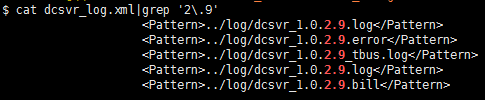
3. modify dcsvr_9 The process starts 、 Stop... In the script id( Here the process ID Get and C-1 The modified values are consistent )

**E.** take dc_tconnd_9 and dcsvr_9 Add to tcm management , And send them tbus passageway , Finally start dc_tconnd_9 and dcsvr_9
1. Add process information to proc_deploy.xml

2. restart tcmcenter
3. from tcmconsole Send out tbus passageway :refreshbuscfg ...
4. To their own bin Start the process under the directory :./start_tconnd.sh; ./start_dcsvr.sh
**F.** For controlled Tmonitor1 Process configuration 、 Issue the collection strategy 、 Alarm strategy configuration
1.Tmonitor1 Of web Basic configuration

2. Issue the collection strategy

3. Observe for a few minutes after the collection strategy is issued , The following figure shows the normal

4. Add default alarm receiver and configure alarm policy
TcaplusDB It's a distributed product of Tencent NoSQL database , The code for storage and scheduling is completely self-developed . With cache + Landing fusion architecture 、PB Levels of storage 、 Millisecond delay 、 Lossless horizontal expansion and complex data structure . At the same time, it has rich ecological environment 、 Easy migration 、 Extremely low operation and maintenance costs and five nine high availability features . Customer coverage game 、 Internet 、 government affairs 、 Finance 、 Manufacturing and the Internet of things .

边栏推荐
猜你喜欢




随机推荐
视觉SLAM十四讲 第9讲 卡尔曼滤波
. How to exit net worker service gracefully
中断操作:AbortController学习笔记
深度学习网路模型
Article 6:clion:toolchains are not configured configure disable profile
How to develop the hash quiz game system? Hash quiz game system development application details case and source code
篇4:win10安装MingW64
Using QT to make a beautiful login interface box
华为云SRE确定性运维专刊(第一期)
[deeply understand tcapulusdb technology] tmonitor system upgrade
C#泛型类案例
IVX 启航
Pycharm 使用过程中碰到问题
new TypeReference用法 fastjson[通俗易懂]
Which is better and safer, GF easy gold rush or compass
安装spark + 用命令运行scala相关项目 + crontab定时执行
RMAN backup database_ Use RMAN for split mirror backup
JSP页面运行却显示源码
GNU nano
RMAN backup database_ Restart RMAN backup