当前位置:网站首页>Arduino IDE for raspberry PI Pico development firmware localization installation tutorial
Arduino IDE for raspberry PI Pico development firmware localization installation tutorial
2022-07-25 02:44:00 【perseverance52】
Arduino IDE for Raspberry Pi Pico Develop firmware localization installation tutorial
What is introduced here is not Arduino The construction of official development board firmware , Because there is only one model in the official raspberry pie development board , Installation only requires
ArduinoSearch the development board manager for the correspondingpicoKeyword can be found and installed .
Arduino Official Raspberry Pi Pico Development board
- There is only one model
Raspberry Pi PicoOptional .
earlephilhower Provided by the author arduino-pico, It is also the focus of this introduction

Raspberry Pi PicoDevelopment board firmware project :https://github.com/earlephilhower/arduino-picoArduino-Picodocumentation :https://arduino-pico.readthedocs.io/en/latest/index.html
According to the installation instructions provided , Before the installation , You need to fill in the corresponding json Address , At home , Add this as per ESP32 Support the same firmware address , Will report a mistake .

- Error message

earlephilhower Provided arduino-pico Localize the installation process
First of all to prepare HFS(HTTP File Server) Tools to build local servers

Get ready for offline earlephilhower Version of arduino-pico Support firmware package
- Download support firmware package

- modify
.jsonfile
https://github.com/earlephilhower/arduino-pico/releases/download/global/package_rp2040_index.json
Copy the above link to the browser address bar and press enter , Download the file .
Use VSCode Or other Notepad tools to open.jsonfile , Find and replace the corresponding information

https://github.com/earlephilhower/arduino-pico/releases/download/2.3.2/rp2040-2.3.2.zip
Replace the above link address with HFS Address generated in the software ,( The one in the middle here 8266 It's the port number ), This address is replaced in more than one place , Directly by Ctrl + H Replace the command , Select all to replace the corresponding content .

http://119.39.213.86:8266/arduino-pico-master.zip( Please don't copy my address , This depends on the personal computer , It must not be the same address as me )

And replacement
rp2040-2.3.2.zipChange it toarduino-pico-master.zip( Please don't copy this of mine , This depends on the name of the compressed package downloaded by individuals , It must not be the same address as me )

- Save after replacement , take .json Drag files to
HFSInside the tool .

Installation steps
- stay Arduino IDE menu - Preferences - Fill in the address of the development board manager : stay HFS In tool software
.jsonOf IP Copy the address information inside , Click ongood,
- Go back to the development board manager menu

- Search the latter and scroll down to find
picoCorresponding development board support package , At the same time HFS Tool software , You can view the relevant accesslogInformation , Click Install .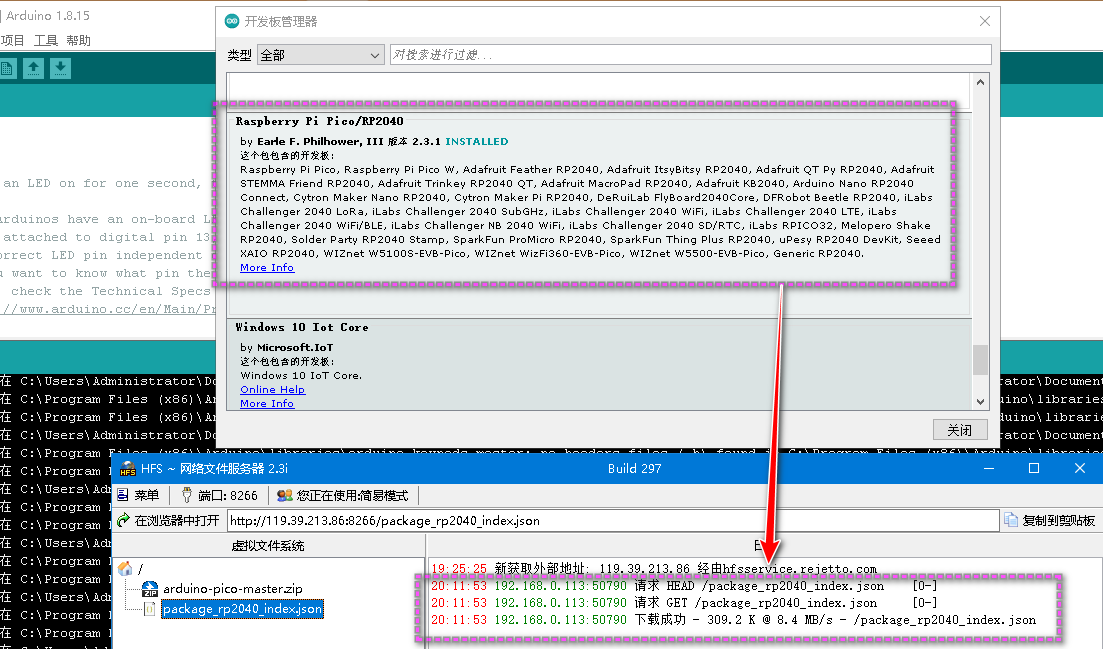
- Wait for installation to complete

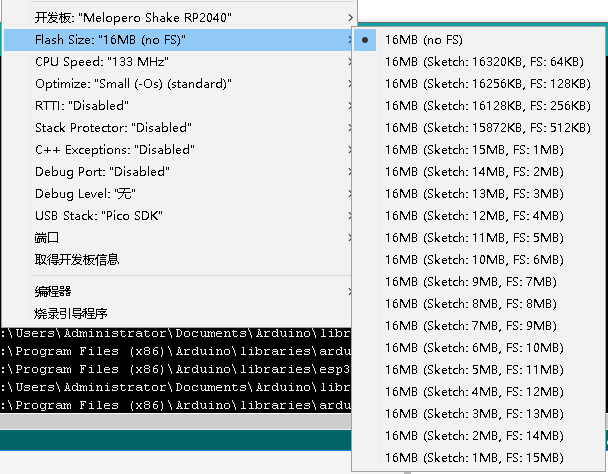
- After installation , You can go to the development board selection to see the corresponding development board
This is more than an official model , The development board models here are much richer .

- You can configure more detailed hardware information
This method is applicable to the construction and installation of firmware packages supported by any development board . Just prepare the supporting firmware package and the corresponding .json File to achieve .
边栏推荐
- Jenkins configuration plug-in interface displays "suggestions collection" in Chinese
- Solution to the occupation of project startup port
- Please ask a question: how to set the new table of MySQL CDC 2.2.x to only receive increment
- Redis unauthorized access vulnerability recurrence (www.hetianlab.com)
- UDP message structure and precautions
- [pyGame practice] nostalgic classic - do you remember the name of this chess game for children? (must collect)
- In the post deep learning era, where is the recommendation system going?
- How to take the mold for the picture of 1.54 inch TFT st7789 LCD screen
- Go common standard library -time
- How MySQL 8.0 based on TRX_ Id find the statement of the whole transaction
猜你喜欢

Vs2019 configuring Qt5 development environment

TS uses a third-party library, and there is no type declaration file error handling

Permanently mount the image steps

Tp5.1 paging (with parameter transfer)

Rotating frame target detection mmrotate v0.3.1 training hrsc2016 data set (II)
YouTube Download and (batch) Download

C language: Structure -- a detailed explanation of memory byte alignment

Introduction to web security telent testing and defense

How to use blender to make 360 degree panorama and panoramic video?

Example demonstration of "uncover the secrets of asp.net core 6 framework" [02]: application development based on routing, MVC and grpc
随机推荐
After upgrading v2.1.0, the synchronization failed
Tp5.1 paging (with parameter transfer)
Mgre.hdlc.ppp.chap.nat comprehensive experiment
Go multiplexing
After working for two months in the summer vacation, I understood three routing schemes of keepalived high availability
Remote sensing image classification tool and visualization application of WebGIS
Digital commerce cloud fine chemical industry management platform integrated informatization solution
VRRP virtual redundancy protocol configuration
Actual combat in ThreadLocal project
Text reading end judgment
Pagoda workman WSS reverse proxy socket legal domain name applet chat remove port
Simulate the implementation of strstr
Mp4 package analysis
Wechat sports field reservation of the finished works of the applet graduation project (5) assignment
SQL recursive follow-up
Talk about what's going on with C # backstage GC?
Generator set work arrangement problem code
6. Object storage
Babbitt | metauniverse daily must read: Dubai launched the national metauniverse strategy, which plans to increase the number of related companies of metauniverse by five times in the next five years
How to use blender to make 360 degree panorama and panoramic video?