当前位置:网站首页>Problems of different renderers running on the web with flutter2.0
Problems of different renderers running on the web with flutter2.0
2022-06-22 19:28:00 【Liuyichu】
Preface
Flutter2.0 Soon after it was released , Yes web Support for has just entered stable Stage .
First few days , structure web There are some problems in application , For example, Chinese is displayed as garbled code , Then the image cross domain problem occurs when the image is loaded :
Failed to load network image
...
Trying to load an image from another domain?
1. Turn on web End construction : Use the following command to start Web End build support
flutter config --enable-web

Prompt us : Restart the editor , So they can read the new settings .
2. After the restart, we input again
flutter config
You can see :
In this way, each new Flutter Project time , All support. web End built , There will be one more build configuration directory by default web( Before setting, only Android,iOS). Even if a project doesn't need support web There is no need to turn off this support for end-to-end construction , Do not use build web The order of .
3. The old project starts web Support : In fact, it is to reconfigure the current project
flutter create .
Copy the above , Don't drop the following symbol .
perform :
Then look at the project directory , except Android and iOS, You can see more web Catalogue :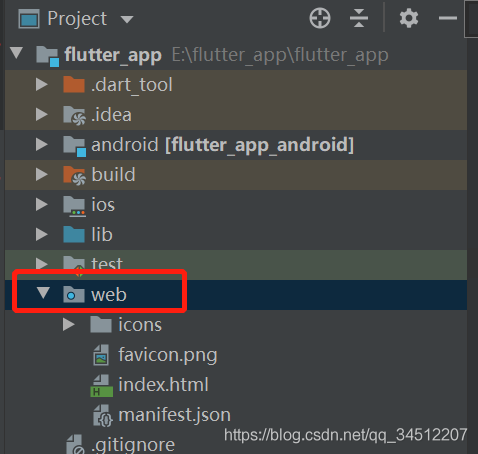
4. debugging web End
When no other end environment is available , Use the following command to compile directly web End and open chrome debug
flutter run
About the problem of cross domain access failure :
Baidu for a while , The answer is :Flutter Running and building Web Application time , You can choose between two different renderers . These two renderers are :
1.HTML.CSS,Canvas Elements and SVG Elements .  The download size of the render is small .
2.Canvaskit. Use Skia Compiled into WebAssembly And use WebGL Rendering .  The render is similar to Flutter Mobile devices and desktops are exactly the same , Faster performance , And it's unlikely that there will be differences between browsers , But the download size has increased by about 2MB.
Flutter The default setting for this option in the official documentation is , When the application is running in a mobile browser , This option selects HTML Renderers ; When the application is running in a desktop browser , choice CanvasKit Renderers . So it seems that the system is set for us CanvasKit Renderers .
So they used orders :
flutter run -d chrome --web-renderer html

flutter run -d chrome --web-renderer canvaskit
Use html The display shows the normal page , While using canvaskit And a blank page is displayed . So up to now , We can also basically locate , It should be downloaded from the browser CanvasKit Problems caused by mistakes . therefore , After a series of scientific Internet settings , Problem solving .
Enclosed flutter web Some common commands :
flutter channel beta // Switch versions
flutter upgrade // Check for upgrades
flutter config --enable-web // add to web Support
flutter devices // View connected devices , Will be displayed chrom browser , There is no suggestion to install one
flutter create xxx // Create a new web project , The project name does not support hump writing
cd xxx // Switch to directory
flutter run -d chrome // Run to device
flutter build web // pack web project
flutter build apk//android  pack
flutter build ios --release//ios  pack
边栏推荐
- 20billion vs 5billion, how much is the "dehydration" little red book worth?
- IPLOOK作为O-RAN联盟会员,将共同促进5G产业发展
- 组合学笔记(五)分配格中的链
- 最长公共子序列
- China's games are "harvesting" foreigners
- 如何提高工作效率?苹果电脑效率工具合集
- Active directory user logon Report
- How MySQL deletes a column in a database table
- jniLibs.srcDirs = [‘libs‘]有什么用?
- 到底使用Thread还是Service?
猜你喜欢
shell脚本详解(七)——正则表达式、sort、uniq、tr

session机制详解以及session的相关应用

shell脚本详解(十)——sed编辑器的使用方法

Thread pool: reading the source code of threadpoolexcutor

2年狂赚178亿元,中国游戏正在“收割”老外
Detailed explanation of session mechanism and related applications of session

TypeScript(7)泛型

C sqlsugar, hisql, FreeSQL ORM framework omni-directional performance test comparison sqlserver

Linked list 4- 21 merge two ordered linked lists

2022 G2 power plant boiler stoker question bank and online simulation examination
随机推荐
shell脚本详解(二)——条件测试、if语句和case分支语句
wpa_ State machine migration of supplicant
Active Directory用户登录报告
贪心之分配问题(2)
Method of activity jump to fragment (intent)
Getting started with database connection pooling (c3p0, Druid)
如何提高工作效率?苹果电脑效率工具合集
STM32 control matrix key, Hal library, cubemx configuration
Notes on Combinatorics (V) chains in distributive lattice
数商云:解析B2B2C多用户商城系统架构设计思路,开启智能商城新时代
Linked list 4- 21 merge two ordered linked lists
Shell script explanation (IV) -- while loop and until loop of loop statements (additional examples and analysis)
程序员工具大全【持续更新】
Message Oriented Middleware (I) MQ explanation and comparison of four MQS
Centeros install mangodb
org.apache.ibatis.binding.BindingException: Invalid bound statement (not found)
PostgreSQL 字符串分隔函数(regexp_split_to_table)介绍以及示例应用
Makefile将某一部分文件不编译
Detailed explanation of shell script (x) -- how to use sed editor
Niuke.com: consolidation interval