当前位置:网站首页>Esphone's self-made infrared remote control is connected to ha to control lights, switches, etc. any remote control can be used
Esphone's self-made infrared remote control is connected to ha to control lights, switches, etc. any remote control can be used
2022-07-23 07:11:00 【Sharing master】
Catalog
Project background
Recently, I took a fancy to the project of intelligent night light , Buy human body induction night lights with a few yuan through Taobao ( Use the shell ), Then add the machine drawing board esp8266 Networked control , Access homeassistant, Do intelligent control .
At present, the following functions are realized :
- Infrared human body detection
- ld2410 Microwave detection
- Ambient brightness detection
- Night light control
- RGB Color lamp control
- dht11 Temperature and humidity readings ( forbid )
- Infrared emission and reception
Now that infrared transmission and reception have been realized , Is it possible to use this device , As a common infrared remote control transfer signal to control the connected homeassistant What about other equipment ?

Implementation process
The great God of online forum has provided relevant codes , Original author post
Implementation steps :
- infrared ( perhaps 315 433 radio frequency ) Remote control transmits signal
- After receiving the signal, the receiving head gives ESP
- ESP hand MQTT
- HA Internal basis MQTT Content execution is automated accordingly
Verify only the infrared part , The measured available :
- Use esphome To identify the infrared remote control key code [main:094]: nec: 1886437949:0
[20:26:22][D][remote.pronto:229]: Received Pronto: data=0000 006D 0001 0000 0003 06C3
[20:26:23][I][main:094]: nec: 1886437949:0
[20:26:23][D][remote.pronto:229]: Received Pronto: data=0000 006D 0001 0000 0002 06C3
[20:26:23][D][remote.pronto:229]: Received Pronto: data=0000 006D 0003 0000 00AD 00AB 0018 003F 0019 06C3
[20:26:24][I][main:094]: nec: 1886437949:0
[20:26:24][D][remote.pronto:229]: Received Pronto: data=0000 006D 0003 0000 00AD 00AB 0019 003E 0018 06C3
[20:26:31][D][remote.pronto:229]: Received Pronto: data=0000 006D 0001 0000 0001 06C3
[20:26:35][I][main:094]: nec: 1886413469:0
[20:26:35][D][remote.pronto:229]: Received Pronto: data=0000 006D 0003 0000 00AE 00AA 0019 003E 0018 06C3
[20:26:37][I][main:094]: nec: 1886413469:0
[20:26:37][D][remote.pronto:229]: Received Pronto: data=0000 006D 0001 0000 0003 06C3
[20:26:37][D][remote.pronto:229]: Received Pronto: data=0000 006D 0003 0000 00AE 00AA 0018 003F 0018 06C3
[20:26:38][I][main:094]: nec: 1886413469:0
[20:26:38][D][remote.pronto:229]: Received Pronto: data=0000 006D 0003 0000 00AE 00AA 0019 003E 0018 06C3
[20:26:40][I][main:094]: nec: 1886413469:0
[20:26:40][D][remote.pronto:229]: Received Pronto: data=0000 006D 0003 0000 00AF 00A9 0018 003F 0019 06C3
Build automation examples
alias: num4 toggle ir_conf
trigger:
  - platform: mqtt
    topic: ir_conf/senso/ir
    payload: '1886413469:0'
action:
  - service: switch.toggle
    data:
      entity_id: switch.wall_switch_left_158d0xxxx
Use infrared remote control to verify

Reference code
Enclosed esphome Code :
esphome:
  name: ir_conf

esp8266:
  framework:
    version: 2.7.4
  board: nodemcuv2

# Enable logging
logger:

# Enable Home Assistant API
api:
  password: !secret api_password
ota:
  password: !secret ota_password

wifi:
  ssid: !secret wifi_ssid
  password: !secret wifi_password
  manual_ip:
    # Set this to the IP of the ESP
    static_ip: 192.168.1.178
    #static_ip: 192.168.1.10
    # Set this to the IP address of the router. Often ends with .1
    gateway: 192.168.1.1
    # The subnet of the network. 255.255.255.0 works for most home networks.
    subnet: 255.255.255.0
    #DNS1: 192.168.31.1
  # Enable fallback hotspot (captive portal) in case wifi connection fails
  # Enable fallback hotspot (captive portal) in case wifi connection fails
  ap:
    ssid: "Light Xiaoyedeng"
    password: "MynRqBY96AUC"

captive_portal:

# remote_receiver:
  # id: rcvr
  # pin:
    # number: D5
    # inverted: true
    # # mode:
      # # input: true
      # # pullup: true
  # dump: #all
    # - nec
    # - raw
mqtt:
  broker: !secret broker
  username: !secret mqtt_name
  password: !secret mqtt_password
  discovery: true
remote_receiver:
  pin:
    number: D5
    inverted: True
    mode: INPUT_PULLUP
  dump: all
  on_nec:
    then:
    - mqtt.publish:
        topic: ir_conf/sensor/ir
        payload: !lambda |-
          char temp[20];
          sprintf(temp, "%d:%d", x.address, x.command);
          ESP_LOGI("main", "nec: %s", temp);
          return temp;
  on_panasonic:
    then:
    - mqtt.publish:
        topic: ir_conf/sensor/ir
        payload: !lambda |-
          char temp[20];
          sprintf(temp, "%d:%d", x.address, x.command);
          ESP_LOGI("main", "nec: %s", temp);
          return temp;
  on_sony:
    then:
    - mqtt.publish:
        topic: ir_conf/sensor/ir
        payload: !lambda |-
          char temp[20];
          sprintf(temp, "%d:%d", x.data, x.nbits);
          ESP_LOGI("main", "nec: %s", temp);
          return temp;
  on_samsung:
    then:
    - mqtt.publish:
        topic: ir_conf/sensor/ir
        payload: !lambda |-
          char temp[20];
          sprintf(temp, "%d:%d", x.data, x.nbits);
          ESP_LOGI("main", "nec: %s", temp);
          return temp;
  on_jvc:
    then:
    - mqtt.publish:
        topic: ir_conf/sensor/ir
        payload: !lambda |-
          char temp[20];
          sprintf(temp, "%d", x.data);
          ESP_LOGI("main", "nec: %s", temp);
          return temp;
  on_rc5:
    then:
    - mqtt.publish:
        topic: ir_conf/sensor/ir
        payload: !lambda |-
          char temp[20];
          sprintf(temp, "%d:%d", x.address, x.command);
          ESP_LOGI("main", "nec: %s", temp);
          return temp;
边栏推荐
- 如何让屏幕上的字显示更大(让大屏幕看文字更舒服的设置方法)
- 小黑啃leetcode:589. N 叉树的前序遍历
- 网上邻居右键属性打不开怎么办 网上邻居右键属性打不开的解决方法
- PHP 防止或检测页面被刷新 post重复提交问题
- Design of boiler drum temperature control system (process control course design matlab/simulink)
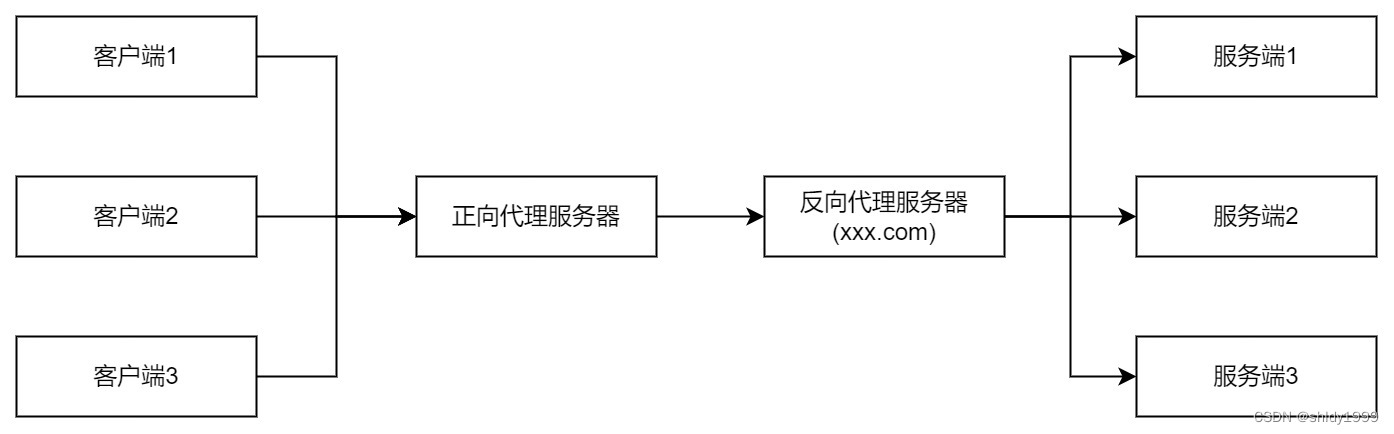
- 正向代理,反向代理及XFF
- How to do if the control panel program cannot be uninstalled? Compulsory uninstallation software tutorial
- 工行网银助手无法安装怎么办?工行网银助手安装失败问题解决方法
- 【FAQ】应用内支付服务无法拉起支付页面常见原因分析和解决方法
- 无法打开代理服务器提示代理服务器没有设置为完全访问该怎么办?
猜你喜欢


随机推荐
电脑提示内存不足怎么办 电脑C盘不够用的解决办法
电脑分区时出现'磁盘上没有足够的空间完成此操作'的解决办法
微软我们有多像上传不了照片怎么回事?TwinsOrNot照片传不上去的解决方法
MySQL --- 子查询 - 子查询概念、规范、分类
Huawei shengteng competition materials
常见运算符
Pikachu shooting range SQL injection search injection clearance steps
How to quickly shut down the computer shut down command sharing
Flink数据源拆解分析(WikipediaEditsSource)
How to turn off the messy pop-up windows on the computer? A tutorial on setting up pop-up advertisements
ipv4无internet访问权限怎么办?ipv4无internet访问权限解决方法(图文详解)
How to open the tutorial of administrator permission setting for computer administrator permission
怎么看电脑是64位还是32位 电脑32位和64位的区别
Shell脚本
CV semantic segmentation model sketch (1)
gpu和cpu有什么区别不同 电脑gpu含义介绍
Q6ui布局操作
电脑不能截屏怎么办?电脑的快捷截屏键无法使用的解决办法
Combing the docking process between the integration base and the business system
CloudWeGo 在飞书管理后台平台化设计实践