当前位置:网站首页>Use the storcli tool to configure raid. Just collect this article
Use the storcli tool to configure raid. Just collect this article
2022-06-27 21:17:00 【Ink Sky Wheel】

The text is :3141 word 28 chart , Estimated reading time :6 minute
above ( How to put the Milky Way Unicorn into U disc ?) mention , Because the domestic server firmware does not support direct configuration RAID, So we need to use storcli This tool is used to operate . Today from RAID Let's briefly introduce the use of this tool in terms of configuration and maintenance , At the same time, it is convenient for everyone to understand RAID The configuration principle of .
First, upload the tool to any directory on the server , And use command chmod +x storcli64 Modify file permissions to executable .

In addition, you can use the command ln -s root/storcli64 usr/bin/storcli To set up soft links , In this way, you can enter... In any directory storcli perform ./ storcli64, Same as the system command .
First Use storcli c0 show Command view RAID Controller information , It contains the topology of the disk 、RAID Information 、 Physical disk configuration status and other information .( notes :c namely Controller, controller , That is, the array card ;e namely Enclosure, The attachment , Generally speaking, it is the hard disk backplane “ Hard disk cage ”;s namely Slot, Physical hard disk slot ;v namely Virtual Drive, Virtual hard disk , That is, logical volumes ;d namely Disk Group, Hard disk set ;f namely Foreign configuration file, External array configuration .)

You can also see the temperature of the array card .

The above is the echo when the hard disk slot is empty , stay 1、2 Insert two pieces into the slot 960G Of SSD after , Echo added PD LIST List of physical disks , It is shown as follows :

Through the command storcli c0/vall show Check it out. RAID Configuration of logical volumes , Currently unconfigured RAID.

Through the command storcli c0/eall/sall show Check it out. c0 All physical slots of the controller and physical disk information in all slots .


step 1: If the original disk exists RAID, Need to put RAID Delete

Use storcli c0 vall show Command to view the existing array configuration information , If there is , need Use storcli c0 v0 delete Delete related configuration . If vd contain MBR Or user information data , Need to add force Parameter forced deletion .
step 2: establish RAID
storcli64 Tool creation RAID The specific methods of use are as follows :
storcli cx add vd r[0|1|5|6|00|10|50|60][Size=<VD1_Sz>,<VD2_Sz>,..|all]
[name=<VDNAME1>,..] drives=e:s|e:s-x|e:s-x,y [PDperArray=x|auto]
[SED] [pdcache=on|off|default][pi] [DimmerSwitch(ds)=default|automatic(auto)|
none|maximum(max)|MaximumWithoutCaching(maxnocache)] [WT|WB|AWB][nora|ra]
[direct|cached] [cachevd]
[Strip=<8|16|32|64|128|256|512|1024>] [AfterVd=X]
[Spares = [e:]s|[e:]s-x|[e:]s-x,y][force]
[Cbsize=0|1|2 Cbmode=0|1|2|3|4|7]

In this case , Yes 1、2 Operate two hard disks to create RAID0 The operation command of is as follows :
storcli c0 add VD r0 drives=252:0,252:1
You can use this command to directly create RAID0.

For some scenes , May need to use “Size=all” Configuration parameters for , Used to increase all disk space to logical volumes .

You can also use Parameters “name=raid0” To specify the RAID name , Will be in Virtual Drives Of Name Show .

If the configuration is not desired , Can adopt storcli c0/v0 delete force To delete RAID To configure .
Create two more groups RAID, Two pieces of SSD do RAID0,4 block SATA Dish making raid0, And named them separately .

In actual use , Hard disk failures are common . Due to the limited resources at hand , Is the total 2 block 960G The solid state disk , add 4 block 4T Of SATA disc , So use 3 block SATA Dish making RAID5, in addition 1 Block simulates a new disk to operate .
First create a 3 It's a hard disk RAID5 array .

Through the command storcli c0 /eall /sall show To view physical disk information .


Disk status description :
UGood(Unconfigured Good, Normal is not configured ), The hard disk status is normal , But it has not been divided into any logical volumes ;
UBad(Unconfigured Bad, Unconfigured exception ),UGood There is an unrecoverable error on the hard disk in state ;
Onln(Online, On-line ), Has been set as a member disk of a virtual hard disk , And it is in the normal online available state ;
Offln(Offline, offline ), The member disk of a virtual hard disk is offline ;
Missing,Online State of the hard disk is detached RAID Status of the group ;
Rbld(Rebuild, The reconstruction ), The hard disk is rebuilding data .
Pull out 5 Slot number is 252:4 The hard disk of , After the operation Use command storcli /c0 /vall show To view array information . Find out RAID5 Array status is Dgrd(degreed, Downgrade ), Near fault , Refer to the previous hardware RAID test ( Hardware RAID Comment on ( On )、 Hardware RAID Comment on ( Next )),RAID5 Only one hard disk failure is acceptable , If you pull out another disc , You will enter Failed( fault ) state .

here , And put the spare 6 Insert hard disk No. 1 as a new disk into 5 Slot No , You can see that the status of the newly inserted disk is Rbld, Recovering data , The reconstruction RAID.

Sure Through the command storcli /c0/e252/sall show rebuild Check it out. rebuild The progress of the , But the time is really long ,RAID No data information , Reconstruction still needs 4 More than half an hour .

For example, in the above operation , Because of the operation sequence ,5 The hard disk in slot No. was used as RAID5 member , 6 The hard disk in slot No. was used as RAID0 member , After unplugging, the previous RAID Related configuration , This part of the configuration will lead to the DG Status as F(Foreign), Unable to add new virtual hard disk .

here , Sure Use command storcli /c0/fall delete Delete the controller c0 All external configuration information for , After deleting DG The state is empty , It can be used normally. .

The above operation is a direct replacement scenario , If the hard drive is still in use , Need to make Command storcli /c0/e252/s4 set offline take 5 The slot hard disk is set to offline Offline, Reuse command storcli /c0/e252/s4 set missing Set the hard disk drive to missing state , Then you can pull out the original faulty hard disk , Put on a new hard disk .

The above mentioned manual hard disk status assignment , For being in ”UBad“ State of the hard disk , Sure Through the command storcli /c0 /e252 /s2 set good Set it to “UGood” state , Convenient for subsequent use .

Once you set it up , You can see the hard disk DG The status is displayed as F, Indicates that there is an external RAID To configure .

have access to command storcli /c0 show View external RAID Details of .

You can try Through the command storcli /c0 /fall import The original RAID Configure recovery .
Again using command storcli /c0 /eall /sall show Check disk status .

As in the previous operation , After the new hard disk is inserted normally, it will be rebuilt automatically RAID, If there is no automatic reconstruction , You need to do the following .
First confirm the disk location , From the status of the hard disk, you can see DG The value of the group is A, From the panel, confirm that the hard disk is on page B Column 、 The first C That's ok , If the hard disk is inserted into 5 Slot No , That's number one 0 Column , The first 2 That's ok , Corresponding The order is :storcli /c0 /e252 /s4 insert dg=1 array=0 row=2.

Re pass command storcli /c0/e252/s4 start rebuild To manually trigger data reconstruction , You can also use pause、resume Command to pause 、 Continue the reconstruction task .

have access to command storcli64 /c0/e252/s4 show rebuild To see... Alone 4 The slot rebuild speed of progress .


There is no soul , To conform to , Not welcome in the future , It wasn't miscellaneous at that time , I don't love you in the past
-- Zeng guofan

Long press QR code
Pay attention to us

边栏推荐
- Can Oracle's CTAs bring constraints and other attributes to the new table?
- Eval function, global, local variables
- Massive data attended the Lanzhou opengauss meetup (ECOLOGICAL NATIONAL trip) activity, enabling users to upgrade their applications with enterprise level databases
- 划重点!国产电脑上安装字体小技巧
- Share how I take notes
- 基于微信小程序的高校党员之家服务管理系统系统小程序#毕业设计,党员,积极分子,学习,打卡,论坛
- Unity3d button adapts the size according to the text content
- MySQL performance optimization index function, hidden, prefix, hash index usage (2)
- 爱数课实验 | 第九期-利用机器学习方法进行健康智能诊断
- JPA踩坑系列之save方法
猜你喜欢

Show the comprehensive strength of strong products, and make the first show of 2022 Lincoln aviator in Southwest China

KDD 2022 | 图“预训练、提示、微调”范式下的图神经网络泛化框架

A distribution fission activity is more than just a circle of friends
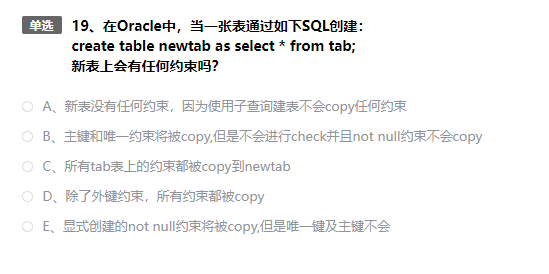
Oracle的CTAS能不能将约束等属性带到新表?
![[STL programming] [common competition] [Part 2]](/img/67/2a2d787680c0984f6c294a9ec3355b.png)
[STL programming] [common competition] [Part 2]

On the drawing skills of my writing career
展现强劲产品综合实力 ,2022 款林肯飞行家Aviator西南首秀

It took me 6 months to complete the excellent graduation project of undergraduate course. What have I done?
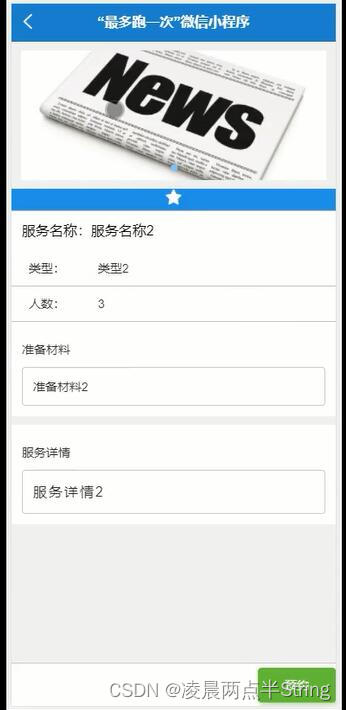
基于微信小程序的警局报案便民服务平台#毕业设计

VMware vSphere ESXi 7.0安装教程
随机推荐
SQL Server for循环用法
教程|fNIRS数据处理工具包Homer2下载与安装
元宇宙虚拟数字人离我们更近了|华锐互动
Recommended practice sharing of Zhilian recruitment based on Nebula graph
Record a failure caused by a custom redis distributed lock
华为伙伴暨开发者大会2022开源时刻全纪录
Character interception triplets of data warehouse: substrb, substr, substring
Leetcode 989. Integer addition in array form (simple)
展现强劲产品综合实力 ,2022 款林肯飞行家Aviator西南首秀
Abap-sm30 check before deletion
KDD 2022 | 图“预训练、提示、微调”范式下的图神经网络泛化框架
爱数课实验 | 第八期-新加坡房价预测模型构建
行业案例|从零售之王看银行数字化转型的运营之道
银河麒麟系统局域网文件共享教程
“好声音“连唱10年,星空华文如何唱响港交所?
花了6个月时间完成本科优秀毕业设计,我做了什么?
如何降低用户关注的非必要页面的权重传递?
Original translation | comparison of machine learning model service tools: kserve, Seldon core and bentoml
GoLand永久激活
Openharmony hisysevent dotting and calling practice of # Summer Challenge (L2)