当前位置:网站首页>Custom scroll bar
Custom scroll bar
2022-07-24 12:44:00 【Liang wha duck,】
List of articles
Code effect :
See the Pen vYxvXPb by Liang what duck “ ( @liang-duck) on CodePen.Drag the scroll bar
oSpan.onmousedown = function (e) {
          e = e || window.event;

		//  Record when clicking the scroll block , Mouse coordinates and scroll blocks oSpan Of left  and  top
		//  Because the scroll block only needs to move up and down , So there is no need to record  x coordinate   and   Rolling block oSpan Of  left
          const contentTop = oContent.offsetTop;
          const spanTop = oSpan.offsetTop;
          const downY = e.clientY;

		//  To prevent a bubble
          e.stopPropagation();

          document.onmousemove = function (e) {
            e = e || window.event;

			//  Record the coordinates when the mouse moves
            const moveY = e.clientY;
            //  Record the distance the mouse moved
            const deferY = moveY - downY;
            //  Make the scroll block move the same distance
            let _y = spanTop + deferY;
            //  The proportion of distance the content moves relative to the scroll block
            let _cy = contentTop - deferY * gap_box;

			//  Set the range of scroll block movement
            if (_y >= gap_scroll) {
              oSpan.style.top = gap_scroll + 'px';
              oContent.style.top = -gap_content + 'px';

            }
            else if (_y <= 0) {
              oSpan.style.top = 0;
              oContent.style.top = 0;
            }
            else {
              oSpan.style.top = _y + 'px';
              oContent.style.top = _cy + 'px';
            }

          };
        };
        //  When the mouse is up , Clear mouse movement events
        document.onmouseup = function () {
          document.onmousemove = null;
        }
Diagram :
The distance of the scroll block : The scroll block does not exceed the top and bottom of the scroll bar ,
That is, the scroll block 0 ≤ top ≤ oScroll.offsetHeight - oSpan.offsetHeight
The scrolling distance of the content box : When the scroll block is dragged to the bottom , The content box is just finished , Therefore, the rolling distance of the content box is proportional to the rolling distance of the rolling block . The height of the content box is dynamic , It is generally customary to use dynamic boxes rather than static boxes .
So the ratio is :
(oContent.offsetHeight - oBox.offsetHeight ) / (oScroll.offsetHeight - oSpan.offsetHeight )
Scroll wheel
mousewheel(oBox, function (e) {
          e = e || window.event;

          const scrollTop = oSpan.offsetTop;
          let val;
          const speed = 5;  //  Set the speed at which the scroll bar moves with the scroll wheel

		//  When the roller rolls forward , The scroll block moves up
          if (e.wheelDetail > 0) {
            val = scrollTop - speed;
          }else {  //   When the roller rolls backward , Scroll down
            val = scrollTop + speed;
          }
          compare(val);

        }, true);
      }


   //  Set the scroll block to follow the scroll wheel   Rolling distance range
      function compare(val) {
        val = max(0, val);  // 0  and  val  The one with the largest
        val = min(gap_scroll, val);  //  gap_scroll  and  val  The smallest one , gap_scroll Is the difference between the scroll bar and the scroll block

        const bili = val / gap_scroll;  //   Record the scroll block   Rolling distance   Close ratio up   The rolling range of the rolling block
        const contentTop = bili * gap_content;  //  Set the moving distance of the content box to account for   Movable range   The proportion

        oSpan.style.top = val + 'px';
        oContent.style.top = -contentTop + 'px';
      }
Icon :
Click on the scroll bar , Move the scroll block to the clicked position
Generally, the middle position of the scroll block is moved to the position where the mouse clicks the scroll bar
When clicking on the scroll block , The scroll block does not move . Only click on the scroll bar to move
oScroll.onclick = function (e) {
          e = e || window.event;

          const that = e.target;
          if(that !== this) return ; //  Event agent , Judge whether it is scroll Click on

          //  stay scroll Click on
          /*let clickTop = e.clientY - oSpan.offsetHeight / 2;
          clickTop = max(0, clickTop); //  When span Of top Less than 0 when ,clickTop=0
          clickTop = min(gap_scroll, clickTop); //  When span Of top Greater than gap_scroll when ,clickTop=gap_scroll
          oSpan.style.top = clickTop + 'px';
          oContent.style.top = -(oSpan.offsetTop / gap_scroll * gap_content) + 'px';*/
          //  The above code does not consider a problem :
          //  What the mouse gets is in the visible area y Location , here box Of left top All are 0, So the running result here is right ,
          //  Suppose there's a divA Wrapped box This div, And box With A  Is the positioning standard , hypothesis left top All for 100, Then the running result is wrong
          //  This is the code  : let clickTop = e.clientY - oSpan.offsetHeight / 2;
          //  To click on scroll On the same location , So at this time e.clientY It adds  100,
          //  that clickTop  It is no longer the expected value , And more than expected  100

          // let val = e.clientY - this.getBoundingClientRect() - oSpan.offsetHeight / 2;  //  Are not compatible IE
          let val = e.pageY - getDoc(this).top - oSpan.offsetHeight / 2;
          compare(val);

        }
A relative positioning problem
For the above problematic code :
let clickTop = e.clientY - oSpan.offsetHeight / 2;
          clickTop = max(0, clickTop); //  When span Of top Less than 0 when ,clickTop=0
          clickTop = min(gap_scroll, clickTop); //  When span Of top Greater than gap_scroll when ,clickTop=gap_scroll
          oSpan.style.top = clickTop + 'px';
The idea of the above code :
Click on the scroll bar with the mouse ,
The position in the middle of the scroll block and the position of the mouse click

In this case, it is feasible ,
Because the scroll bar and mouse are relative body Positioning of the
Mouse clientX and clientY and
Scroll block offsetLeft and offsetTop
It's consistent

Suppose the height of the scroll bar is 200px , With body Is the positioning standard ,left=100 top=100
The height of the scroll block is 30px , Or relative to the scroll bar positioning
At this time, when the mouse clicks on the scroll bar ,
Suppose the mouse clicks in the middle of the scroll bar , At this time, the mouse clientY = 200
Follow the idea of the above code ,oSpan.offsetTop = 200 - (oSpan.offsetHeight/2)=185
because oSpan It is positioned relative to the scroll bar , So it will move to the lower position 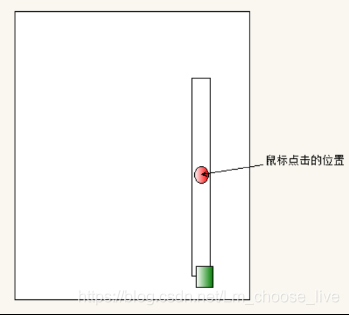
So the scrolling block top be equal to Mouse position - Positioning distance 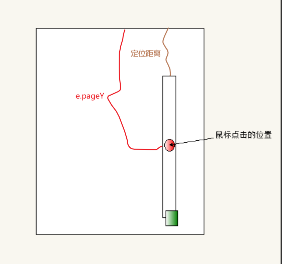
let val = e.pageY - getDoc(this).top - oSpan.offsetHeight / 2;
It is possible to nest multiple boxes :
That is to say, subtract The positioning distance of each box and :
//  Stack the positioning distance between each stage , Know add body
      function getDoc(ele) {
        const obj = {
          top: 0,
          left: 0
        }
        while (ele !== document.body) {
          obj.left += ele.offsetLeft;
          obj.top += ele.offsetTop;

          ele = ele.offsetParent;
        }
        return obj;
      }
边栏推荐
猜你喜欢

自己实现is_default_constructible
nacos部署
Getting started with SQL join use examples to learn left connection, inner connection and self connection
SQL JOIN 入门使用示例学习左连接、内连接、自连接

The price of domestic flagship mobile phones is nearly 6000, but they can't even beat iphone12. It's clear who users choose

C Advanced - data storage

Behind the rapid growth, Huawei cloud Wulanchabu data center is the green way

从零实现深度学习框架——再探多层双向RNN的实现
EfficientFormer:轻量化ViT Backbone

How to realize the function of grabbing red envelopes in IM system?

随机推荐
Deep and shallow copies of objects, extends
Teach you how to use power Bi to realize four kinds of visual charts
Installation and deployment of ansible
How to find out the function calling process of complex code running as soon as possible
向勒索病毒说不,是时候重塑数据保护策略
从零实现深度学习框架——再探多层双向RNN的实现
Basic SQL server operation problems - only when lists are used and identity_ Only when insert is on can the display value be set for the identification column in the table
Leetcode's 302 weekly rematch
支持刘海屏
Leecode-268. missing numbers (Application of XOR, find numbers that do not appear, find numbers that only appear once)
Cluster construction based on kubernetes v1.24.0 (II)
【C语言】详细的文件操作相关知识
nacos部署
Wechat applet generates QR code
Behind the rapid growth, Huawei cloud Wulanchabu data center is the green way
中国消费者和产业链都很难离开苹果,iPhone的影响力太大了
【Rust】引用和借用,字符串切片 (slice) 类型 (&str)——Rust语言基础12
Analysis of ISP one click download principle in stm32
猿人学第五题
2022.07.15 暑假集训 个人排位赛(十)