当前位置:网站首页>JS ------ Chapter 5 functions and events
JS ------ Chapter 5 functions and events
2022-07-24 23:16:00 【Monkey hanging on a tree】
review
Use of arrays
The objectives of this chapter
function , event ,js object ,js Operate page elements
1. function / Method
1.1 What is a function
A function is a program or code that can be directly referenced by another program or code . It's also called subprogram 、(OOP in ) Method . A bigger one Program Generally, it should be divided into several program blocks , Each module is used to implement a specific function .
Call other functions by the main function , Other functions can also call each other . The same function can be called any number of times by one or more functions . In programming , Some commonly used function modules are often written as functions , Put it in the function library for public use . want Good at using functions , In order to reduce the workload of writing program segments repeatedly .
function : A code block with specific functions . Call... When needed , Execute... On call !( I won't take the initiative !)
if(){} : Control whether the code is executed .
for(){}: Control how many times the code is executed .
function(){}: Control when code is executed . Execute... On call .
1.2 The function classification
- Library function ( System function )
js Code blocks with specific functions provided to us .
- alert() prompt() document.write() Number() parseInt() ...
- Custom function ( a key )
- Define your own functions , Define functions according to your own needs .
1.3 Definition and use of functions
grammar :
// Definition
function Function name ( Parameters 1, Parameters 2, Parameters 3,...)
{
Function function code ;
return Function return value ;
}
// call
Function name ( data 1, data 2, data 3...);explain :
function: Keywords used to define functions , Can't write wrong .
Function name : User defined , Naming rules : Letter , Numbers , Underline ,$, The number can't start . The name of the small hump , for example : getNum()
parameter list : Define the parameter list in parentheses after the function name , Parameters can be more or less , There can be no . In fact, parameters are variables , Acceptable data .
Function function code : Specific functions to be implemented by the current function , Is the core of function .
return Return value : After the function is executed , Can pass return keyword , Return the result processed by the function . It can be omitted .
Use of functions : If a function code , Need to be used repeatedly , At this point, it is recommended to define this code as a function . Another situation , If in a process , Part of the code is too much , At this time, this part of the code can be encapsulated into a function , Optimize code structure .
Example : Wash the clothes
//1. Repeat what you have to do
	//2. Things that may change later

	// Defined function : Complete the function of washing clothes
	//  Washing machine to wash clothes
	function xyj(){
		document.write(" Take out the clothes to wash <br/>");
		document.write(" Put it in the washing machine <br/>");
		document.write(" Add water <br/>");
		document.write(" Add detergent <br/>");
		document.write(" Start the washing machine <br/>");
		document.write(" Automatic drying <br/>");
	}

	// Wash clothes on Monday :
	//  Call function :  Function name ();
	xyj();

	// Wash clothes on Wednesday :
	xyj();

	// Wash clothes on Saturday :
	xyj();
1.3.1 Functions with no parameters and no return value
example : Say hello
// Defined function
// Say hello
	// No arguments , No return value
	/*
	function  Function name (){
		 The body of the function
	}
	*/
	function sayHello(){
		// This is just an output , Not a return value
		document.write(" Hello ");
	}
// Call function
sayHello();
1.3.2 Functions with no arguments and return values
example : Luck draw
<script type="text/javascript">
	// random number :1. Range [0,1) 0-0.999999999
	//       2. Decimal data is random
	//var r = Math.random();
	//document.write(r+"<br/>");
	//  ask : How to generate a 1-60 The random number
	//  [0,1) * 60 => 0,59.999999 + 1 => 1,60.9999999 => parseInt( data )
	//r= parseInt(Math.random()*60+1);
	//document.write(r);

	// Define a function to return 0-60 Of
	//  Get someone at random
	function getMR(){
		// Student array
		var stus = [
			" Zhang San ", //0
			" Li Si ",  //1
			" Wang Wu ",  //2
			" Zhao Liu ",  //3
			" Sun Qi "   //4
		];
		// Get subscripts randomly
		// obtain  0-4
		var r = parseInt(Math.random()*5);
		// Get an element in the array
		//return The following data is the return value of the function
		return stus[r];
	}
	document.write("111111111<br/>");
	document.write("111111111<br/>");
	document.write("111111111<br/>");
	document.write("111111111<br/>");
	document.write("111111111<br/>");
	document.write("111111111<br/>");
	document.write("111111111<br/>");
	// Call function , Defining variables , Accept the return value of the function
	var xxx = getMR();
	document.write(" The return value of the function is :"+xxx+"<br/>");
	document.write("111111111<br/>");
	document.write("111111111<br/>");
	document.write("111111111<br/>");
	document.write("111111111<br/>");

  </script>
Be careful : If the function is not used at the end return Return results , At this point, if you use the variable acceptance function , The accepted data is undefined.
/*
	// Defined function
	function say(){
		document.write(" Hello ");
	}
	//  Call function , And receive the return value
	// The problem is : Does someone else's function give you a return value ????
	var v = say();
	// What's the answer : undefined
	document.write(v);
	*/


	// Defined function
	function say(){
		document.write(" Hello ");
		// adopt return To define the return value of the function
		return 100;
	}
	//  Call function , And receive the return value
	var v = say();
	// What's the answer : 100
	document.write(v);
1.3.3 Functions with parameters and no return value
example : Say hello to sb , Someone studies a course
<script type="text/javascript">
	// Ginseng , No return value
	// Say hello to sb
	function hello(name){
		// The parameters of the function : It's just a variable , You can receive the value passed in by the caller
		alert(" Hello ,"+name);
	}

	// Call function
	//hello(" Zhang San ");
	//hello(" Li Si ");
	//hello(" Wang Wu ");

	// Ginseng ( There are defined variables in parentheses ), No return value ( Function does not return)
	function study(name,course,hours){
		document.write(name+" Study "+course+" Study "+hours+" Hours <br/>");
	}

	// Call function
	study(" Zhang San ","js",10);
	document.write("111111111111111111111<br/>");
	document.write("111111111111111111111<br/>");
	document.write("111111111111111111111<br/>");
	document.write("111111111111111111111<br/>");
	document.write("111111111111111111111<br/>");
	study(" Li Si ","html",3);
	hello(" Zhang San ");
	document.write("111111111111111111111<br/>");
	document.write("111111111111111111111<br/>");
	hello(" Li Si ");
  </script>
1.3.4 Functions with parameters and return values
example : Find the sum of any two intervals
<script type="text/javascript">
	// Find the sum of numbers in any interval : 1-100,50-200,30-80
	// Ginseng ( There are variables in brackets ), There is a return value ( There are methods return Return value )
	function qh(start,end){
		var sum = 0;
		for(var i=start;i<=end;i++){
			sum+=i;
		}
		return sum;
	}

	// Call function :1-100,50-200,30-80
	var res = qh(1,100)
	document.write("1-100:"+res+"<br/>");

	res = qh(50,200)
	document.write("50-200:"+res+"<br/>");

	res = qh(30,80)
	document.write("30-80:"+res+"<br/>");


  </script>
1.3.5 Anonymous functions
grammar
//  Defining anonymous functions
function( Parameters 1, Parameters 2...){
    // Code block
    return  result ;
}
// Defining anonymous functions , And stored in variables
var x = function (){
document.write(" I'm an anonymous function ");
}
// Call anonymous functions
x();
// Event and function binding
// window.onload: Page load completion event in browser window
window.οnlοad=function(){
alert(123);
}2. Events and functions of web page elements
2.1 event
event : Just something happened , Usually we will html Element events are bound to specific methods , When the event triggers , Method of program automatic execution binding , This completes the specific program processing . This is the event driven mechanism of the program .
example 1: Button triggers function call
example 2: Modify the background color of the element through the event trigger

<!DOCTYPE html >
<html>
 <head>
  <title> New Document </title>
  <meta charset="utf-8">
  <meta name="Generator" content="EditPlus">
  <meta name="Author" content="">
  <meta name="Keywords" content="">
  <meta name="Description" content="">
  <script type="text/javascript">
	// object : Things with a series of attributes and behaviors are called objects
	//  people :  full name , Gender , Age , height ....  eat , drink ....
	//  Button :  Tag name ,id,class,value....  Click on , double-click ,.....
	// h1:
	// p:

	//  Custom function
	function test1(){
		alert(" You ordered me ");
	}

	// Give Way p The background of the element changes
	function test2(){
		// adopt js The way , Change element styles
		//1. Get element object
		// document.getElementById(id name ): according to id Get element object
		// Get documents id Fame and position myp The element object of
		var pys = document.getElementById("myp");
		//2. use js To modify the style attributes of objects
		// css style :background-color   js Writing : backgroundColor
		//         font-size                    fontSize
		//         color	                    color
		pys.style.backgroundColor="red";
	}


	// Give Way span Font changes : The font color changes to green , The size changes to 50px
	function test3(){
		// adopt js The way , Change element styles

	}
  </script>
 </head>

 <body>
	<!-- When you click an element ( Specific events ), Conduct specific processing ( Call function )-->
	<h1 onclick="test1()"> This is a title </h1>
	<div onclick="test1()"> This is a div</div>
	<!--onmouseover When the mouse moves over the element , Conduct specific processing -->
	<p onmouseover="test2()" id="myp"> This is a p</p>

	<span onmouseout="test3()"> This is a span</span>
 </body>
</html>
2.2 What is an object
In software system , Object has a unique identifier , Objects include attribute (Properties) and ( Behavior ) Method (Methods), Attributes are information that needs to be remembered , The method is the service that the object can provide .
2.3 js object
js object : Contains html Element object , And others js Built in or custom objects .
// according to id Get html Elements ,  What we get is a html Element object
var v = document.getElementById("id");
alert(v);
2.4 Use js visit html Element object
a. Set up / Get form elements ( The text box , The radio , check , A drop-down box ...) The content of
b. Set up / Get non form elements (h1-h6,p,div,span,a....) The content of
// adopt HTML Elements , Trigger js Execution of a function
< Elements   Event name =" Function name ()"/>
// adopt js visit HTML Elements
1. Form Elements
Get form element data :
var bl = document.getElementById(" Form Elements id").value;
Set the form element data
document.getElementById(" Form Elements id").value=" data "
2. Non form elements
Get the content of non form elements
var nr = document.getElementById(" Non form elements id").innerHTML;
Set the content of non form elements
document.getElementById(" Non form elements id").innerHTML=" data ";
3. adopt js Set element style
Set the inline style of the element
document.getElementById(" Elements id").style.color=" The font color ";
Set the class style of the element
document.getElementById(" Elements id").className=" Class style name ";innerText Express Get the text in the tag ( Content ) No labels
innerHTML Express Get everything in the tag ( Include label + Text )
outerHTML Express Get everything in the current tag Include the tag itself
The event function of binding elements goes in three steps ( Event driven mechanism ):
3w, For which element , when , What to do with
who The event source that triggered the event : To whom to bind functions ( Which label ). For which element
When When Click to trigger Event operations . when
what What for? The body code of the function . What to do
Case study 1: Change the page color
<!DOCTYPE html>
<html>
<head>
<title> new document </title>
<style type="text/css">
</style>
<script type="text/javascript">
// Debugging problems :
// 1. Whether there is an error in the page console . Observation
// 2. The function code is all commented , Only one pop-up window is left . exclusions .
function changeColor(){
//alert(123);
// Click the button to switch the page background
// Switch page background : document.body.style.backgroundColor=""
//document.body.style.backgroundColor="red";
if(document.body.style.backgroundColor=="red"){
document.body.style.backgroundColor="green";
}else if(document.body.style.backgroundColor=="green"){
document.body.style.backgroundColor="blue";
}else{
document.body.style.backgroundColor="red";
}
}
</script>
</head>
<body>
<input type="button" value=" Change the page background " onclick="changeColor()"/>
</body>
</html>
Case study 2: Calculator
1. Write interface ( title , Three text boxes , Four buttons )
2. Functions that implement addition, subtraction, multiplication and division , Bound to the click event of the button


<!DOCTYPE html >
<html>
 <head>
  <title> New Document </title>
  <meta charset="utf-8">
  <meta name="Generator" content="EditPlus">
  <meta name="Author" content="">
  <meta name="Keywords" content="">
  <meta name="Description" content="">
  <script type="text/javascript">
	//var x; "xxx",'sdfsd',20,234.234

	// Define calculator
	//ysf: When accepting method calls , Passed in operator parameters
	function jisuan(ysf){
		// Display operators
		//alert(ysf);

		//1. Get the value of the text box
		var txt1 = document.getElementById("num1");
		var v1 = Number(txt1.value);

		var txt2 = document.getElementById("num2");
		var v2 = Number(txt2.value);
		//2. Operate according to the passed in operator
		var jg ;
		switch(ysf){
			case "+":
				jg = v1+v2;
				break;
			case "-":
				jg = v1-v2;
				break;
			case "*":
				jg = v1*v2;
				break;
			case "/":
				jg = v1/v2;
				break;
		}

		//3. Set the operation result into the result text box
		var txtRes =document.getElementById("res");
		txtRes.value = jg;
	}

  </script>
 </head>

 <body>
  <table border="1" align="center">
	<caption> Calculator </caption>
	<tr>
		<td> data 1</td>
		<td>
			<input type="text" name="num1" id="num1" />
		</td>
	</tr>
	<tr>
		<td> data 2</td>
		<td>
			<input type="text" name="num2" id="num2"/>
		</td>
	</tr>
	<tr>
		<td> operation </td>
		<td>
			<input type="button" value="+" onclick="jisuan('+')"/>
			<input type="button" value="-" onclick="jisuan('-')"/>
			<input type="button" value="*" onclick="jisuan('*')"/>
			<input type="button" value="/" onclick="jisuan('/')"/>
		</td>
	</tr>
	<tr>
		<td> result </td>
		<td>
			<input type="text" name="res" id="res"/>
		</td>
	</tr>
  </table>
 </body>
</html>
Case study 3: Guess the number
a. Generate a random number 1-100 It doesn't show
b. Let the user enter the number he guessed in the text box
c. When you click the guess button , Compare user entered values with random numbers , It's big or small , Give a hint
// Expand : I can only guess 5 Time

<!DOCTYPE html >
<html>
 <head>
  <title> New Document </title>
  <meta charset="utf-8">
  <meta name="Generator" content="EditPlus">
  <meta name="Author" content="">
  <meta name="Keywords" content="">
  <meta name="Description" content="">
  <script type="text/javascript">
	// Generate a 1-100 The random number
	// var r = Math.random()
	var r = 79;
	// Define a function to compare input data with random numbers
	function bijiao(){
		//  Get the data in the text box
		var txt = document.getElementById("num");
		var v = Number(txt.value);

		// compare
		if(v>r){
			//alert(" Guess the ")
			var mydiv = document.getElementById("tip");
			// innerHTML: Set the internal content of the paired labels
			mydiv.innerHTML = " Guess the ";
		}else if(v<r){
			alert(" Guess a little ")
		}else{
			alert(" Guessed it ");
		}
	}

  </script>
 </head>

 <body>
	 Enter a data :
	<input type="text" id="num"/>
	<input type="button" value=" Take a guess " onclick="bijiao()"/>
	<hr/>
	<div id="tip">
		 Prompt information is displayed here
	</div>
 </body>
</html>
3. Debugging of code
1 Observation debugging : According to the abnormal prompt , Find the wrong location , Find the error code through observation
2 Step by step output information debugging method : If the code doesn't go wrong , But the results did not meet expectations , You can print and output information step by step according to the code flow to track the code execution process
3 Breakpoint debugging : Use the debugging tool provided by the browser to debug
4. Common events in web pages
4.1 event
Events are actions that can be recognized by controls , If you press ok Button , Choose one Radio button perhaps Check box . Each control has its own recognized event , Such as forms Loading 、 single click 、 Double click and so on , Edit box ( The text box ) Text change events , wait .
Something happened . adopt html Elements trigger things .
4.2 Common events
1. Mouse events
event | |
* onclick | Click event |
ondblclick | Double-click the event |
onmousedown | The mouse click |
onmouseup | Release the mouse |
onmouseover | Mouse migration |
onmouseout | Mouse removal |
2. Keyboard events
onkeydown | Press down |
onkeyup | Release |
onkeypress | Press and release |
3. Browser Events
*onload | Trigger when page loading is complete |
*onunload | Triggered when the page exits |
4. Form Events
* onblur | Trigger when the element loses focus | 2 |
* onchange | This event is triggered when the content of a form element changes ( <input>, <keygen>, <select>, and <textarea>) | 2 |
* onfocus | Triggered when the element gets focus | 2 |
Element gets user input | 3 | |
Triggered when the form is reset | 2 | |
Triggered when the user enters text into the search field ( <input="search">) | ||
Triggered when the user selects text ( <input> and <textarea>) | 2 | |
* onsubmit | Trigger when the form is submitted |
Self study cases :
Picture switching : Click on the previous , Next , Let the picture switch
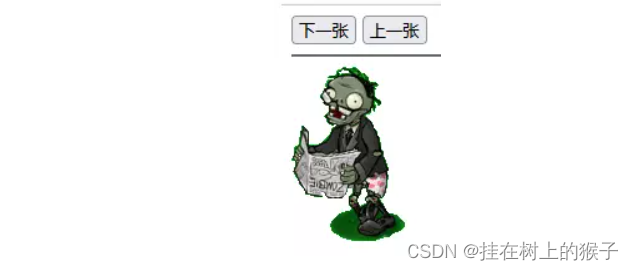
<!DOCTYPE html >
<html>
 <head>
  <title> New Document </title>
  <meta charset="utf-8">
  <meta name="Generator" content="EditPlus">
  <meta name="Author" content="">
  <meta name="Keywords" content="">
  <meta name="Description" content="">
  <script type="text/javascript">
	var i = 0;
	//  Next picture
	function nextImg(){
		i++;
		var str = "js"+i+".gif";
		//alert(str);

		var jiangshi = document.getElementById("jsImg");
		jiangshi.src = "img/"+str;

		// Expand : It is required that the reincarnation display , Previous , The next one is complete
	}
  </script>
 </head>

 <body>
  <input type="button" value=" Next " onclick="nextImg()"/>
  <input type="button" value=" Previous "/>
  <hr/>
  <img src = "img/js0.gif" id="jsImg"/>
 </body>
</html>
summary
function , event , object
summary : function Learn how to define and call functions
call : direct , Bound to tag events
Get objects :document.getElementById();
边栏推荐
- 激光雷达障碍物检测与追踪实战——cuda版欧式聚类
- 网上怎么炒股手机上炒股安全吗
- 痞子衡嵌入式:MCUXpresso IDE下将源码制作成Lib库方法及其与IAR,MDK差异
- About constant modifier const
- CA certificate production practice
- Learn AI through detectron2
- [cloud native kubernetes] kubernetes cluster advanced resource object staterulesets
- Value driven provides the core driving force for the transformation of commercial BP - BP realization under business scenarios - Commercial BP sharing
- Collection of common online testing tools
- 《元宇宙2086》单日销量超《三体》 夺得京东图书单日科幻榜冠军
猜你喜欢

背景图和二维码合成

《元宇宙2086》单日销量超《三体》 夺得京东图书单日科幻榜冠军
Background image and QR code synthesis

基于Verilog HDL的数字秒表

Org.json Jsonexception: what about no value for value

Go basic notes_ 4_ map

JUC concurrent programming - Advanced 05 - lock free of shared model (CAS | atomic integer | atomic reference | atomic array | field updater | atomic accumulator | unsafe class)

VGA display based on FPGA

About constant modifier const

NVIDA-TensorRT部署(一)
随机推荐
Read and understand the advantages of the LAAS scheme of elephant swap
高阶产品如何提出有效解决方案?(1方法论+2案例+1清单)
Baidu online disk +chrome plug-in
痞子衡嵌入式:MCUXpresso IDE下将源码制作成Lib库方法及其与IAR,MDK差异
ODBC executes stored procedure to get return value
Network Security Learning (III) basic DOS commands
NVIDA-TensorRT部署(一)
JDBC 驱动升级到 Version 8.0.28 连接 MySQL 的踩坑记录
Backgroundworker enables time-consuming operations without affecting interface response
物联网平台返回数据解析时遇到org.json.JSONException: No value for Value怎么办
Add a little surprise to life and be a prototype designer of creative life -- sharing with X contestants in the programming challenge
如何创建和管理自定义的配置信息
Notes of Teacher Li Hongyi's 2020 in-depth learning series 4
About constant modifier const
[1184. Distance between bus stops]
Trinitycore worldofwarcraft server - registration website
常用在线测试工具集合
About the word 'don't remember'
MySQL查询慢的一些分析
Convert a string to an integer and don't double it