当前位置:网站首页>Mqtt of NLog custom target
Mqtt of NLog custom target
2022-06-22 03:46:00 【Dotnet cross platform】
NLog yes .Net in Most popular Logging open source projects ( One of ), it flexible 、 free 、 Open source
Official support file 、 The Internet (TCP、UDP)、 database 、 Console Equal output
Community support Elastic、Seq Wait for the log platform to output
Real time log requirements
In specific scenarios such as the industrial Internet of things Get logs in real time Information
Commonly used in the field of industrial Internet of things is mqtt agreement
Then we use NLog Customize a Target, Output log to MqttServer
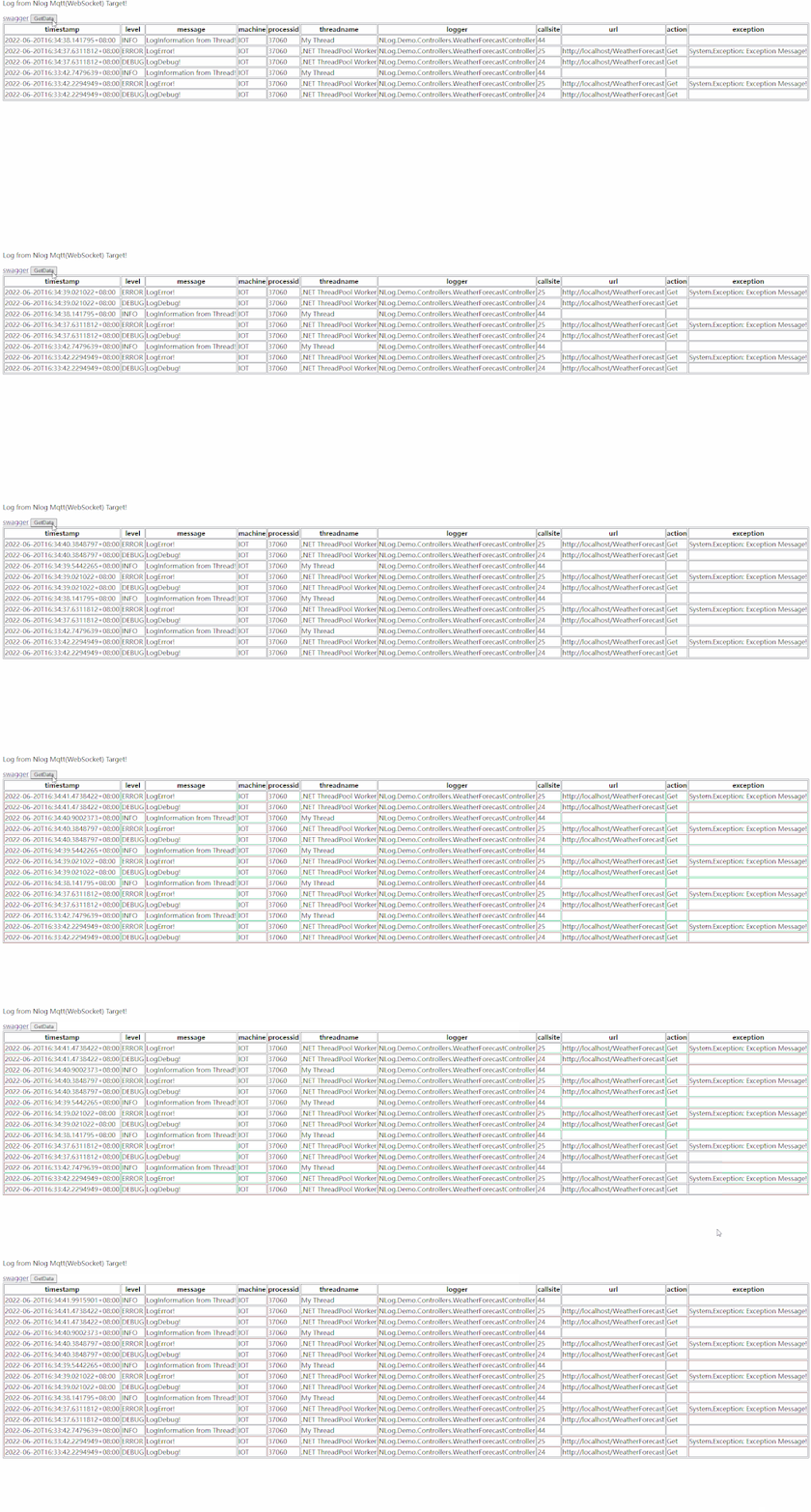
Web adopt Mqtt(websocket) Get logs in real time , and No The passage of tradition WebApi polling journal
NLog Customize Target
The official documentation describes how to customize Target, Can be obtained a string Log message , Unable to get structured message
Need to use custom Field To do this part of the job
/// <summary>
/// Additional field details
/// </summary>
[NLogConfigurationItem]
public class Field
{
    /// <summary>
    /// Name of additional field
    /// </summary>
    [RequiredParameter]
    public string Name { get; set; }

    /// <summary>
    /// Value with NLog <see cref="NLog.Layouts.Layout"/> rendering support
    /// </summary>
    [RequiredParameter]
    public Layout Layout { get; set; }

    /// <summary>
    /// Custom type conversion from default string to other type
    /// </summary>
    /// <remarks>
    /// <see cref="System.Object"/> can be used if the <see cref="Layout"/> renders JSON
    /// </remarks>
    public Type LayoutType { get; set; } = typeof(string);

    /// <inheritdoc />
    public override string ToString()
    {
        return $"Name: {Name}, LayoutType: {LayoutType}, Layout: {Layout}";
    }
}
rewrite Write Method
protected override void Write(LogEventInfo logEvent)
{
    //default fields
    Dictionary<string, object> logDictionary = new()
    {
        { "timestamp", logEvent.TimeStamp },
        { "level", logEvent.Level.Name },
        { "message", RenderLogEvent(Layout, logEvent) }
    };
    //customer fields
    // Here it is treated as a string , There's room for optimization
    foreach (var field in Fields)
    {
        var renderedField = RenderLogEvent(field.Layout, logEvent);

        if (string.IsNullOrWhiteSpace(renderedField))
            continue;

        logDictionary[field.Name] = renderedField;
    }

    SendTheMessage2MqttBroker(JsonConvert.SerializeObject(logDictionary));
}
Use
The following will be used Nlog.Target.MQTT, Demonstrated through web Real-time view Application's journal .
establish WebApi project
quote NLog.Target.MQTT

The configuration file
<extensions>
    <add assembly="NLog.Web.AspNetCore"/>
    <!--<add assembly="NLog.Targets.MQTT"/>-->
    <add assembly="NLog.Targets.MQTT"/>
</extensions>
<!-- the targets to write to -->
<targets>
    <!-- MQTT Target  -->
    <target xsi:type="MQTT" name="mqtt" host="localhost" port="1883" username="UserName"  password="Password" topic="log"
            layout="${longdate}|${event-properties:item=EventId_Id:whenEmpty=0}|${level:uppercase=true}|${logger}|${message} ${exception:format=tostring}|url: ${aspnet-request-url}|action: ${aspnet-mvc-action}|${callsite}" >
        <field name="machine" layout="${machinename}" />
        <field name="processid" layout="${processid}" />
        <field name="threadname" layout="${threadname}" />
        <field name="logger" layout="${logger}" />
        <field name="callsite" layout="${callsite-linenumber}" />
        <field name="url" layout="${aspnet-request-url}" />
        <field name="action" layout="${aspnet-mvc-action}" />
        <field name="level" layout="${level:uppercase=true}" />
        <field name="message" layout="${message}" />
        <field name="exception" layout="${exception:format=toString}" />
    </target>
</targets>
<!-- rules to map from logger name to target -->
<rules>
    <logger name="*" minlevel="Trace" writeTo="mqtt" />
</rules>
To configure MQTTServer and NLog
// ...
// NLog: Setup NLog for Dependency injection
builder.Logging.ClearProviders();
builder.Logging.SetMinimumLevel(Microsoft.Extensions.Logging.LogLevel.Trace);
builder.Host.UseNLog();

//AddHostedMqttServer
builder.Services.AddHostedMqttServer(mqttServer =>
    {
        mqttServer.WithoutDefaultEndpoint();
    })
    .AddMqttConnectionHandler()
    .AddConnections();

//Config Port
builder.WebHost.UseKestrel(option =>
{
    option.ListenAnyIP(1883, l => l.UseMqtt());
    option.ListenAnyIP(80);
});
var app = builder.Build();

// ...
//UseStaticFiles html js etc.
app.UseStaticFiles();
app.UseRouting();

//Websocket Mqtt
app.UseEndpoints(endpoints =>
{
    //MqttServerWebSocket
    endpoints.MapConnectionHandler<MqttConnectionHandler>("/mqtt", options =>
    {
        options.WebSockets.SubProtocolSelector = MqttSubProtocolSelector.SelectSubProtocol;
    });
});
// ...
Web Connect MqttServer
// ...
<script src="./jquery.min.js"></script>
<script src="./mqtt.min.js"></script>
<script src="./vue.js"></script>
// ...

var client = mqtt.connect('ws://' + window.location.host + '/mqtt', options);
client.on('connect',
    function() {
        client.subscribe('log',
            function(err) {
                if (!err) {
                    console.log("subed!");
                } else {
                    alert("subed error!");
                }
            });
    });
client.on('message',
    function(topic, message) {
        if (topic === 'log') {
            if (app.logs.length > 50)
                app.logs.length = 0;
            app.logs.unshift($.parseJSON(message.toString()));
        }
    });
// ...
Output log
// ...
_logger.LogDebug("LogDebug!");
_logger.LogError(new Exception("Exception Message!"), "LogError!");

//new thread output log after 500ms
Thread thread = new Thread(ThreadProc);
thread.Name = "My Thread";
thread.Start();
// ...
Real-time view log visit /index.html

8. It can also be done through Mqtt Client subscription log

Source code and related links
[1] Github:https://github.com/iioter/NLog.Targets.MQTT
[2] Gitee:https://gitee.com/iioter/NLog.Targets.MQTT
[3] IoTGateway-Doc:http://iotgateway.net/blog/NLog
[4] NLog Customize Target:https://github.com/NLog/NLog/wiki/How-to-write-a-custom-target
You can pay attention to me if you are interested
边栏推荐
- Flutter-Stream使用
- MySQL 45 lecture notes (I) execution of an SQL statement
- Flutter-渲染原理&三棵树详解
- Rabbmitmq publish subscribe mode < 2 >
- 系统漏洞利用与提权
- 达梦数据库客户端屏蔽sql关键字
- AI自己写代码让智能体进化!OpenAI的大模型有“人类思想”那味了
- Key program of TwinCAT 3 RS232 communication
- 倍福TwinCAT3 Ads错误查询列表
- Sword finger offer 68 - ii Nearest common ancestor of binary tree
猜你喜欢

L'avenir est venu: l'âge du nuage

Dart异步是怎麼實現

128 traps - source code analysis

【原理图和PCB】基于单片机的超声波测距仪设计

2019年全国职业院校技能大赛中职组“网络空间安全”正式赛卷及其“答案”

Beifu twincat3 ads error query list

倍福Twincat NC PTP使用介绍

A component required a bean of type 'com. example. demo3.service. UserServiceImp' that could not be fou

如何快速定位bug和编写测试用例?

Flutter 性能优化
随机推荐
面试官:知道 Flutter 生命周期吗?
3DE new simulation status
2022.6.21-----leetcode. one thousand one hundred and eight
Beifu twincat3 ads error query list
Hierarchical traversal of binary tree
倍福CX9020(WINCE 7)控制器使用方法和操作
SSM住院管理系统
基于SSM的博客系统【带后台管理】
我在华为度过的 “两辈子”(学习那些在大厂表现优秀的人)
VIM common commands
Snappy format parsing
Use of shutter stream
Wireshark数据包分析——wireshark0051.pcap
VIM from dislike to dependence (18) -- advanced search mode
Float floating point number understanding
Flutter 颜色渐变及模仿淘宝渐变关注按钮
How to break through the sales dilemma of clothing stores
IIR滤波器设计基础及Matlab设计示例
Irregular naming
【Leetcode】17回溯(电话号码的字母组合)