当前位置:网站首页>Latex数学公式
Latex数学公式
2022-07-24 18:22:00 【华为云】
https://www.bilibili.com/video/BV1Sb411s7cq?p=12跟着视频学习所得
latex公式编辑器,非常有用
https://latex.codecogs.com/eqneditor/editor.php
@toc
环境
需要引入宏包\usepackage{amsmath}\usepackage{amssymb}
行内公式
行内公式和行间公式的区别
使用行内公式会让你的公式和之前的文字处于同一行。
使用行间公式会对之前的文字换行,然后公式单独成行并居中显示。
%1$ 行内公式 $%2\( 行内公式 \)%3\begin(math) 行内公式\end(math)简单演示:
\documentclass[utf-8]{ctexart}\usepackage{ctex}\usepackage{amsmath}\usepackage{amssymb}\begin{document} $\sqrt[4]{x^2+2}$ \\ \(\cos{\frac{\pi}{3}}+\sin{\frac{\pi}{6}}=1 \) \\ \begin{math} \log_24=2 \end{math}\end{document}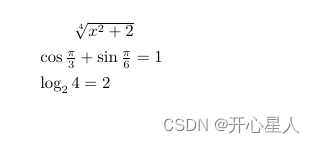
行间公式
%1$$ 行间公式 $$ %2\[ 行间公式 \]%3 \begin{displaymath}行间公式\end{displaymath}%4\begin{equation*}%不自动编号行间公式\end{equation*} 带编号的公式
一个equation环境一个编号
\begin{equation} \int_0^1(1+x)dx\end{equation}\begin{equation} \int_0^1(1+z)dz\end{equation}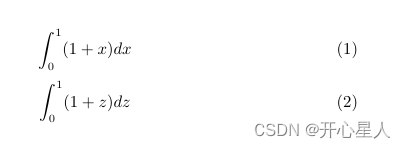
\begin{equation} a+b=b+a \label{commutative}\end{equation}加法交换律如上式\ref{commutative}所示。 \label{commutative}和\ref{commutative}的使用
多个公式一个编号
条件编号
\begin{equation} \begin{cases} f(x)=1+x+x^2 \\ g(x)=a_nx^n+a_{n-1}x^{n-1}+...+a_1x^1 \end{cases}\end{equation}
方程组编号
\begin{equation} \begin{split} x+y=1 \\ x-y=0 \end{split}\end{equation}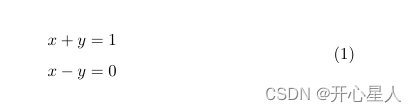
数学函数和数学符号
\log_2{x}\ln{}\sin{}\cos{\pi/3}\arccos{x}\sqrt{2}\sqrt[4]{x^2+2} %开4次方根号\frac{3}{4} %表示3/4 $ \circ $ %度数符号$ \pi $ %π$ > $ %大于$ < $ %小于$ \ge $ %大于等于(斜等号)$ \le $ %小于等于$ \geq $ %大于等于(≥)$ \leq $ %小于等于(≤)$ \cdot $ %点乘$ \times $ %叉乘$ \div $ %除号多行公式排版
1、gather环境 多个公式居中排版
%gather环境\begin{gather} a+b=b+a\\ abc=bac \notag %\notag则不进行编号\end{gather}
2、align环境 多个公式对齐排版
%align环境 特点:可以实现对应部分的对齐\begin{align} x &= 1+4 \\ y &= 2+8\end{align} % 多列公式的对齐(注意每列公式中间要加&)\begin{align*} %不进行编号 x &= 1+4 & a &=4+9 \\ y &= 2+8 & b &=3+1\end{align*} 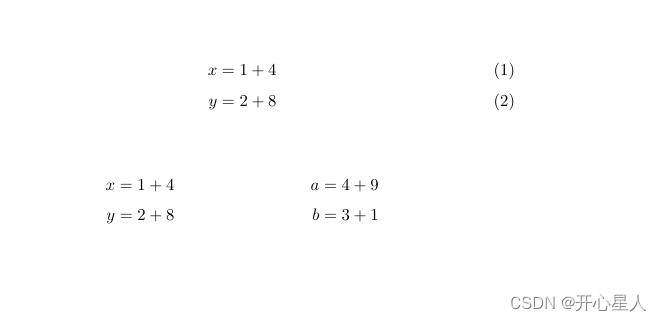
3、.split环境 连等号 居中编号
%split equation下,实现居中编号,连等公式 \begin{equation} \begin{split} \cos{2x}&=\cos^2{x} - \sin^2{x} \\ &= 2\cos^2{x} - 1 \end{split} \end{equation}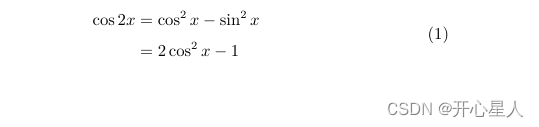
4、cases环境 分段函数
%case环境 用于分段函数%每一行公式用&连接每一个部分\begin{equation} F(x)= \begin{cases} 1, & \text{如果} x=10; \\ 2, & \text{如果} x=20; \\ \end{cases}\end{equation}%euqation大环境下,想要输入文本用\text{}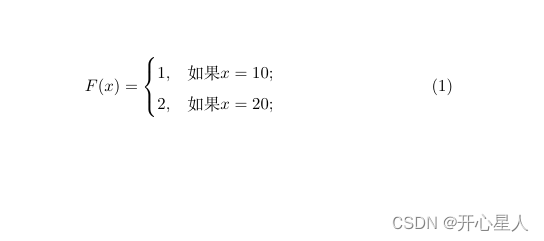
边栏推荐
猜你喜欢

6126. Design food scoring system

5. Reference type and value type as function parameters?
JumpServer的使用

Shanghai Jiaotong University team used joint deep learning to optimize metabonomics research

Pycharm configuring opencv Library

安装JumpServer

【obs】依赖库: x264 vs 构建

Mid year inventory | in 2022, PAAS will be upgraded again

["code" power is fully open, and "chapter" shows strength] list of contributors to the task challenge in the first quarter of 2022

下拉列表组件使用 iScroll.js 实现滚动效果遇到的坑
随机推荐
Show or hide password plaintext + password box verification information
Alibaba /166 obtains the API instructions for all products in the store
猜JWT关键字
Custom web framework
Wu Enda writes: how to establish projects to adapt to AI career
Three ways of redis cluster
1. Typeof view variable type?
开窗函数(1)-部门工资前三员工
6. How to add an array in Es5?
Wechat applet
How to prepare for hyperinflation
jmeter -- prometheus+grafana服务器性能可视化
CF. Bits And Pieces(子集状压dp + 剪枝)
redis集群的三种方式
如何为超级通胀做好准备
【校验】只能输入数字(正负数)
【obs】视频、音频编码与rtmp发送的配合
A practical scheme of realizing 0.5px on mobile terminal
Flatten array.Flat (infinity)
Space three point circle code