当前位置:网站首页>The simplest DIY pca9685 steering gear control program based on the integration of upper and lower computers of C # and 51 single chip microcomputer
The simplest DIY pca9685 steering gear control program based on the integration of upper and lower computers of C # and 51 single chip microcomputer
2022-06-23 11:01:00 【daodanjishui】
51 SCM Internet of things smart car series article catalog
Chapter one : The most simple DIY Of 51 Bluetooth remote control car design
Second articles : The most simple DIY Serial port Bluetooth hardware implementation scheme
Third articles : The most simple DIY bluetooth PS2 The remote control controls the Bluetooth smart car
Fourth articles : The most simple DIY be based on 51 Servo controller based on single chip microcomputer
Chapter five : The most simple DIY Based on Bluetooth 、51 Steel patriot machine gun controller with single chip microcomputer and steering gear
Chapter 6 : The most simple DIY be based on Android The universal Bluetooth device intelligent remote controller of the system
Chapter 7 : The most simple DIY be based on 51 Single chip microcomputer 、PCA9685、IIC、 Pan tilt servo cluster control program
Chapter eight : The most simple DIY be based on C# and 51 The single chip microcomputer integrates the upper and lower computers PCA9685 Steering gear control program
List of articles
- 51 SCM Internet of things smart car series article catalog
- Preface
- One 、 The most simple DIY be based on C# and 51 The single chip microcomputer integrates the upper and lower computers PCA9685 What is the steering gear control program ?
- Two 、 Principle analysis
- Two 、 Programming
- 3、 ... and 、 Simulation and debugging
- summary
Preface
daodanjishui The simplest of the core original technologies of the Internet of things DIY be based on C# and 51 The single chip microcomputer integrates the upper and lower computers PCA9685 Steering gear control program .
There are various open source intelligent steering gear cluster upper computer software on the market , But there are complex and simple , If you want to get started 51 Use of single chip microcomputer C# The upper computer controls sg90 The steering gear , This plan will give you a quick and efficient plan .
One 、 The most simple DIY be based on C# and 51 The single chip microcomputer integrates the upper and lower computers PCA9685 What is the steering gear control program ?
In Chapter 7, I finished 51 Use of single chip microcomputer PCA9685 The design of module controlling multiple actuators , Readers wonder why they didn't write to control multiple steering engines at that time UI Interface ? That's because learning is a gradual process , Master basic skills to draw inferences from one instance . So far , My eighth blog post is an upgraded version of my seventh blog post , You can use the same 51 Single chip microcomputer controls two servo pan tilt , And not affected by each other , One C#UI The interface controls a servo pan tilt through the serial port , A rudder pan tilt consists of 51 The single chip microcomputer automatically controls the action of the same cycle . The steering gear control code is quite exquisite , Part is my own original code , If you don't study hard and think deeply , It is impossible to write such code , Internet of things technology requires the interconnection of all things , Can you use a UI Interface to control multiple rudders ? The answer is yes , This time we need to use PCA9685 Module to directly control the steering gear ,51 Single chip computer through I2C Bus control PCA9685 modular , Still need to use VS2010 Development C# Program formation UI Interface , Including front-end and back-end code .
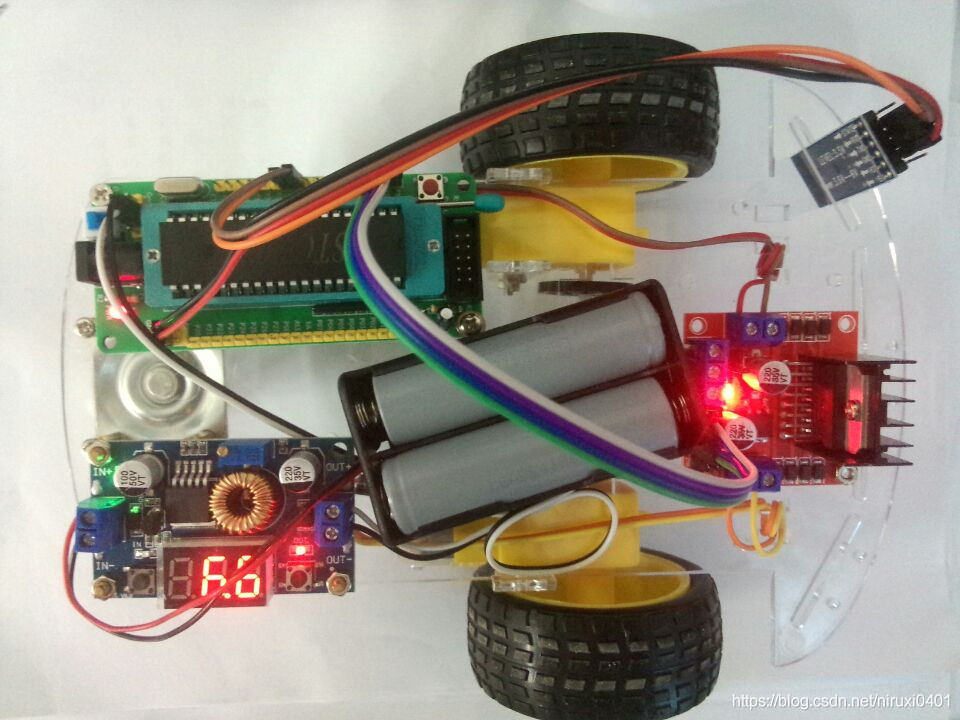
The fourth part is using a timer 0 Control a steering gear , The fifth part is using a timer 0 Control two steering gears ; They all use timers 0 Produce and control PWM The wave finally controls the steering gear ; No more timers 0 Control the steering gear directly , use I2C Bus to control PCA Module to control the steering gear , All-round open source originality , Now write it down in words , The source code has been greatly upgraded , The code is very concise and wonderful , Now write it down in words , Deep memories of my childhood and prospects for the future technology .“ Closed door construction UI” Although a little painful , But when you see that the steering gear you made by yourself passes after it is powered on UI When the interface is controlled and running , You will find that all the efforts are worth it ! The family photo is shown below :

Youku video demo address :https://v.youku.com/v_show/id_XNTAxNDQ4NTIwNA==.html
Watch the video directly
The most simple DIY be based on C# and 51 The single chip microcomputer integrates the upper and lower computers PCA9685 Steering gear control program
Two 、 Principle analysis
1. Existing technology
This time I plan to use the steering gear control module to indirectly control the steering gear , Many foreigners arduino Projects are all using PCA9685 To control the steering gear , Many sellers in circuit city use this arduino To control the steering gear , There are several advantages :1. Call the existing library directly , As shown in the figure below :

2. Direct use arduino Integrated IIC Library control for IIC Direct bus control PCA9685, Very convenient , Several parameters can be configured to control multiple rudders . Then I will introduce the shortcomings :
(1)51 SCM cannot use these libraries ,stm32 You can't use these libraries , So Circuit City sells everything for free arduino The steering gear program is mainly used , The gold content is not very high .(2) Even if you can use arduino Single chip microcomputer , The response speed of the steering gear is relatively slow , If I use stm32 To control the steering gear , You will find a lot of fluency , There is no pressure when dozens of steering gears are used together .(3) Use... On the Internet 51 MCU transplantation Adafruit-PWM-Servo-Driver-Library Of arduino Library to 51 There are not many successful codes on the single chip computer , There are no detailed notes and descriptions .
2. Technology I use
I used this PCA The module controls four steering gears in total , Combined into two PTZ . You can see it in the video , These two PTZ movements are the same , Turn first 0 Degree retransmission 60 Degrees finally go to 80, Keep cycling , Because I wrote a rudder action operation in the program to achieve the rehearsal effect in chronological order , Readers can learn how I control a bunch of steering gears in chronological order , Absolutely simple and violent , Simple and detailed program notes are suitable for all ages . If you don't buy a pan tilt, you can only control the steering gear !
Code instructions : This time the code is not sloppy , Direct use 51 Single chip common IO Mouth simulation IIC Communication protocol implementation substitution arduino Of IIC Communication library program , transplant arduino The steering gear control library of 51 It is used on single chip microcomputer , The gold content of the code is not low , In addition to learning how to use IIC Outside the bus , You can also learn to use 51 control PCA9685 The module thus controls a plurality of steering gears . Here is a screenshot of the code :

3. Hardware and software preparation
Hardware description : The material of this blog post is different from the previous two posts , More PCA9685, You don't have to buy a PTZ , Anyway, our focus is to control the steering gear , You can buy it for about ten yuan on a treasure . The structure and parameters of the steering gear are as follows :
Software specifications : So this time really join C# The upper computer controls the two steering engines through the serial port , The other two rudders are handed over to the dead cycle to repeat the same action , Another feature is , You can send an angle through the upper computer , Then one of the two controlled rudders will turn to the specified angle , very interesting .
Two 、 Programming
1. Design software logic
(1) Among them, two steering engines use automatic pipeline to repeat the same action , No additional control commands are required . Then you need to execute a certain program in an endless loop .
while(1){


									/* setPWM(0, 0, SERVO000);// The steering gear 0 Go to first 0 degree  delayms(1000);// Time delay 1S setPWM(0, 0, 239);// Just let the steering gear 0 go to 60 degree  delayms(1000);// Time delay 1S setPWM(0, 0, SERVO80);//#define SERVO80 284 //80 degree  delayms(1000);// Time delay 1S setPWM(1, 0, SERVO000);// The steering gear 1 Go to first 0 degree  delayms(1000);// Time delay 1S setPWM(1, 0, 239);// Just let the steering gear 1 go to 60 degree  delayms(1000);// Time delay 1S setPWM(1, 0, SERVO80);//#define SERVO80 284 //80 degree  delayms(1000);// Time delay 1S */

									// If you need to control other steering gear , And so on , ha-ha , Notice one PCA9685 You can control at most 16 The steering gear
								 setPWM(14, 0, SERVO000);// The steering gear 14 Go to first 0 degree
								 delayms(1000);// Time delay 1S
								 setPWM(14, 0, 239);// Just let the steering gear 14 go to 60 degree
								 delayms(1000);// Time delay 1S
								 setPWM(14, 0, SERVO80);//#define SERVO80 284 //80 degree
								 delayms(1000);// Time delay 1S

								 setPWM(15, 0, SERVO000);// The steering gear 1 Go to first 0 degree
								 delayms(1000);// Time delay 1S
								 setPWM(15, 0, 239);// Just let the steering gear 1 go to 60 degree
								 delayms(1000);// Time delay 1S
								 setPWM(15, 0, SERVO80);//#define SERVO80 284 //80 degree
								 delayms(1000);// Time delay 1S

								 // Here write functions such as key scanning

								}
(2) Copy off the shelf 51 Single chip microcomputer I2C Communication code , A lot of stuff on the Internet .
/*--------------------------------------------------------------- IIC initialization  ----------------------------------------------------------------*/
void init()
{

    sda=1;                //sda scl Be pulled up before use
    delayus();
    scl=1;
    delayus();
}
/*--------------------------------------------------------------- IIC The bus starts to transmit  ----------------------------------------------------------------*/
void start()
{

    sda=1;
    delayus();
    scl=1;       //scl high sda Pull it down
    delayus();
    sda=0;
    delayus();
                scl=0;
                delayus();
}
/*--------------------------------------------------------------- IIC end  ----------------------------------------------------------------*/
void stop()
{

    sda=0;
    delayus();
    scl=1;                         //scl pull up  sda To produce a rising edge
    delayus();
    sda=1;
    delayus();
}
/*--------------------------------------------------------------- IIC The reply  ----------------------------------------------------------------*/
void ACK()
{

    uchar i;
    scl=1;
    delayus();
    while((sda=1)&&(i<255))
                i++;
    scl=0;
    delayus();
}
/*---------------------------------------------------------------  Write a byte  ----------------------------------------------------------------*/
void write_byte(uchar byte)
{

    uchar i,temp;
    temp=byte;
    for(i=0;i<8;i++)
    {

        temp=temp<<1;
        scl=0;
                                delayus();
                                sda=CY;
                                delayus();
                                scl=1;
                                delayus();
    }
    scl=0;
    delayus();
    sda=1;
    delayus();
}
/*---------------------------------------------------------------  Read a byte  ----------------------------------------------------------------*/
uchar read_byte()
{

                uchar i,j,k;
                scl=0;
                delayus();
                sda=1;
                delayus();
                for(i=0;i<8;i++)
                {

                                delayus();
                                scl=1;
                delayus();
                if(sda==1)
                {

                                j=1;
                }
                else j=0;
                k=(k<< 1)|j;
                scl=0;
                }
                delayus();
                return k;
}
(3) according to I2C The agreement is combined into PCA9685 The driver
/*---------------------------------------------------------------  to PCA9685 Write Bytes  ----------------------------------------------------------------*/
void PCA9685_write(uchar address,uchar date)
{

                start();
                write_byte(PCA9685_adrr);        //PCA9685
                ACK();
                write_byte(address);  //
                ACK();
                write_byte(date); //
                ACK();
                stop();
}
/*---------------------------------------------------------------  from PCA9685 Read a byte  ----------------------------------------------------------------*/
uchar PCA9685_read(uchar address)
{

                uchar date;
                start();
                write_byte(PCA9685_adrr); //PCA9685
                ACK();
                write_byte(address);
                ACK();
                start();
                write_byte(PCA9685_adrr|0x01);        //
                ACK();
                date=read_byte();
                stop();
                return date;
}
/*--------------------------------------------------------------- PCA9685 Reset  ----------------------------------------------------------------*/
void reset(void)
{

    PCA9685_write(PCA9685_MODE1,0x0);
}


void begin(void)
{

    reset();
}
(4)PCA9685 Parameter setting
/*--------------------------------------------------------------- PCA9685 Parameter setting  ----------------------------------------------------------------*/
void setPWMFreq(float freq)
{

                uint prescale,oldmode,newmode;
                float prescaleval;
                freq *= 0.92;  // Correct for overshoot in the frequency setting
                prescaleval = 25000000;
                prescaleval /= 4096;
                prescaleval /= freq;
                prescaleval -= 1;
                prescale = floor(prescaleval + 0.5);

                oldmode = PCA9685_read(PCA9685_MODE1);
                newmode = (oldmode&0x7F) | 0x10; // sleep
                PCA9685_write(PCA9685_MODE1, newmode); // go to sleep
                PCA9685_write(PCA9685_PRESCALE, prescale); // set the prescaler
                PCA9685_write(PCA9685_MODE1, oldmode);
                delayms(2);
                PCA9685_write(PCA9685_MODE1, oldmode | 0xa1);
}
/*--------------------------------------------------------------- PWM Wave parameter setting  num: The serial number of the steering gear 0~15 altogether 16 The steering gear  on:PWM The range of the rising count value is 0 To 4096; off:PWM The range of the drop count is from 0 To 4096;  One PWM The cycle is divided into 4096 Start counting , from 0 Start counting up to on When the number is counted, the high level is output   Calculate to off When the number is counted, it becomes low level , therefore on It's not equal to 0 Time delay is the time delay , be equal to 0 When  off The value of is equal to 4096 The ratio of is the duty cycle . ----------------------------------------------------------------*/
void setPWM(uint num, uint on, uint off)
{

                PCA9685_write(LED0_ON_L+4*num,on);
                PCA9685_write(LED0_ON_H+4*num,on>>8);
                PCA9685_write(LED0_OFF_L+4*num,off);
                PCA9685_write(LED0_OFF_H+4*num,off>>8);
}
(5) Because there are two steering engines that need to be used C#UI The interface sends commands to control , Therefore, it is necessary to write the MCU serial port interrupt program , This code is original , Including string receiving and parsing to achieve angle reversal , It is worth learning from .
void receive() interrupt 4 // Serial port interrupt service program , SCM serial port will trigger when it receives data ?
{


	if(RI==1){

	RI=0;   // Re clearing 0 Waiting to receive
	a=SBUF;// Receive the data transmitted from the computer
	//SBUF=a;// The single chip microcomputer returns the received data to the computer
	// Here you can place the logic that the steering gear interrupt service program needs to handle
  // Next, add the smart car command analysis
	 AA[i++]=a;
	 if((AA[i-1]=='\n')&&(AA[i-2]=='\r')){
    // Determine if you have encountered "\r\n"
		        AA[i-2]='\0';	// use "\0" Replaced the "\r" Character variable

	 if((strstr(AA,"FFF")!=0)){
    // The string lookup function is used , This is the second way
			      	send(AA);
		          angle1=angle1+add_angle;
		          if(angle1>=180)
								 angle1=180;
							sprintf(BB,"data is %d",angle1);
				      send(BB);
							setPWM(0, 0, (int)(4096*(0.5+((float)angle1)*(2.5-0.5)/180))/20);// Just let the steering gear 0 go to angle1 degree
		          //front();// Forward
	 }else if((strstr(AA,"BBB")!=0)){
    // The string lookup function is used , This is the second way
			      	send(AA);
		          angle1=angle1-add_angle;
		          if(angle1<=0)
								 angle1=0;
							sprintf(BB,"data is %d",angle1);
				      send(BB);
							setPWM(0, 0, (int)(4096*(0.5+((float)angle1)*(2.5-0.5)/180))/20);// Just let the steering gear 0 go to angle1 degree
		         //back();// back off
	 }else if((strstr(AA,"LLL")!=0)){
    // The string lookup function is used , This is the second way
			      	send(AA);
		          angle2=angle2-add_angle;
		          if(angle2<=0)
								 angle2=0;
							sprintf(BB,"data is %d",angle2);
				      send(BB);
							setPWM(1, 0, (int)(4096*(0.5+((float)angle2)*(2.5-0.5)/180))/20);// Just let the steering gear 1 go to angle2 degree
		         //left();// Turn left
	 }else if((strstr(AA,"RRR")!=0)){
    // The string lookup function is used , This is the second way
			      	send(AA);
		          angle2=angle2+add_angle;
		          if(angle2>=180)
								 angle2=180;
							sprintf(BB,"data is %d",angle2);
				      send(BB);
							setPWM(1, 0, (int)(4096*(0.5+((float)angle2)*(2.5-0.5)/180))/20);// Just let the steering gear 1 go to angle2 degree
		         //right();// Turn right
	 }else {


				  send(AA);
				  angle=atoi(AA);
				  if(angle>=0&&angle<=180){

		      setPWM(0, 0, (int)(4096*(0.5+((float)angle)*(2.5-0.5)/180))/20);// Just let the steering gear 0 go to angle degree
				  /* bai=angle/100; shi=angle%100/10; ge=angle%10; */
		      //sprintf(BB,"data is %f",(4096*(0.5+((float)angle)*(2.5-0.5)/180))/20);
		      sprintf(BB,"data is %d",angle);
				  send(BB);
		      //stop();// stop it
					}
	 }

		     i=0;
			   for(j=0;j<10;j++){

			      AA[j]='\0';
			   }

     	// The end of logic
			TI=0;	// Clear the transmit interrupt flag bit
	   }
   }
	}
(6)C# Design project and code screenshot 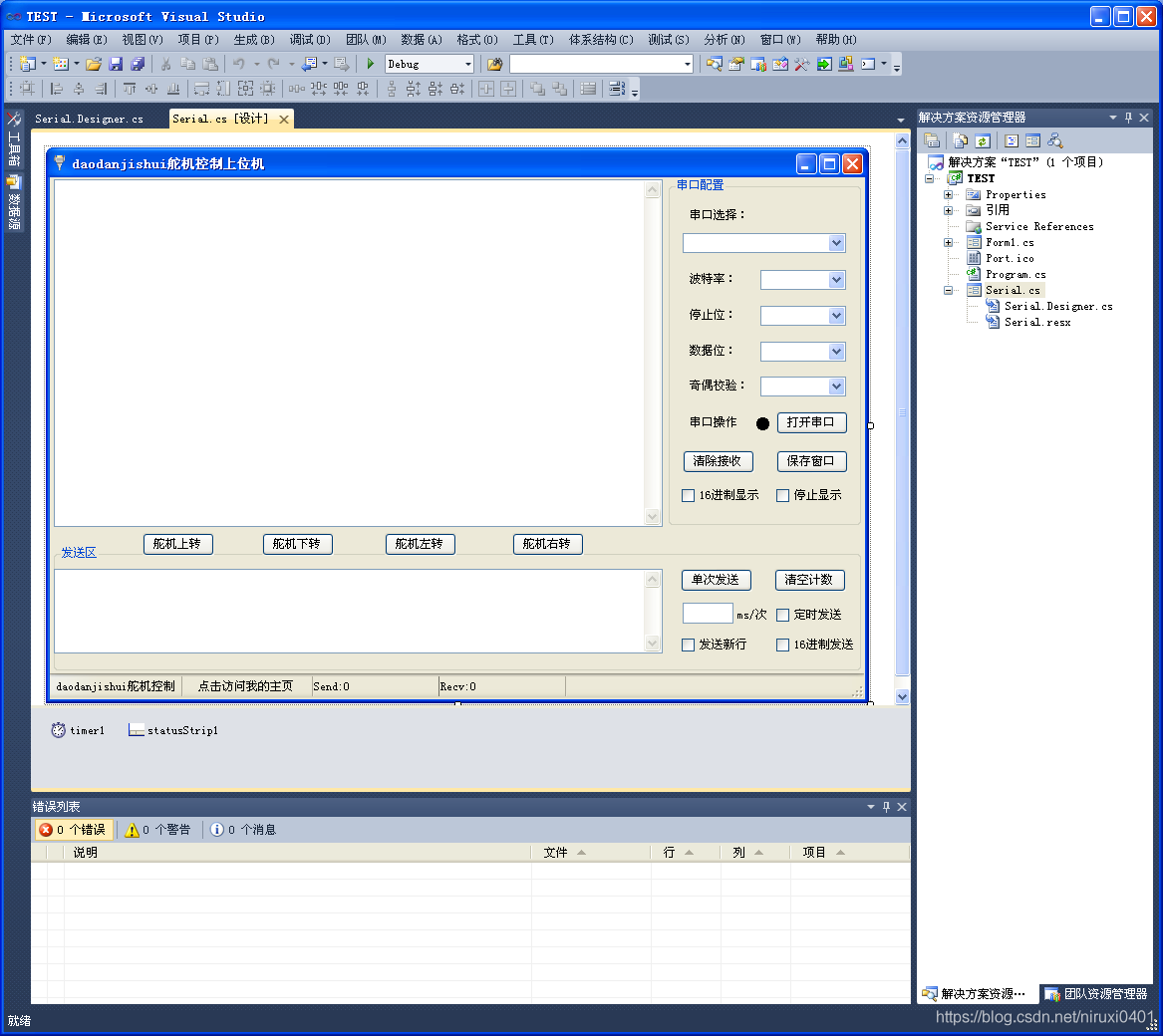

Default code description : Whole Keil5 Project a file , Very concise , It is very suitable for secondary development or learning , At present, all the functions are given , There are still some definitions of variables and macros , If the patient readers read it slowly, they can gain a lot , Maybe I can reproduce this program , After all, the key parts of the code are annotated , I wrote this code for a week , And that is C# The project code of is actually modified by the code of the serial port debugging assistant , There are a lot of them on the Internet , I won't let it go . If interested readers want my full source code , Please go to my designated place to download the project , Respect for the original , Respect the fruits of labor , What I can guarantee is that my code is reliable , Be able to control the specified hardware , Video as proof .
2. Analysis of the code
First of all, emphasize that this program uses MDK5 and VS2010 Written , Please contact me if you have any other requirements , In fact, what kind of software is used to develop programs is secondary , The key is the logic of your product design . I remember my teacher said , In fact, development languages are just tools , The key is whether you have a complete logic mechanism in your mind .
In fact, I wrote a complete comment on the source code , Just talk about what readers can learn ? This source code can learn a lot , such as I2C agreement , Steering gear coordinated control ,PCA9685 Use of modules ,C# Serial port communication ,C#UI Interface design and so on , If we want to achieve UI The interface controls multiple actuators , Then my source code is absolutely worth the money !
3、 ... and 、 Simulation and debugging
This is for the video presentation . It's relatively simple, so I won't explain it in detail .
The following is a screenshot of the operation control steering gear :
summary
Function description : use VS2010 Compiling C# The upper computer uses four buttons to control the PTZ movement composed of two steering engines , The connection adopts the mode of serial port communication ( So I saw that I put the single-chip computer P3.0 and P3.1 Receive USB turn TTL At last, it was connected to the computer ), In addition, you can input in the input box of the upper computer 0 To 180 The integer of , Click single send , One of the two actuators controlled by the key responds to the input angle value and turns to the response angle . The pan tilt composed of the other two actuators is not controlled by the upper computer , I am repeating the action I entered in advance and moving around again . A controlled , An uncontrolled is quite interesting .
Knowledge description : This work involves a lot of knowledge points , For example, SCM serial communication , SCM serial port instruction analysis 、 Serial port digital analysis 、 Single chip microcomputer IO Mouth simulation IIC signal communication 、PCA9685arduino Migrate library functions to 51 On single chip microcomputer ,VS2010 C# The upper computer development of serial port control program . Knowledge is quite awesome , The upper computer can be customized according to the needs of buyers logo Change it to the desired effect . There are still many areas that can be improved .
use C# The upper computer is written in windows The compatibility running on the operating system is very good , because C# By Microsoft Developed , The development kit is very small , It's not like using java Development of the upper computer , Take up a large volume , And install jdk To run , Otherwise, pack and compress , According to my estimation, the anonymous four axis host computer also uses C# Developed , But they don't open source , Learn this well C# Development of open source host computer , It's kind of useful . Notice that I use VS2010 To develop , Please adjust the software compatibility by yourself ! Please see the screenshot of the last issue for the source code of the MCU lower computer , No screenshots for this modification , use MDK5 Written 51 Program .
In modern life UI There are more interfaces , So embedded UI Design and development never stop ,JAVA SWING The written interface is also very extensive , So please look forward to , Next time I will use C# The upper computer is combined with the camera , The single chip microcomputer collects the pictures of the camera and transmits them to C# Upper computer , It can be wired or wireless , Implement a remote image monitoring steering gear system . It's wonderful to look forward to !
Download project code :https://www.cirmall.com/circuit/22312/
Point, I'll jump
PCA9685 Reference material
边栏推荐
- NOI OJ 1.4 05:整数大小比较 C语言
- 最简单DIY基于蓝牙、51单片机和舵机的钢铁爱国者机关枪控制器
- Step by step introduction to sqlsugar based development framework (9) -- Realizing field permission control with WinForm control
- 【黄金分割点】与【斐波那契数列】
- UART的奇偶校验
- Similarities and differences between SPI and IIC
- Description of directory files of TLBB series of Tianlong Babu - netbill server [ultra detailed]
- NOI OJ 1.3 04:带余除法 C语言
- Weidongshan equipment information query routine learning
- [Architect (Part 40)] connecting mongodb database developed by server
猜你喜欢
最简单DIY串口蓝牙硬件实现方案

MySQL Basics - Notes

Analysis of LinkedList source code

最简单DIY基于STM32的远程控制电脑系统①(电容触摸+按键控制)

Set up a QQ robot for ordering songs, and watch beautiful women

最简单DIY基于STM32F407探索者开发板的MPU6050陀螺仪姿态控制舵机程序

Design and implementation of distribution network and Internet connection scheme for esp32-cam high cost performance temperature and humidity monitoring system

Solve the problem of invalid audio autoplay

开源二进制文件静态漏洞分析工具BinAbsInspector安装使用

Build a QQ robot to wake up your girlfriend
随机推荐
JVM easy start-02
list的深度剖析及模拟实现
Design and implementation of stm32f103zet6 single chip microcomputer dual serial port mutual sending program
从0到1,IDE如何提升端侧研发效率?| DX研发模式
NOI OJ 1.2 10:Hello, World! Size of C language
[use of Matlab graphical user interface controls]
圖片存儲--引用
torch权重转mindspore
flutter系列之:flutter中的Wrap
PHP reflection class use
Cool photo album code, happy birthday to the object!
Torch weight to mindspore
list的介绍及使用
Simplest DIY remote control computer system based on STM32 ① (capacitive touch + key control)
最简单DIY基于蓝牙、51单片机和舵机的钢铁爱国者机关枪控制器
MAUI使用Masa blazor组件库
STM32F103ZET6单片机双串口互发程序设计与实现
UART的奇偶校验
Why does the pointer not change the corresponding value as a formal parameter
Economic common sense