当前位置:网站首页>四、MFC工具栏、运行时类信息机制、运行时创建机制
四、MFC工具栏、运行时类信息机制、运行时创建机制
2022-07-25 06:08:00 【[T]】
一、工具栏

1、相关类
CToolBarCtrl  父类CWnd,工具栏按钮
CToolBar  父类CControlBar,封装了关于工具栏的操作,以及和框架窗口的关系
2、工具栏的使用
(1)添加工具栏资源
(2)创建工具栏 CToolBar::CreateEx
(3)加载工具栏 CToolBar::LoadToolBar
(4)设置工具栏的停靠(与框架窗口的关系)
CToolBar::EnableDocking
CFrameWnd::EnableDocking
CFrameWnd::DockControlBar
3、创建项目,添加工具栏
(1)创建项目(MFCToolBar)
(2)添加.rc资源文件,添加菜单

(3)编写代码,绑定菜单
#include <afxwin.h>
#include "resource.h"

class CMyFrameWnd:public CFrameWnd
{
	DECLARE_MESSAGE_MAP()
public:
	afx_msg int OnCreate(LPCREATESTRUCT pcs);
	afx_msg void OnNew();
private:
	CMenu m_menu;
};
BEGIN_MESSAGE_MAP(CMyFrameWnd, CFrameWnd)
	ON_WM_CREATE()
	ON_COMMAND(ID_NEW, OnNew)
END_MESSAGE_MAP()
int CMyFrameWnd::OnCreate(LPCREATESTRUCT pcs)
{
	m_menu.LoadMenu(IDR_MENU1);
	SetMenu(&m_menu);
	return CFrameWnd::OnCreate(pcs);
}
void CMyFrameWnd::OnNew()
{
	AfxMessageBox("新建菜单项被点击");
}

class CMyWinApp:public CWinApp
{
public:
	virtual BOOL InitInstance();
};

BOOL CMyWinApp::InitInstance()
{
	CMyFrameWnd* pFrame = new CMyFrameWnd;
	pFrame->Create(NULL, "MFCToolBar");
	m_pMainWnd = pFrame;
	pFrame->ShowWindow(SW_SHOW);
	pFrame->UpdateWindow();
	return TRUE;
}
CMyWinApp theApp;
(4)添加工具栏资源
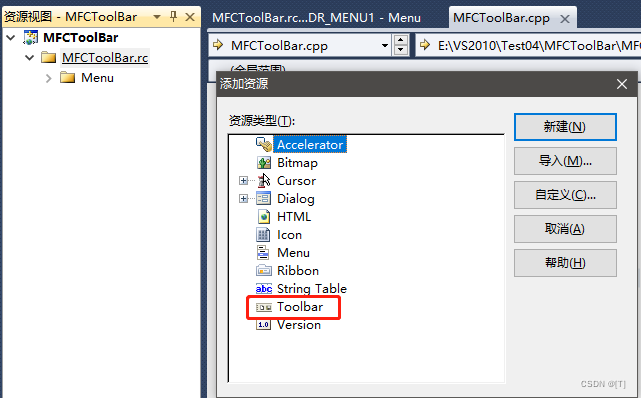

(5)绑定工具栏
代码
#include <afxwin.h>
#include <afxext.h>
#include "resource.h"

class CMyFrameWnd:public CFrameWnd
{
	DECLARE_MESSAGE_MAP()
public:
	afx_msg int OnCreate(LPCREATESTRUCT pcs);
	afx_msg void OnNew();
	afx_msg void OnSet();
private:
	CMenu m_menu;
	CToolBar m_toolbar;
};
BEGIN_MESSAGE_MAP(CMyFrameWnd, CFrameWnd)
	ON_WM_CREATE()
	ON_COMMAND(ID_NEW, OnNew)
	ON_COMMAND(ID_SET, OnSet)
END_MESSAGE_MAP()
int CMyFrameWnd::OnCreate(LPCREATESTRUCT pcs)
{
	m_toolbar.CreateEx(this, TBSTYLE_FLAT, WS_CHILD|WS_VISIBLE|CBRS_ALIGN_TOP|CBRS_GRIPPER);
	//CBRS_GRIPPER	工具栏把手属性
	m_toolbar.LoadToolBar(IDR_TOOLBAR1);

	m_menu.LoadMenu(IDR_MENU1);
	SetMenu(&m_menu);
	return CFrameWnd::OnCreate(pcs);
}
void CMyFrameWnd::OnNew()
{
	AfxMessageBox("新建菜单项被点击");
}
void CMyFrameWnd::OnSet()
{
	AfxMessageBox("绿色按钮被点击");
}

class CMyWinApp:public CWinApp
{
public:
	virtual BOOL InitInstance();
};

BOOL CMyWinApp::InitInstance()
{
	CMyFrameWnd* pFrame = new CMyFrameWnd;
	pFrame->Create(NULL, "MFCToolBar");
	m_pMainWnd = pFrame;
	pFrame->ShowWindow(SW_SHOW);
	pFrame->UpdateWindow();
	return TRUE;
}
CMyWinApp theApp; 

(6)设置工具栏停靠
代码
#include <afxwin.h>
#include <afxext.h>
#include "resource.h"

class CMyFrameWnd:public CFrameWnd
{
	DECLARE_MESSAGE_MAP()
public:
	afx_msg int OnCreate(LPCREATESTRUCT pcs);
	afx_msg void OnNew();
	afx_msg void OnSet();
private:
	CMenu m_menu;
	CToolBar m_toolbar;
};
BEGIN_MESSAGE_MAP(CMyFrameWnd, CFrameWnd)
	ON_WM_CREATE()
	ON_COMMAND(ID_NEW, OnNew)
	ON_COMMAND(ID_SET, OnSet)
END_MESSAGE_MAP()
int CMyFrameWnd::OnCreate(LPCREATESTRUCT pcs)
{
	m_toolbar.CreateEx(this, TBSTYLE_FLAT, WS_CHILD|WS_VISIBLE|CBRS_ALIGN_TOP|CBRS_GRIPPER);
	//CBRS_GRIPPER	工具栏把手属性
	m_toolbar.LoadToolBar(IDR_TOOLBAR1);

	//设置工具栏停靠
	m_toolbar.EnableDocking(CBRS_ALIGN_ANY);
	EnableDocking(CBRS_ALIGN_ANY);
	DockControlBar(&m_toolbar, AFX_IDW_DOCKBAR_BOTTOM);

	m_menu.LoadMenu(IDR_MENU1);
	SetMenu(&m_menu);
	return CFrameWnd::OnCreate(pcs);
}
void CMyFrameWnd::OnNew()
{
	AfxMessageBox("新建菜单项被点击");
}
void CMyFrameWnd::OnSet()
{
	AfxMessageBox("绿色按钮被点击");
}

class CMyWinApp:public CWinApp
{
public:
	virtual BOOL InitInstance();
};

BOOL CMyWinApp::InitInstance()
{
	CMyFrameWnd* pFrame = new CMyFrameWnd;
	pFrame->Create(NULL, "MFCToolBar");
	m_pMainWnd = pFrame;
	pFrame->ShowWindow(SW_SHOW);
	pFrame->UpdateWindow();
	return TRUE;
}
CMyWinApp theApp;
二、运行时类信息机制
在程序运行时可以获知对象的类的相关信息(如:对象是否继承于某个类)
1、运行时类信息机制的使用
(1)类必须派生于CObject
(2)类内必须添加申明宏:DECLARE_DYNAMIC(theClass)
(3)类外必须添加实现宏:IMPLEMENT_DYNAMIC(theClass, baseClass)
(4)使用CObject::IsKindOf函数可以判断某个函数是否继承于某个类
2、创建项目(MFC)
(1)创建(控制台)项目(MFCDynamic)
(2)编写程序
#include <afxwin.h>
#include <iostream>
using namespace std;

class CAnimal:public CObject
{
	DECLARE_DYNAMIC(CAnimal)
};
IMPLEMENT_DYNAMIC(CAnimal, CObject)

class CDog:public CAnimal
{
	DECLARE_DYNAMIC(CDog)
};
IMPLEMENT_DYNAMIC(CDog, CAnimal)

int main()
{
	CDog yellowDog;
	if(yellowDog.IsKindOf(RUNTIME_CLASS(CAnimal)))
	{
		cout<<"判断正确"<<endl;
	}
	else
	{
		cout<<"判断错误"<<endl;
	}
}
(3)宏展开
#include <afxwin.h>
#include <iostream>
using namespace std;

class CAnimal:public CObject
{
	DECLARE_DYNAMIC(CAnimal)
};
IMPLEMENT_DYNAMIC(CAnimal, CObject)


class CDog:public CAnimal
{
	//DECLARE_DYNAMIC(CDog)
public:
	static const CRuntimeClass classCDog;
	virtual CRuntimeClass* GetRuntimeClass() const;
};
//IMPLEMENT_DYNAMIC(CDog, CAnimal)
//IMPLEMENT_RUNTIMECLASS(CDog, CAnimal, 0xFFFF, NULL, NULL)
AFX_COMDAT const CRuntimeClass CDog::classCDog =
	{
		"CDog",
		sizeof(class CDog),
		0xFFFF,
		NULL,
		RUNTIME_CLASS(CAnimal),
		NULL,
		NULL
	};
CRuntimeClass* CDog::GetRuntimeClass() const
{
	//return RUNTIME_CLASS(CDog);
	return ((CRuntimeClass*)(&CDog::classCDog));
}

int main()
{
	CDog yellowDog;
	if(yellowDog.IsKindOf(RUNTIME_CLASS(CAnimal)))
	{
		cout<<"判断正确"<<endl;
	}
	else
	{
		cout<<"判断错误"<<endl;
	}
}

类运行时信息机制会遍历静态变量(CRuntimeClass)组成的列表,根据列表可以判断类继承关系
3、执行过程
yellowDog.IsKindOf( RUNTIME_CLASS(CDog))//函数内部this为&yellowDog,参数为链表头
{
  CRuntimeClass* pClassThis = GetRuntimeClass();
                     //利用&yellowdog调用宏展开虚函数,获取链表头结点

  return pClassThis->IsDerivedFrom(RUNTIME_CLASS(CDog))
				//函数内部this为链表头,参数也为链表头
  {
    const CRuntimeClass* pClassThis = this;//获取链表头
    while (pClassThis != NULL)
    {
      	if (pClassThis == RUNTIME_CLASS(CDog))
	    return TRUE;
        pClassThis = pClassThis->m_pBaseClass;
    }
    return FALSE;
  }
}
三、运行时类创建机制
1、动态创建机制使用
(1)类派生自CObject
(2)类内必须添加申明宏:DECLARE_DYNCREAYE(theClass)
(3)类外必须添加实现宏:IMPLEMENT_DYNCREATE(theClass, baseClass)
(4)使用CRuntimeClass::CreateObject(对象加工厂)函数将类对象创建
2、创建项目
(1)创建(控制台)项目(MFCDyncreate)
(2)编写程序
#include <afxwin.h>
#include <iostream>
using namespace std;

class CAnimal:public CObject
{
	DECLARE_DYNCREATE(CAnimal)
};
IMPLEMENT_DYNCREATE(CAnimal, CObject)


class CDog:public CAnimal
{
	DECLARE_DYNCREATE(CDog)
};
IMPLEMENT_DYNCREATE(CDog, CAnimal)

int main()
{
	CObject* pob = RUNTIME_CLASS(CDog)->CreateObject( );//对象加工厂
	if( pob )
	{
		cout << pob << endl;
	}else
	{
		cout << "对象创建失败" << endl;
	}
	return 0;
}
(3)宏替换
#include <afxwin.h>
#include <iostream>
using namespace std;

class CAnimal:public CObject
{
	DECLARE_DYNCREATE(CAnimal)
};
IMPLEMENT_DYNCREATE(CAnimal, CObject)


class CDog:public CAnimal
{
	//DECLARE_DYNCREATE(CDog)
public:
	static const CRuntimeClass classCDog;
	virtual CRuntimeClass* GetRuntimeClass() const;
	static CObject* PASCAL CreateObject();
};
//IMPLEMENT_DYNCREATE(CDog, CAnimal)
CObject* PASCAL CDog::CreateObject()
{
	return new CDog;
}
AFX_COMDAT const CRuntimeClass CDog::classCDog =
{
	"CDog",
	sizeof(class CDog),
	0xFFFF,
	CDog::CreateObject,
	RUNTIME_CLASS(CAnimal), NULL, NULL
};
CRuntimeClass* CDog::GetRuntimeClass() const
{
	return RUNTIME_CLASS(CDog);
}


int main()
{
	CObject* pob = RUNTIME_CLASS(CDog)->CreateObject( );//对象加工厂
	if( pob )
	{
		cout << pob << endl;
	}else
	{
		cout << "对象创建失败" << endl;
	}
	return 0;
}
(4)动态创建机制执行过程
RUNTIME_CLASS(CDog)->CreateObject()//函数内部this为本类(CDog)的静态变量地址(链表头
{
  CObject* pObject = (*m_pfnCreateObject)() //CDog::CreateObject
  {
    return new CDog;
  }
  return pObject;
}边栏推荐
- (牛客多校二)J-Link with Arithmetic Progression(最小二乘法/三分)
- [node] the service port is occupied error: listen eaddinuse: address already in use::: 9000- how to close the port started by node
- What does PK, NN, Qu, B, UN, ZF, AI, G mean when creating tables in MySQL
- U-boot-1.1.6 transplant notes (beginner)
- Leetcode/ integer division
- Vbs script COM object extension and use (3)
- VIM configuring golang development environment
- 二叉搜索树(DAY 75)
- Unity model simplification / consolidation one click plug-in
- Prometheus operator configures promethesrule alarm rules
猜你喜欢

(2022年牛客多校一)I-Chiitoitsu(期望DP)

阻塞队列分析

Brief introduction of acoustic filter Market

(Niuke multi School II) j-link with arithmetic progress (least square method / three points)

【Node】服务端口被占用Error: listen EADDRINUSE: address already in use :::9000-如何关闭node启动的端口

HTB-Devel

Mechanism and principle of multihead attention and masked attention

Data too long for column ‘data‘ at row 1以及设置成longblob造成的乱码解决。node-mysql

剑指 Offer 45. 把数组排成最小的数

ROI pooling and ROI align
随机推荐
(Niuke multi school I in 2022) i-chiitoitsu (expected DP)
VO, dto, do, Po distinction and use
Amazoncaptcha 95%成功率绕过亚马逊IP验证码
context must be a dict rather解决
Multithreading programming under Win32 API
Summer summary 2
msys2常用配置
Detailed annotation and analysis of start.s of uboot
UML modeling tools Visio, rational rose, powerdesign
Leetcode/ integer division
Sword finger offer 32 - I. print binary tree from top to bottom
对于von Mises distribution(冯·米塞斯分布)的一点心得
R language ggpubr package ggarrange function combines multiple images and annotates_ Figure add annotation, annotation, annotation information for the combined image, and use the right parameter to ad
(2022牛客多校二)L-Link with Level Editor I(动态规划)
(2022牛客多校二)K-Link with Bracket Sequence I(动态规划)
Msys2 common configuration
动态规划学习笔记
Draw Bezier curve through screen interaction
MySQL中建表时 pk、nn、qu、b、un、zf、ai、g代表的意思
Cout format output common functions and flags summary