当前位置:网站首页>[FFH] websocket practice of real-time chat room
[FFH] websocket practice of real-time chat room
2022-07-24 08:48:00 【Go to bed after finishing】
【FFH】 Real time chat room WebSocket actual combat
Preface
If you want to realize the same function as wechat chat , It is obviously not enough to communicate within the network , Therefore, the soft bus does not work with this kind of long-distance transmission . If we want to complete the chat function of wechat , The traditional method is to use webSocket Full duplex communication with the help of server .
WebSocket What is it? ?
WebSocket yes One in a single TCP Network communication protocol for full duplex communication on the connection .
There was no such thing as webSocket When , We all use HTTP Protocol for network communication , however HTTP The protocol is a stateless , There is no connection , One-way application layer protocol , Therefore, the client can only make one-way requests to the server , The server cannot actively send messages to the client , As a result, it is difficult for businesses such as real-time chat to carry out .
Developers can use HTTP The scheme of long polling , That is to say, we need HTTP The connection request must be maintained for a period of time , To get the latest server messages . This is obviously inefficient , And it's a waste of resources .
So it was born WebSocket, You only need to connect once , You can always maintain full duplex communication .
Demo Exhibition
Now let's use the official WebSocket Interface to achieve a simple real-time chat room Demo. The effect is as follows :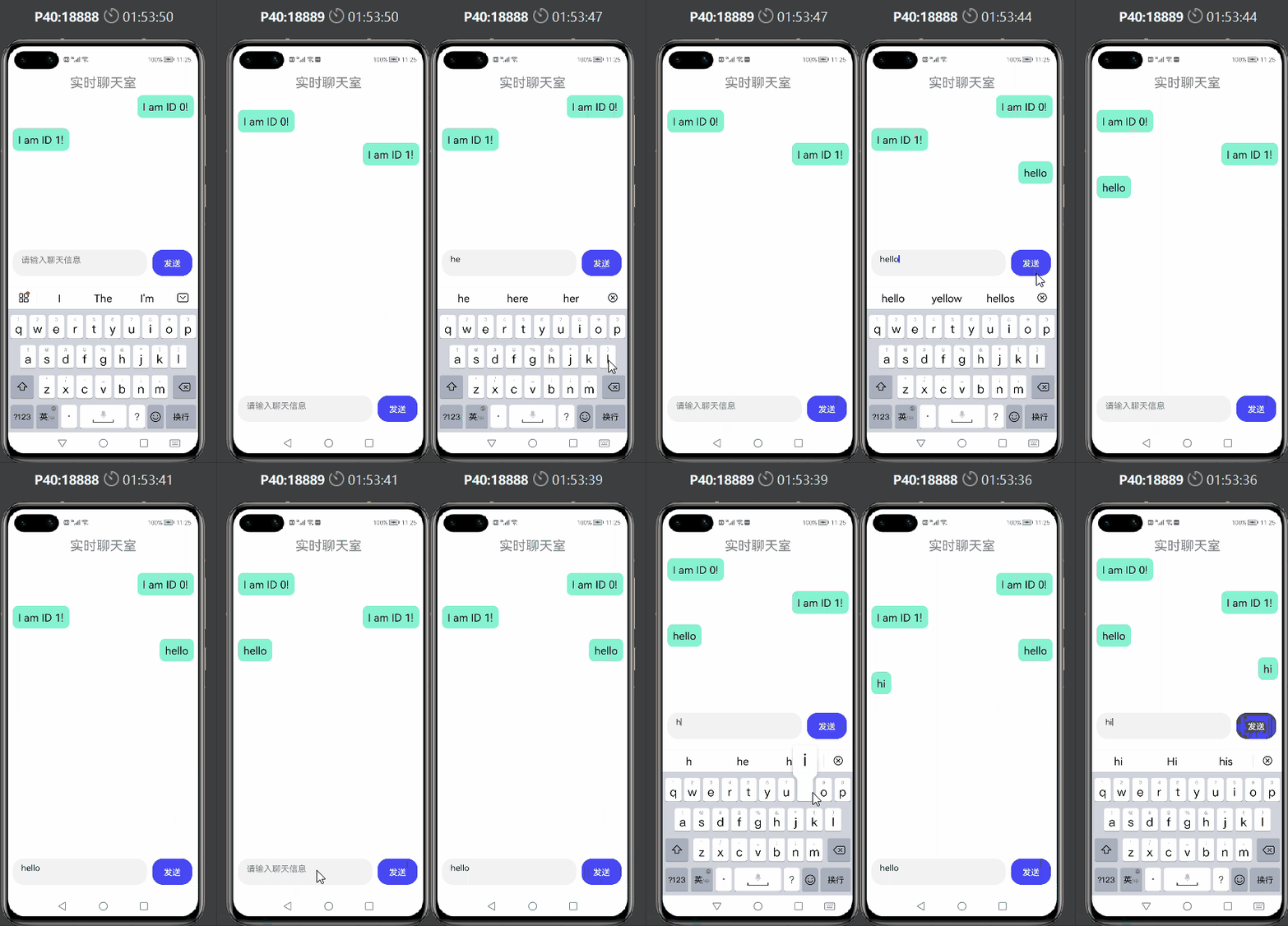
Code implementation
You can see the interface description in the official document , We only need a few interfaces to realize our business requirements .
https://developer.harmonyos.com/cn/docs/documentation/doc-guides/websocket-connection-0000001333321005

① Apply for network permission
stay config.json Register network permissions in the file , This permission allows the program to open a network socket , Make a network connection .
"reqPermissions": [
  {
    "name": "ohos.permission.INTERNET"
  }
]
② Import webSocket modular
import webSocket from '@ohos.net.webSocket';
③ establish webSocket object
Then we call createWebSocket() Interface generates a webSocket object , And save it .
let ws = webSocket.createWebSocket();
④ Connect webSocket passageway
call connect() Interface . I need a URL Pass in as a parameter , In this demo in , Directly use a previously developed server interface to call , But not open to the outside world , Therefore, you only need to put the interface address you have developed into ”wsURL“ Inside you can .
    onInit() {

        let that = this;
        ws.connect("wsURL", (err, value) => {

            if (!err) {

                console.log("xxx---connect success");
            } else {

                console.log("xxx---connect fail, err:" + JSON.stringify(err));
            }
        });
    },
⑤ Subscribe to message updates in the channel
Here we call on( type:‘message’ ) Interface for message listening , It should be noted here that the string type passed by the server , So if the message is JSON object , You need to use JSON.parse() To analyze , restore JSON object .
    onInit() {

        let that = this;
        ws.on('message', (err, value) => {

            console.log("xxx---on message, message:" + value);
            // What is passed is the serialized string , Need to deserialize as JSON object
            let dataObj = JSON.parse(value)
            console.log("xxx---parse success---postId: "+dataObj.postId+",message:"+dataObj.message)
            that.message.push(dataObj)
            console.log("xxx---check message: "+JSON.stringify(that.message))
        });
    },
⑥ Send a message
Next call send() Interface to send messages , Note here , If you want to pass JSON object , To use JSON.stringify() Do serialization , Make sure we pass in the form of a stream string .
In the callback of this interface , We can also print it out , Check whether the message is sent successfully .
   	sendMessage(){

        let that  = this;
        let data = {

            postId:that.id,
            message:that.sendMes
        }
        let dataStr = JSON.stringify(data)
        ws.send(dataStr, (err, value) => {

            if (!err) {

                console.log("xxx---send success");
            } else {

                console.log("xxx---send fail, err:" + JSON.stringify(err));
            }
        });
        that.message.push(data)
    },
⑦ Hide the title bar
Careful friends will find , my demo The black title bar of the display is missing , In fact, it can be hidden , Only need config.json In file module.abilities Add a few lines of code below .
"metaData":{

            "customizeData":[
              {

                "name": "hwc-theme",
                "value": "androidhwext:style/Theme.Emui.NoTitleBar",
                "extra":""
              }
            ]
          }
⑧ Pattern design
Next, simply design the interface style , Render the obtained message .
<div class="container">
    <div style="width: 100%;height: 8%;color: #ff86868a;font-size: 25px;justify-content: center;position: absolute;">
        <text style="top: 10px;">
             Real time chat room
        </text>
    </div>
    <list style="height: 80%;">
        <list-item for="{
     {message}}" class="{
     {$item.postId==id?'listItemRight':'listItemLeft'}}" >
            <div class="listItemDiv" >
                <text style="padding:5px;border-radius: 10px;font-size: 20px;margin: 5px;max-width: 70%;">
                    {
   {$item.message}}
                </text>
            </div>
        </list-item>
    </list>
    <div style="position: absolute;left:10px;bottom: 20px;">

        <textarea id="textarea" class="textarea" extend="true" placeholder=" Please input chat information " onchange="inputChange" >
        </textarea>
        <button style="width: 75px;height: 50px;margin-left: 10px;background-color: #ff4848f5;" onclick="sendMessage">   send out  </button>
    </div>

</div>
.container {

    display: flex;
    flex-direction: column;
    justify-content: center;
    align-items: center;
    left: 0px;
    top: 0px;
    width: 100%;
    height: 100%;
}
.textarea {

    placeholder-color: gray;
    width: 70%;
}

.listItemDiv{

    background-color: #ff87f3d0;
    border-radius: 10px;

}

.listItemLeft{

    margin: 10px;
    width: 100%;
    justify-content: flex-start;
}
.listItemRight{

    margin: 10px;
    width: 100%;
    justify-content: flex-end;
}
边栏推荐
- [Sheung Shui Shuo series] EE feedback details
- Meta tags let search engines search your website
- Scatter chart - date
- On express framework
- Sword finger offer II 024. reverse linked list
- Arrays and linked lists
- Web3 traffic aggregation platform starfish OS interprets the "p2e" ecosystem of real business
- 【一起上水硕系列】EE feedback 详解
- Some mistakes that Xiaobai often makes (update from time to time, and promise not to make them again next time)
- Okaleido tiger NFT is about to log in to binance NFT platform, and the era of NFT rights and interests is about to start
猜你喜欢

Precautions for using kettle excel input

1、 Midwey addition, deletion, modification and query

Limited and unlimited Games: crypto

【一起上水硕系列】Final RAD-new literacies

After two days of tossing and turning, I finally wrote my first fluent app, which almost tortured me into a nervous breakdown

Hack the box - File Inclusion module detailed Chinese tutorial

Crypto giants all in metauniverse, and platofarm may break through

Some mistakes that Xiaobai often makes (update from time to time, and promise not to make them again next time)

Typora提示【This beta version of Typora is expired, please download and install a newer version】的解决方案

Is yuancosmos hype? Or the future
随机推荐
Limited and unlimited Games: crypto
Look at the most influential infrastructure m-dao of Web3 through the current situation of Dao
Shell script backup mongodb database
Xiaobai learns Jenkins - installation and quick start
Will Plato become the risk target of the meta universe? Platofarm has great opportunities
office回退版本,从2021到2019
【一起上水硕系列】一起提前看看July课程
2、 Encapsulation and tool classes for adding, deleting, modifying and checking in midway
Online lover
Wargames NATAS (11-15) problem solving essay
Sed add content after a line
Four data interaction modes of go grpc
"Problem solving" Batman's trouble
0 threshold takes you to know two-point search
【一起上水硕系列】June总结+no 焦虑+July计划+如何考试+如何提升
redis学习一redis介绍及NIO原理介绍
5、 Use of environment variables in midway
Route interceptor
How difficult is it to build a digital collection platform?
Is gamefi in decline or in the future?