当前位置:网站首页>HarmonyOS鸿蒙使用ORM Bee访问数据库实例
HarmonyOS鸿蒙使用ORM Bee访问数据库实例
2022-06-22 02:45:00 【abckingaa】
在使用HarmonyOS开发app应用时,经常会用到数据库存储数据。
要是用ORM框架,可以大大提高开发效率。
ORM Bee简单易用,文件小,性能好;同时支持Android和Harmony,还支持JDBC(可在JavaWeb等开发中使用)。
在Harmony和Android两个环境,可以用同一套Bee代码访问DB,提高代码重用,节省人力物。
以下说明,假设已创建了Data Ability工程。
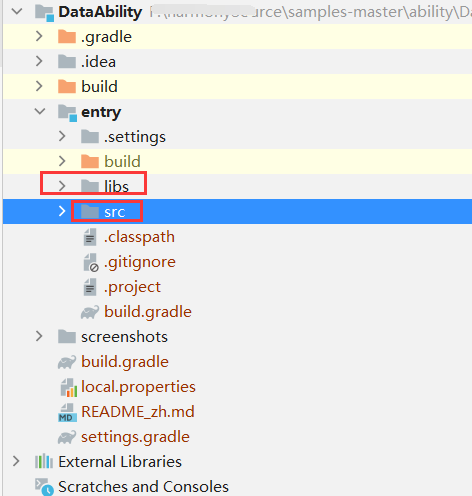
工程全图如下:
一、添加jar包
将bee的jar包复制到entry包下的libs目录,右击jar包,
选择:Add as Libray... , 在跳出的对话框中选择ok.

完成后如下:

二、将相关配置注册到Bee
在启动的Ability ,添加相应的配置和注册信息。 若有自定义的配置在bee.properties则需要;则需要使用:BeeConfigInit.init();
将上下文注册到Bee;将创建表和更新表的回调类,注册到Bee;
以后就可以直接使用Bee了。
public class UserDataAbility extends Ability {
    private static final String TAG = UserDataAbility.class.getSimpleName();
    private static final HiLogLabel LABEL_LOG = new HiLogLabel(3, 0xD000F00, TAG);
    @Override
    public void onStart(Intent intent) {
        super.onStart(intent);
        BeeConfigInit.init(); //若有自定义的配置在bee.properties则需要
        ContextRegistry.register(this.getApplicationContext()); //将上下文注册到Bee
        RdbOpenCallbackRegistry.register(new MyRdbOpenCallback()); //将创建表和更新表的回调类,注册到Bee
//      BeeRdbStoreRegistry.register(rdbStore);  //直接注册rdbStore对象也可以.  但需要自己去生成,配置信息也不好管理
    }
}若有自定义的配置在bee.properties,将该文件放在entry\src\main\resources\rawfile目录下。如下图所示(整个代码结构,也可参考)。

三、定义安装app时,创建表和更新表的类
package ohos.samples.dataability;

import ohos.data.rdb.RdbOpenCallback;
import ohos.data.rdb.RdbStore;
import ohos.hiviewdfx.HiLog;
import ohos.hiviewdfx.HiLogLabel;
import ohos.samples.dataability.bee.entity.*;
import ohos.samples.dataability.entity.Person;
import org.teasoft.honey.osql.autogen.Ddl;
import org.teasoft.honey.osql.core.HoneyContext;

public class MyRdbOpenCallback extends RdbOpenCallback {
    private static final String TAG = "MyRdbOpenCallback";
    private static final HiLogLabel LABEL_LOG = new HiLogLabel(3, 0xD000F00, TAG);
    @Override
    public void onCreate(RdbStore store) {
        try{

//        store.executeSql(   //手动写sql
//                "create table if not exists " +  "person (user_id integer primary key autoincrement, "
//                        + "name text not null, "  + "age integer)");

            HiLog.info(LABEL_LOG,"--------------------创建表.......开始.");

            String sql= Ddl.toCreateTableSQL(new Person()); //不想写sql可以自动生成
            HiLog.info(LABEL_LOG, "---------------create table sql:"+sql);
            store.executeSql(sql);

            store.executeSql(Ddl.toCreateTableSQL(new LeafAlloc()));
            store.executeSql(Ddl.toCreateTableSQL(new Orders()));
            store.executeSql(Ddl.toCreateTableSQL(new Tb_inaccount()));
            store.executeSql(Ddl.toCreateTableSQL(new Tb_outaccount()));
            store.executeSql(Ddl.toCreateTableSQL(new TestUser()));
         } catch (Exception e) {
           HiLog.error(LABEL_LOG, "---------------create table:"+e.getMessage());
        }
        HiLog.info(LABEL_LOG, "------------onCreate  finished!");
    }

    @Override
    public void onUpgrade(RdbStore store, int oldVersion, int newVersion) {
        HoneyContext.setCurrentAppDB(store);
        HiLog.info(LABEL_LOG,"--------------------更新表.......");
        HiLog.info(LABEL_LOG, "%{public}s", "DataBase upgrade");
        HoneyContext.removeCurrentAppDB();
    }

}
四,可以在其它AbilitySlice中使用Bee操作数据库了
以下是select,update,insert,delete操作的例子。
主要语句如下:
Suid suid = BF.getSuid();  //简单的select,update,insert,delete操作
suid.insert(p);
suid.delete(new Person(), condition);
suid.update(p); //根据id修改对象
list = suid.select(new Person());//BF是BeeFactoryHelper的简称,也可以如下用法: //Suid suid=BeeFactoryHelper.getSuid();
详细代码如下:
    private void insert(Component component) {
        HiLog.info(LABEL_LOG, "----------------insert");
        try {
            Person p = new Person();
            p.setName(getRandomName());
            p.setAge(getRandomAge());
            suid.insert(p);
            HiLog.info(LABEL_LOG, "----------------insert结束.");
        } catch (Exception e) {
            HiLog.error(LABEL_LOG, "--------------insert--:" + e.getMessage());
        }
        query(true);
    }

    private void delete(Component component) {
        HiLog.info(LABEL_LOG, "----------------delete");

        try {
            Condition condition = BF.getCondition();
            condition.between("userId", 1, 2);
            suid.delete(new Person(), condition);
        } catch (Exception e) {
            HiLog.error(LABEL_LOG, "--------------insert--:" + e.getMessage());
        }
        query(true);
    }

    private void update(Component component) {
        HiLog.info(LABEL_LOG, "----------------update");
        try {
            Person p = new Person();
            p.setName("Tom_update");
            p.setAge(0);
            p.setUserId(1);
            suid.update(p); //根据id修改对象
        } catch (Exception exception) {
            HiLog.error(LABEL_LOG, "%{public}s", "update: dataRemote exception|illegalStateException");
        }
        query(true);
    }

    private void query(boolean queryAll) {
        HiLog.info(LABEL_LOG, "----------------query");

        getGlobalTaskDispatcher(TaskPriority.DEFAULT).asyncDispatch(() -> {
            List<Person> list = null;
            if (queryAll) {  //查所有
                list = suid.select(new Person());
            }else {
                list = suidRich.select(new Person(), 2, 5); //查从第2条开始的5条数据
            }
            appendText(list);
        });
}边栏推荐
- mocklog_ Simulation log
- Using hook based on xposed framework
- Common string operations in day15qt 2021-10-20
- FPGA Xilinx 7 Series FPGA DDR3 hardware design rules
- Day13QMainWindow2021-09-28
- Introduction to Apache ActiveMQ Artemis
- B-Tree
- Wechat applet film and television comment exchange platform system graduation design (2) applet function
- Markdown advanced syntax, marktext compatible
- Object detection -- how to use labelimg annotation tool
猜你喜欢


随机推荐
银联支付 返回商户 Nignx post请求405
All the knowledge you want to know about the PMP Exam is here
C mapster object mapper learning
Implementation differences between import and require in browser and node environments
Programming of pytorch interface
Architecture and practice of vivo container cluster monitoring system
GraphConnect 2022 大会的产品发布一览
FPGA-Xilinx 7系列FPGA DDR3硬件设计规则
JS special effects in the construction of animated web pages
PMP备考相关敏捷知识
【3.整数与浮点数二分】
Microblog closes publishing multiple part-time fraud information illegal accounts: how to crack down on data fraud
GraphAcademy 课程讲解:《Neo4j 图数据科学基础》
JVM makes wheels
Cmake common command category notes
【2. 归并排序】
Graphconnect 2022 at a glance
mocklog_ Simulation log
[7. high precision division]
Two dot vertical progress styles