当前位置:网站首页>Angr(七)——angr_ctf
Angr(七)——angr_ctf
2022-07-25 09:27:00 【c1rcl3】
通过angr_ctf熟悉angr的使用方法
参考链接:
10
1. 直接下载angr_ctf提供的ELF可执行文件10_angr_simprocedures
2. 用IDA静态分析
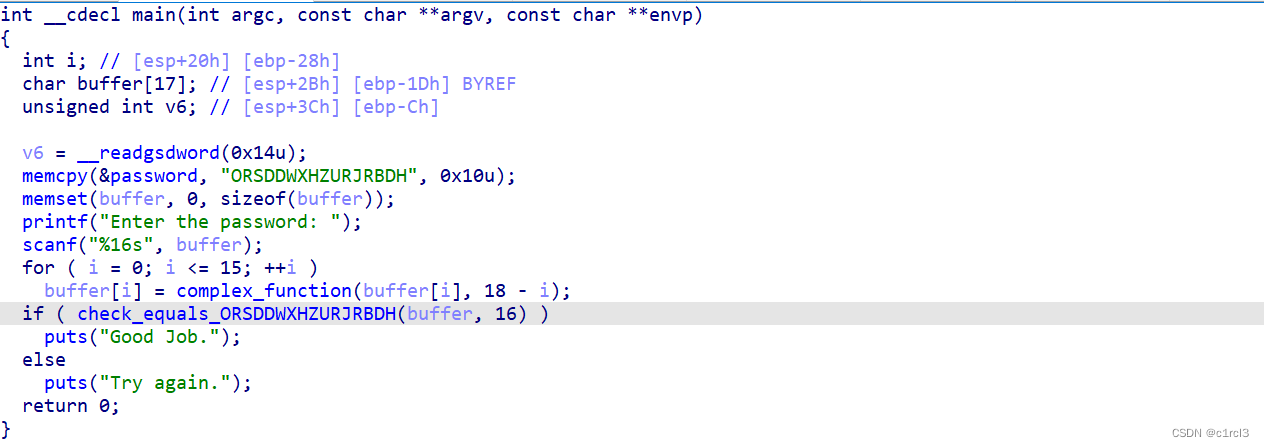
main函数调用scanf读取用户输入到buffer中,之后调用complex_function函数逐字符对buffer中的内容进行处理。最后将处理后的内容与password中的内容比较。
3. 编写脚本求解程序输出Good Job时对应的输入,为了避免字符串比较带来的路径爆炸,可以对字符串比较函数进行hook。与09中通过地址进行hook不同,由于10中多次调用了字符串比较函数,所以直接对符号(函数名)进行hook

import angr
import claripy


def isGood(state):
	return b'Good Job.' in state.posix.dumps(1)

def isBad(state):
	return b'Try again.' in state.posix.dumps(1)

p = angr.Project("./10")
init_state = p.factory.entry_state()
class mySimProcedure(angr.SimProcedure):
	def run(self, buffer_addr, buffer_size):
		bvt = self.state.memory.load(buffer_addr, buffer_size)
		target = "ORSDDWXHZURJRBDH".encode()
		return claripy.If(target == bvt, claripy.BVV(1, 32), claripy.BVV(0, 32))
check_symbol = "check_equals_ORSDDWXHZURJRBDH"
p.hook_symbol(check_symbol, mySimProcedure())
sm = p.factory.simulation_manager(init_state)
sm.explore(find=isGood, avoid=isBad)
for i in range(0, len(sm.found)):
	found_state = sm.found[i]
	print("{}".format(found_state.posix.dumps(0)))
4. 运行脚本查看结果

5. 检查结果的正确性

11
1. 直接下载angr_ctf提供的ELF可执行文件11_angr_sim_scanf
2. 用IDA静态分析

main函数中,调用complex_function函数对字符串s中的8个字符逐个处理,再读取两个无符号整数到buffer0和buffer1,分别比较buffer0与s的前四个字符,buffer1与s的后四个字符(32位)。
3. 编写脚本求解程序输出Good Job时对应的输入
import angr
import claripy

def isGood(state):
	return b'Good Job.' in state.posix.dumps(1)

def isBad(state):
	return b'Try again.' in state.posix.dumps(1)

p = angr.Project("./11")
init_state = p.factory.entry_state()
class mySimProcedure(angr.SimProcedure):
	def run(self, format_addr, buffer0_addr, buffer1_addr):
		buffer0 = claripy.BVS('buffer0', 32)
		buffer1 = claripy.BVS('buffer1', 32)
		self.state.memory.store(buffer0_addr, buffer0, endness=p.arch.memory_endness)
		self.state.memory.store(buffer1_addr, buffer1, endness=p.arch.memory_endness)
		self.state.globals['solutions0'] = buffer0
		self.state.globals['solutions1'] = buffer1
scanf_symbol = "__isoc99_scanf"
p.hook_symbol(scanf_symbol, mySimProcedure())
sm = p.factory.simulation_manager(init_state)
sm.explore(find=isGood, avoid=isBad)
for i in range(0, len(sm.found)):
	found_state = sm.found[i]
	store_solution0 = found_state.globals['solutions0']
	store_solution1 = found_state.globals['solutions1']
	res0 = found_state.solver.eval(store_solution0)
	res1 = found_state.solver.eval(store_solution1)
	print("{} {}".format(res0, res1))
4. 运行脚本查看结果

5. 验证结果的正确性

边栏推荐
- Radio and multi selection buttons of swing components
- shortest-unsorted-continuous-subarray
- Filter filter details (listeners and their applications)
- 第五阶段第一周
- [nearly 10000 words dry goods] don't let your resume don't match your talent -- teach you to make the most suitable resume by hand
- Attention is all you need 论文精读笔记 Transformer
- Pytorch 张量列表转换为张量 List of Tensor to Tensor 使用 torch.stack()
- IO流中的输出流
- Subtotal of rospy odometry sinkhole
- Swing组件之单选与多选按钮
猜你喜欢


随机推荐
UE4 外部打开exe文件
JDBC操作数据库详解
CentOS install redis
oracle 解析同名xml 问题
struct2的原理
修改mysql的分组报错Expression #1 of SELECT list is not in GROUP
简易加法计算器
鼠标监听,画笔
软件测试笔记,测试用例设计
Swing component
一.初始MySQL,MySQL安装、配置环境、初始化
Chrome开发者工具详解
JS uses requestanimationframe to detect the FPS frame rate of the current animation in real time
Configuring ROS development environment with vscode: Causes and solutions to the problem of ineffective code modification
UE4 碰撞(Collsion)
广度优先遍历(图和二叉树的层序遍历相关问题)
GUI窗口
车辆属性最近一次入库时间初始化生成sql脚本文件
Small knowledge of common classes
Detailed explanation of JDBC operation database