当前位置:网站首页>【Power Shell】Invoke-Expression ,Invoke-Expression -Command $activateCommand; Error or power shell failed to activate the virtual environment
【Power Shell】Invoke-Expression ,Invoke-Expression -Command $activateCommand; Error or power shell failed to activate the virtual environment
2022-07-25 01:09:00 【zbossz】
power Shell As soon as you open it, there is a red letter error :
Invoke-Expression :  The position of   That's ok :1  character : 1164
+ ... \Xshell 7;C:\Program Files (x86)\NetSarang\Xftp 7;"C:\Program Files\N ...
+                                                        ~~~~~~~~~~
 An expression or statement contains an unexpected tag “C:\Program”.
 The position of  D:\Programe\Anaconda\shell\condabin\Conda.psm1:109  character : 15
+               Invoke-Expression -Command $activateCommand;
+               ~~~~~~~~~~~~~~~~~~~~~~~~~~~~~~~~~~~~~~~~~~~
    + CategoryInfo          : ParserError: (:) [Invoke-Expression], ParseException
    + FullyQualifiedErrorId : UnexpectedToken,Microsoft.PowerShell.Commands.InvokeExpressionCommand
I use a lot here It's useless The way to :
①conda init
②conda install -n root -c pscondaenvs pscondaenvs
③ hold Invoke-Expression -Command $activateCommand;
Change to
    If(-not [String]::IsNullOrEmpty($activateCommand)) {
          Invoke-Expression -Command $activateCommand;
    }
Later, when I checked, I found that many of them had a kind of thinking , That is, there is something wrong with the system environment variables ;
So I revised it along this line
So next, we locate the wrong information 
Inside these signs , These content , It is actually a system environment variable path What's in it :


And then we put 
This variable is found :
Then we find that this variable is :
C:\Program Files\NVIDIA GPU ComputingToolkit\CUDA\v11.3\lib\x64;
C:\Program Files\NVIDIA GPU Computing Toolkit\CUDA\v11.3\bin;
C:\ProgramFiles\NVIDIAGPUComputingToolkit\CUDA\v11.3\common\lib\x64;
C:\Program Files\NVIDIA GPU Computing Toolkit\CUDA\v11.3\bin\
Then let's take a look at the file manager 
We found that there was 2 individual cuda, Now that's it ,11.3 This environment variable is wrong again , Let's just put it directly CUDA\11.3 Delete the environment variable of . Just use cuda10.1【 Because many of my deep learning environments are installed torchgpu The version is cu101 Of , So I keep it cu101 Environment variables of 】
That's it after deletion :
You can see cuda Not in the back

This environment variable has been deleted for me , Although the final result is the same as some of the information reported in error , Because I forgot to delete the previous environment variables in the screenshot .
But this error report has been solved for us , There will be no more errors when opening :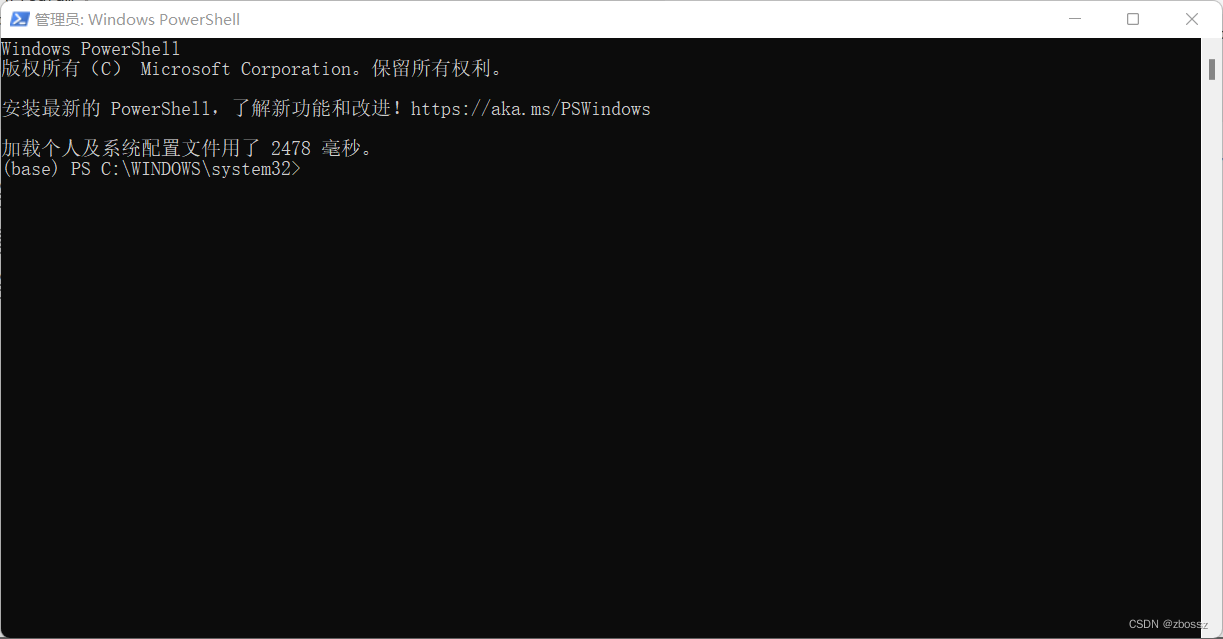
I saw many people on the Internet who didn't use my same solution , Maybe it's because they didn't pretend like me 2 Versions CUDA, So there is no conflict . So , If you are a friend of deep learning power shell There is a problem at the beginning , It is likely that there is the same as me cuda Environment variable conflict problem , Just report the error
Delete the environment variables here 【 The premise is that you are also in conflict with multiple versions of environment variables 】
Or is it , You can consider adjusting the position of environment variables .
that , This problem is solved .End of this period , See you next time .

边栏推荐
- [development tutorial 10] crazy shell · open source Bluetooth smart health watch OTA image production and download technical documents
- Pursue and kill "wallet Assassin" all over the network
- Divide 300000 bonus! Deeperec CTR model performance optimization Tianchi challenge is coming
- 第四章 驱动子系统开发
- Six stones Management: the process is only convenient to shirk responsibility, but not helpful to solve problems
- Multi table query of SQL
- Uxdb resets the password without knowing the plaintext password
- Join MotoGP Monster Energy British Grand Prix!
- 基于ABP实现DDD--领域逻辑和应用逻辑
- 7.16 - daily question - 408
猜你喜欢

Amd epyc 9654 Genoa CPU cache test exposure L1 bandwidth up to 30tb/s
Unity slider slider development

Young people who lost the IPO
Document the use of anti shake in packaged components and projects

What is iftmcs indicating contract status message?

Implementing DDD based on ABP -- domain logic and application logic

How to empty localstorage before closing a page

The IPO of Tuba rabbit was terminated: the annual profit fell by 33%, and Jingwei Sequoia was the shareholder
Esp32 OLED lvgl displays common Chinese characters

Financial RPA robot enables enterprises to open a new era of intelligence
随机推荐
Chapter III kernel development
Tiktok iqiyi announced cooperation, long and short video handshake and reconciliation?
7.18 - daily question - 408
The use of Multimeter in circuit analysis experiment of Shandong University
自动化测试系列-Selenium三种等待详解
Batchinsert avoid inserting duplicate data ignor
[25. Hash table]
Notes on topic brushing (XXII) -- Dynamic Planning: basic ideas and topics
The position of the nth occurrence of MySQL in the string
Document the use of anti shake in packaged components and projects
C recursively obtains all files under the folder and binds them to the treeview control
Detailed explanation of alexnet of paddlepaddle paper series (with source code)
Example analysis of enum data type in MySQL
Vegetable greenhouses turned into smart factories! Baidu AI Cloud helps Shouguang, Shandong build a new benchmark for smart agriculture
Game partner topic: the cooperation between breederdao and monkeyleague kicked off
[development tutorial 10] crazy shell · open source Bluetooth smart health watch OTA image production and download technical documents
Kusionstack open source | exploration and practice of kusion model library and tool chain
What does it operation and maintenance management mean? How to establish an effective IT operation and maintenance management system?
Educational events
Detailed usage of iperf