当前位置:网站首页>openlayers 绘制动态迁徙线、曲线
openlayers 绘制动态迁徙线、曲线
2022-06-26 12:36:00 【liuqing0.0】
前言:本来懒得写这个博客,实在深感无聊,没啥事情做,出篇博客让大家看看。文章会尽可能简短。
简单效果
掉帧属录屏效果,尚未测试过性能,因为这个可以看自己调节。以下为一条贝塞尔曲线分了180段的效果描述。
颜色属于瞎编乱造,只为示例,不为效果负责。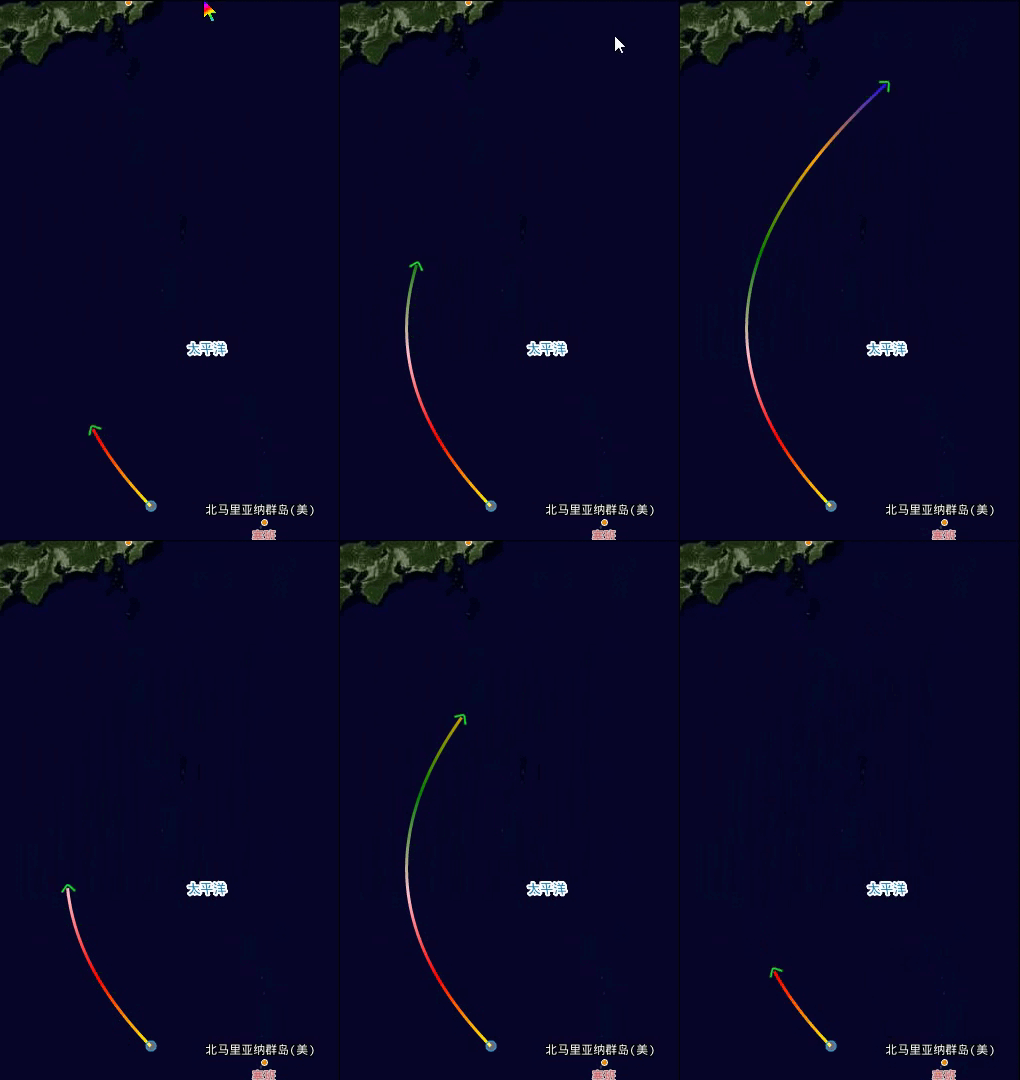
准备步骤
1、先生成起点与终点的表示点。这个很重要,原因在于:openlayers 会智能的检测图层中的数据源(source)是否有需要更新的features,如果你没有设置features,或者不在视图内,是不会触发渲染、因此,也就不会触发我们需要的prerender事件。
2、监听图层的prerender 事件,顾名思义,prerender 意味着这是 openlayers 暴露出来的一个图层的渲染事件,prerender意味着在渲染前执行的一个函数,他会传入一个renderEvent对象。
3、获取到renderEvent之后,我们可以通过 此API,获取一个有关于openlayers底层对当前图层绘制的canvas内容,里头主要封装了两个操作:绘制geometry, 设置样式。
核心实现
贝塞尔曲线的实现
上图中可以看出,线是动态画出来的,其实是由一个个密集的线表示而绘制出来的一条曲线。为此,我们分为三点一个个去说。
1、动态增加的线
需要一个数组去记录当前应该渲染的线的集合。以及一个用于表示上一个结束点坐标的位置 去 在下一个阶段 作为 开始位置。
let lineCoords = []
let startPos = ...
layer.on('prerender',function(evt){

	let endPos = []
	lineCoords.push([startPos,endPos])
	let geometry = new MultiLineString(lineCoords);
})
2、曲线的绘制
本例使用二阶贝塞尔曲线绘制。不懂请去别处找资料。
主要在于控制点的寻找。以及如何获取当前贝塞尔曲线上的点坐标。
getCurrentEnd 函数 里面的计算 取自 百度百科上的贝塞尔曲线 二次方公式。
function ConstantMultiVector2(c, pos) {

        return [c * pos[0], c * pos[1]];
      }
      function vector2Add(a, b) {

        return [a[0] + b[0], a[1] + b[1]];
      }

      /** * a = > [ lng,lat] * b = > [ lng,lat] * n => ratio * 二维向量线性插值 */
      function linerInperpote(a, b, n) {

        let curA = ConstantMultiVector2(1.0 - n, a);
        let curB = ConstantMultiVector2(n, b);
        return vector2Add(curA, curB);
      }
      // 获取 当前贝塞尔曲线上的 点坐标
      function getCurrenetEnd(originPos1, center, originPos2, times) {

        let curTimes = times / 180;
        let a = ConstantMultiVector2(Math.pow(1.0 - curTimes, 2), originPos1);
        let b = ConstantMultiVector2(2 * curTimes * (1 - curTimes), center);
        let c = ConstantMultiVector2(Math.pow(curTimes, 2), originPos2);
        return vector2Add(vector2Add(a, b), c);
      }
以下表示控制点为: 开始点 与结束点 的中点 的经纬度位置 ,经度减10作为控制点。
let controlPos = vector2Add(
        linerInperpote(originPos1, originPos2, 0.5),
        [-10.0, 0]
      )
3、段数的处理(时间的增加)
涉及到动画必然跟时间会有联系。这里我们选择以线段的处理到达终点作为一个周期。
将整个线位置的输入过程分为180段。并非180段最好,这个看个人的设置。理论上来说段数越高,表现越明显,当然,运动会越慢,所以合适就好。
let times = 0;
layer.on("prerender", (evt) => {

	if (times % 180 === 0) {

          times = 0;
          lineCoords = [];
          lastEndPos = startPos;
  	}
  	times++;
  	layer.changed()
}
在结束一个周期时,初始化相关的变量。
调用layer.changed() 重复执行这个函数,即告诉openlayers框架:当窗口中存在该图层的features时,始终更新此图层。
4、渲染
layer.on("prerender", (evt) => {

	let geometry = new MultiLineString(multiCoords);
	let ctx = getVectorContext(evt);
	ctx.setStyle(
          new Style({

            stroke: new Stroke({

              // 模板字符串
              color: 'red',
              lineCap: "butt",
              width: 3,
            }),
          })
	);
}
ctx.drawGeometry(geometry);
样式处理
渐变色处理
理论上来说,你可以操作每一条线的颜色,但通常我们不会这么做,因为太损耗性能了。(理由跟canvas的底层设计有关,有兴趣可以去搜索下。总之fillStyle strokeStyle的设置耗时可能比绘制还长)

而可以看到上图,实际上就是个渐变色的应用。只不过是比较不常见的一个圆形渐变。不使用大家更常见的linear-gradient渐变 也就是线性渐变的原因如下图。
从表现形式上来说,我更喜欢一小段呈现出更加多变的颜色。而且只要颜色设置的较为相近,应该说线条的颜色还是会挺好看的。
圆形渐变许多人了解较少。这里特地说明一下。
主要分为开始圆跟结束圆的渐变色叠加,也就是说,我们大可以设置两个同样的色板,对开始圆的坐标进行偏移达到一种绚丽的效果。但更普遍的,我们一般只用一个圆就够了。
在使用之前,我们还需要计算当前两个线之间,开始点与结束点的距离以让整个圆在开始点的坐标将颜色扩散出去。同时将开始点与结束点都迁移到开始点的屏幕像素位置。
		// 通过getPixelFromCoordinate 获取当前位置对应的屏幕像素位置
      	let getPixelFromCoordinate = this.map.getPixelFromCoordinate.bind(
        	this.map
      	);
        let startGrdPixelPos = getPixelFromCoordinate(pos1);
        let endGrdPixelPos = getPixelFromCoordinate(pos2);
        let xdiff = endGrdPixelPos[0] - startGrdPixelPos[0]
        let ydiff = endGrdPixelPos[1] - startGrdPixelPos[1]
        let radius = Math.pow(Math.pow(xdiff,2) + Math.pow(ydiff,2),0.5);
        var grd = ctx.context_.createRadialGradient(
          startGrdPixelPos[0],
          startGrdPixelPos[1],
          0,
          startGrdPixelPos[0],
          startGrdPixelPos[1],
          radius
        );
        grd.addColorStop(0, "yellow");
        grd.addColorStop(0.2, "red");
        grd.addColorStop(0.4, "pink");
        grd.addColorStop(0.6, "green");
        grd.addColorStop(0.8, "orange");
        grd.addColorStop(1, "blue");
        ctx.setStyle(
          new Style({

            stroke: new Stroke({

              // 模板字符串
              color: grd,
              lineCap: "butt",
              width: 3,
            }),
          })
        );
        ctx.drawGeometry...
箭头处理
本实例中箭头主要是通过添加Icon 的方式 对图片进行旋转达到的。所以说,对比使用逻辑去计算的箭头应该说方便许多。但是有一点在这里需要注意: 不要使用src 去 为Icon 添加图片。此处也困扰了我很久,后面我基本上确定这就是一个BUG。使用src属性在prerender函数这里调用setStyle你是创建不了图片的。至于是为什么,这里就不再赘述了。
因此,我们使用图片对象去做处理。
let arrowImage = new Image();
// 再说一次: 在vue 里面, 静态文件资源放于public目录下
// 意味着此时的请求路径,如果你的端口是8080,从本质上来说等于: http://localhost:8080/image/arrow1.png
// 你的目录结构应为 public/image/arrow1.png
// 再问我就自杀
arrowImage.src = "image/arrow1.png";
let arrowFlag = false;
arrowImage.onload = function () {

	arrowFlag = true;
};

layer.on("prerender", (evt) => {

        let arrowGeometry = new Point(endPos);
		const dx = endPos[0] - lastEndPos[0];
        const dy = endPos[1] - lastEndPos[1];
        const rotation = Math.atan2(dy, dx);
        if (arrowFlag) {

          ctx.setImageStyle(
            new Icon({

              img: arrowImage,
              rotateWithView: true,
              rotation: -rotation,
              imgSize: [16, 16],
            })
          );
        }
        ctx.drawGeometry(arrowGeometry);
}
结语
写在结尾,今天星期四了,明天星期五,有谁可以帮我点个外卖吗,我想吃炸鸡
边栏推荐
- nvm安装教程
- This executeQuery (SQL) cannot compile classes for JSP. What is the reason?
- Msvcr110 not found DLL, unable to continue code execution Solution for startup
- 7-2 摘花生
- 2022 edition of China's energy and chemical industry market in-depth investigation and investment feasibility analysis report
- 程序员必备,一款让你提高工作效率N倍的神器uTools
- PHP generate order number
- 源码学习:AtomicInteger类代码内部逻辑
- What are the top ten securities companies? Is it safe to open a mobile account?
- 快手实时数仓保障体系研发实践
猜你喜欢

power designer - 自定义注释按钮

Redis learning - 02 common data types, operation commands and expiration time

Installing MySQL under Linux (RPM package installation)

由错误<note: candidate expects 1 argument, 0 provided>引发的思考

小程序中控件里面的内容较多,让其支持滚动的良好方案

Scala-day03- operators and loop control

程序员必备,一款让你提高工作效率N倍的神器uTools
Adobe Acrobat阻止30款安全软件查看PDF文件 或存在安全风险

TP5 thinkphp5 report serialization of'closure'is not allowed

NoSQL mongodb - 02 mongodb server installation, mongodb shell, basic concepts and visualization tools

随机推荐
软件测试 - 基础篇
7-2 摘花生
Xiaobai lazy special-win10-win11 one click installation version
Php+laravel5.7 use Alibaba oss+ Alibaba media to process and upload image / video files
Msvcr110 not found DLL, unable to continue code execution Solution for startup
MySQL optimization - index (what is an index?)
Ubuntu安装配置PostgreSQL(18.04)
由错误<note: candidate expects 1 argument, 0 provided>引发的思考
PHP returns false when calling redis method decrby less than 0
做自媒体视频的各种常用工具合集奉上
5+API,清除应用缓存
PHP get directory size
NoSQL mongodb - 04 mongodb database and web service combination case
Investment planning and forecast report on the future direction of China's smart agriculture during the 14th five year plan (2022)
JS get the current screen height method and listen for DOM elements to enter the viewport
Example of parameter passing from laravel query constructor to closure method
老司机总结的12条 SQL 优化方案(非常实用)
International beauty industry giants bet on China
A most practical arbitrage wizard EA [2022 modified version]
一个快速切换一个底层实现的思路分享