当前位置:网站首页>Test APK exception control nettraffic attacker development
Test APK exception control nettraffic attacker development
2022-06-23 07:40:00 【Fadi】
1. Purpose
be based on 《 Application experience standard of software Green Alliance 》 in NetTraffic The definition of resources , Yes NetTraffic Simulation of the behavior of multiple small traffic packets in the background . Designed to trigger abnormal power consumption control mechanism in mobile phones .

Screen is off this time NetTraffic At least two levels used more than :30 Time ,60 Time , Execute the following judgment :
The green line does not control the standard : Important perceptible scenarios , Not limited to and including the system application white list 、 Third party application whitelist 、CTS、 Charge 、 Default input method 、 Default clock 、 Audio scene 、 Step counting scenario
The red line should control the standard : The number of small traffic times of non downloading and uploading this time has exceeded 30 Time , exceed 5 Minutes of non perceptible scenes
Be careful : For small packets , Avoid downloading behavior scenarios , Prevent misjudgment
The first level : Notification alerts or power consumption tagging
The second level : Restrict or intercept
2022-06-22 15:00:40.459 2630-23738/com.huawei.iaware I/DownloadState: singleUid: 10175 [com.sufadi.blocknettraffic] speed: 7830 real speed: 7800 (rxB:34116 txB:5036 rxP:73 txP:77)
2022-06-22 15:00:40.474 2630-23738/com.huawei.iaware I/DownloadState: shareUid: 0 /system/bin/netd transmitting data speed : 35 bytes/s (rxB:118 txB:59 rxP:1 txP:1 iface:1)
2022-06-22 15:00:44.711 2630-3079/com.huawei.iaware I/APwActAnalysis: net traffic high power app: com.sufadi.blocknettraffic trafficCount: 30 duration:150180
2. testing procedure
H Mobile phones and T mobile phone 、 Other mobile phones for installation apk.
All mobile phones need to set the app to white list .
2.1 Mobile phone white list setting method :
Cell phone manager -> Apply startup settings : Allow self starting 、 Allow association to start 、 Allow background startup

2.2 Test environment
Turn on the Internet
2.3 Run this apk
Packet usage behavior detection in the background of screen out
2.4 Run this apk
test : After adding white list , Run this apk after , Press home key , Off screen ,30 Minutes later, the screen will be lit to view , Whether there is an abnormal reminder of high power consumption
3. apk Source code
Ben apk effect : Unlimited backstage WiFi Scanning behavior
3.1 UI
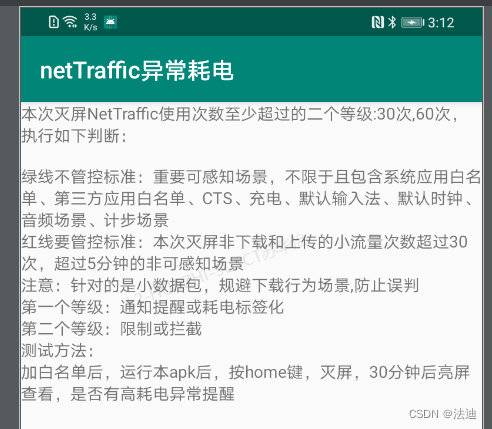
3.2 Core logic
3.2.1 MainActivity
package com.sufadi.blocknettraffic

import android.content.Intent
import androidx.appcompat.app.AppCompatActivity
import android.os.Bundle

class MainActivity : AppCompatActivity() {

    override fun onCreate(savedInstanceState: Bundle?) {
        super.onCreate(savedInstanceState)
        setContentView(R.layout.activity_main)

        startService(Intent(this, BlockNetTrafficService::class.java))
    }
}

<?xml version="1.0" encoding="utf-8"?>
<androidx.constraintlayout.widget.ConstraintLayout xmlns:android="http://schemas.android.com/apk/res/android"
    xmlns:app="http://schemas.android.com/apk/res-auto"
    xmlns:tools="http://schemas.android.com/tools"
    android:layout_width="match_parent"
    android:layout_height="match_parent"
    tools:context=".MainActivity">

    <TextView
        android:layout_width="wrap_content"
        android:layout_height="wrap_content"
        android:text=" Screen is off this time NetTraffic At least two levels used more than :30 Time ,60 Time , Execute the following judgment :\n
\n The green line does not control the standard : Important perceptible scenarios , Not limited to and including the system application white list 、 Third party application whitelist 、CTS、 Charge 、 Default input method 、 Default clock 、 Audio scene 、 Step counting scenario
\n The red line should control the standard : The number of small traffic times of non downloading and uploading this time has exceeded 30 Time , exceed 5 Minutes of non perceptible scenes
\n Be careful : For small packets , Avoid downloading behavior scenarios , Prevent misjudgment
\n The first level : Notification alerts or power consumption tagging
\n The second level : Restrict or intercept
\n The test method :
\n After adding white list , Run this apk after , Press home key , Off screen ,30 Minutes later, the screen will be lit to view , Whether there is an abnormal reminder of high power consumption
"
        app:layout_constraintLeft_toLeftOf="parent"
        app:layout_constraintRight_toRightOf="parent"
        app:layout_constraintTop_toTopOf="parent" />

</androidx.constraintlayout.widget.ConstraintLayout>
3.3.2 Access configuration
Keep alive and connected
    <!--  Foreground service attribute permission  -->
    <uses-permission android:name="android.permission.FOREGROUND_SERVICE" />
    <!--  network right  -->
    <uses-permission android:name="android.permission.INTERNET" />
3.3.3 Core logic
The backstage has been regularly connected to Baidu and resident services
package com.sufadi.blocknettraffic

import android.app.Notification
import android.app.NotificationChannel
import android.app.NotificationManager
import android.app.Service
import android.content.Context
import android.content.Intent
import android.location.Location
import android.location.LocationListener
import android.location.LocationManager
import android.os.Bundle
import android.os.Handler
import android.os.IBinder
import android.os.Message
import android.util.Log
import okhttp3.OkHttpClient
import okhttp3.Request
import java.io.IOException
import java.lang.ref.WeakReference

class BlockNetTrafficService: Service() {

    companion object {
        val TAG = "BlockNetTrafficService"
        val FORGROUND_ID = 0x11
        val MSG_UPDATE_NETWORK = 1
    }

    var mMainHandle: MainHandle? = null


    override fun onBind(p0: Intent?): IBinder? {
        return null
    }

    override fun onCreate() {
        super.onCreate()
        Log.d(TAG, "onCreate")
        startMyForeground()

        mMainHandle = MainHandle(this)
        sendRequestWithHttpClient()
    }

    override fun onDestroy() {
        super.onDestroy()
        stopForeground(true)
    }


    class MainHandle(serviceTct: BlockNetTrafficService) : Handler() {

        private val mRefServiceTct: WeakReference<BlockNetTrafficService>

        init {
            mRefServiceTct = WeakReference(serviceTct)
        }

        override fun handleMessage(msg: Message) {
            val service = mRefServiceTct.get() ?: return

            when (msg.what) {
                MSG_UPDATE_NETWORK -> {
                    service?.sendRequestWithHttpClient()
                }
            }
        }
    }

    private fun startMyForeground() {
        Log.d(TAG, "startMyForeground show notification")
        Log.d(TAG, "PhoneDataService startMyForeground sdk :" + android.os.Build.VERSION.SDK_INT)
        val nb = Notification.Builder(this)

        if (android.os.Build.VERSION.SDK_INT >= 26) {
            val CHANNEL_ONE_ID = "channel_id_foreground"
            val CHANNEL_ONE_NAME = "Channel One"
            var notificationChannel: NotificationChannel? = null

            notificationChannel = NotificationChannel(
                CHANNEL_ONE_ID,
                CHANNEL_ONE_NAME, NotificationManager.IMPORTANCE_LOW
            )

            nb.setChannelId(CHANNEL_ONE_ID)

            val manager = getSystemService(Context.NOTIFICATION_SERVICE) as NotificationManager
            manager.createNotificationChannel(notificationChannel)
        }

        nb.setSmallIcon(R.mipmap.ic_launcher)
        nb.setContentTitle(getString(R.string.notification_title))
        nb.setContentText(getString(R.string.notification_Content))

        try {
            startForeground(FORGROUND_ID, nb.build())
        } catch (e: Exception) {
            e.printStackTrace()
        }

    }

    // Method : Send network request , Get Baidu home page data . Turn on threads inside
    private fun sendRequestWithHttpClient() {
        Thread(Runnable {
            val requestUrl =
                "https://www.baidu.com/"
            val okHttpClient = OkHttpClient()
            val request = Request.Builder()
                .url(requestUrl)
                .build()

            val call = okHttpClient.newCall(request)
            Log.v(TAG, "okHttpClient.newCall")
            try {
                val response = call.execute()
                if (response.isSuccessful()) {
                    //The call was successful.print it to the log
                    val msg = Message()
                    msg.what = MSG_UPDATE_NETWORK
                    msg.obj = response.body().string()
                    Log.v(TAG, response.body().string())
                    mMainHandle?.sendMessageDelayed(msg, 1000)
                }
            } catch (e: IOException) {
                e.printStackTrace()
            }
        }).start()

    }
}
3.3.4 Huawei exception detection log
Screen is off this time NetTraffic At least two levels used more than :30 Time ,60 Time , Execute the following judgment :
The green line does not control the standard : Important perceptible scenarios , Not limited to and including the system application white list 、 Third party application whitelist 、CTS、 Charge 、 Default input method 、 Default clock 、 Audio scene 、 Step counting scenario
The red line should control the standard : The number of small traffic times of non downloading and uploading this time has exceeded 30 Time , exceed 5 Minutes of non perceptible scenes
Be careful : For small packets , Avoid downloading behavior scenarios , Prevent misjudgment
The first level : Notification alerts or power consumption tagging
The second level : Restrict or intercept
2022-06-22 15:00:40.459 2630-23738/com.huawei.iaware I/DownloadState: singleUid: 10175 [com.sufadi.blocknettraffic] speed: 7830 real speed: 7800 (rxB:34116 txB:5036 rxP:73 txP:77)
2022-06-22 15:00:40.474 2630-23738/com.huawei.iaware I/DownloadState: shareUid: 0 /system/bin/netd transmitting data speed : 35 bytes/s (rxB:118 txB:59 rxP:1 txP:1 iface:1)
2022-06-22 15:00:44.711 2630-3079/com.huawei.iaware I/APwActAnalysis: net traffic high power app: com.sufadi.blocknettraffic trafficCount: 30 duration:150180
边栏推荐
- 3dmax插件开发环境配置及FileExport和Utilities模板测试
- How flannel works
- G++ compilation command use
- leetcode210. 课程表 II 207. 课程表 拓扑排序 dfs bfs
- codeforce 158B Taxi
- Judge black production based on CDN and client slow log characteristics
- MySQL Niuke brush questions
- Minio single node deployment Minio distributed deployment fool deployment process (I)
- [pit stepping record] a pit where the database connection is not closed and resources are released
- Tp6+redis+think-queue+supervisor implements the process resident message queue /job task
猜你喜欢
![[* * * array * * *]](/img/fe/2520d85faab7d1fbf5036973ff5965.png)
[* * * array * * *]

Detailed explanation of redis persistence, master-slave and sentry architecture
测试apk-异常管控NetTraffic攻击者开发

1278_FreeRTOS_借助prvAddCurrentTaskToDelayedList接口理解delayed task

干货来了|《PaaS》合辑抢先看~

User mode and kernel mode

MySQL on duplicate key and PgSQL on conflict (primary key) handle primary key conflicts

20bn Jester complete dataset Download
Pagoda forgot password
![[game theory] basic knowledge](/img/eb/08b1ce5106e574dc42be58f72fbab9.jpg)
[game theory] basic knowledge
随机推荐
[deep learning] [original] how to detect targets and draw map and other parameter maps without yolov5 weights or models
如何优雅的快速下载谷歌云盘的大文件 (二)
【唠嗑篇】普通人到底该怎么学技术啊?
Online text filter less than specified length tool
Nacos adapts Oracle11g create table DDL statement
How bootstrap clears floating styles
Ntu-rgbd data set download and data format analysis
JS to determine the added and decreased elements of two arrays
U-Net: Convolutional Networks for Biomedical Image Segmentation
作为思摩尔应对气候变化紧急事件的一项举措,FEELM加入碳披露项目
1278_FreeRTOS_借助prvAddCurrentTaskToDelayedList接口理解delayed task
MYSQL牛客刷题
Spock-sub打桩
测试apk-异常管控NetTraffic攻击者开发
Technical article writing guide
Tp6+redis+think-queue+supervisor implements the process resident message queue /job task
【AI实战】机器学习数据处理之数据归一化、标准化
MySQL (IV) - MySQL storage engine
Spock constraint - call frequency / target / method parameters
Ldconfig command