当前位置:网站首页>Image cropper example
Image cropper example
2022-07-25 15:13:00 【Deep sea blue mountains】
When uploading avatars, you need to cut and upload , You can use <input type="file"> Make a picture selection , Then combine cropper Tailoring , The cropping result is the image base64 Format , Then upload the results to the server
For detailed parameters, please refer to :https://github.com/fengyuanchen/cropperjs
Requirements introduction related js and CSS:
https://cdn.bootcdn.net/ajax/libs/cropperjs/1.5.9/cropper.min.css
https://cdn.bootcdn.net/ajax/libs/cropperjs/1.5.9/cropper.min.js
effect :

Code example :
<!DOCTYPE html>
<html lang="en">

<head>
    <meta charset="UTF-8">
    <meta name="viewport" content="width=device-width, initial-scale=1.0">
    <script src="https://cdn.bootcdn.net/ajax/libs/jquery/3.5.1/jquery.min.js"></script>
    <link href="https://cdn.bootcdn.net/ajax/libs/cropperjs/1.5.9/cropper.min.css" rel="stylesheet">
    <script src="https://cdn.bootcdn.net/ajax/libs/cropperjs/1.5.9/cropper.min.js"></script>
    <title>Cropperjs</title>
    <style>
        .photo_cropper {
            float: left;
            width: 400px;
            height: 370px;
            margin-right: 20px;
        }

        .cropper_preview {
            float: left;
            width: 310px;
            overflow: hidden;
        }

        .photo_preview {
            float: left;
            overflow: hidden;
            margin-bottom: 10px;
            margin-right: 10px;
        }

        .photo_cropper>img,
        .photo_preview>img {
            width: 100%;
            height: 100%;
        }

        .preview-lg {
            height: 240px;
            width: 260px;
        }

        .preview-md {
            height: 120px;
            width: 120px;
        }

        .preview-sm {
            height: 80px;
            width: 80px;
        }

        .preview-xs {
            height: 40px;
            width: 40px;
        }

        .hint-content {
            top: -18px;
            font-size: 12px;
            color: gray;
        }


        .btn-primary,
        input[type="file"] {
            padding: 5px 10px;
            background-color: #00c176;
            color: white;
            border-radius: 4px;
            border: none;
        }

        .btn-primary {
            padding: 8px 10px;
        }
    </style>

</head>

<body>
    <div class="photo_container">
        <div class="photo_cropper">
            <img src="https://timgsa.baidu.com/timg?image&quality=80&size=b9999_10000&sec=1604414071111&di=6681d440860b07f3c7a4fc2fcb224180&imgtype=0&src=http%3A%2F%2Fh.hiphotos.baidu.com%2Fzhidao%2Fpic%2Fitem%2F0dd7912397dda144dac4acc9b2b7d0a20df486f8.jpg"
                id="cr_photoImg">
        </div>
        <div class="cropper_preview">
            <div class="photo_preview preview-lg"></div>
            <div class="photo_preview preview-md"></div>
            <div class="photo_preview preview-sm"></div>
            <div class="photo_preview preview-xs"></div>
        </div>
    </div>
    <div class="cropper_actions" style="clear: both;">
        <div class="actions">
            <input type="file" accept=".gif,.jpg,.jpeg,.png" onchange="imgChange(event)" id="fileInput">
            <input type="button" class="btn-primary cr_savePhotoBtn" value="  preservation ">
        </div>
        <div class="hint-content"> Support formats :png、jpg,  The size of the picture does not exceed 5MB.</div>
    </div>
</body>

</html>

<script>
    let cropper = null;
    $('.photo_preview').html($('.photo_cropper').html());
    function imgChange(e) {
        var fileObj = e.target.files[0];
        var typeExtens = 'image/jpeg,image/png';
        if (!typeExtens.includes(fileObj.type)) {
            alert(' Can only upload png、jpg Format .');
            return false;
        }
        if (fileObj.size > 5 * 1024 * 1024) {
            alert(' The size of the picture does not exceed 5MB.');
            return false;
        }
        console.info(fileObj);// Picture file
        var reader = new FileReader();
        reader.onload = (function (file) {
            return function (e) {
                $('#cr_photoImg').attr('src', this.result);// This is base64 The data of the
                cropper = initCropper(cropper);
            };
        })(e.target.files[0]);
        reader.readAsDataURL(e.target.files[0]);
    }
    //  Initialize image cropping
    function initCropper(cropper) {
        cropper && cropper.destroy();
        cropper = new Cropper(document.getElementById('cr_photoImg'), {
            viewMode: 1,
            preview: '.photo_preview',
            minCropBoxWidth: 150,
            aspectRatio: 1 / 1,
            autoCropArea: 1
        });
        return cropper;
    }
    $('.cr_selectPhoto').on('click', function () {
        $('#fileInput').trigger("click");
    })
    $('.cr_savePhotoBtn').on('click', function () {
        if ($('#fileInput').val().length == 0) {
            alert(' Please choose a picture ');
            return false;
        }
        const blobMimeType = 'image/png';
        let croppedCanvas = cropper.getCroppedCanvas({
            width: 200,
            height: 200
        });
        let dataStr = croppedCanvas.toDataURL(blobMimeType, 0.9);
        // addSave(dataStr)// Picture the base64 The data is saved to the server
    });
</script>
边栏推荐
- How much memory can a program use at most?
- vscode 插件篇收集
- Simulate setinterval timer with setTimeout
- Stored procedure bias of SQL to LINQ
- 6月产品升级观察站
- Spark DF增加一列
- 在win10系统下使用命令查看WiFi连接密码
- SSM Advanced Integration
- Docker上运行redis以配置文件方式启动,连接客户端报错Error: Server closed the connection
- The implementation process of inheritance and the difference between Es5 and ES6 implementation
猜你喜欢
[Android] recyclerview caching mechanism, is it really difficult to understand? What level of cache is it?

防抖(debounce)和节流(throttle)

Share a department design method that avoids recursion

记一次Yarn Required executor memeory is above the max threshold(8192MB) of this cluster!

String type time comparison method with error string.compareto

Implement a simple restful API server

"How to use" agent mode
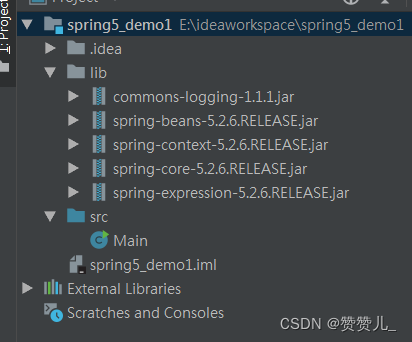
Add the jar package under lib directory to the project in idea

推荐10个堪称神器的学习网站
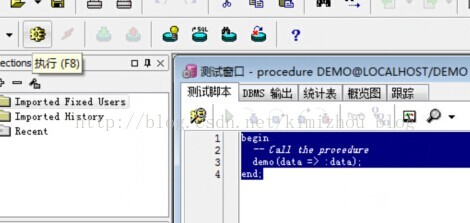
Pl/sql creates and executes ORALCE stored procedures and returns the result set
![[Android] recyclerview caching mechanism, is it really difficult to understand? What level of cache is it?](/img/e0/ca18e18788ebe2a5c3572e422cfcbd)
随机推荐
Scala111-map、flatten、flatMap
Instance Tunnel 使用
简易轮播图和打地鼠
Meanshift clustering-01 principle analysis
Award winning interaction | 7.19 database upgrade plan practical Summit: industry leaders gather, why do they come?
Share a department design method that avoids recursion
【JS高级】js之正则相关函数以及正则对象_02
oracle_ 12505 error resolution
Use the command to check the WiFi connection password under win10 system
sql to linq 之存储过程偏
深入:微任务与宏任务
MySQL sort
golang复习总结
[C topic] Li Kou 206. reverse the linked list
Detailed explanation of lio-sam operation process and code
MeanShift聚类-01原理分析
《三子棋》C语言数组应用 --n皇后问题雏形
浏览器工作流程(简化)
[C topic] the penultimate node in the Niuke linked list
Spark DF增加一列