当前位置:网站首页>OpenHarmony南向学习笔记——Hi3861+HC-SR04超声波检测
OpenHarmony南向学习笔记——Hi3861+HC-SR04超声波检测
2022-07-23 09:19:00 【小向是个Der】
前言
最近参加立创训练营,用Hi3861做机器狗,接着上一段时间的学习继续OpenHarmony的设备开发学习,之前的笔记中一直没有使用到超声波模块,在这次的训练营中,笔者打算尝试在Hi3861试试。
模块介绍
产商的手册如下所示,笔者购买的是2022款,链接如下:「超声波测距模块 HC-SR04 超声波传感器 支持兼容UNO R3/51/STM32」。
该模块支持四种模式来获取距离,可以通过背面的电阻设置进行选择。
1. GPIO模式
时序图

此模式需要使用Hi3861的两个IO口来与超声波模块的TRIG和ECHO两个脚进行通信。
通信流程
根据厂商资料可以知道,该模块的通信流程如下:
1.主控芯片与TRIG连接的IO配置为输出模式,与ECHO连接的IO配置为输入模式;
2.MCU给TRIG引脚输出一个大于10us的高电平脉冲;
3.模块通过ECHO脚返回一个高电平脉冲信号;
4.主控记录ECHO脚高电平脉冲时间T并代入公式计算。
代码
此代码参考了润和的智能循迹避障小车样例代码。笔者此处使用的是传智教育的元气派,有部分接口定义不太一样。
// An highlighted block

#define Echo  8   //Echo //GPIO8
#define Trig  7   //Trig //GPIO7
#define GPIO_FUNC 0

float GetDistance  (void) {

    static unsigned long start_time = 0, time = 0;
    float distance = 0.0;
    IotGpioValue value = IOT_GPIO_VALUE0;
    unsigned int flag = 0;
            /* =============== GPIO通信模式流程 1初始化GPIO======================================== */
    IoTIoSetFunc(Echo, GPIO_FUNC);//设置Echo连接IO为普通GPIO模式,无复用
    IoTGpioSetDir(Echo, IOT_GPIO_DIR_IN);//设置Echo连接IO为输入模式
    IoTGpioSetDir(Trig, IOT_GPIO_DIR_OUT);//设置Trig连接IO为输出模式
            /* =============== GPIO通信模式流程 2输出起始信号======================================== */
    IoTGpioSetOutputVal(Trig, IOT_GPIO_VALUE1);//拉高Trig
    IoTUdelay(20);//20us
    IoTGpioSetOutputVal(Trig, IOT_GPIO_VALUE0);//拉低Trig
           /* =============== GPIO通信模式流程 3检测Echo脚输出的高电平时间======================================== */
    while (1) {

        IoTGpioGetInputVal(Echo, &value);//读取Echo脚的电平状态
        if ( value == IOT_GPIO_VALUE1 && flag == 0) {
    //如果为高
            start_time = IoTGetUs();//获取此时时间
            flag = 1;
        }
        if (value == IOT_GPIO_VALUE0 && flag == 1) {
    //高电平结束变成低电平
            time = IoTGetUs() - start_time;//计算高电平维持时间
            start_time = 0;
            break;
        }
    }
               /* =============== GPIO通信模式流程 4代入公式计算======================================== */
    distance = time * 0.034 / 2;
    // printf("distance is %f\r\n",distance);
    return distance;
}
打印结果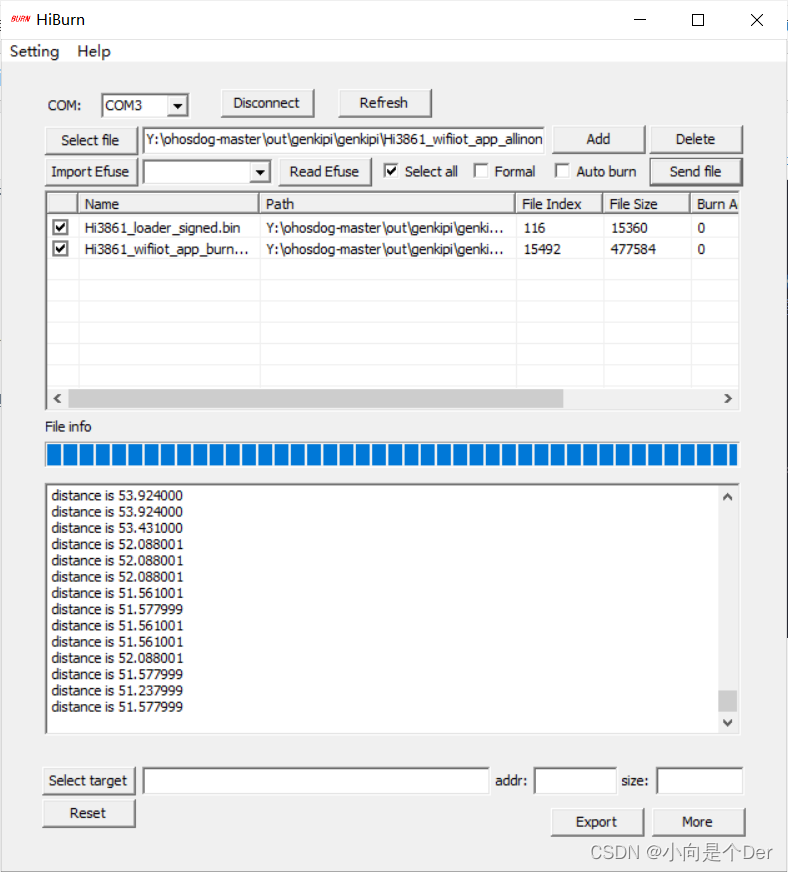
有关其他三种模式的通信,等笔者的10K欧0603电阻到了在做介绍。
边栏推荐
- 手工测试如何转向自动化测试?字节5年自动化经验浅谈一下...
- Question 142 of Li Kou: circular linked list 2
- Authing supports Zadig! Unified authentication and rapid docking of cloud native users
- 【FLink】FLink Hash collision on user-specified ID “opt“. Most likely cause is a non-unique ID
- ArcGIS uses DEM data to delineate the specific steps and processes of catchment area
- Program design of dot matrix Chinese character display of basic 51 single chip microcomputer
- [paper notes] mobile robot navigation method based on hierarchical depth reinforcement learning
- Chapter 3 complex query
- 【论文笔记】基于分层深度强化学习的移动机器人导航方法
- Pychart reads excel file with error: raise xlrderror (file_format_descriptions[file_format]+; not supported)
猜你喜欢

Question 142 of Li Kou: circular linked list 2

AI acceleration gesture recognition experience based on efr32mg24

Spotlight light box JS plug-in full screen enlarged picture

uni-app知识点和项目上遇到的问题和解决办法的记录

【C语言】猜数字小游戏+关机小程序

云呐|公司固定资产如何管理?公司固定资产如何管理比较好?

Canvas from getting started to persuading friends to give up (graphic version)
![Pychart reads excel file with error: raise xlrderror (file_format_descriptions[file_format]+; not supported)](/img/f0/9491ccc2a86d95bb30066397fb9fb6.png)
Pychart reads excel file with error: raise xlrderror (file_format_descriptions[file_format]+; not supported)

Sword finger offer19 regular expression
对象使用过程中背后调用了哪些方法
随机推荐
Is it risky and safe to open a mobile stock account?
【测试平台开发】23. 接口断言功能-保存接口断言和编辑回显
Experience in developing large crawlers in requests Library
OKRK3399开发板预留I2C4挂载EEPROM
(重链剖分)魔法树
Flat style feedback form page
Optimize Huawei ECs to use key login
Surrounded Regions
requests库大型爬虫开发经验
10 years of software testing engineer experience, very confused
Which is a good fixed asset management system? What are the fixed asset management platforms?
ArgoCD 用户管理、RBAC 控制、脚本登录、App 同步
Offline data interoperability
JS software unloading prompt expression changes with the mouse JS special effect
10年软件测试工程师经验,很茫然....
Due to resource constraints, the namenode fails to start with an error unable to create new native thread
[can I do your first project?] Detailed introduction and Simulation Implementation of gzip
什么是Per-Title编码?
AI acceleration gesture recognition experience based on efr32mg24
Pychart reads excel file with error: raise xlrderror (file_format_descriptions[file_format]+; not supported)