当前位置:网站首页>Jsp+dao integration
Jsp+dao integration
2022-07-24 05:20:00 【x0757】
1 Accept data submitted by hyperlinks
<%-- Hyperlinks : How to transfer parameters of hyperlinks Use ?key=value&key=value--%>
<a href="indexDo02.jsp?name=ykq&age=18"> Connect </a>
2 How to solve the garbled code
<%
    request.setCharacterEncoding("utf-8");
    String name= request.getParameter("uname");
    String pwd = request.getParameter("pwd");
    UserDao userDao = new UserDao();
    User user = userDao.findByNameAndPwd(name,pwd);
    if(user!=null){
        session.setAttribute("user",user);
        response.sendRedirect("success.jsp");
    }else{
        response.sendRedirect("login.jsp?error=1");
    }
%>
Common coding :
ISO-8859-1: International Code But Chinese is not supported .
UTF-8: Universal code supports English, Chinese and traditional Chinese .---- Enterprise development uses UTF-8
GBK: Chinese code . Simplified Chinese and traditional Chinese .
GB2312: Chinese code But it supports simplified Chinese .
3 Page Jump

4 JSP+Dao Integrate
4.1 Sign in
 <title>Title</title>
    <script>
        function reg(){
        location.href='register.jsp';
        }
    </script>
</head>
<body>
<%
String error = request.getParameter("error");
if(error!=null&&"1".equals(error)){
    out.print("<font color='red'> Wrong account or password </font>");
}
%>
<form action="loginDo.jsp" method="post">
     account number :<input type="text" name="uname"><br>
     password :<input type="password" name="pwd"><br>
    <input type="submit" value=" Sign in ">
    <input type="button" value=" register " onclick="reg()">
</form>
</body>
</html>
loginDo.jsp
<%
    request.setCharacterEncoding("utf-8");
    String name= request.getParameter("uname");
    String pwd = request.getParameter("pwd");
    UserDao userDao = new UserDao();
    User user = userDao.findByNameAndPwd(name,pwd);
    if(user!=null){
        session.setAttribute("user",user);
        response.sendRedirect("success.jsp");
    }else{
        response.sendRedirect("login.jsp?error=1");
    }
%>
4.2 register
    <title> Registration page </title>
    <script>
        function checkUsername(){
            var uname = document.getElementsByName("uname")[0].value;
            if(uname==null || uname.trim()==""){
                alert(" Please enter your account number ");
                return false;
            }
            return true;
        }
        function checkPassword(){
            var pwd=document.getElementsByName("pwd")[0].value;
            if(pwd==null || pwd.trim()==""){
                alert(" Please input a password ");
                return false;
            }
            return true;
        }
        function checkRealname(){
            var realname=document.getElementsByName("realname")[0].value;
            if(realname==null || realname.trim()==""){
                alert(" Please enter a name ");
                return false;
            }
            return true;
        }
        function ck(){
            if(checkUsername()&&checkPassword()&&checkRealname()){
                return true;
            }
            return false;
        }
    </script>
</head>
<body>
<h1> Registration page </h1>
<form action ="registerDo.jsp" method="post" onsubmit="return ck()">
     account number :<input type="text" name="uname" onblur="checkUsername()"><br>
     password :<input type="password" name="pwd" onblur="checkPassword()"><br>
     full name :<input type="text" name="realname" onblur="checkRealname()"><br>
    <input type="submit" value=" Submit ">
</form>
reginsterDo.jsp
<%
request.setCharacterEncoding("utf-8");
    String name =request.getParameter("uname");
    String pwd = request.getParameter("pwd");
    String realname = request.getParameter("realname");
    UserDao userDao = new UserDao();
    User user =new User(name,pwd,realname);
    userDao.insert(user);
    response.sendRedirect("login.jsp");
%>
4.3 Delete
<%
    String id = request.getParameter("id");

    DepartmentDao departmentDao = new DepartmentDao();
    departmentDao.delete(Integer.parseInt(id));

    response.sendRedirect("success.jsp");
%>
4.4 modify
<%
    String id =request.getParameter("id");
    DepartmentDao departmentDao = new DepartmentDao();
    Department department = departmentDao.findById(Integer.parseInt(id));
%>
<form action="updateDo.jsp" method="post">
    id Number :<input type="text" value="<%=department.getId()%>" name="id" /><br>
     department :<input type="text" value="<%=department.getName()%>" name="deptname"/><br>
    <input type="submit" value=" Confirm the change "/>
</form>
updateDo.jsp
<%
request.setCharacterEncoding("utf-8");
String id= request.getParameter("id");
String name = request.getParameter("deptname");
    DepartmentDao departmentDao  = new DepartmentDao();
    Department d = new Department();
    d.setId(Integer.parseInt(id));
    d.setName(name);
    departmentDao.update(d);
    response.sendRedirect("success.jsp");
%>
4.5 add to
<form action ="addDo.jsp" method="post">
    id Number :<input type="text" name="id"><br>
     department :<input type="text" name="deptname">
    <input type="submit" value=" add to ">
</form>
addDo.jsp
<%
    request.setCharacterEncoding("utf-8");

    String name =request.getParameter("deptname");
    DepartmentDao departmentDao = new DepartmentDao();
    Department department = new Department();
    department.setName(name);
    departmentDao.add(department);

    response.sendRedirect("success.jsp");
%>
5 Nine built-in objects
1. out object --- effect : Used to output information to the browser . Common methods : print();
2. request object -- effect : Request object . Common methods :getParameter(); setCharacterEncoding("") , getSession(): obtain session object .
3. session object --> effect : A conversation The same user shares the storage in session Data in . Common methods :setAttribute(key,value) getAttribute(key); removeAttribute(key), invalidate(); Make current session Invalid
4. response The response object --> Common methods : sendRedirect(). getWriter(): obtain out object .
5.pageContext object : Represents the current page object . It can share the data of the current page . You can get other 8 Built in objects .
6.application object : All users share the data stored by this object .
7.page object : Represents the object of the current page this.
8.config object : Used to get servlet Configuration information .
9.exception object : Exception object . If the object wants to use, the web page must be an exception page
6 Four domain objects
Data stored in different objects , The scope of action is different .
1. pageContext: Can store data , The scope of action is that the current page is valid . 2. request: Can store data , The scope of action is that the same request is valid .--- Request forwarding jump 3. session: Can store data , The scope is that the same session is valid .--- User information 4. application: Can store data , The scope of action is the same application . Save the data to application in , Wrong number, especially wrong Because the longer the storage time is, the longer the resources are used .
Understand modifiers public protected Default private
7 The difference between redirection and request forwarding
7.1 Redirect

7.2 Request forwarding

7.3 difference
1. The redirection address bar will change , And a new request object will be generated . Can't get request Saved data .
2. The request forwarding address bar will not change , And it uses the same request object . Can get request Saved data .
The longer the storage period , The longer it takes up resources . Generally, when we develop, most of our data are used to saving to request In the object . As long as a small amount of data is saved to session In the session . For example, when logging in, the user's information is saved to session In the session .
8 jstl Tag library and EL expression
8.1 el expression
EL expression --> effect : Get the data in the four domain objects .
grammar : ${xxxScope.key}
We originally passed xxx.getAttribute(key) You can also get the data in the four domains , Why even use EL expression , because EL Expression syntax is more concise . And later can be with our jstl Tag library . If EL Expression not found for key, Returns an empty string "".
EL Expression belongs to jsp Or explain later thymeleaf The grammar of
<%
   // Store data into four domains
pageContext.setAttribute("name","pageContesxt The content of ");
request.setAttribute("name","request The content of ");
session.setAttribute("name","session The content of ");
application.setAttribute("name","application The content of ");
response.sendRedirect("b.jsp");
//request.getRequestDispatcher("b.jsp").forward(request,response);
%>
<hr>
    adopt getAttribute() Get the contents of the four domain objects <br>
<%=pageContext.getAttribute("name")%><br>
<%=request.getAttribute("name")%><br>
<%=session.getAttribute("name")%><br>
<%=application.getAttribute("name")%><br>
<hr>
 adopt el Expression to get the contents of the four domain objects <br>
${pageScope.name}<br>
${requestScope.name}<br>
${sessionScope.name}<br>
${applicationScope.name}<br>
<hr>
${name}<br>
el expression You can also omit scope ${key} Which object will it get data from . The default from the pageContext Is the scan right key, If so, don't continue scanning , If not, continue scanning request, And so on .
8.2 jstl Tag library
There are some commonly used labels --- such as : Circular label Judgment labels .
The purpose of using these labels is to reduce jsp in java Add script code . Enterprises do not recommend that you jsp Too many <%%> This will make the web page more messy . At this time, someone provided JSTL Tag library .
How to use jstl Tag library :
(1)web Introduce... Into the project jstl Tag library dependency

(2) In the use of jstl Labeled jsp Introduce the tag library on the web page
<%--jsp The header of the web page is introduced jstl Core tag library --%>
<%@ taglib prefix="c" uri="http://java.sun.com/jsp/jstl/core" %>
(3) Use
<%
    List<Student> list = new ArrayList<>();
    list.add(new Student(1," Zhang San ",24," Shanghai ",1));
    list.add(new Student(2," Li Si ",21," Hangzhou ",0));
    list.add(new Student(3," Wang Wu ",20," Beijing ",1));
    request.setAttribute("Students",list);
%>
<table border="1" width="500">
    <tr>
        <td> Number </td>
        <td> full name </td>
        <td> Address </td>
        <td> Age </td>
        <td> Gender </td>
    </tr>

<c:forEach items="${Students}" var="s">
    <tr>
    <td>${s.id}</td>
    <td>${s.name}</td>
    <td>${s.age}</td>
    <td>${s.address}</td>
        <c:if test="${s.sex==0}">
            <td> Woman </td>
        </c:if>
        <c:if test="${s.sex==1}">
            <td> male </td>
        </c:if>
    </c:forEach>
    </tr>
9 servlet Control layer
9.1 What is? servlet?
Namely java Class code . It can introduce the data transmitted by the front-end page , At the same time, you can also respond the results of the back-end query to the front-end , So that the front end can display the data to jsp Webpage .
9.2 Why use servlet
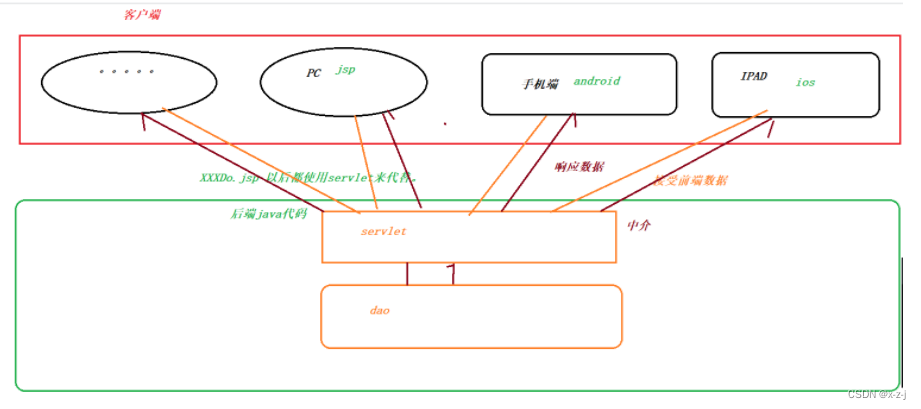
9.3 How to use servlet
(0) introduce servlet-api.jar package

(1) Create a class and inherit HttpServlet Parent class .
public class HelloServlet extends HttpServlet {
}
(2) rewrite HttpServlet in service Method .--- Business processing .
// Parameters passed by the front end can be accepted You can also save the data queried by the back end and let the front end obtain
@Override
protected void service(HttpServletRequest req, HttpServletResponse resp) throws ServletException, IOException {
}
(3) Put custom servlet Configuration to web.xml In file
<servlet>
    <servlet-name>helloServlet</servlet-name>
    <servlet-class>com.xzj.servlet.HelloServlet</servlet-class>
</servlet>

    <servlet-mapping>
        <servlet-name>helloServlet</servlet-name>
        <url-pattern>/hello</url-pattern>
    </servlet-mapping>
9.4 One servlet Handle multiple requests
If there are many different requests , Do we have to create one for each different request servlet Do you , If so, there will be many servlet class .addUser deleteUser updateUser. We should only create one for the same category servlet.
such as : Operations on user classes ,UserServlet Operation of student class StudentServlet. If you use one servlet. So how to distinguish what operation . We can pass a parameter to indicate what operation it is when jumping .
One table corresponds to one servlet.
One table corresponds to one dao and entity
9.5 Use jsp+el+jstl+servlet complete crud


9.6 servlet Life cycle of
Namely servlet The process from creation to initialization, then to service and finally to destruction . Namely servlet Life cycle of .
servlet Different methods will be implemented at different stages .
(1) Construction method ---->servlet Execute when created
(2) Initialization method --->servlet This method will be executed when some parameters are initialized after creation .
(3) Execution method --->servlet When called .
(4) Destruction method --->servlet Shut down .
Find out : No matter how many requests are sent , Constructor and initialization methods are executed only once . and service Every request is executed .
prove servlet It's a singleton mode . Save memory space .
When the server tomcat Restart or rewrite the deployment project , that servlet Will be destroyed
Above when you first visit through a browser servlet Will be created and initialized . You can also configure when tomcat Create and initialize at startup servlet.
10 filter Filter
What is a filter ?
Filter out some unwanted information , Let some desired information pass . for example : The filter screen of the cup , Stuck on the highway . Purifier .
Filters in programs ?
Let some legitimate requests pass through the filter , And intercept some request paths that do not meet the requirements . When the request reaches the filter , You can set some parameters for the request .
The principle of the filter

How to create filters
(1) Create a class and implement Filter Interface and rewrite the corresponding method
@WebFilter(filterName = "EncodingFilter",urlPatterns = "/*")
public class EncodingFilter implements Filter {
    @Override
    public void init(FilterConfig filterConfig) throws ServletException {

    }

    @Override
    public void doFilter(ServletRequest req, ServletResponse resp, FilterChain filterChain) throws IOException, ServletException {
        req.setCharacterEncoding("utf-8");// Set the encoding of the request   The received request parameters will not be garbled .
        resp.setCharacterEncoding("utf-8");// Set the encoding of the response , The response data will not be garbled .
        // release
        filterChain.doFilter(req,resp);
    }

    @Override
    public void destroy() {

    }
}
(2) Login filter
@WebFilter(filterName = "LoginFilter", urlPatterns = "/*")
public class LoginFilter implements Filter {
    @Override
    public void init(FilterConfig filterConfig) throws ServletException {

    }

    @Override
    public void doFilter(ServletRequest req, ServletResponse resp, FilterChain filterChain) throws IOException, ServletException {
        // Move down   Some methods exist in subclasses .
        HttpServletRequest request = (HttpServletRequest) req;
        HttpServletResponse response = (HttpServletResponse) resp;

        // Get the request path
        String path = request.getRequestURI();
        //1. Judge whether the current request path is the path to be released
        if(path.contains("/login.jsp")||path.contains("/UserServlet")){
            filterChain.doFilter(req,resp);
            return; // Termination of the method
        }

        //2. You must log in before you can release . How to determine whether to log in .
        HttpSession session = request.getSession();
        Object user = session.getAttribute("user");
        if(user!=null){ // Indicates that the user has logged in
            filterChain.doFilter(req,resp);
            return;
        }

        //3. Go to the login page
        response.sendRedirect("/web07/login.jsp");

    }

    @Override
    public void destroy() {

    }
}
边栏推荐
- Read "effective managers - Drucker"
- [advanced mathematics] the difference between differentiable and differentiable functions
- Hanoi problem
- IDEA:SLF4J: Failed to load class “org.slf4j.impl.StaticLoggerBinder“.
- Machine vision learning summary
- C#表格数据去重
- The opening ceremony of the 2022 Huawei developer competition in China kicked off!
- Bear market bottoming Guide
- MySQL深入了解
- Ren Xudong, chief open source liaison officer of Huawei: deeply cultivate basic software open source and jointly build the root technology of the digital world
猜你喜欢

FTP file transfer protocol
PPPoE网关模拟环境搭建

反射的介绍
HCIA NAT experiment

Introduction to 51 single chip microcomputer (dedicated to the most understandable article for beginners)

Image to image translation with conditional advantageous networks paper notes

IDEA:SLF4J: Failed to load class “org.slf4j.impl.StaticLoggerBinder“.

智能指针、左值引用右值引用、lambda表达式

Data annotation learning summary
SSM整合
随机推荐
Pointer learning diary (II)
Embedded system transplantation [3] - uboot burning and use
Icml2022 | rock: causal reasoning principle on common sense causality
[postgraduate entrance examination vocabulary training camp] day 10 - capital, expand, force, adapt, depand
Fiddler抓包工具的使用
FTP file transfer protocol
Data annotation learning summary
What are the core strengths of a knowledge base that supports customers quickly?
[database connection] - excerpt from training
Read the summary of "machine learning - Zhou Zhihua"
智能指针、左值引用右值引用、lambda表达式
Problems encountered in configuring Yum source
Illustration and text demonstrate the movable range of the applet movable view
SSH service
Drools development decision table
。 Single type digital sensing is an application 0 Up address is at the factory
Image to image translation with conditional advantageous networks paper notes
反射的介绍
Codeforce:d2. remove the substring (hard version) [greedy string + subsequence]
SSM整合