当前位置:网站首页>Second harmonyos training
Second harmonyos training
2022-06-21 11:36:00 【Dandelion650】
- Section 10 Custom components use ( Add more pages , Bottom tab )
- Custom component creation (js Use absolute path for pictures )
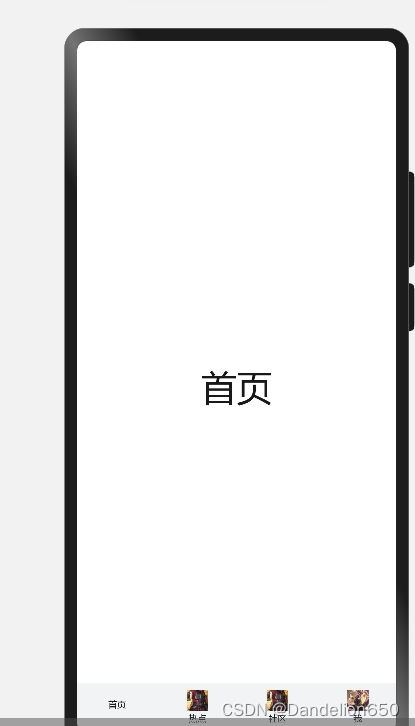
- Define a folder for storing custom components components.tabbar And set up 3 Base file tabbar.hml、tabbar.js、tabbar.css, It should be noted that :3 The file names of two files must be consistent , Otherwise, the file will not be found . The purpose of this custom component is to configure a... At the bottom of the page tabbar Tab experience .
- Set the corresponding settings for the bottom tab json data source , For preservation icon picture 、 title , And click the selected icon picture ( Pictures must use absolute paths )
- Use toolbar + toolbar-item Built in components build the bottom tabbar Tab Services 「tabbar.hml」
- Import tabbarItem data , And set the corresponding data , At the same time, set the click event Click the corresponding button for dynamic setting icon Choose
- Set up CSS style take tabbar Tab bottom 「tabbar.css」
- Custom component calls
- name Property refers to the custom component name ( Not required ), Component names are case insensitive , The default is lowercase ,src Properties refer to custom components hml File path ( Required ), If not set name attribute , It is used by default hml Use the file name as the component name
- Event binding : Binding subcomponent events in custom components use (on|@)child1 grammar , Passed in the child component this.$emit('child1', { params: ' Pass parameters ' }) Trigger the event and transfer the value , Parent component execution bindParentVmMethod Method and receive the parameters passed by the subcomponent
- Custom component creation (js Use absolute path for pictures )
- Section 11 Implementation of parent-child component communication function
- Parent component passed props Pass values... To subcomponents
- Props Custom components can be created by props Declarative attribute , The parent component passes parameters to the child component by setting properties ,camelCase( Hump nomenclature ) Of prop name , When an external parent component passes parameters, it needs to use kebab-case ( Short horizontal lines separate the names ) form , That is, when attribute compProp When the parent component references, it needs to be converted to comp-prop.
- Add default , Subcomponents can be defined by fixed values default Set the default value , When the parent component does not set this property , Its default value will be used . In this case props Property must be in object form , It can't be in an array .
- Data unidirectionality , The data transfer between parent and child components is one-way , Can only be passed from parent component to child component , The child component cannot directly modify the value passed down by the parent component , Can be props The value passed in is in data As the default value after receiving , Right again data Change the value of
- Child components change the state of parent components through custom events
- Subcomponents can also pass up parameters through bound events , Add a pass parameter to a custom event .
- Subcomponents pass parameters up text, When the parent component receives, it passes e.detail To get the parameters .
- It should be noted that The custom event name in the parent component is because hml Limit , Case insensitive , Need to use - Splicing , however , Calling in a subcomponent requires the use of 「 Hump type 」 Conduct $emit call .
- Parent component passed props Pass values... To subcomponents
- Section 12 Routing function implementation
- Page definition
- stay Pages Create a new folder under the folder to represent the required route , Of course , We can also create a new one Ablity Experience , Here's a demonstration Pages.Name.
- stay Under the new folder, be sure to create three new files index.hml、index.js、index.css Three files , The file name must use index To name it , Using other names will result in file dependencies not being found . Shortcut , You can select the corresponding Ability Pages Under the folder , then new page Add page directly , And will automatically register the route , This is more convenient
- stay config.json In file
- Use of routes
- Import routing module
- router.push(OBJECT), Jump to the specified page in the application .
- router.replace(OBJECT), Replace the current page with a page in the application , And destroy the replaced page .
- router.back(OBJECT), Return to the previous page or the specified page .
- router.clear(), Clear all history pages in the page stack , Only keep the current page as the top page of the stack .
- router.getLength(), Get the number of pages currently in the page stack .
- router.getState(), Get the status information of the current page
- ps
- Page routing can only be called after page rendering , stay onInit and onReady In the life cycle, the page is still in the rendering stage , It is forbidden to call page routing method
- Page definition
边栏推荐
- 数据库主键一定要自增吗?有哪些场景不建议自增?
- 编译原理知识点整理
- OpenGL学习笔记之坐标变换学习
- What if the server is invaded
- 学者魔改 Qt Creator 插件框架(附实例)
- 转赠券发放倒计时!星际口袋转赠规则抢先看
- 100w的数据表比1000w的数据表查询更快吗?
- Operation and maintenance security, not so simple
- New experience of cultural tourism! 3dcat helps Guangzhou intangible cultural heritage "yuancosmos" block make a cool appearance
- atguigu----条件渲染
猜你喜欢

15+ urban road element segmentation application, this segmentation model is enough!

Nature sub Journal | Zhou concentrated the team to reveal that long-term climate warming leads to the decrease of soil microbial diversity in grassland

【yolov5s目标检测】opencv加载onnx模型在GPU上进行推理

从零走进软件开发的世界

机器学习2-线性回归

2022 safety officer-b certificate retraining question bank and simulated examination

Interesting research on mouse pointer interaction

2022 special operation certificate examination question bank and online simulation examination for safety management personnel of hazardous chemical business units

2022 HV electrician judgment questions and answers

2022 safety officer-c certificate title and answer
随机推荐
Discussion on outsourcing safety development management and control
泰克Tektronix示波器上位机软件NS-Scope介绍
2022 HV electrician judgment questions and answers
开源FTP 服务器 FileZilla Server
XML实体注入漏洞
harmonyOS第二次培训
Citus 11 for Postgres 完全开源,可从任何节点查询(Citus 官方博客)
Five steps to successfully complete threat modeling
Flink tuning (I) resource tuning and back pressure analysis
Kotlin - Sequence 序列
Ar manipulator of game console
It is the German oscilloscope software and the keysight oscilloscope upper computer software ns-scope
5 best practices for perfect security code auditing
Devsecops: s-sdlc enterprise best practices
适配器电源自动测试设备|充电器ATE测试系统NSAT-8000介绍
服务器安全审计系统设计与实现
Please consult me. Is it necessary to enable any settings or functions of Mysql to use MySQL CDC, or is it necessary to have MySQL I
服务器被入侵了怎么办
New experience of cultural tourism! 3dcat helps Guangzhou intangible cultural heritage "yuancosmos" block make a cool appearance
Qmlbook learning summary