当前位置:网站首页>Beijiafu (p+f) R2000 modified radar IP
Beijiafu (p+f) R2000 modified radar IP
2022-06-24 22:47:00 【One leaf obsession】
When debugging the car , Beijiafu is used R2000 A radar , When the equipment starts drawing, it is found that the drawing cannot be built , So check /scan No data found on the topic , Try ping Radar interface discovery ping no , Should be IP Address and upper computer port IP Wrong address .
First, check the radar IP Address , There are two buttons on the radar , Press to display IP:
Press the right key twice and then the left key. The radar will display IP Number , The picture here is not very clear .
View the radar at the beginning IP The address is 192.168.111.10, And the upper computer ping Of IP The address is 192.168.188.50. Different from the reality , Therefore, the radar needs to be configured .
1、 Configuration requirements :
a windows laptop , A wire line .
Two software needs to be installed on the laptop :
1、R2000_DTM_v1.3.2.1
2、P+F PACTware_4_1_SP6_Full
The first one here is R2000 Plug in for , The second is configuration software , Both need to be installed , Otherwise, the equipment will not be found .
The radar is connected to two wires , One is the power cable and the other is the network cable , The network cable is directly connected to the computer .
2、 Software installation
As mentioned in the first step above, both software need to be downloaded and installed , Here is a main record of a problem :
When installing the above software, if the installation interface displays :
this setup requires the .net framework 3.5 installed
You need to modify the computer configuration :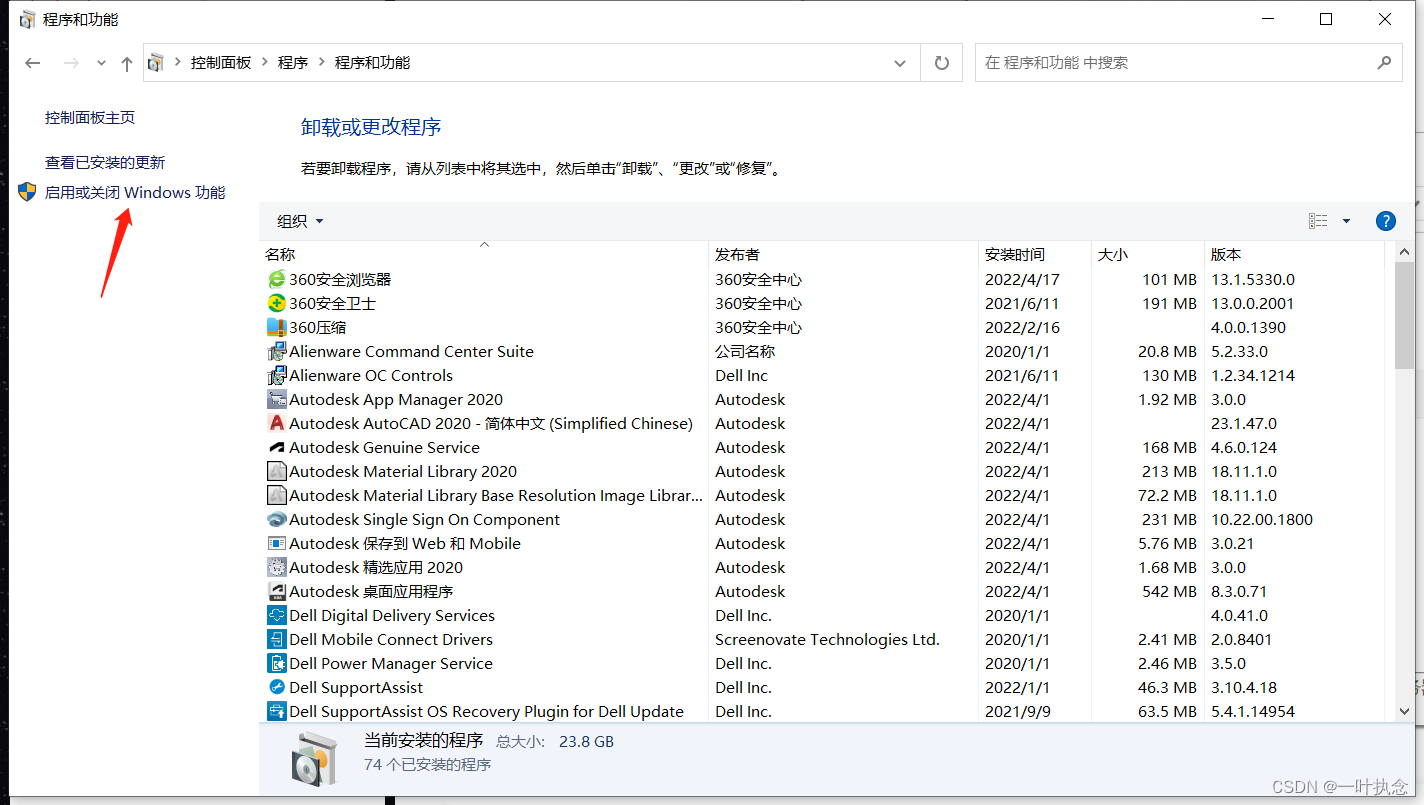
In the control panel - Program - Click start or close on the left side of the program and function interface windows Features :
Check the top .NET Framework 3.5 Two selection boxes in the options . Then click OK , Normally, there will be a download and installation process , It's not a long wait .
3、 Set up this machine IP
If you want to use windows To connect the beijiafu radar, you also need to connect the IP The address is set to be in the same network segment as the radar , Otherwise, it cannot be detected in the software .
Connect the radar to the computer through the network cable after it is powered on , Right click the computer networking logo , choice “ Turn on the Internet and Intenet Set up ” Options . Enter the network setting interface

You can see that there are two options on the computer , One is the hotspot of mobile phone connection , The other is the Ethernet of radar .
And then in the control panel - The Internet and Internet- Find Ethernet under network connection , Right click Properties ( The radar must be connected here to display )
Double click to select Internet Protocol version 4(TCP/IPV4), Will automatically get IP The address is changed to “ Use the following IP Address ”, Then fill in a field under the same network segment as the radar IP Address , Radar, for example IP by 192.168.111.10, Then it can be set as 192.168.111.11. If the radar is 192.168.188.50, Then it can be set as 192.168.188.49. The first three numbers are the same, and the last one is different .

Then click OK .
The terminal can be used after configuration ping Check the radar to see if you can ping through , If you can, it means that you are in the same network segment .
win+R, Then input cmd Open the terminal
ping 192.168.188.50 See if there are any data 
4、 Modify radar IP
In radar energy ping Open the software of beijiafu in case of communication :
After opening, select Add Device... In the device data :
Then select the device to connect , determine .
At this point, you can see that a new device appears in the device tab on the left side of the screen :
Then select the device directory on the right side of the screen :

Double click to add the third one :OMD R2000 HD
At this time in R2000 There will be a OMD R2000 HD: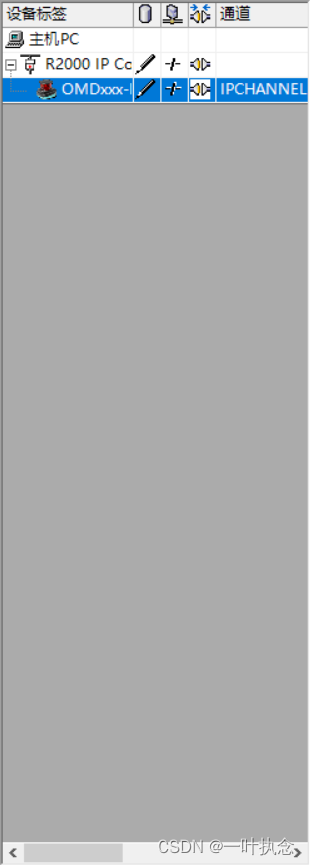
Right click to establish a connection, and then double-click OMD R2000 HD, You can see the current attribute :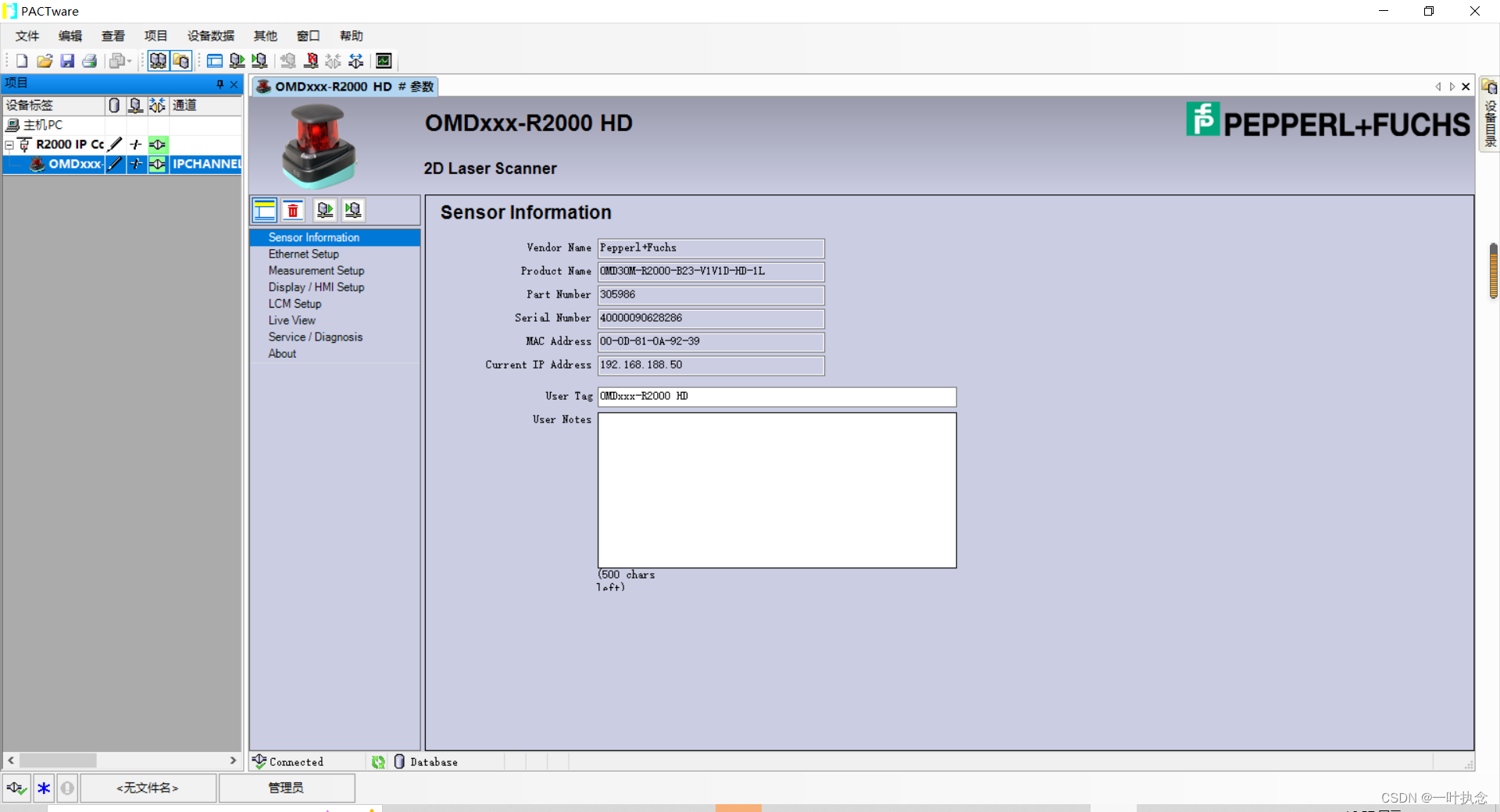
At this time, you can select “Ethernet Setup", Check Enable update of IP configuration, And then down here static IP Fill in the... To be set IP.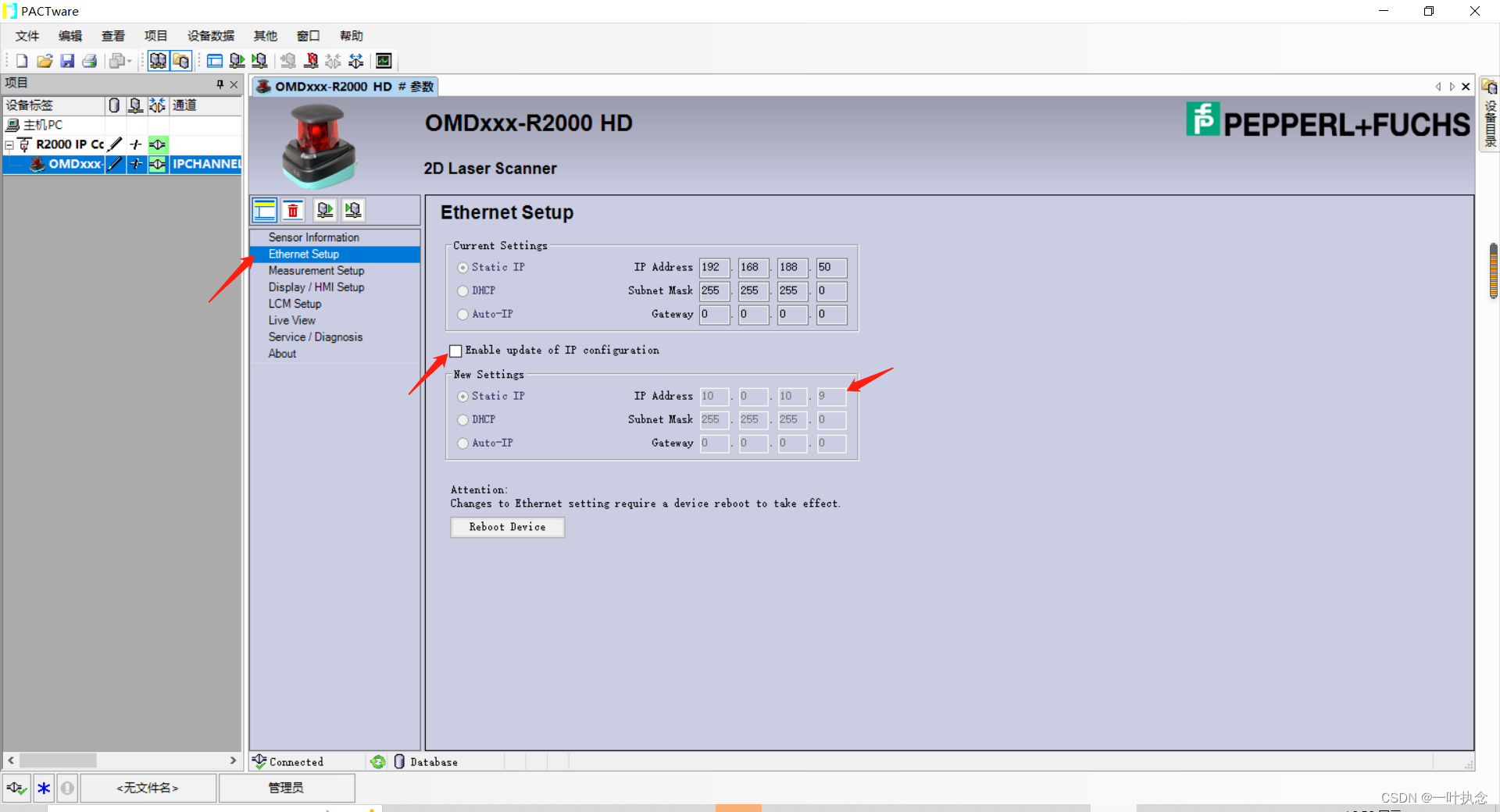
Right click after filling OMD R2000 HD- Write device . Or click here reboot device Estimates are also valid , Never tried. .
Finally, the terminal can also be used ping Look at the new IP Address to see if the modification is successful , Or press the key on the radar directly to check IP Change or not .
边栏推荐
- 【WSL】SSH 远程连接及宿主机端口转发配置
- Technology Review: what is the evolution route of container technology? What imagination space is there in the future?
- Can AI chat robots replace manual customer service?
- Environment configuration | vs2017 configuring openmesh source code and environment
- DX 的 HLSL 和 GL 的 GLSL的 矩阵构建的行列区别
- Firewall working principle and detailed conversation table
- Learn more about the practical application of sentinel
- See how sparksql supports enterprise level data warehouse
- MySQL + JSON = King fried!!
- Leetcode algorithm The first common node of two linked lists
猜你喜欢

Docker installs redis-5.0.12. Detailed steps

Chapter 10 project communication management

nuScenes——数据集配置过程中遇到图像文件缺失或大小为0时的补救方法

NIO 零拷贝

别再乱用了,这才是 @Validated 和 @Valid 的真正区别!!!

Win10 or win11 printer cannot print

Virtual private network foundation

双亲委派机制

Genesis公链与美国一众加密投资者齐聚Consensus 2022

Technology Review: what is the evolution route of container technology? What imagination space is there in the future?
随机推荐
Memory alignment of structures
NIO、BIO、AIO
[ingénierie logicielle] points clés à la fin de la période
【Mongodb】READ_ ME_ TO_ RECOVER_ YOUR_ Data, the database is deleted maliciously
ACL (access control list) basic chapter - Super interesting learning network
See how sparksql supports enterprise data warehouse
Technology Review: what is the evolution route of container technology? What imagination space is there in the future?
Virtual private network foundation
Seven principles of software design
【Mongodb】READ_ME_TO_RECOVER_YOUR_DATA,数据库被恶意删除
Feign project construction
Environment configuration | vs2017 configuring openmesh source code and environment
Learn more about the practical application of sentinel
Attackg: constructing technical knowledge graph from cyber thread intelligence reports
面试害怕被问MySQL相关问题 ?这份三万字精华总结 + 面试100 问,吊打面试官完全够了
Pinduoduo updates the merchant live broadcast service agreement and strictly punishes the illegal merchants
See how sparksql supports enterprise level data warehouse
2022年高处安装、维护、拆除考试模拟100题及模拟考试
OA system -- save the verification code to session
Heavyweight! Fada is listed as a "specialized and new" enterprise