当前位置:网站首页>Unity中的地平面简介
Unity中的地平面简介
2022-06-21 09:19:00 【歇歇】
本指南将引导您逐步了解如何在Unity中创建增强现实体验。我们建议以Vuforia核心样本为起点。
注意: Android,iOS和UWP支持地面飞机。地平面仅与平台启用器(ARKit / ARCore)支持的设备或Vuforia Engine专门校准的设备兼容。有关 最新设备覆盖范围,请参阅 支持的设备列表。
Unity中的地平面
地平面最好通过Unity Vuforia核心示例进行演示,我们建议从此处开始以熟悉概念和组件,以构建自己的表面检测AR体验。
- 在Unity中创建并打开一个新项目。根据此处的《入门指南》,使用Vuforia引擎进行设置 。
- 导航到Unity Asset Store(在Web浏览器中)并搜索Vuforia。
- 选择Vuforia Core样本并将其添加到您的资产。确保使用您的Unity帐户登录。
- 返回Unity编辑器,然后从窗口->包管理器选项卡中打开包管理 器。
- 在下拉菜单中,选择 我的资产

- 选择Vuforia Core Samples,然后按 Import。这将安装Vuforia Engine和所有必要的依赖项。
- 完成后,找到并打开 3地平面 项目标签下的场景 资产/样本资源/场景
- 要使用“播放模式”测试地平面功能, 必须首先打印目标。该目标位于 资产/编辑器/ Vuforia / ImageTargetTextures / VuforiaEmulator /。
或者,打开选项卡 文件->构建设置, 然后选择您的平台并构建到您的设备。
地平面场景结构
除了使用地平面的必要组件之外,示例场景还使我们了解了其他有用的部分,以建立直观的AR体验。
PlaneManager.cs 控制表面和重置的命中测试的逻辑。它还定义了以下阶段在现实世界中放置的内容:Anchor_Plane和Anchor_MidAir。
ProductPlacement.cs 和 TouchHandler.cs 显示了有关如何使用户与放置的内容进行交互的逻辑。
GroundPlaneUI.cs 拥有用于指示每个虚拟内容并与之交互的UI。
创建您的第一个地面体验
在本节中,我们将将地平面功能添加到一个空的Unity项目中,并在添加组件时对其进行说明。这些步骤将指导您添加和测试地平面。
- 打开Unity并 创建 一个新项目。
- 如本文所述添加Vuforia Engine SDK 。
- 删除默认的 主摄像头 ,并添加 ARCamera游戏物体 通过扩大 游戏物体菜单下拉列表并选择 Vuforia引擎- > AR相机。
- 打开 的 Vuforia引擎配置 并添加 许可证密钥。
- 以与上述相同的方式,转到 GameObject 并添加 Vuforia Engine-> Ground Plane> Ground Plane Stage。

该 地平面舞台游戏对象 作为 父游戏物体。您的内容应成为此组件的子级。
请注意,地平面舞台上有视觉标记,表明它是100平方厘米。这些视觉指南仅在Unity编辑器中呈现,用于确定Unity编辑器中的实际比例。此外,Ground Plane Stage允许您将内容相对于Ground Plane本身进行定位,从而使您可以相对于实际表面和比例放置内容。

我们将在地面平面舞台上添加一些内容。
- 在层次结构中选择“ 地平面舞台” GameObject,然后单击鼠标右键以添加 3D Object-> Capsule。将其X,Y和Z比例设置为0.5。

- 在 GameObject 菜单中,选择 Vuforia Engine-> Ground Plane> Plane Finder。
平面查找器执行以下操作:
- 甲nchor输入监听行为- 监听从所述用户输入(例如,在设备屏幕上的抽头)。
- 平面查找器行为- 尝试找到合适的平面以将内容放置在现实世界中。
- 内容定位行为-将 内容放入现实世界。
在这里,您可以个性化用于识别表面的指示器,并根据用户输入将“模式” 设置 为“自动”以进行自动检测或“交互”以进行检测。您还可以为设备和平面之间的预期距离定义高度。
- 将 地平面舞台GameObject 拖到 “平面查找器GameObject” 中“内容定位行为”组件 的“ 锚定舞台”参数中 。这是地平面正常运行所需的一切。

在设备上构建和测试
- 我们将部署到该设备上以测试我们的地面飞机体验。
确保使用“地平面 支持的设备”列表中的设备。请参阅 此处, 以获取有关设置“ 构建设置” 和“ 播放器设置” 以及 将应用程序构建并运行到 设备的说明。如果设备不可用,请参见下面的“地平面仿真器”部分。
- 启动应用程序,环顾您的环境。请注意,应该出现标线并投影到平面上。
找到合适的表面后,点击屏幕。您应该看到囊被放置在标线所指向的平面上。再次轻拍添加其他胶囊。

默认情况下, 每次定位时,“ 内容定位行为”都会复制该阶段和内容。而是在每个用户的点击上移动舞台, 可以取消选中“内容定位行为”的“ 重复舞台”。

地平面模拟器
如果不支持受支持的设备,则在Unity的“播放模式”下运行时,您可以使用Vuforia Engine模拟地面 。这使开发人员无需部署到设备即可测试其“地面飞机”体验。
- 要模拟地平面,请导航至“项目”窗口,然后转到 资产\ Vuforia \数据库\ ForPrint \仿真器\ 然后打开 仿真器地平面.pdf 文件并在没有应用缩放的A4尺寸纸张上打印模板。

- 将标准网络摄像头连接到计算机,然后在Unity中按“播放”按钮。将您的网络摄像头指向“地平面模板”。

- 您应该看到胶囊相对于“地平面”模板出现。如果没有,请确保 在Vuforia配置(Cmd + Shift + V或Ctrl + Shift + V)中将“ 播放模式”正确设置为WEBCAM 。
将浮动内容放置在您的环境中
放置浮动内容的工作流程与将内容放置到飞机上的工作流程非常相似。本节将重点介绍浮动内容和基础内容之间的主要区别。
- 与其创建 地平面舞台,不如创建 空中舞台。从 GameObject 菜单中,选择 Vuforia Engine-> Mid Air> Mid Air Stage。
- 在 半空中舞台游戏对象 作为 父游戏物体 ,其内容被作为一个孩子。
请注意,空中舞台上有视觉标记,指示其为100平方厘米。这些视觉指南仅在Unity编辑器中呈现,用于确定Unity编辑器中的实际比例。
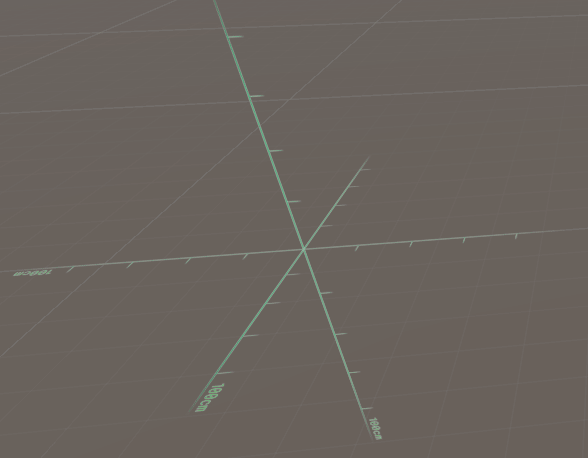
- 将您的内容添加为空中舞台的子级。在此示例中,我们在空中舞台内添加了无人驾驶飞机的模型。

- 在半空中舞台上使用真实的比例尺来相对于舞台正确定位和缩放内容(相距50cm)。

- 在 GameObject 菜单中,选择 Vuforia Engine> Mid Air> Mid Air Positioner。空中定位器的行为与“平面查找器”对地平面的行为非常相似。
空中舞台执行以下操作:
- 锚输入侦听器行为-侦听 来自用户的输入(例如,在设备屏幕上点击)。
- 空中定位器行为- 尝试找到合适的飞机在上面放置内容。
您可以在此处配置指示器和摄像机之间的距离。您也可以自定义指标。
- 内容定位行为-将 内容放入现实世界。
- 将 空中舞台GameObject 拖到 “内容定位行为” 组件的“ 锚定舞台”参数上 。

- 现在,使用标准网络摄像头构建或测试场景。您将在屏幕中间看到一个绿色的半透明球体。绿色球体指示您在点击时将内容放置在何处。


进阶设定
地平面示例仅演示一种构建应用程序逻辑并创建沉浸式和交互式AR体验的方法。用于启用地平面的组件仅用于常见用例,可以轻松配置为构建自己的应用逻辑。
要进行自定义,您可以编写自己的逻辑,以在命中测试结果返回合适的表面时将内容定位在空的锚点上。使用自定义脚本替换 ContentPositioningBehaviour ,该脚本使用 PositionalDeviceTracker API创建空的锚点。然后,让 MidAirPositionerBehaviour 和 PlaneFinderBehaviour 调用自定义脚本。
更改将命中测试传递给例如用户输入的方式。集成您自己的UI系统,并通过按下按钮来调用事件。简单地说,呼叫 MidAirPositionerBehaviour 和 PlaneFinderBehaviour 事件,通常是由调用 AnchorInputListener
边栏推荐
- Style penetration of vant UI components -- that is, some styles in vant UI components cannot be modified
- Merge sort of sorting
- R language obtains help information of global, package and function: use the rsitesearch function to search the information of the specified package or function in the R community help manual and arch
- Ali has been working for 8 years. This learning note is left when he reaches P8. He has helped his friends get 10 offers
- Clipboard learning records and pit encountered
- Quick sort_ sort
- 【实战】STM32 FreeRTOS移植系列教程5:FreeRTOS消息队列
- Request and response must know
- The R language uses the sink function to export the string to the txt file in the specified directory. If no directory is specified, it will be output to the current working dir
- The most authoritative Lei niukesi in history --- embedded Ai Road line [yyds]
猜你喜欢

Abstractqueuedsynchronizer (AQS) source code detailed analysis - condition queue process analysis

一条命令开启监控之旅!

Wechat applet
![[Mgt] model Mgt for code interpretation](/img/4f/694e7b93626436007021b718ad69b5.png)
[Mgt] model Mgt for code interpretation
![[practice] stm32mp157 development tutorial FreeRTOS system 6: FreeRTOS list and list items](/img/28/51be35224959b1bf70f4edc8a54ff4.png)
[practice] stm32mp157 development tutorial FreeRTOS system 6: FreeRTOS list and list items

Abstractqueuedsynchronizer (AQS) source code detailed analysis - countdownlatch source code analysis
微信小程序

TC软件详细设计文档(手机群控)

The next stop of Intelligent Manufacturing: cloud native + edge computing two wheel drive
![[early knowledge of activities] list of recent activities of livevideostack](/img/8c/f8007931b1a5944f3a0a243a5afcc4.png)
[early knowledge of activities] list of recent activities of livevideostack
随机推荐
Alibaba P6 employees came to a small company for an interview and asked for an annual salary increase of 500000 yuan. How dare you speak
STL tutorial 2-myarray framework implementation
Abstractqueuedsynchronizer (AQS) source code detailed analysis - semaphore source code analysis
R language uses the < - operator to create a new variable, uses the existing data column (sum, mean) to create a new data column, uses the ifelse function or conditional judgment to create a discrete
[vs], [usage problem], [solution] when VS2010 is opened, it stays in the startup interface
Binary search (integer binary)
Compiling 32-bit programs using cmake on 64 bit machines
111. solve the problem of prohibiting scripts from running on vs code. For more information, see error reporting
The way of filling holes in APK Decompilation
R language through rprofile Site file, user-defined configuration of R language development environment startup parameters, shutdown parameters, user-defined specified cran local image source download
finally block can not complete normally
Mobile applications introduce static Cordova according to different platforms
Summary of Web automated testing
Retrofit extended reading
Android database upgrade
Retrofit扩展阅读
stm32mp1 Cortex M4开发篇8:扩展板LED灯控制实验
Adapt to the pits in Huawei models
Pingcap was selected as the "voice of customers" of Gartner cloud database in 2022, and won the highest score of "outstanding performer"
Shortcut keys accumulated when using various software