当前位置:网站首页>halcon知识:dyn_threshold的用法(划痕检测)
halcon知识:dyn_threshold的用法(划痕检测)
2022-06-23 11:53:00 【无水先生】
一、dyn_threshold算子说明
dyn_threshold(OrigImage, ThresholdImage : RegionDynThresh : Offset, LightDark : )
- dyn_threshold 从输入的两幅图像中选择像素满足阈值条件的区域。
- 令 g_{o} = g_{OrigImage} 和 g_{t} = g_{ThresholdImage}。
- 其中,g_{OrigImage}是原始图像,g_{ThresholdImage}是平滑后图像,充当阈值。
那么
1) LightDark = 'light' 的条件是:

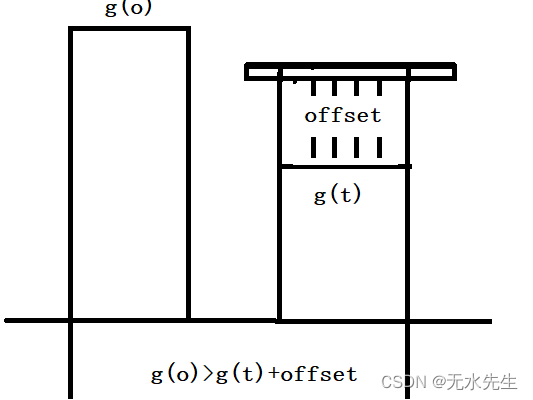
2)对于 LightDark = 'dark',条件是:

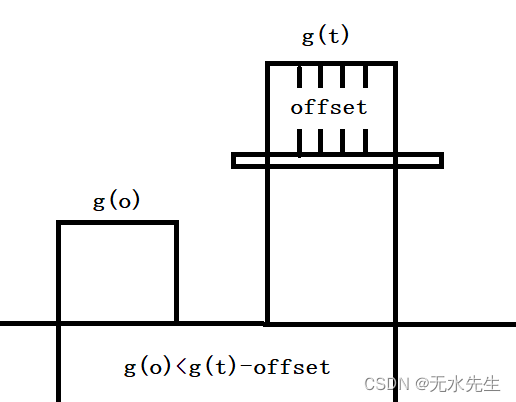
3)对于 LightDark = 'equal',条件是:

4)对于 LightDark = 'not_equal',条件是:

通常,阈值图像是原始图像的平滑版本(例如,通过应用 mean_image、binomial_filter、gauss_filter 等)。那么 dyn_threshold 的效果类似于将阈值应用于原始图像的高通滤波版本(参见 highpass_image)。
二、针对问题:
2.1 原始图片
如下图中,将划痕部分检出来。
read_image (Image, 'surface_scratch')
- 原始图的表面灰度图(看不出明显的划痕)。

2.2 平滑后的图片
mean_image (Image, ImageMean, 7, 7)平滑图片灰度图(划痕明显):

2.3 观察结果
可以断定,平滑图片中,能够将被噪声湮灭的细长划痕的信号给暴露出来。
三、代码部分
* This programm shows the extraction of surface scratches via
* local thresholding and morphological post-processing
*
dev_update_off ()
dev_close_window ()
*
* Step 1: Acquire image
*
read_image (Image, 'surface_scratch')
get_image_size (Image, Width, Height)
dev_open_window_fit_image (Image, 0, 0, Width, Width, WindowID)
set_display_font (WindowID, 16, 'mono', 'true', 'false')
dev_set_draw ('margin')
dev_set_line_width (4)
dev_display (Image)
Message := 'This program shows the extraction of'
Message[1] := 'surface scratches via local thresholding'
Message[2] := 'and morphological post-processing'
disp_message (WindowID, Message, 'window', 12, 12, 'black', 'true')
disp_continue_message (WindowID, 'black', 'true')
stop ()
*
* Step 2: Segment image
*
* Using a local threshold
mean_image (Image, ImageMean, 7, 7)
dyn_threshold (Image, ImageMean, DarkPixels, 5, 'dark')
*
* Extract connected components
connection (DarkPixels, ConnectedRegions)
dev_set_colored (12)
dev_display (Image)
dev_display (ConnectedRegions)
Message := 'Connected components after image segmentation'
Message[1] := 'using a local threshold.'
disp_message (WindowID, Message, 'window', 12, 12, 'black', 'true')
disp_continue_message (WindowID, 'black', 'true')
stop ()
*
* Step 3: Process regions
*
* Select large regions
select_shape (ConnectedRegions, SelectedRegions, 'area', 'and', 10, 1000)
dev_display (Image)
dev_display (SelectedRegions)
disp_message (WindowID, 'Large Regions', 'window', 12, 12, 'black', 'true')
disp_continue_message (WindowID, 'black', 'true')
stop ()
*
* Visualize fractioned scratch
open_zoom_window (0, round(Width / 2), 2, 303, 137, 496, 3, WindowHandleZoom)
dev_set_color ('blue')
dev_display (Image)
dev_display (SelectedRegions)
set_display_font (WindowHandleZoom, 16, 'mono', 'true', 'false')
disp_message (WindowHandleZoom, 'Fractioned scratches', 'window', 12, 12, 'black', 'true')
disp_continue_message (WindowHandleZoom, 'black', 'true')
stop ()
*
* Merge fractioned scratches via morphology
union1 (SelectedRegions, RegionUnion)
dilation_circle (RegionUnion, RegionDilation, 3.5)
dev_display (Image)
dev_display (RegionDilation)
Message := 'Region of the scratches after dilation'
disp_message (WindowHandleZoom, Message, 'window', 12, 12, 'black', 'true')
disp_continue_message (WindowHandleZoom, 'black', 'true')
stop ()
skeleton (RegionDilation, Skeleton)
connection (Skeleton, Errors)
dev_set_colored (12)
dev_display (Image)
dev_display (Errors)
Message := 'Fractioned scratches merged via morphology'
disp_message (WindowHandleZoom, Message, 'window', 12, 12, 'black', 'true')
disp_continue_message (WindowHandleZoom, 'black', 'true')
stop ()
*
* Distinguish small and large scratches
close_zoom_window (WindowHandleZoom, Width, Height)
select_shape (Errors, Scratches, 'area', 'and', 50, 10000)
select_shape (Errors, Dots, 'area', 'and', 1, 50)
dev_display (Image)
dev_set_color ('red')
dev_display (Scratches)
dev_set_color ('blue')
dev_display (Dots)
Message := 'Extracted surface scratches'
Message[1] := 'Not categorized as scratches'
disp_message (WindowID, Message, 'window', 440, 310, ['red','blue'], 'true')
检查结果:

总结:
- 灰度低通滤波可以突出信号。
- dyn_threshold可以对两幅孪生图的信号进行阈值分割。
边栏推荐
- 汉源高科8路电话+1路百兆以太网RJ11电话光端机 8路PCM电话光端机
- MySQL matches multiple values in one field
- 六维图剖析:中国建筑集团有限公司企业成长性分析
- 自动化或电气专业必备软件
- Where to find capacitance parameters!?
- 请问连接oracle时,这个version 1.54 是什么的version?
- Redis 入门-第一篇-数据结构与对象-简单动态字符串(SDS)
- 开源之夏中选名单已公示,基础软件领域成为今年的热门申请
- 广播级E1转AES-EBU音频编解码器 E1转立体声音频卡侬头(XLR)编解码器
- RF Analyzer Demo搭建
猜你喜欢

得物多活架构设计之路由服务设计

64路PCM电话光端机64路电话+2路百兆以太网电话光端机64路电话PCM语音光端机

Getting started with redis - Chapter 2 - data structures and objects - linked lists

Meta称英安全法可能“扫描所有私人信息” 或侵犯隐私

广播级E1转AES-EBU音频编解码器 E1转立体声音频卡侬头(XLR)编解码器

@黑马粉丝,这份「高温补贴」你还没领?

Learning notes sweep crawler framework
HMS Core 视频编辑服务开放模板能力,助力用户一键Get同款酷炫视频

Ppt makes 3D rotation animation from beginner to advanced

凭借32量子比特!Rigetti Computing打入英国量子计算市场
随机推荐
【无标题】2022年压力管道巡检维护试题及在线模拟考试
Invalid Navicat scheduled task
Learning notes sweep crawler framework
Redis 入门-第二篇-数据结构与对象-链表
HMS Core 视频编辑服务开放模板能力,助力用户一键Get同款酷炫视频
Three ways to learn at work
目前 在哪里开户是最安全正规的?
Necessary software for automation or electrical specialty
Qt 知识:使用 QGraphicsPixmapItem类
How Huawei cloud implements a global low latency network architecture for real-time audio and video
使用tensorflow2创建神经网络
Oversampling series I: sampling theorem and oversampling rate
【零基础微信小程序】基于百度大脑人像分割的证件照换底色小程序实战开发
请问连接oracle时,这个version 1.54 是什么的version?
QT5知识:信号和槽的一些要点
【云驻共创】华为云HCIA-IoT V2.5培训系列内容之物联网概览
Getting started with redis - Chapter 4 - data structures and objects - jump table
蓝桥杯单片机(一)——关闭外设及熄灭LED
4K-HDMI光端机1路[email protected] HDMI2.0光端机 HDMI高清视频光端机
想学习eTS开发?教你开发一款IQ-EQ测试应用