当前位置:网站首页>GPU server considerations
GPU server considerations
2022-07-16 09:16:00 【kushr】
vpn
Even on vpn You can't use the browser after , But you can surf the Internet (zoom, Wechat is still available ),ping ip No problem with the address , but ping There is something wrong with the web page name , representative dns There is a problem . Change at this time dns Just go ( Replaced by Google 8.8.8.8)
Connect (vscode)
1 Download plug-ins :
2 Click on the plus sign 
3 Enter the server address and user name 
4 Click on the plus sign , Enter the server 
5 Input password 
6 openfolder, Locate folder , Left visualization window 
Connect (pycharm)
pycharm Because it was written for a long time and it was very small at that time , So the narration may be a little confused …
Simply put, it is to connect the local directory and the server directory + Choose compiler ( It's the environment ),pycharm Unlike vscode It is a direct visualization of server content , It is equivalent to connecting the local and server , So than vscode There is an additional step of uploading from the local to the server .
1、 stay linux Run in py file :
python name.py
2、pycharm Configure virtual compiler :
1)tool-deployment-configuration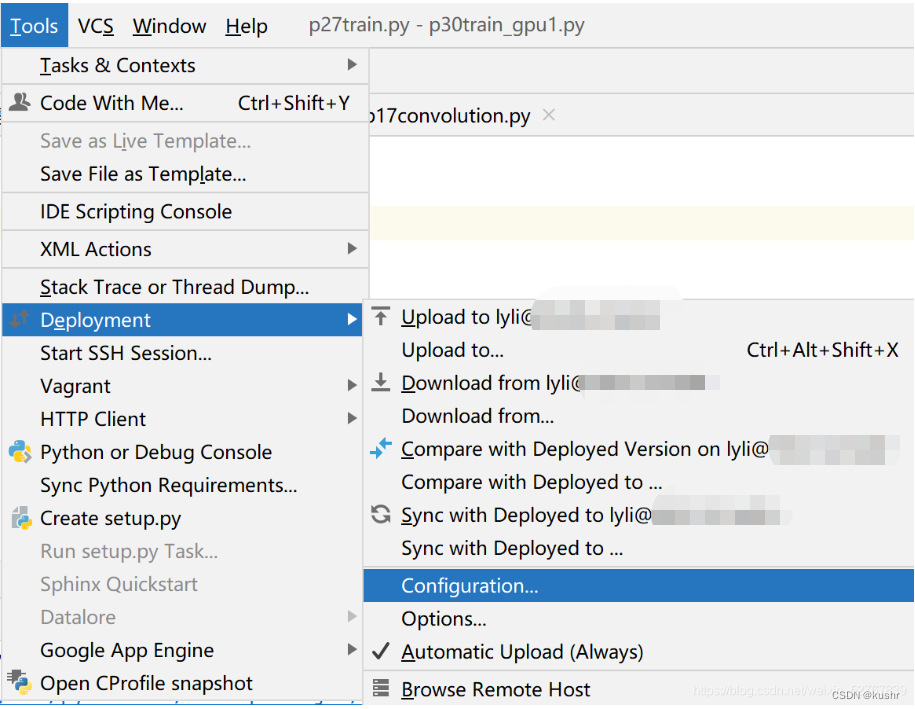
+sftp
Enter the server name ( Customize )
connection-configuration( It can be used test connection try )
mappings:
localpath And deploymentpath: They are the local project file directory and the project file in the server 
2)file-settings-project-python interpreter-add-ssh interpreter
next-interpreter Write python The location of the interpreter
(linux Into python,
import sys
sys.executable)
commonly bin Drop executable 
file-settings-interpreter-show all:
Click pen to change to ssh( It was configuration)
Be careful , The interpreter cannot run local files when connected to the server , Otherwise, the report will be wrong :
want pycharm deployment Synchronize local projects to the server 
deployment path Write well , And then right-click project,deployment-up to xxx

upload success
deployment Don't set too many paths , There may be conflict
pycharm Remote connection server compilation error : No such file or directory
reason :
1、 Maybe the local file was not uploaded to the server ; resolvent :deployment-mapping Establish a connection and upload ;
2、setting-interpreter Inside mapping No settings 
In this way, the setting is completed , spot ok After running successfully
tmux
( Here will be the default ctrlb Changed to ctrla)
First in the terminal ssh [email protected], Sign in
tmux ls See which windows are available
Input tumx Get into tmux page
tmux attach -t number: Get into indx by number The window of
ctrla+| Left and right split screen
ctrla± Split up and down
ctrla+c Open a new window
ctrla+q Turn off split screen / window
ctrla+n Next window /ctrlc+N Last window
ctrl+d Exit but not close
ctrla+r Refresh
ctrla+z Maximize pannel
tmux attach -t Number -d Access to the session And forcibly withdraw from other session
ctrla m Turn off the mouse
ctrla M Open the mouse
gpu command
see cuda edition :vvcc --version
watch -n 0.1 -d nvidia-smi View dynamic memory
watch -n 0.1 --color gpustat --c View dynamic memory ( Small view )
nvidia-smi
View static memory
Release gpu Memory ( After the program runs, it still displays gpu Memory occupied ):fuser -v /dev/nvidia* # Lookup occupation GPU Resources PIDkill -9 pid
Use specified gpu:
original text
CUDA_VISIBLE_DEVICES=1 python my_script.py
or
os.environ[‘CUDA_VISIBLE_DEVICES’] = ‘3,4,5,6,7’( The code is written immediately )
Kill the process by force : When the program gets stuck / Stop but gpu Memory is not free :
gpystat -p Check the process pid
kill -9 pid
linux command
~ representative /home/ User name directory
Look at the hidden files under the user name directory :( for example bashrc):~/.bashrc
ls -a Look at the hidden file
# Unrealized
Restore deleted files
here
Document processing
Download and unzip the file
Use wget -O rename url download
decompression :
Unzip big files ( exceed 2 individual g)
7z x xxx.zip
Local and server file transfer
Upload files locally :scp /path/filename [email protected]:/path
Local upload directory :scp -r local_dir [email protected]:remote_dir
Server downloads files :scp [email protected]:/path/filename /path/filename( Local directory )
Server download directory :scp -r [email protected]:/path( Remote directory ) /path( Local directory )
Moving files :
https://blog.csdn.net/u010579482/article/details/72081996mv sourcePath destPath
example : mv /home/lyli/codeRepete/PatchAttack/942d3a0ac09ec9e5eb3a/* /home/lyli/codeRepete/PatchAttack
take 94… The contents of the folder are placed in PatchAttack in
Delete folder : rm -rf Directory name
Cannot be in the directory a Delete the directory a
Look at the number of files :
ll | grep -c “^-”
ll | grep -c “^d”
Check the space occupied by the hard disk
du -lh --max-depth=1 Check whether the subdirectories of the current directory occupy
du -sh Only view the current directory
df -hl Check disk space usage
View remaining memory
free -m Company mb
free -g Company gb
vim
vim file name Get into vim
:q sign out vim
:wq Save and exit
Enter vim ~/.vimrc ( Create... In the home directory vimrc file )
stay .vimrc Configuration in
Input / key word You can search for keywords , Press enter+n To find the next
Select replication :ctrl+shift+ cursor
Paste :shift+insert
putty Connect
Environment related
3090 And cuDA
View servers cuda:nvcc --version
Pay attention to the server cuda The version is best and torch Of cuda Version match , Otherwise it will appear model.cuda() Problems that cannot be implemented
conda info -e : View all conda Environmental Science python -V see python edition
see torch,cuda And tf edition :
python
import torch
import tensorflow as tf
toech.__version__
tf.__version__
torch.version.cuda
perhaps pip list grep | torch
Check a path with keywords :( example : Look at the pip) ls ~/anaconda3/envs/tf115/bin/ | grep pip
which pip see pip The path of ( Other orders are the same )
If pip The path is not right ( Not under this environment path , May cause the current channel There is no package to download ), function
export PATH=“/home/ user name /anaconda3/bin:$PATH”, And then restart ( in base Switch back to the current environment ) Check which pip
perhaps :conda install -c conda-forge Package name , This is directly from conda forge download
tail -30 ~/.bashrc Look at the hidden file bashrc After 30 That's ok echo $PATH Look at the environment variables ( Colon division )
jupyter problem
jupyter The configuration file : vim /home/lyli/.jupyter/jupyter_notebook_config.py
or :~/.jupyter/jupyter_notebook_config.py
Change or add kernal: Reference here pip install ipykernelpython -m ipykernel install --name your_invironment_name
My environment :
The following environmental records are created for individuals only
torch1:python3.8.8 ;torch 1.11.0+cu102; tf:1.15.0
test1: python 3.8.10 ; torch 1.11.0+cu102; tf:1.15.5
tf115:python 3.6.9 ; torch 1.10.2 ;tf:1.15.0 ( A bit of a problem. )
torch1_0: python 3.7.11; torch 1.0.1 ;tf:null
torchEnv: python 3.8.13; torch 1.11.0+cu102; tf: 1.15.5
above cuda All are 10.2
p_3.6: python 3.6.13 ; torch 1.10.2 cuda:11.1
边栏推荐
- input获取焦点
- Write an OpenGL renderer from scratch -- infrastructure construction
- pytorch_lightning中lightning_logs里的hparams.yaml输出为空问题
- Comment comprendre le mécanisme de la mémoire et de l'attention dans l'apprentissage profond? Cette thèse de doctorat de 212 pages de Deakin vous donne une réponse.
- 林子雨spark scala版编程小结
- spark期末考试选择题精选
- Flink SQL 求上一个月 是哪个函数?
- 《Learning Span-Level Interactions for Aspect Sentiment Triplet Extraction》论文阅读
- The difference between wait and waitpid
- Transformer 落地出现 | Next-ViT实现工业TensorRT实时落地,超越ResNet、CSWin
猜你喜欢


随机推荐
Go grpc: a solution of connection reset by peer
成员函数之构造函数
《Seq2Path: Generating Sentiment Tuples as Paths of a Tree》论文阅读
曹洁 Spark编程Scala版本课后习题答案
Common problems of unsuccessful Arduino upload program
Machine learning - support vector machine (SVM)
【AGD】应用下载直达高频问题合集
如何洞曉深度學習中記憶與注意力機制?這份Deakin大學212頁博士論文給您做解答
解决WINDOS文件夹需要管理员权限无法删除,高级安全设置无法更改所者权限,点击变灰色
Detailed explanation of odoo Eval
input获取焦点
Odoo multi company
odoo manifest.py文件详解
Jupyterab installation
jsp学习笔记
np.unravel_index() 求出数组某元素(或某组元素)拉成一维后的索引值在原本维度(或指定新维度)中对应的索一般与np.argmax(A) 或 np.argmin(A) 配合使用
模拟实现库函数strcpy,对strcpy的进一步理解(深刻理解重叠问题,防止内存与源重叠)
Odoo 的安全性
odoo多公司
uniapp-小程序与H5压缩图片上传