当前位置:网站首页>[in depth understanding of tcapulusdb technology] how to realize single machine installation of tmonitor
[in depth understanding of tcapulusdb technology] how to realize single machine installation of tmonitor
2022-06-25 18:22:00 【Data person】
This section introduces Tmonitor web portal And the installation and deployment of background processes ,web portal And background should be installed on different machines . Be careful : All operations are in root Execute under authority .
Installation needs 3 A package ( The latest installation package shall prevail ):
- web_portal_2.2.18_05130ad9.tar.gz Mainly Tmonitor Manage Pages
- tmonitor_install_2.2.18_05130ad9.tar.gz Mainly Tmonitor Background processes
We are going to put Tmonitor And tcaplus center Installed on the same machine , Put the top one first 3 Packages uploaded to /data Catalog , decompression
1. Tmonitor Web Portal install
- cd /data/web_portal/, because tcaplus OMS Occupied 80 port , So modify conf file , Listen 8080 port . modify server.php, set_httpd_port(8080)
- Check the database datadir Whether the disk is enough . If it's not enough, change to /data Under the plate
- root The user login mysql
- mysql> create database tmonitor_center_db; – Particular attention , tmonitor The foreground database and background database are separated , The foreground database uses this name , Backstage with other names
- mysql -uroot -pxxxx -Dtmonitor_center_db < *.sql hold /data/web_portal All under directory sql File import
- mysql> create user tmonitor;
- grant ALL on tmonitor_center_db.* to ‘tmonitor’@‘%’ identified by ‘xxxx’
- grant ALL on tmonitor_center_db.* to ‘tmonitor’@‘localhost’ identified by ‘xxxx’
- grant ALL on tmonitor_center_db.* to ‘tmonitor’@‘127.0.0.1’ identified by ‘xxxx’
- grant ALL on tmonitor_center_db.* to ‘tmonitor’@‘100.78.65.157’ identified by ‘xxxx’
- grant ALL on tmonitor_center_db.* to ‘tmonitor’@‘100_78_65_157’ identified by 'xxxx- echo $HOSTNAME
- flush privileges
- Switch to root user , perform ./install_web_protal.sh 100.78.65.157 3306 tmonitor_center_db tmonitor xxxx PASSWORD 2.2.7 ( The penultimate argument is LoginType, You can fill in OA perhaps PASSWORD), This script will create /data/monitor Catalog , The foreground page will start from this directory
- then netstat –lpn Check 8080 Whether the port is started , without , Try it again , php server.php start -p 8080 start-up , Stop command : php server.php stop
- Log in to the page , Registered users tmonitor, If you can't log in , telnet ip Port look select * from tm_users_permission; See if you have administrator privileges (role=1)

- Click on ” management ” Button , Take what is being deployed tmonitor System added , After the background process gets up, it can provide services

- Here, the front desk installation is completed , Next, install the background process
2. Tmonitor Web Portal add to Tmonitor System
- https://git.code.oa.com/gcloud_storage_group/tmonitor The code and installation package are here , You may need to apply for git jurisdiction
- Upload web_portal_2.2.18_05130ad9.tar.gz Package to /data Under the table of contents , decompression , cd /data/tmonitor_install
- vim tmonitor_conf.xml Modify the following

- The interface used in the following figure is used for alarm sending . If it is IDC machine , Use tof Send SMS and wechat , Use uwork Make a phone call

- If it is IDC machine , Need to be in tof and uwork” service ip” Add... To the list sasvr Of ip, To send the alarm normally (tof apply : http://tof.oa.com/application/views/, Or contact jasonlzhang, uwork Apply to contact yorkershi).
- The machine should be able to connect directly tnm2, Need to install agent Tools , The specific steps are described later in the document .

- Above picture dcsvr Of business_id Default to 1, If there are more than one dcsvr Just increase... In turn . dc_tconnd Port for 7980, Keep the default without changing

- In the figure above, you need to provide mysql Of root password , And build the background database in advance . The steps are the same as the foreground database
- mysql –uroot –pxxxx
- create database db_tmonitor_for_qcloud_singapore_1;
- grant ALL on db_tmonitor_for_qcloud_singapore_1.* to ‘tmonitor’@‘%’ identified by ‘xxxx’ ;
- grant ALL on db_tmonitor_for_qcloud_singapore_1.* to ‘tmonitor’@‘localhost’ identified by ‘xxxx’ ;
- grant ALL on db_tmonitor_for_qcloud_singapore_1.* to ‘tmonitor’@‘127.0.0.1’ identified by ‘xxxx’ ;
- grant ALL on db_tmonitor_for_qcloud_singapore_1.* to ‘tmonitor’@‘100.78.65.157’ identified by ‘xxxx’; – ip
- grant ALL on db_tmonitor_for_qcloud_singapore_1.* to ‘tmonitor’@‘100_78_65_157’ identified by ‘xxxx’; – echo $HOSTNAME
- flush privileges;

- Select the components to be installed as shown in the figure above , tcm and Business_id The default is the same as that filled in before
- Check 22 Whether the port can ssh land , Otherwise modify exp Port is 36000
- Check /etc/ssh/sshd_config and sshd_special_user, Make sure tmonitor Users have ssh Login rights
- ./tmonitor_install.pl install Start installation , Errors may be reported during installation , wait for ”install end”. This script will create tmonitor user , And create /data/tmonitor Catalog , In the future, all background processes will be in this directory
- If the execution script reports an error (Can’t locate Time/HiRes.pm) Need to install :
- yum install -y perl-DBD-MySQL perl-Time-HiRes perl-XML-Simple.noarch
- perl-XML-LibXML.x86_64 perl-libxml-perl.noarch
- mysql -utmonitor -pxxxx -Ddb_tmonitor_for_qcloud_singapore_1 Log in to see if the following table is created successfully
- Because on this machine tcaplus Also installed tcm Components , And tmonitor Of tcm Port conflict , So it needs to be modified /data/tmonitor/tmonitor_install Under the directory xml(tcmcenter.xml tcmconsole.xml tagent.xml tconnd.xml tcenterd.xml) Default port and manually pull up the process , The ports are used as follows
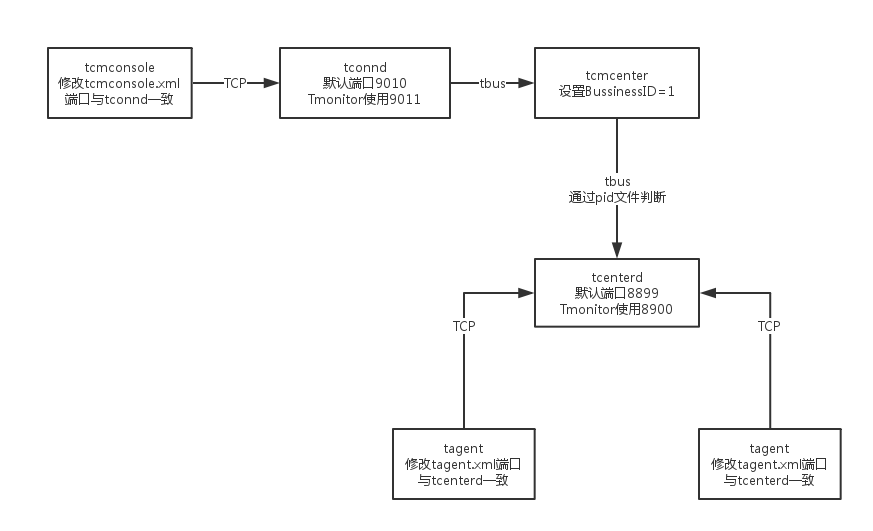
- chmod 777 /tmp/tcmconsole.pid This pid file tcaplus and tmonitor Can use , So you need to modify the permissions
- Then start each process in the direction of the arrow in the figure below , And log in tcmconsole Check whether the process is correct , Then pull up in turn dc_tconnd, dcsvr, sasvr process
- start 1.0.1.1 It can be pulled up directly dc_tconnd
- start 1.0.2.1 Pull up dcsvr An error will be reported during the process , see dcsvr Log , It is found that many connections are required mysql database . This is the old version tmonitor The remaining problems , It needs to be modified manually
- ~/tmonitor_install/dcsvr_1/cfg]$ vim dcsvr.xml Create an empty database according to the database name listed in this file
- First root land mysql, to tomitor User's permission to create database : grant ALL on . to ‘tmonitor’@‘100.78.65.157’ identified by ‘xxxx’; flush privileges
- then tmonitor The user login mysql -utmonitor -pxxxx -h100.78.65.157, Create the following database
- create database tmonitor
- create database db_route
- create database db_273_customscript
- create database db_1_autoupdate
- create database db_2_procstatus_data
- create database 0_tbus_data
- create database 0_thostinfo_data
- create database version
- And then use sed modify xml
- sed -i ‘/DBMSHost/c 100.78.65.157’ dcsvr.xml
- sed -i ‘/DBMSPassword/c xxx’ dcsvr.xml
- sed -i ‘/DBMSUser/c tmonitor’ dcsvr.xml
- After the modification, go to tcmconsole start-up dcsvr and sasvr process
- After all processes start successfully , The second part is done . If you need to uninstall or reinstall , perform /data/tmonitor_install/tmonitor_install.pl uninstall that will do
3. Business configuration
- Get into tmonitor page , Click on ” Access change ”
- Report method selection custom The way , Actively report to the node , tcm The way is sasvr Pull
- Mocha ITOM -> Apply for approval -> Access approval The following approval , cc_id Default fill 1
- Then click ”Monitor V2” Below ” Get into ” Button , Select the business just filled in , When you enter the database for the first time, you will make a mistake and say that the database information is not filled in , Go ahead and complete
- restart sasvr
- Be careful , Above picture Tmonitor The system automatically allocates business ID=1, This is the same as the one we matched before business_id It's the same . If it's not the same , Need modification xml Below BussinessID and TbusConf And restart , Again /tmp/tconnd_1.0.1.$instance_1.pid This _1 It should also be modified accordingly
- modify tcaplus Of xml, Add native ip To the white list , restart tcmcenter, Then go to ” Business configuration ” -> “ Collection policy configuration ”, Directly from IDC Copy from the cluster , Pay attention to revision ip And port , Submit update
- modify tcaplus center About sasvr Related configuration items , restart Then check that the mng_path Is there any data . Check that all processes have indicators reported . ( modify tcapcenter_cfg.xml, Be careful !!! The following figure enable To be converted into true, HttpGetSasvrInfoUrl final 0 To be converted into 1, With the above id bring into correspondence with )
- Business configuration -> Alarm receiver configuration -> Group management -> edit , Fill in the alarm receiver . Because this version has bug, So point editing is useless . Can only be modified from the database , Be careful app_id To include existing app and default
- Configure an alarm strategy , Test whether the alarm can be sent out
- Copy IDC The alarm strategy is applied to the new environment
TcaplusDB It's a distributed product of Tencent NoSQL database , The code for storage and scheduling is completely self-developed . With cache + Landing fusion architecture 、PB Levels of storage 、 Millisecond delay 、 Lossless horizontal expansion and complex data structure . At the same time, it has rich ecological environment 、 Easy migration 、 Extremely low operation and maintenance costs and five nine high availability features . Customer coverage game 、 Internet 、 government affairs 、 Finance 、 Manufacturing and the Internet of things .

边栏推荐
- Sword finger offer double pointer
- 【深入理解TcaplusDB技术】TcaplusDB运维单据
- 实际开户复杂吗?在线开户安全么?
- 深度学习网路模型
- 跨境电商亚马逊、eBay、Shopee、Lazada、速卖通、沃尔玛、阿里国际等平台,怎样进行自养号测评更安全?
- 【深入理解TcaplusDB技术】单据受理之事务执行
- Huawei cloud SRE deterministic operation and maintenance special issue (the first issue)
- 揭秘GES超大规模图计算引擎HyG:图切分
- Deep understanding of ELF files
- 1. Understanding of norm
猜你喜欢

快手616战报首发,次抛精华引新浪潮,快品牌跃入热榜top3

ASP. Net supermarket convenience store online shopping mall source code, for the surrounding distribution system

SDN system method | 9 Access network

Sword finger offer double pointer

微服务介绍

【深入理解TcaplusDB技术】TcaplusDB新增机型

One article solves all search backtracking problems of Jianzhi offer

Centos7 installing redis 7.0.2

Slam visuel Leçon 14 leçon 9 filtre Kalman

Uncover ges super large scale graph computing engine hyg: Graph Segmentation
随机推荐
OSError: Unable to open file (truncated file: eof = 254803968, sblock->base_addr = 0, stored_eof = 2
【深入理解TcaplusDB技术】TcaplusDB运维单据
跨境电商亚马逊、eBay、Shopee、Lazada、速卖通、沃尔玛、阿里国际等平台,怎样进行自养号测评更安全?
RMAN备份数据库_跳过脱机,只读和不可访问的文件
158_模型_Power BI 使用 DAX + SVG 打通制作商业图表几乎所有可能
OSError: Unable to open file (truncated file: eof = 254803968, sblock->base_addr = 0, stored_eof = 2
【flutter 页面跳转后退如何刷新?】
延时函数如何延时
RMAN backup database_ Manage backup window
視覺SLAM十四講 第9講 卡爾曼濾波
Problems encountered during the use of pychar
Iet attends the 2022 World Science and technology community development and Governance Forum and offers suggestions for building an international science and technology community
How can the self-supporting number evaluation be safer for cross-border e-commerce platforms such as Amazon, eBay, shopee, lazada, express, Wal Mart and Alibaba international?
C#泛型类案例
IVX sailing
Skills to master in advanced development
Hash of redis command
中断操作:AbortController学习笔记
. How to exit net worker service gracefully
[deeply understand tcapulusdb technology] cluster management operation