当前位置:网站首页>Network Security Learning (IV) user and group management, NTFS
Network Security Learning (IV) user and group management, NTFS
2022-07-24 22:43:00 【Shake light·】
User and group management
Server system version introduction
windows Server system : win2000 win2003 win2008 win2012
linux Server system : Redhat Centos
User management
After each user logs in to the system , Have different operation permissions
Each account has its own unique SID( Security identifier )
user SID:S-1-5-21-426206823-2579496042-14852678-500
System SID:S-1-5-21-426206823-2579496042-14852678
user UID:500
windows System administrator administrator Of uid yes 500
For ordinary users uid yes 1000 Start
Different accounts have different permissions , Give permissions to different accounts , That is, for different accounts SID Grant authority !
see SID value whoami /user
You can also use the registry to view
Run input
regedit
HKEY_LOCAL_MACHINE\SOFTWARE\Microsoft\windows NT\Currentversion\ProfileList
Location of account password storage : c\:windows\system32\config\SAM # Brute force / Storehouse
windows On the system , The default password is valid for up to 42 God
Built in account
Accounts for people to use :
administrator # Administrator account
guest # Guest account
The system account number related to the computer service component
system # System accounts == Authority is supreme
local services # Local service account Slightly lower than Ordinary users
network services # Network service account permissions be equal to Ordinary users
The configuration file
Each user has his own profile ( Home directory ), Automatically generated when the user logs in for the first time , The path is a :
win7/win008 c:\ user \
xp/win2003 c:\Documents and Settings\
User management command
net user # View the list of users
net user user name password # Change Password
net user user name password /add # Create a new user
net user user name /del # Delete a user
net user user name /active:yes/no # Activate or disable the account
Add after user name $ You can create hidden users
Group management
Group overview
The role of the group : Simplify the authorization
Built in groups
The permission of built-in group has been given by the system by default
• Need to be added manually
(1)administrators Administrators group
(2)guests guests
(3)users Common user groups
(4)power users Downward compatible groups , It is generally not used now
• Dynamic group containing members
(5)interative Dynamically included in locally logged in users
(6)authenticated users Dynamically include authenticated users
(7)everyone All the people
command
net localgroup View groups
net localgroup Group name /add add group
net localgroup Group name /del Delete the group
net localgroup Group name user name /add Add users to groups
net localgroup Group name user name /del Remove users from the group
Server remote management
step :
1. First, configure the network , Ensure that the client and server can communicate
2. The server turns on remote control : Right click on my computer —— attribute
3.win+R Input mstsc Open the remote connection tool
enter server ip Address
4. Enter the server user account password
Be careful :
If you use a non administrator user to log in , Please add the logged in user to the built-in Group Remote Desktop Users in
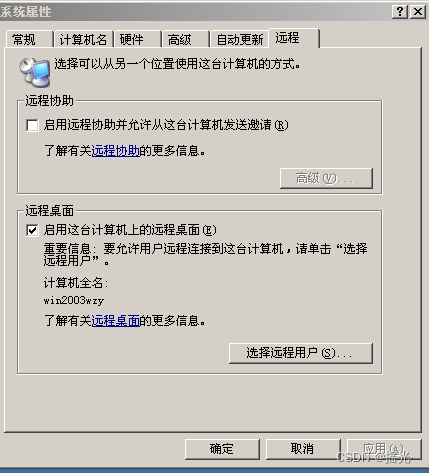

Telnet
Enable telnet service
win+R Input services.msc

Select any input t Quick positioning to t The first service , find telnet, double-click Change the startup type to automatic and apply
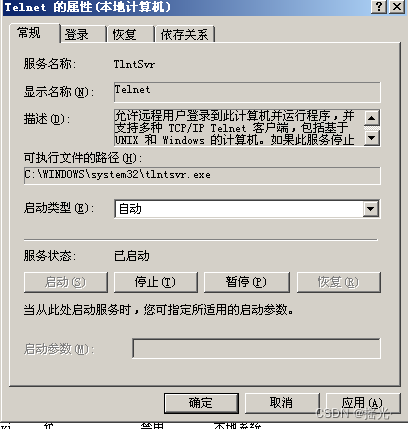
Double click... Again telnet Check that the service status is set to start —— determine
Use telnet Remote control
Open command line input telnet The server ip Address —— Don't send the password —— logon server
If you use a non administrator user to log in , Please add the logged in user to the built-in Group TelnetClients in
Check the port
netstat -an View all open ports on this computer
telnet:23
Remote Desktop Protocol RDP:3389
Crack windows System password
utilize 5 this shift Vulnerability cracking password
Loophole
1. When not logged in to the system . continuity 5 This press shift key , The program will pop up c:\windows\system32\sethc.exe
2.win7 There will be a notepad when repairing the abnormal startup of the system , Through this Notepad, yes sethc.exe Rename
The process
Continuous press 5 Time shift key , The following window will pop up
1. We shut down abnormally
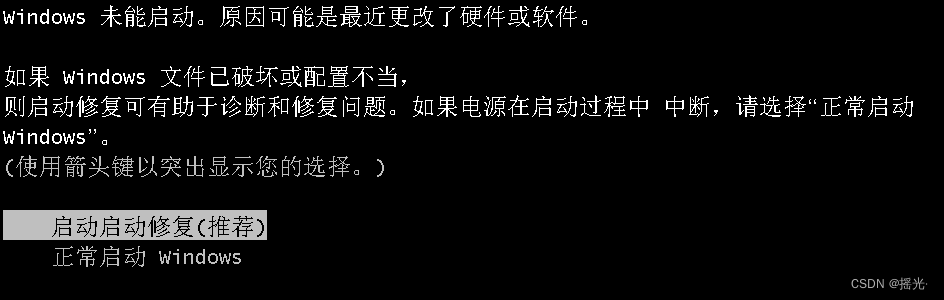
2. No reduction

3. Wait for the startup repair to appear , Select view problem details , Slide to the bottom , Select the privacy statement link , Will open a notepad with the highest permission

4. file —— open —— Get into c:\windows\system32
Notice the d The disk is actually c disc
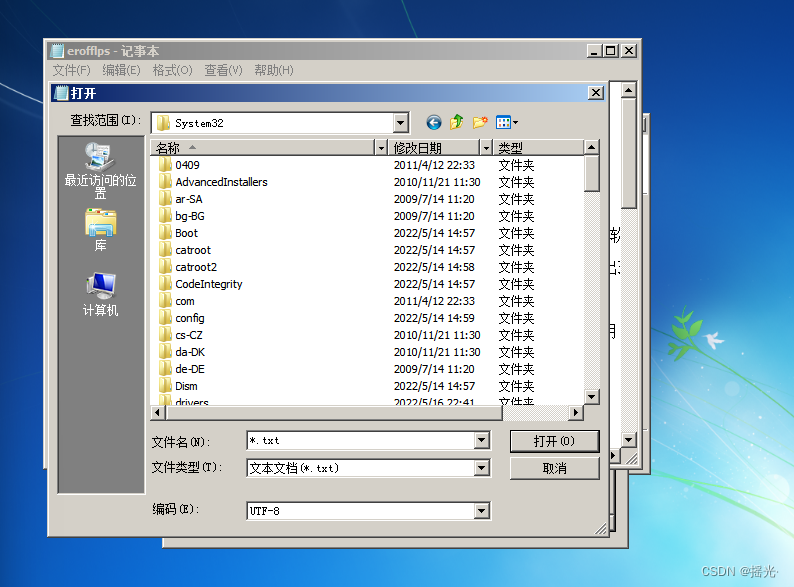
5. Change the file type to All the files

6. find sethc Applications , Rename it
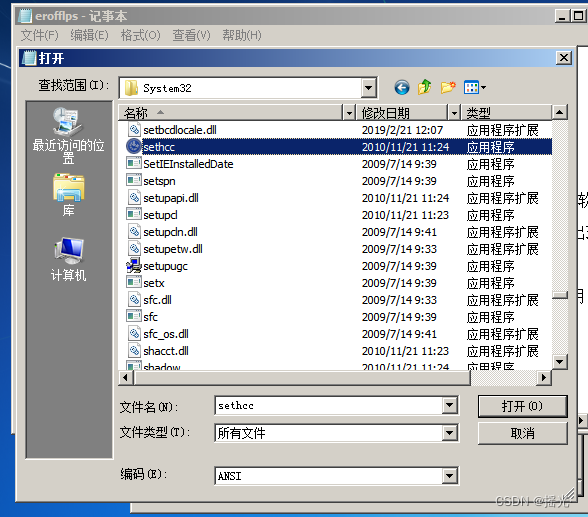
7. find cmd, Make a copy and change it into sethc

8. Reboot , utilize shift Open the command line
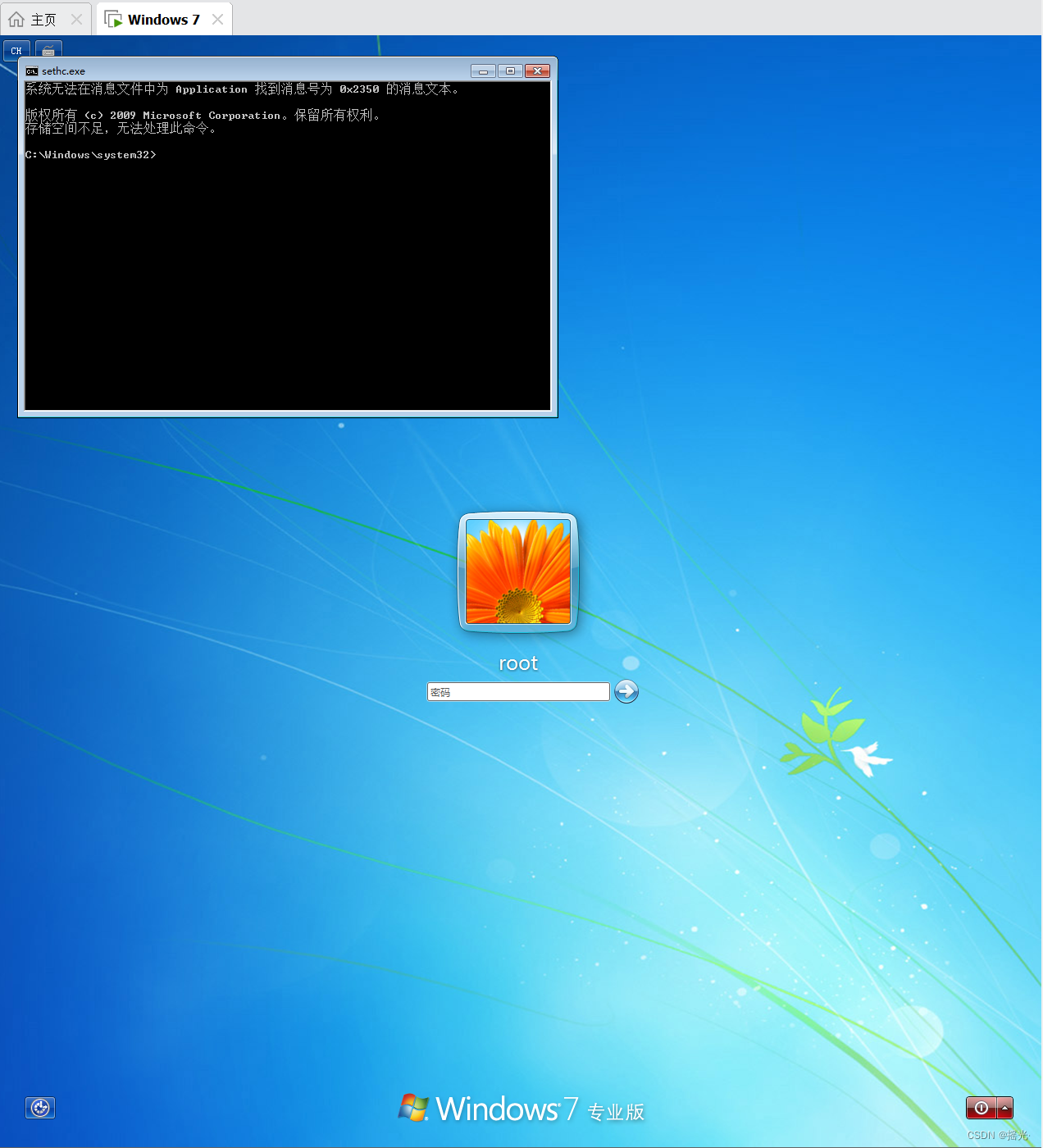
9. Change account password
net user user name New password
NTFS security privilege
NTFS Summary of permissions
1. By setting NTFS jurisdiction , Realize the permissions of different users to access different objects
2. After assigning the correct access rights , Users can access their resources
3. Set permissions to prevent resources from being tampered with , Abridgement
File System Overview
A file system is a method of organizing files on an external storage device
Common file systems :
windows
FAT16/FAT32 In the early windows
NTFS windows
ReFS windows
linux
EXT
swap Exchange file system , It mainly divides part of the disk space into memory usage
In the early FAT The file system does not support a single large file ( exceed 4GB)
FAT Convert to NTFS:
convert Disk character /fs:ntfs Data is not lost but irreversible
Check the disk file format
Right click —— attribute —— File format

NTFS The characteristics of the document
1. Improve disk read and write performance
2. reliability
EFS Encrypted file system ( Use BitLockeri Perform disk encryption )
ACL Access control list ( Set the permissions )
3. Disk utilization
Compress
Disk quota
4. Support single file larger than 4 individual G
modify NTFS jurisdiction
Right click folder —— attribute —— Security allows you to view permissions

Permission to analysis
File permissions
Complete control of Have all permissions
modify Have read , write in , modify , Permission to delete files
Read and run Have permissions to read and execute files
Read Have permission to read files
write in Have the right to modify the contents of the file
Special authority Control the permissions of the file permission list
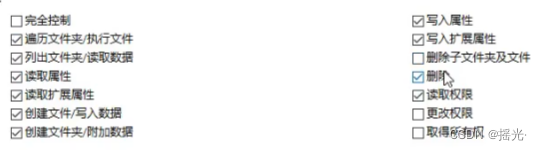


Folder permissions
Complete control of Have read , write in , modify , Delete file , And special permissions
modify Have read , write in , modify , Permission to delete files
Read and run Have the ability to download files in the folder , Permissions to read and execute files
List the folder Directory You can list folder contents
Read Have the ability to download files in the folder , Read permissions
write in Have permission to create new files in the folder
Special authority Controls the permissions of the folder permission list
In addition to the above permissions, you can also display more permissions in advanced
Cancel permission inheritance
effect : After the cancellation , You can modify the permission list in the diagram at will

Otherwise, permissions are inherited from the parent directory , Can't modify
Modification method
1. Select Advanced
2. Uncheck the items in the figure

3. Choose whether to keep the permission of the parent directory
Copy as reserved , Delete as not reserved

Modify the permission list
1. Select Add
2. Enter user name or group name
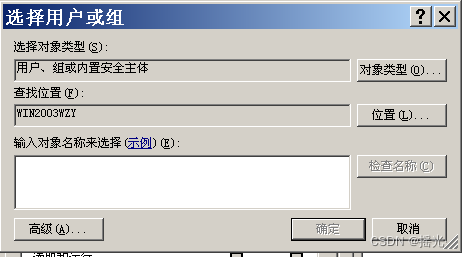
3. If you forget your user name , Click Advanced

4. Select find now select the specified group or user —— determine

5. Confirm to finish adding

Authority accumulation
When users belong to multiple groups at the same time , Permissions are cumulative
Accumulation only accumulates “ allow ” jurisdiction
Refused permission
When permission conflicts occur , Deny permission has the highest priority
Such as :a The user's permission to a folder is all denied , but a Belongs to the administrator group , Even if the administrator group has full control of the folder ,a Still unable to open this folder
Special permissions
• Read permissions ( It has nothing to do with reading the contents of a file or folder )
— Read the access control list of a file or folder
— For users who want to access a file , This permission must be checked
• Change permissions ( It has nothing to do with modifying the contents of a file or folder )
— Whether users can modify the access control list of files or folders , Because this permission can be added or deleted for users
limit , It will cause many unsafe factors , This permission is generally not given to
— To change , The premise is that it must be able to read
• Obtain ownership rights
— Only administrators can have this permission
Take ownership
Only by default administrator You have the right to
effect : You can change the owner of any folder to administrator
Pictured : The administrator does not have permission

1. Open security —— determine

2. Select Advanced
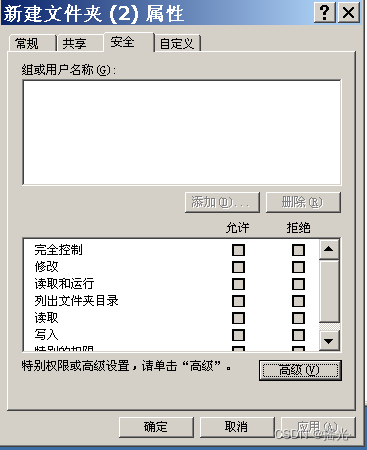
3. Choose the owner , Change the holder to administrator or administrator group , Check to replace the owner of sub containers and objects —— determine

Force permission inheritance
effect : Force inheritance on all subfolders under this folder , Overwrite its own permission list
Open properties —— Security —— senior
Check the items that can be applied to sub objects displayed at this time to replace the permission items of all sub objects —— determine

file move , The impact of replication on permissions
Same partition ( Under the same plate ):
Move : The authority remains unchanged
Copy : The permission becomes the permission of the current folder
Cross partition :
Move : The permission becomes the permission of the current folder
Copy : The permission becomes the permission of the current folder
File sharing server (CIFS)
Shared server overview
Provide file sharing services through the network , Provide file download and upload Services ( Similar to FTP The server )
Create a share
Method : Right click folder properties - share -- Turn on sharing -- Set share name -- Set sharing permissions
notes :
1) When logging in locally , Receive only NTFS Impact of permissions
2) When logging in remotely , Will be shared and NTFS The common influence of authority , And take the intersection !
3) Therefore, it is recommended to set the sharing permission to everyone: Complete control of , Then the specific permission requirements are NTFS You can set it in permission .
Sharing conditions
1. Two computers can ping through
2.win+R Input UNC Address ( Or the host name of the server )

3. Enter the account password on the opposite system

see uid
whoami View current login user
whoami /user View the of the currently logged in user uid
Hide sharing
Add after the share name $ If it matches, it can be hidden

To access this hidden folder, you need to enter the address manually

Share related commands
net share # List shares
net share Share name /del # Delete share
We found that c: and d: Shared by default , It's not safe , And restart after deletion will resume
The masking system automatically generates hidden shares
Open the registry
Win+R Input regedit
Locate the shared registry location
HKEY_Local_MACHINE\System\CurrentControlSet\Services\LanmanServer\Parameters\
Right click New REG_DWORD Like open AutoShareServer key , The value is 0
Check the local network connection status
netstat -an
Nine 、 close 445 service
Can be closed by 445 Port to shield the incoming virus ( Such as blackmail virus )
Method 1: open services.msc, And stop and disable server service
Method 2: No access to 445, Configure advanced security firewall - Inbound rules ( stay win7 And above ,win2008 And above )
1. Open the advanced security firewall
Control panel —— A firewall —— Advanced settings

2. Add inbound rule —— Select the inbound rule —— New rules

3. Select port

4.tcp and udp All need to be closed , So add a two hop rule , Port selection 445
5. Choose block connection

6. Future generations

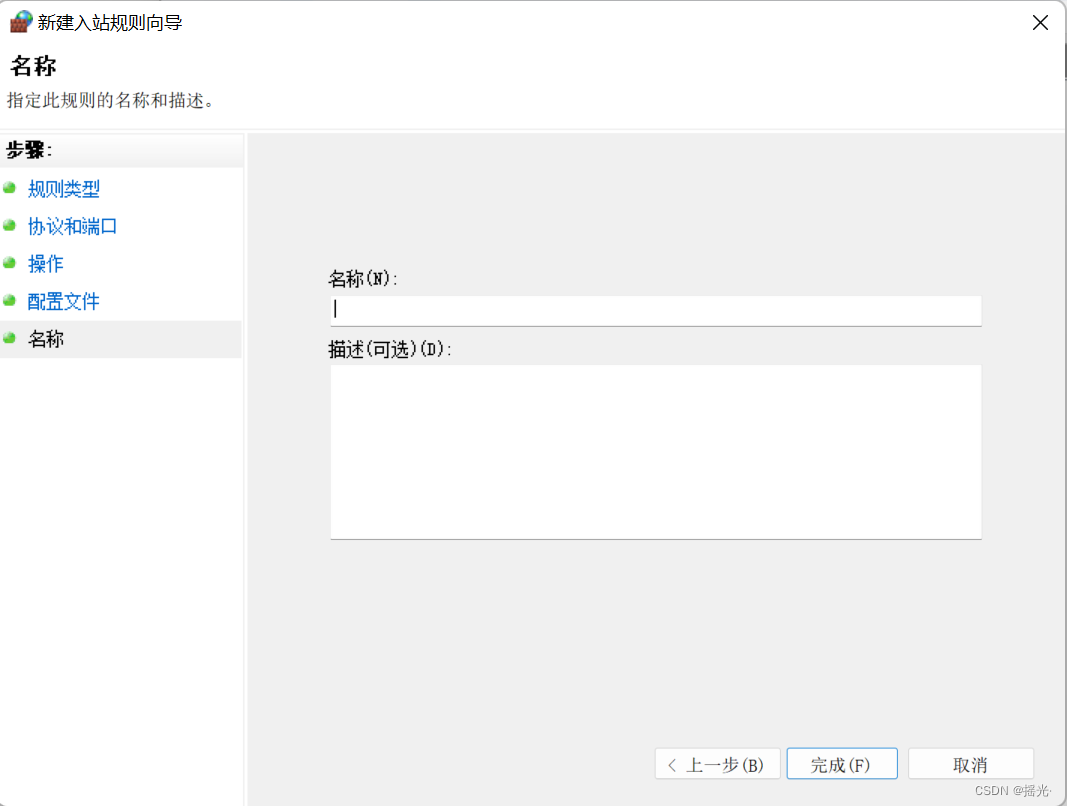
7. Specify a name —— complete
utilize PE Crack the system password
1. Download the system's corresponding pe, write in u Plate
2. start-up bios, stay boot Lieutenant general, put u The disk reading sequence is placed in front of the system disk
3. start-up pe System , Use the built-in tools to modify
边栏推荐
- Outlook邮件创建的规则失效,可能的原因
- PCL点云处理之直线点集投影规则化(五十六)
- Implementation of graph structure, from point to edge and then to graph
- IndexTree2D
- AC自动机
- The tragic experience of installing scikitlearn on win764
- [cloud native] Devops (IV): integrated sonar Qube
- 【数据库学习】Redis 解析器&&单线程&&模型
- Time series data in industrial Internet of things
- From violent recursion to dynamic programming, memory search
猜你喜欢

IndexTree2D
![[1184. Distance between bus stops]](/img/dd/3437e6a14ac02dac01c78b372a5498.png)
[1184. Distance between bus stops]

Gee - dataset introduction mcd12q1

通过企业微信自建应用向微信推送信息

The kettle job implementation runs a kettle conversion task every 6S

《ArchSummit:珍爱微服务底层框架演进》
Push information to wechat through enterprise wechat self built application

JUC concurrent programming - Advanced 05 - lock free of shared model (CAS | atomic integer | atomic reference | atomic array | field updater | atomic accumulator | unsafe class)

Monotonic stack structure exercise -- cumulative sum of minimum values of subarrays

由斐波那契数列引述到矩阵快速幂技巧
随机推荐
洛谷 P2024 [NOI2001] 食物链
有序表之AVL树
Time series data in industrial Internet of things
PCL点云处理之直线点集投影规则化(五十六)
用VS Code搞Qt6:编译源代码与基本配置
Visual studio input! No prompt
窗口内最大值或最小值的更新结构——窗口内最大值
Ranking of engineering project management software
The rule created by outlook mail is invalid. Possible reasons
Available parameters of ansible Playbook
Boundary extraction of PCL point cloud processing (58)
Glidemodule appglidemodule and generated API details
About constant modifier const
Kubernetes scheduling concept and workflow
ASP.NET Core 6.0 基于模型验证的数据验证
【零基础】php代码审计之sql注入
WPF opens external programs and activates them when needed
TrinityCore魔兽世界服务器-注册网站
PCL point cloud processing to find the two endpoints of the line point set (57)
Application programming of communication heartbeat signal for communication abnormality judgment