当前位置:网站首页>Discuz论坛搭建详细过程,一看就懂
Discuz论坛搭建详细过程,一看就懂
2022-07-24 08:51:00 【初夏_learning】
说明:本实验在虚拟机中进行,所使用的软件是VMware Workstation Pro16;
使用的是rhel-server-8.2-x86_64-dvd的镜像文件,搭建论坛的安装包为Discuz_X3.4_SC_UTF8.zip。
1.首先配置yum本地源
mkdir /media/cdrom
mount /dev/sr0 /media/cdrom
编辑yum的配置文件:
vim /etc/yum.repos.d/base.repo

打开之后,写入:
[BaseOS]
name=BaseOS
baseurl=file:///media/cdrom/BaseOS
enabled=1
gpgcheck=0

[Appstream]
name=AppStream
baseurl=file:///media/cdrom/AppStream
enabled=1
gpgcheck=0
在配置文件中写下下面这段代码,写完后记得保存并退出。
如果需要下次自动挂载的话,需打开:
vim /etc/fstab

写下:
/dev/sr0 /media/cdrom iso9660 defaults 0 0
2.安装HTTP服务
yum install httpd -y

启动httpd
systemctl start httpd
查看httpd的状态
systemctl status httpd
3.关掉防火墙与sexlinux
systemctl stop firewalld.service
setenforce 0

查看防火墙状态:
systemctl status firewalld.service

查看sexlinux
getenforce
由于防火墙是开着的,会阻止我们虚拟机与pc之间互相的访问,因此我们需要关闭防火墙。
selinux 有三种工作模式,分别是:
(1)enforcing:强制模式。违反 selinux 规则的行为将被阻止并记录到日志中。
(2)permissive:宽容模式。违反 selinux 规则的行为只会记录到日志中。一般为调试用。
(3)disabled:关闭 selinux。
selinux 工作模式可以在 /etc/selinux/config 中设定。
selinux 主要作用就是最大限度地减小系统中服务进程可访问的资源(最小权限原则)。
4.安装php
软件它是网页相关的软件,我们要动态访问网页。安装有关php的所有软件,使用命令:
yum install php* -y
5.安装数据库
一般默认都已经安装过了,不过没关系,我们可以再安装一下,使用命令:
yum install mariadb-db -y 它会提示我们已经安装过了。
启动服务,使用命令:
systemctl start mariadb.service数据库安好后,我们需要初始化数据库。论坛中的数据都被存放再数据库中,数据库可以简单的理解为一张EXCEL表格,对应的用户和密码等信息。
①安装数据库:使用命令:
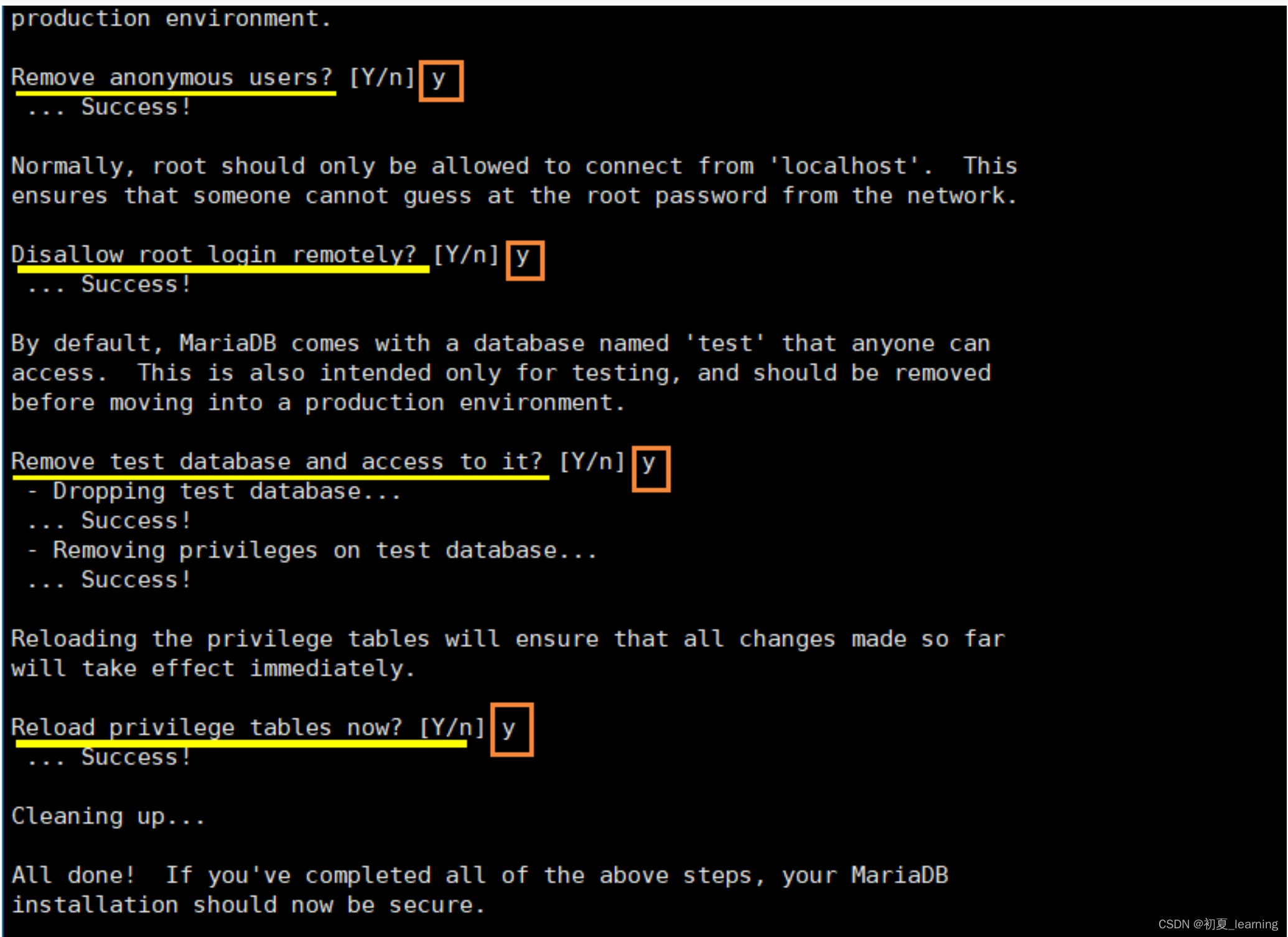
mysql_secure_installation
②然后直接回车进入下一步,它会提示是否给进入数据库的root用户设置密码
③我们输入y或Y,回车后输入密码,两次密码一致进入下一步。

④询问:是否删除匿名(anonymous)用户?y 这个根据实际情况而定。由于我们这里是实验,直接y到下一步。
⑤询问:不允许(disallow)root用户远程登陆?y
⑥询问:移除数据测试数据库并访问它?y
⑦询问:现在重新加载权限表?y
6.登录数据库
使用命令:
mysql -u root -p 回车 ,密码为进入数据库的密码。进入数据库后,我们可以使用数据库的命令简单的看一下:
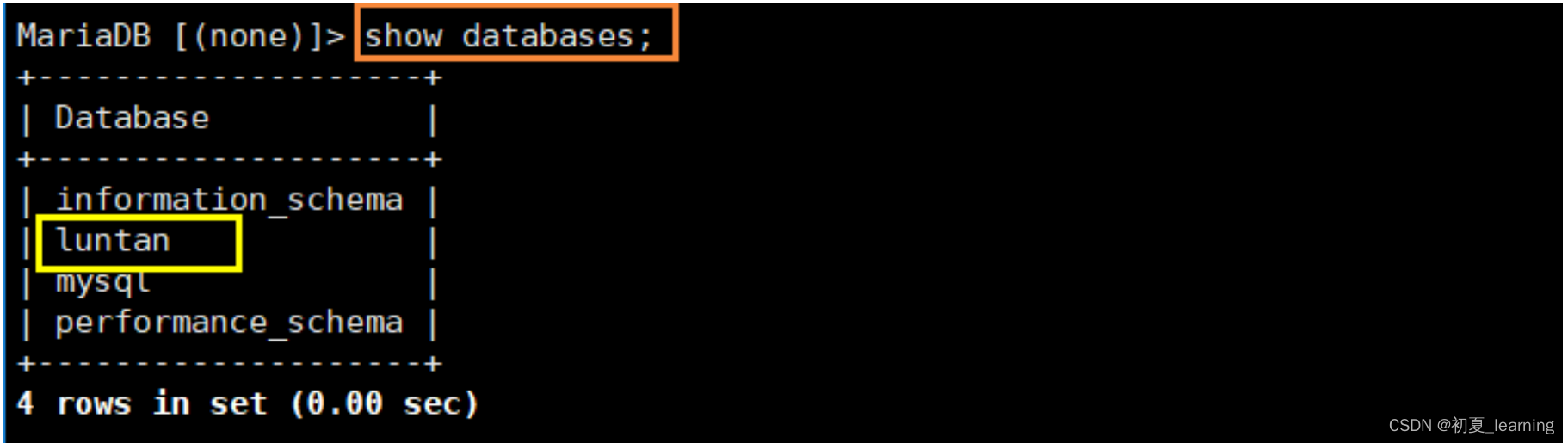
show databases;
7.创建数据库
使用命令:
create dabase luntan; 创建完成后,我们在使用
show databases;检查一下,发现luntan的数据库已经成功创建。
完成之后我们使用命令:quit 或者 exit 退出即可。
8.搭建论坛
首先,创建文件夹命令:
mkdir /www

之后切换目录进入:
cd /www
需要将Discuz_X3.4_SC_UTF8.zip压包上传/www目录下
之后将上传的压缩文件解压
gunzip Discuz_X3.4_SC_UTF8_20220518.zip.gz

unzip Discuz_X3.4_SC_UTF8_20220518.zip
解压完之后,对http配置文件更改:
vim /etc/httpd/conf.d/vhosts.conf

写入:
<Directory /www>
    AllowOverride none
    require all granted
</Directory>
<Virtualhost /192.168.31.128>
    DocumentRoot /www
    ServerName 192.168.31.128
</Virtualhost>
这里的192.168.31.128是根据自己的网卡信息填入,可以通过命令
ifconfig 或者 ip a查看自己的网卡信息。
之后重启HTTP服务
systemctl restart httpd这时候我们就可以去浏览器安装Discuz。
在浏览器输入网址
192.168.31.128/upload/install就会出来安装界面
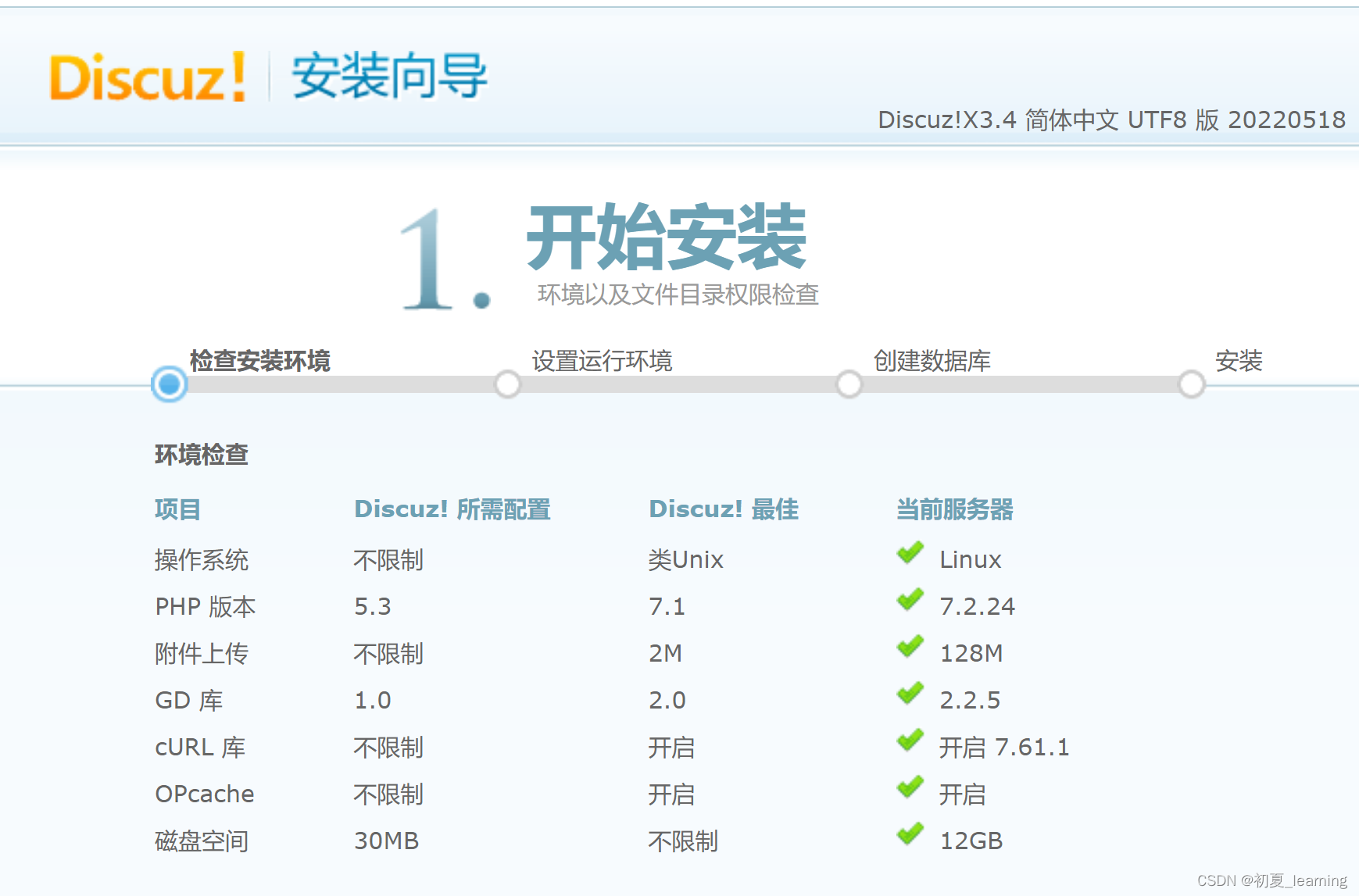
但是发现文件不可写,权限不够

改权限使用命令:
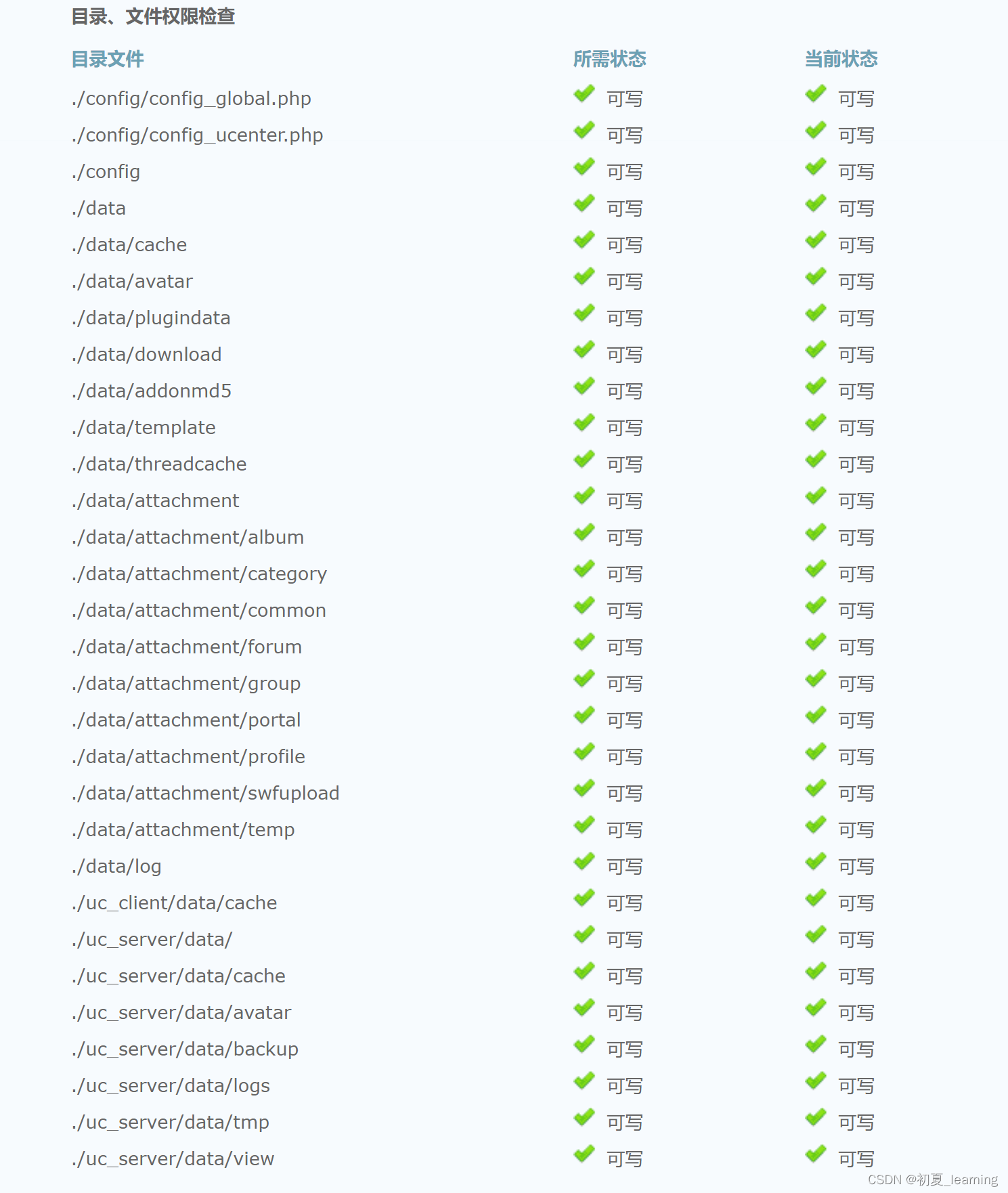
chmod o+w config data uc_* -R

这时我们刷新一下浏览器就会发现正常了,刷新安装向导网页:发现所有状态为 可写 状态

点下一步
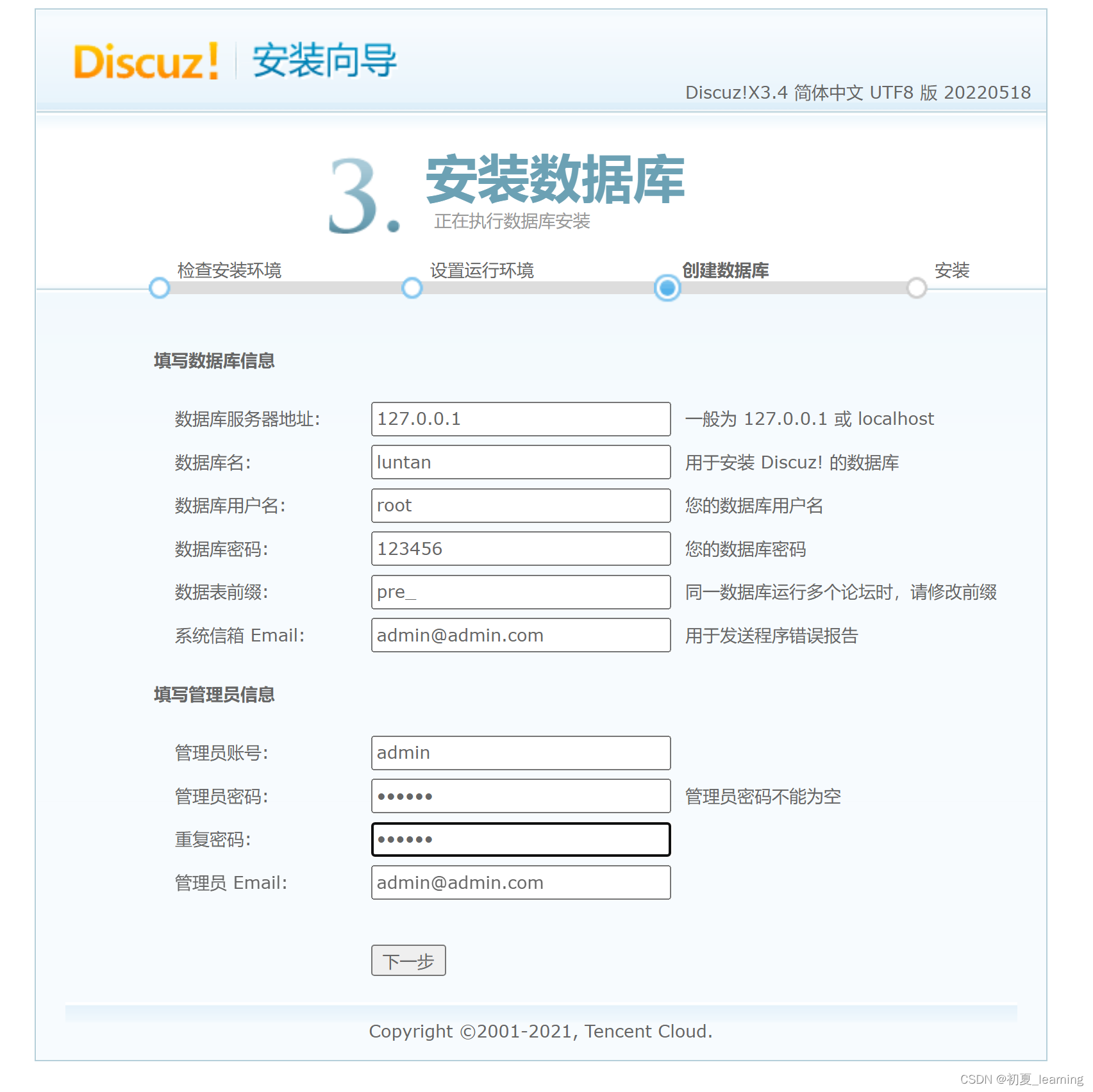 之后将我们之前创的数据库名填入,数据库用户名和密码。下一步

安装完成

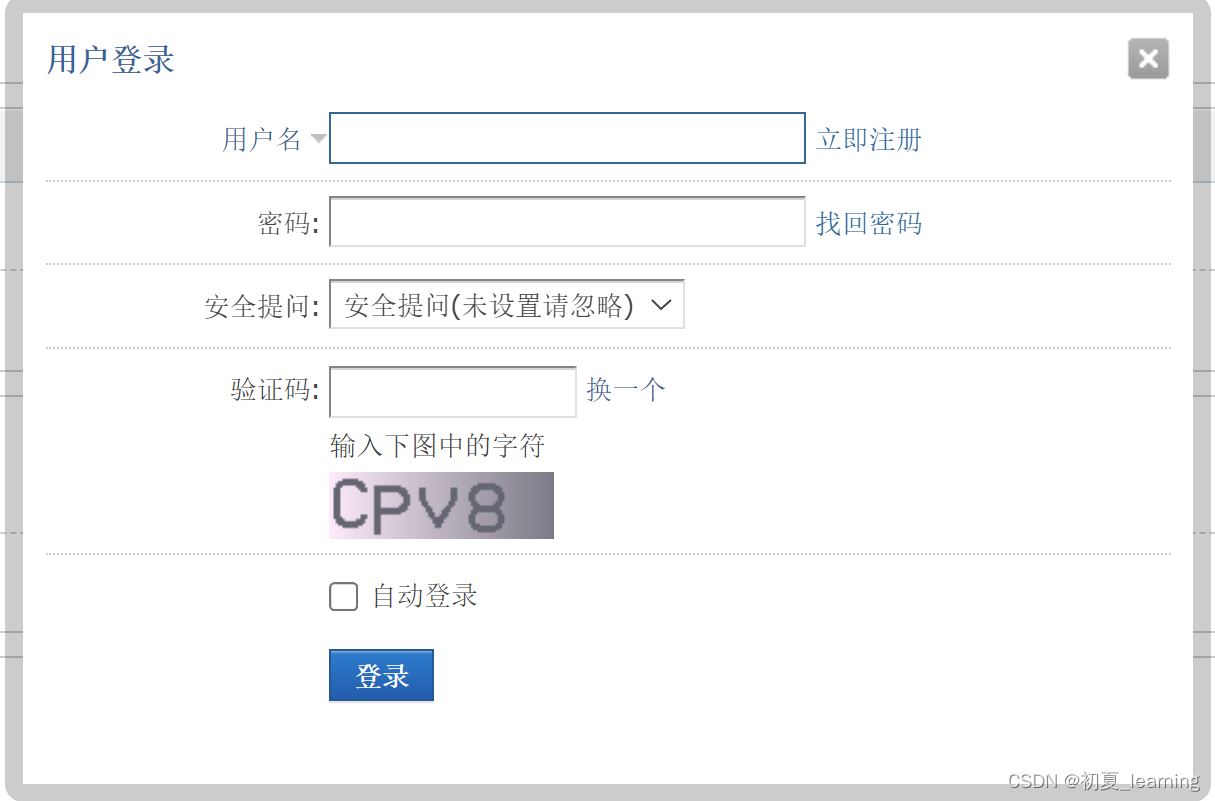
此时DISCUZ论坛已经完全搭建,我们可以在里面注册用户、登陆。
用户登录
:
用户注册:

到这里我们本节实验就讲解完了,此实验只对本电脑访问使用。如果想让别人访问自己做的论坛需要一台真实的服务器上搭建,这样别人就可以访问你的论坛了。
边栏推荐
- RPC调用方如何实现异步调用:CompletableFuture
- Change of sheetname
- Dao race track is booming. What are the advantages of m-dao?
- [Sheung Shui Shuo series] EE feedback details
- Using golang to implement RPC (1)
- Optimization of MySQL paging query
- Ubuntu20.04 install MySQL 5.7
- Valentine's Day
- Relationship between fork and pipeline
- Some mistakes that Xiaobai often makes (update from time to time, and promise not to make them again next time)
猜你喜欢

Digital collection =nft? Have you entered the digital collection?

Bit.store, which has attracted much attention, is at a glance of the latest developments

安装软件时提示【An error occurred while trying to create a file in the destination directory: 拒绝访问】的解决方法

Hack the box - File Inclusion module detailed Chinese tutorial

JS string interception

Shanghai issued a document to support the entry of NFT cultural exchange: the trend of digital collections has arrived!

Musk responded that the brain has been uploaded to the cloud: already did it!

JMX console unauthorized access vulnerability

Interviewer: man, how much do you know about the read-write lock of go language?

Is yuancosmos hype? Or the future
随机推荐
Will Plato become the risk target of the meta universe? Platofarm has great opportunities
Golang implements sanggi diagram and analyzes user behavior trajectory
How to import CAD files into the map new earth and accurately stack them with the image terrain tilt model
The solution of [an error occurred while trying to create a file in the destination directory: access denied] is prompted when installing the software
Protocol buffer learning notes
Beandefinition three ways to load beans
林业调查巡检数据采集解决方案
Shanghai issued a document to support the entry of NFT cultural exchange: the trend of digital collections has arrived!
【FFH】OpenHarmony啃论文成长计划---cJSON在传统C/S模型下的应用
Valentine's Day
Wargames bandit (21-33) problem solving essay
Chinese brands in the historical process
Realize page return to parent directory based on cookies
Kotlin学习笔记1——变量、函数
Advantages of using partitions
Encryption market ushers in a new historical cycle. Look at jpex's "stability" and "health"
Opencv Chinese document 4.0.0 learning notes (updating...)
Xiaobai learns oauth2
Hack the box - File Inclusion module detailed Chinese tutorial
redis学习一redis介绍及NIO原理介绍