当前位置:网站首页>[node] theory + practice enables you to win sessions and cookies
[node] theory + practice enables you to win sessions and cookies
2022-06-22 09:20:00 【Jdoit CW】
Content
understand session、cookie
use node Server implementation session、cookie
Front end demonstration
1. cookie And session
cookie: A space opened up by the browser in the computer hard disk , It is mainly used for server-side data storage .
- cookie The data in is distinguished in the form of domain names .
- cookie The data in has expiration time , The data will be automatically deleted by the browser after time .
- cookie The data in will be automatically sent to the server with the request .
session: It's actually an object , Stored in memory on the server side , stay session Object can also store multiple pieces of data , Every piece of data has a sessionid As the only sign .
Verification diagram :

2. node Server implementation
stay node.js We need the help of express-session Realization session function ., Portal :express-session
Specific operations inside the middleware
Add... To the request object session attribute ,session The value of is the object ,session The user information can be saved after the user logs in successfully , The method will be used internally when we go to session Generated when data is stored in the sessionId, Is the unique identification of the currently stored data , And then sessionId Stored on the client side cookie in . When the client accesses the server again , Method will get the data from the client cookie , And extract from it sessionId, And according to sessionId from cookie User information found in . At this point, the authentication is successful !
build node Server code A little ( Please refer to :node Server setup )
2.1 First in the entry file (app.js) Write create session Middleware
app.use(session({
     // establish session middleware
    secret: 'secret keys',
    resave: false,
    saveUninitialized: false,
    cookie: {

        maxAge: 24 * 60 * 60 * 1000 // session Expiration time
    }
}))
2.2 Log in successfully , And when you log out, you should check the session To operate
const express = require('express');
const router = express.Router();
const dbConfig = require('../util/dbconfig.js'); //  Database connection pool

router.post('/login', async(req, res) => {

    const {
     username, password } = req.body;
    let sql = 'select password from test where username=?';
    let sqlArr = [username];
    let result = await dbConfig.sysqlConnect(sql, sqlArr);
    if (result.length) {

        if (password === result[0].password) {

            req.session.username = username //  Add user information to the request object
            res.send({

                status: 200,
                msg: ' Login successful '
            })
        } else {

            res.send({

                status: 400,
                msg: ' Wrong user name or password '
            })
        }
    } else {

        res.send({

            status: 400,
            msg: ' The username does not exist '
        })
    }
})

//  Log out
router.get('/loginout', (req, res) => {

    req.session.destroy(err => {

        if (err == null) {

            res.clearCookie('connect.sid'); //  Delete the corresponding... Of the client cookie,( Note that the value here is unique , It depends on the attribute name of the client )
            res.send({
     msg: ' Log out ', status: 200 })
        } else {

            res.send({
     msg: ' Exit failed ', status: 400 })
        }
    })
})

//  Determine whether the user is logged in
router.get('/loginStatus', (req, res) => {

    if (req.session && req.session.username) {
     // provided that session There is information in
        res.send('var isLogin = true')
    } else {

        res.send('var isLogin = false')
    }
})

module.exports = router
Be careful : For the database connection pool here, please refer to :mysql Connect
3. Actual demonstration
3.1 Verification effect display
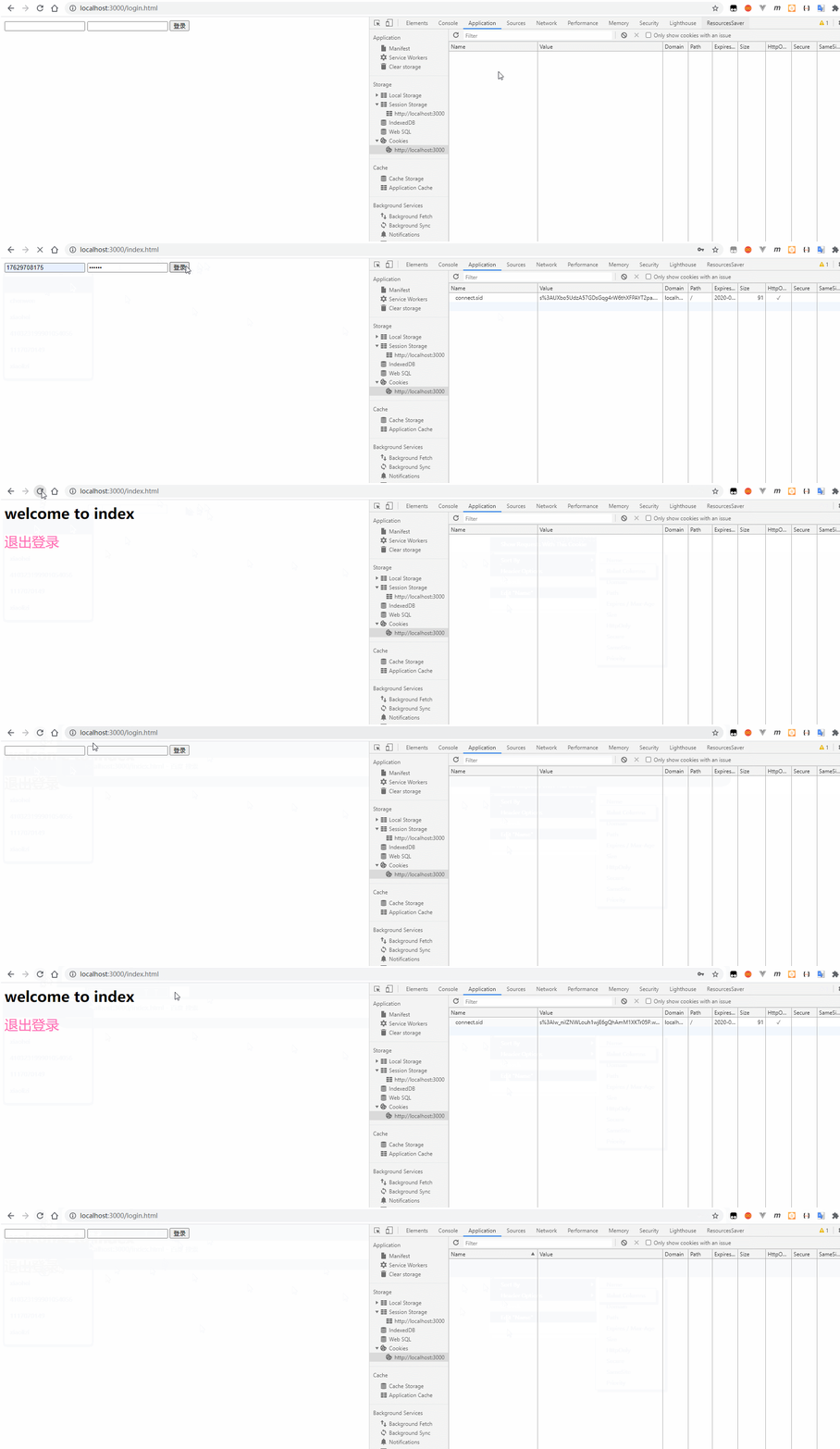
3.2 step
①: Create a static page on the server :login.html 、index.html
②: use ajax request Access the corresponding interface
③: Request the user status interface on the required page , Make sure the user is logged in
- login.html
<!DOCTYPE html>
<html lang="en">

<head>
    <meta charset="UTF-8">
    <meta name="viewport" content="width=device-width, initial-scale=1.0">
    <script src="./js/jquery.min.js"></script>
    <title>Document</title>
</head>

<body>
    <form id="loginForm">
        <input type="text" name="username" id="">
        <input type="password" name="password" id="">
        <input type="submit" value=" Sign in ">
    </form>
    <script> $(function() {
      $('#loginForm').on('submit', function() {
      const formdata = $(this).serialize(); $.ajax({
      url: '/users/login', type: 'post', data: formdata, success(res) {
      if (res.status == 200) {
      location.href = '/index.html' } else {
      alert(' Wrong user name or password ') } } }) return false }) }) </script>
</body>

</html>
index.html
<!--  Determine login status  -->
<script src="/users/loginStatus"></script>
<script> if (!isLogin) location.href = '/login.html' </script>
<!DOCTYPE html>
<html lang="en">

<head>
    <meta charset="UTF-8">
    <meta name="viewport" content="width=device-width, initial-scale=1.0">
    <script src="./js/jquery.min.js"></script>
    <title>Document</title>
    <style> a {
      text-decoration: none; font-size: 30px; color: hotpink; } </style>
</head>

<body>
    <h1>welcome to index</h1>
    <a href="javascript:;"> Log out </a>
    <script> $('a').on('click', function() {
      $.ajax({
      url: '/users/loginout', success(res) {
      if (res.status == 200) {
      console.log(' Log out '); location.href = '/login.html' } } }) }) </script>
</body>

</html>
Be careful : Add status judgment to the required page , Ensure user identity
About authentication , More often I will use token, About token Use , May refer to :token verification
边栏推荐
- Servlet的生命周期
- Brush questions in C language | judge whether a certain year is only a leap year (12)
- Stream流创建_操作_收集_案例
- 机器学习|nltk_Data下载错误|nltk的stopwords语料下载错误解决方法
- Unicode characters / static non static access
- Php+stripe payment API, the latest PHP version of stripe overseas payment tutorial
- [tensorboard] step on all minefields and solve all your problems
- try/finally --return那些事
- Php+mysqli create a table, read multiple items, add, modify and query a complete instance
- Common SQL statements in MySQL
猜你喜欢

Why use gradient descent method

让你轻松上手【uni-app】

Sound and shadow 2022 heavy release! Detailed explanation of the new functions of Huisheng Huiying 2022

Node cannot recognize the 'node' entry as the name of a cmdlet, function, script file, or runnable program. Please check the spelling of the name. If the path is included, make sure the path is correc

Threejs implementation of simple panoramic view demo

DOM编程

XSS vulnerability attack

Byte/byte?别搞晕了!
![[detailed explanation] point multiplication and cross multiplication of neural network matrix (pytorch version)](/img/17/e964216d81555d0a1203ee51d4698e.png)
[detailed explanation] point multiplication and cross multiplication of neural network matrix (pytorch version)

kali木马入侵win7系统
随机推荐
File upload attack and protection
Solidity from introduction to practice (IV)
try/finally --return那些事
PHP seven methods to obtain complete instances of file name suffixes [collect]
Threejs implementation of simple panoramic view demo
Sparse array ^ create ^ restore ^ save ^ fetch -- family bucket
Feedforward and backpropagation
Shell中的单中括号和双中括号的区别
The difference between scnprintf and snprintf
[qnx hypervisor 2.2 user manual]5.6 close guest
Fuzzy query and aggregate function
Originality: dozens of lines of pure PHP code decrypt goto encrypted PHP single file [for learning only]
Classic & Cases
Template engine, making interaction elegant
The circular queue is implemented in super detail. I understand it in a few seconds
MySQL中常用的SQL语句
list_head
Unicode字符/静态非静态的访问
看看volatile你深知多少
稀疏数组^创建^还原^存盘^取盘--全家桶