当前位置:网站首页>Chapter 3: drawing triangles
Chapter 3: drawing triangles
2022-06-24 07:49:00 【Code Knight】
One 、 Draw triangle
1、 initialization
(1) initialization GLFW
// initialization GLFW
	glfwInit();// initialization GLFW
	glfwWindowHint(GLFW_CONTEXT_VERSION_MAJOR, 3);// Set the major version number
	glfwWindowHint(GLFW_CONTEXT_VERSION_MINOR, 3);// Set the minor version number
	glfwWindowHint(GLFW_OPENGL_PROFILE, GLFW_OPENGL_CORE_PROFILE);// Set the core mode
	//glfwWindowHint(GLFW_OPENGL_FORWARD_COMPAT, GL_TRUE);//MAC OS
	glfwWindowHint(GLFW_RESIZABLE, false);// Close resizable window
(2) Create a window
// create a window ( wide 、 high 、 Window name )
	auto window = glfwCreateWindow(screen_width, screen_hight, "Triangle", nullptr, nullptr);
	if (window == nullptr) {

		std::cout << "Failed to Create OpenGL Context" << std::endl;
		glfwTerminate();
		return -1;
	}
	glfwMakeContextCurrent(window);
(3) initialization GLAD
// initialization GLAD
	if (!gladLoadGLLoader((GLADloadproc)glfwGetProcAddress))
	{

		std::cout << "Failed to initialize GLAD" << std::endl;
		return -1;
	}
(4) Create a viewport
// Create viewport
	glViewport(0, 0, screen_width, screen_hight);
Initialization code ( whole ):
#include <glad/glad.h>
#include <GLFW/glfw3.h>

#include <iostream>

const int screen_width = 800;
const int screen_hight = 600;

int main() {


	// initialization GLFW
	glfwInit();// initialization GLFW
	glfwWindowHint(GLFW_CONTEXT_VERSION_MAJOR, 3);// Set the major version number
	glfwWindowHint(GLFW_CONTEXT_VERSION_MINOR, 3);// Set the minor version number
	glfwWindowHint(GLFW_OPENGL_PROFILE, GLFW_OPENGL_CORE_PROFILE);// Set the core mode
	//glfwWindowHint(GLFW_OPENGL_FORWARD_COMPAT, GL_TRUE);//MAC OS
	glfwWindowHint(GLFW_RESIZABLE, false);// Close resizable window

	// create a window ( wide 、 high 、 Window name )
	auto window = glfwCreateWindow(screen_width, screen_hight, "Triangle", nullptr, nullptr);
	if (window == nullptr) {

		std::cout << "Failed to Create OpenGL Context" << std::endl;
		glfwTerminate();
		return -1;
	}
	glfwMakeContextCurrent(window);

	// initialization GLAD
	if (!gladLoadGLLoader((GLADloadproc)glfwGetProcAddress))
	{

		std::cout << "Failed to initialize GLAD" << std::endl;
		return -1;
	}

	// Create viewport
	glViewport(0, 0, screen_width, screen_hight);

	return 0;
}
2、 Vertex input
The coordinate system specifies

Vertex coordinate code
// Vertex data of triangle
const float triangle[] = {

	//-- Location --//
	-0.5f,-0.5f,0.0f,// The lower left
	0.5f,-0.5f,0.0f,// The lower right
	0.0f,0.5f,0.0f,// Right up
};

3、 Data processing
(1)VBO、VAO

// Generate and bind VBO
	GLuint vertex_buffer_object;
	glGenBuffers(1, &vertex_buffer_object);
	glBindBuffer(GL_ARRAY_BUFFER, vertex_buffer_object);
	// Bind vertex data to the default buffer
	glBufferData(GL_ARRAY_BUFFER, sizeof(triangle), triangle, GL_STATIC_DRAW);

// Generate and bind VAO
	GLuint vertex_array_object;
	glGenVertexArrays(1, &vertex_array_object);
	glBindVertexArray(vertex_array_object);

(2) Vertex Attribute
// Set vertex property pointer
	glVertexAttribPointer(0, 3, GL_FLOAT, GL_FALSE, 3 * sizeof(float),(void*)0);
	glEnableVertexAttribArray(0);

(3) Unbind code
// After setting, you can unbind VBO、VAO 了
	glBindVertexArray(0);
	glBindBuffer(GL_ARRAY_BUFFER, 0);
4、 Vertex shaders and clip shaders

// Vertex shader source code
	const char* vertex_shader_source =
		"#version 330 core\n"
		"layout (location = 0) in vec3 aPos;\n"
		"void main()\n"
		"{\n"
		" gl_Position = vec4(aPos,1.0);\n"
		"}\n\0";

// Fragment shader source code
	const char* fragment_shader_source =
		"#version 330 core\n"
		"out vec4 FragColor;\n"
		"void main()\n"
		"{\n"
		" FragColor = vec4(1.0f,0.5f,0.2f,1.0f);\n"
		"}\n\0";

// Generate and compile shaders
	// Vertex shader
	int vertex_shader = glCreateShader(GL_VERTEX_SHADER);
	glShaderSource(vertex_shader, 1, &vertex_shader_source, NULL);
	glCompileShader(vertex_shader);
	int success;
	char info_log[512];
	//  Check whether the shader was successfully compiled , If compilation fails , Print error messages
	glGetShaderiv(vertex_shader, GL_COMPILE_STATUS, &success);
	if (!success)
	{

		glGetShaderInfoLog(vertex_shader, 512, NULL, info_log);
		std::cout << "ERROR::SHADER::VERTEX::COMPILATION_FAILED\n" << info_log << std::endl;
	}
	//  Fragment Shader
	int fragment_shader = glCreateShader(GL_FRAGMENT_SHADER);
	glShaderSource(fragment_shader, 1, &fragment_shader_source, NULL);
	glCompileShader(fragment_shader);
	//  Check whether the shader was successfully compiled , If compilation fails , Print error messages
	glGetShaderiv(fragment_shader, GL_COMPILE_STATUS, &success);
	if (!success)
	{

		glGetShaderInfoLog(fragment_shader, 512, NULL, info_log);
		std::cout << "ERROR::SHADER::FRAGMENT::COMPILATION_FAILED\n" << info_log << std::endl;
	}
//  Link vertex and clip shaders to a shader program
	int shader_program = glCreateProgram();
	glAttachShader(shader_program, vertex_shader);
	glAttachShader(shader_program, fragment_shader);
	glLinkProgram(shader_program);
	//  Check whether the shader is successfully linked , If the link fails , Print error messages
	glGetProgramiv(shader_program, GL_LINK_STATUS, &success);
	if (!success) {

		glGetProgramInfoLog(shader_program, 512, NULL, info_log);
		std::cout << "ERROR::SHADER::PROGRAM::LINKING_FAILED\n" << info_log << std::endl;
	}
	//  Delete shader
	glDeleteShader(vertex_shader);
	glDeleteShader(fragment_shader);
//  Wireframe mode
	//glPolygonMode(GL_FRONT_AND_BACK, GL_LINE);
5、 Rendering

// Render loop
	while (!glfwWindowShouldClose(window)) {


		//  Empty the color buffer
		glClearColor(0.0f, 0.34f, 0.57f, 1.0f);
		glClear(GL_COLOR_BUFFER_BIT);

		//  Using shader programs
		glUseProgram(shader_program);

		//  Draw triangle
		glBindVertexArray(vertex_array_object);                                    //  binding VAO
		glDrawArrays(GL_TRIANGLES, 0, 3);                                          //  Draw triangle
		glBindVertexArray(0);                                                      //  Unbind

		//  Swap buffers and check for triggering events ( For example, keyboard input 、 Mouse movement, etc )
		glfwSwapBuffers(window);
		glfwPollEvents();
	}
	//  Delete VAO and VBO
	glDeleteVertexArrays(1, &vertex_array_object);
	glDeleteBuffers(1, &vertex_buffer_object);
Two 、 Complete code
Code :
#include <glad/glad.h>
#include <GLFW/glfw3.h>

#include <iostream>

const int screen_width = 800;
const int screen_hight = 600;

// Vertex data of triangle
const float triangle[] = {

	//-- Location --//
	-0.5f,-0.5f,0.0f,// The lower left
	0.5f,-0.5f,0.0f,// The lower right
	0.0f,0.5f,0.0f,// Right up
};

int main() {


	// initialization GLFW
	glfwInit();// initialization GLFW
	glfwWindowHint(GLFW_CONTEXT_VERSION_MAJOR, 3);// Set the major version number
	glfwWindowHint(GLFW_CONTEXT_VERSION_MINOR, 3);// Set the minor version number
	glfwWindowHint(GLFW_OPENGL_PROFILE, GLFW_OPENGL_CORE_PROFILE);// Set the core mode
	//glfwWindowHint(GLFW_OPENGL_FORWARD_COMPAT, GL_TRUE);//MAC OS
	glfwWindowHint(GLFW_RESIZABLE, false);// Close resizable window

	// create a window ( wide 、 high 、 Window name )
	auto window = glfwCreateWindow(screen_width, screen_hight, "Triangle", nullptr, nullptr);
	if (window == nullptr) {

		std::cout << "Failed to Create OpenGL Context" << std::endl;
		glfwTerminate();
		return -1;
	}
	glfwMakeContextCurrent(window);

	// initialization GLAD
	if (!gladLoadGLLoader((GLADloadproc)glfwGetProcAddress))
	{

		std::cout << "Failed to initialize GLAD" << std::endl;
		return -1;
	}

	// Create viewport
	glViewport(0, 0, screen_width, screen_hight);

	// Generate and bind VBO
	GLuint vertex_buffer_object;
	glGenBuffers(1, &vertex_buffer_object);
	glBindBuffer(GL_ARRAY_BUFFER, vertex_buffer_object);
	// Bind vertex data to the default buffer
	glBufferData(GL_ARRAY_BUFFER, sizeof(triangle), triangle, GL_STATIC_DRAW);
	// Generate and bind VAO
	GLuint vertex_array_object;
	glGenVertexArrays(1, &vertex_array_object);
	glBindVertexArray(vertex_array_object);

	// Set vertex property pointer
	glVertexAttribPointer(0, 3, GL_FLOAT, GL_FALSE, 3 * sizeof(float), (void*)0);// Parameters : Vertex shader position values , component , Vertex data type , Is it standardized , step 、 Data offset
	glEnableVertexAttribArray(0);// Turn on 0 passageway

	// After setting, you can unbind VBO、VAO 了
	glBindVertexArray(0);
	glBindBuffer(GL_ARRAY_BUFFER, 0);

	// Vertex shader source code
	const char* vertex_shader_source =
		"#version 330 core\n"
		"layout (location = 0) in vec3 aPos;\n"
		"void main()\n"
		"{\n"
		" gl_Position = vec4(aPos,1.0);\n"
		"}\n\0";

	// Fragment shader source code
	const char* fragment_shader_source =
		"#version 330 core\n"
		"out vec4 FragColor;\n"
		"void main()\n"
		"{\n"
		" FragColor = vec4(1.0f,0.1f,0.1f,1.0f);\n"
		"}\n\0";

	// Generate and compile shaders
	// Vertex shader
	int vertex_shader = glCreateShader(GL_VERTEX_SHADER);
	glShaderSource(vertex_shader, 1, &vertex_shader_source, NULL);
	glCompileShader(vertex_shader);
	int success;
	char info_log[512];
	//  Check whether the shader was successfully compiled , If compilation fails , Print error messages
	glGetShaderiv(vertex_shader, GL_COMPILE_STATUS, &success);
	if (!success)
	{

		glGetShaderInfoLog(vertex_shader, 512, NULL, info_log);
		std::cout << "ERROR::SHADER::VERTEX::COMPILATION_FAILED\n" << info_log << std::endl;
	}
	//  Fragment Shader
	int fragment_shader = glCreateShader(GL_FRAGMENT_SHADER);
	glShaderSource(fragment_shader, 1, &fragment_shader_source, NULL);
	glCompileShader(fragment_shader);
	//  Check whether the shader was successfully compiled , If compilation fails , Print error messages
	glGetShaderiv(fragment_shader, GL_COMPILE_STATUS, &success);
	if (!success)
	{

		glGetShaderInfoLog(fragment_shader, 512, NULL, info_log);
		std::cout << "ERROR::SHADER::FRAGMENT::COMPILATION_FAILED\n" << info_log << std::endl;
	}
	//  Link vertex and clip shaders to a shader program
	int shader_program = glCreateProgram();
	glAttachShader(shader_program, vertex_shader);
	glAttachShader(shader_program, fragment_shader);
	glLinkProgram(shader_program);
	//  Check whether the shader is successfully linked , If the link fails , Print error messages
	glGetProgramiv(shader_program, GL_LINK_STATUS, &success);
	if (!success) {

		glGetProgramInfoLog(shader_program, 512, NULL, info_log);
		std::cout << "ERROR::SHADER::PROGRAM::LINKING_FAILED\n" << info_log << std::endl;
	}
	//  Delete shader
	glDeleteShader(vertex_shader);
	glDeleteShader(fragment_shader);

	//  Wireframe mode
	//glPolygonMode(GL_FRONT_AND_BACK, GL_LINE);

	// Render loop
	while (!glfwWindowShouldClose(window)) {


		//  Empty the color buffer
		glClearColor(0.0f, 0.0f, 0.0f, 1.0f);
		glClear(GL_COLOR_BUFFER_BIT);

		//  Using shader programs
		glUseProgram(shader_program);

		//  Draw triangle
		glBindVertexArray(vertex_array_object);                                    //  binding VAO
		glDrawArrays(GL_TRIANGLES, 0, 3);                                          //  Draw triangle
		glBindVertexArray(0);                                                      //  Unbind

		//  Swap buffers and check for triggering events ( For example, keyboard input 、 Mouse movement, etc )
		glfwSwapBuffers(window);
		glfwPollEvents();
	}

	//  Delete VAO and VBO
	glDeleteVertexArrays(1, &vertex_array_object);
	glDeleteBuffers(1, &vertex_buffer_object);

	//  Clean up all resources and exit the program correctly
	glfwTerminate();
	return 0;
}
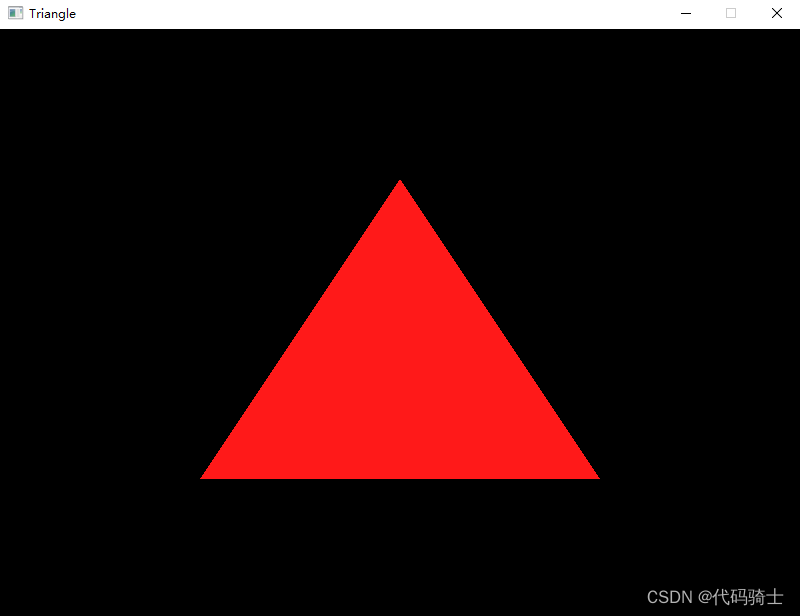
Output :
Modify dimensions

Change triangle color

Change the background color

Wireframe mode

Output :

边栏推荐
猜你喜欢


随机推荐
exness:鲍威尔坚持抗通胀承诺,指出衰退是可能的
Pair class notes
免费ICP域名备案查接口
atguigu----16-自定义指令
随机数备注
Any remarks
《canvas》之第4章 线条操作
Global and Chinese market of water massage column 2022-2028: Research Report on technology, participants, trends, market size and share
Mysql database recovery case sharing
光照使用的简单总结
图形技术之管线概念
Opencvsharp binary image anti color
BOM notes
科一易错点
UE common console commands
10. Tencent cloud IOT device side learning - firmware upgrade
uniapp uni-app H5 端如何取消 返回按钮的显示 autoBackButton不生效
【NILM】非入侵式负荷分解模块nilmtk安装教程
Hongmeng development IV
Take my brother to make a real-time Leaderboard