当前位置:网站首页>Hard Disk Partitioning and Permanent Mounting
Hard Disk Partitioning and Permanent Mounting
2022-08-05 06:09:00 【Magic star】
Hard Disk Partitioning and Permanent Mounts
MBR partition
What is a hard disk: A computer hard disk is the main storage device of a computer.
The role of partitions
- Main partition: can be used directly, can be installed system
- Extended partition: cannot be used directly, it must be divided into logical partitions
- Logical partition: Relying on the extended partition, the space in the extended partition (with the operating system installed) is used
mbr partition:
Only partition the hard disk below 2T
A sector has 512 bytes, the first 446 bytes are the boot program
- Primary partition: serial number is 1-4
- Logical partition: sequence number starts from 5
- Extended partition: must be the primary partition
- The primary partition is not necessarily an extended partition
- The logical partition must not be the primary partition
gpt partition
It can have 128 partition tables and can partition hard disks above 2T
fdisk

Create a normal partition
Usage (fdisk disk name)

mkfs.xfs partition name (create filesystem)

mount: mount partition name folder name

Create a logical partition
Usage (fdisk hard drive name)

mkfs.xfs partition name (create filesystem)

mount: mount partition name folder name


Create a special partition (swap partition)
Usage (fdisk hard drive name)
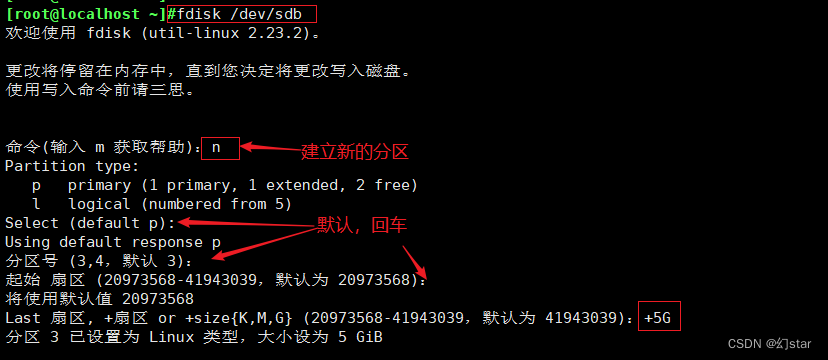

mount: mount partition name folder name
Create a special partition swap
The partition type must be changed to 82 (swap partition)
t: Change the partition type

Permanent mount
[[email protected] ~]#vim /etc/fstab
[[email protected] ~]#mount -a
Mounting rules
1. A mount point can only mount one device at a time
2. A mount point mounts multiple devices at the same time, only the data of the last device can be seen, the data on other devices will be hidden
3. A device can be mounted to multiple mount points at the same time
4. Usually the mount point is usually an existing empty directory
If a user is mountingThe mount directory cannot be unmounted
I want to remount
mount -o remount /dev/sdb1 /mnt/
mount -o remount,ro /dev/sdb1 /mnt/
fuser -km /mnt/ ###Kill directly
MBR 446 before the master boot record 64 after the boot program Partition table 2 mark bit
1. Partition fidsk gdisk Primary partition extension logic
2. Create file system mkfs. File system type mkswap
3. Mountmount swapon
Repair file system:
dd if=/dev/zero of=/dev/sdb1 bs=512 count=1
dd copy
if copy from where what /dev/zero
ofIt is copied to /dev/sdb1
bs=512 once copied 512
count=1 copied once
边栏推荐
猜你喜欢


随机推荐
硬盘分区和永久挂载
每日一题-正则表达式匹配-0715
D39_向量
UE4美术你有必要了解的数学基础
spark源码-任务提交流程之-2-YarnClusterApplication
入门文档07 分阶段输出
教你如何封装功能组件和页面组件
通过单总线调用ds18b20的问题
2020年手机上最好的25种免费游戏
dsf5.0 弹框点确定没有返回值的问题
Cocos Creator开发中的事件响应
手把手教你搭建小程序
来来来,一文让你读懂Cocos Creator如何读写JSON文件
(C语言)strlen、strcpy、strcat、strcmp、strstr函数的模拟实现
成功的独立开发者应对失败&冒名顶替综
什么是阿里云·速成美站?
[Day8] (Super detailed steps) Use LVM to expand capacity
云游戏未来展望
Apache配置反向代理
论那些给得出高薪的游戏公司底气到底在哪里?