当前位置:网站首页>Getting started with fluent Animation: inner and outer reverse ring loading animation
Getting started with fluent Animation: inner and outer reverse ring loading animation
2022-06-22 12:28:00 【Still waters run deep zz】
Series articles
Flutter - Imitation Airbnb Price range filter for .( One )
Imitate Netease cloud music APP
List of imitative flush stocks
The three-level linkage of imitation of Gao de Drawer
design sketch
The title is a bit awkward , The first title seems to trigger sensitive words , So this is the only way
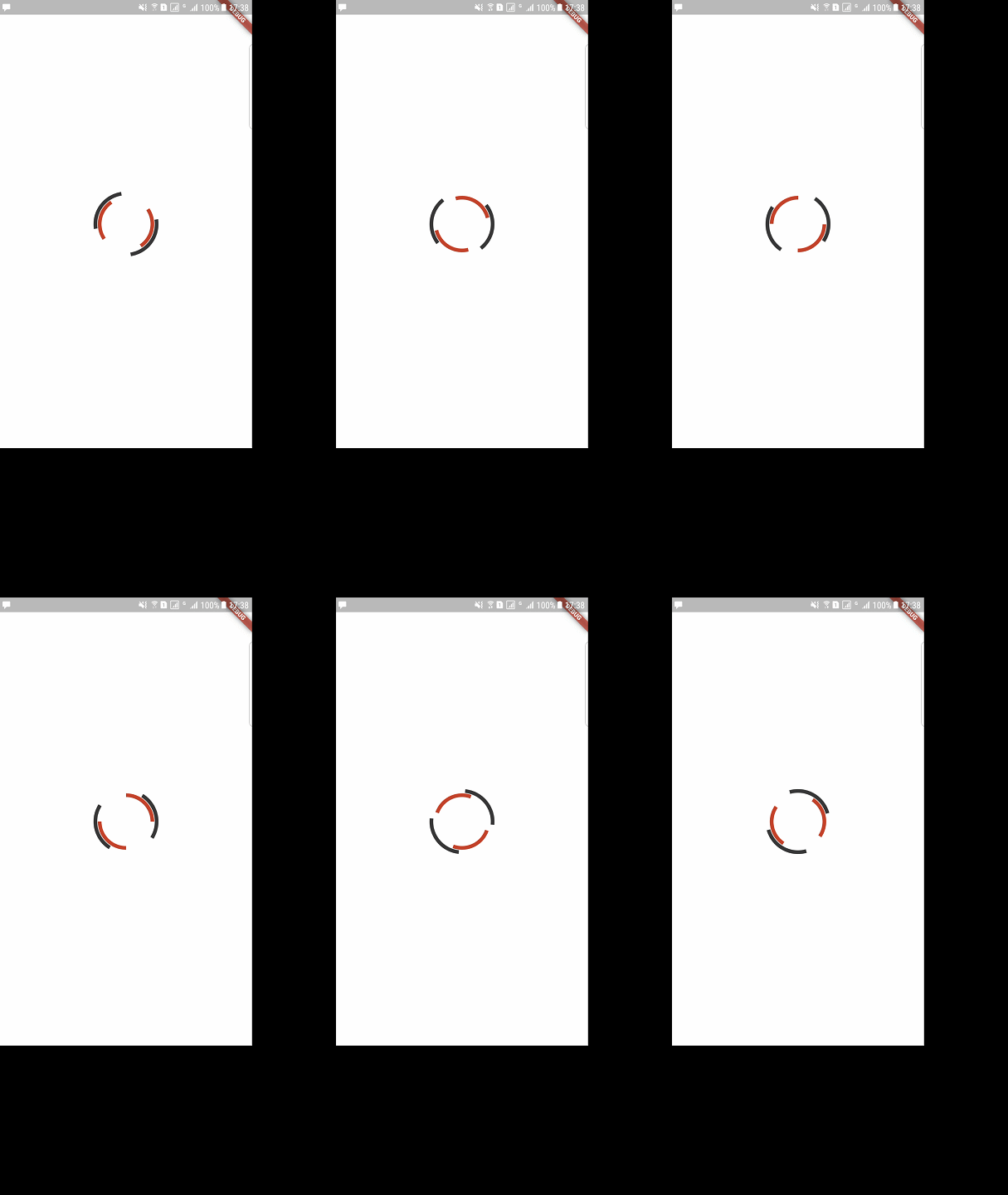

analysis
 This is obviously a drop of two colors ~

 The trajectory is the inner circle 、 A circle outside . Specific performance: , The outer two quarter arcs , The inner two quarter arcs , And centrosymmetric .
 Internal and external relative motion , The inner circle speed should be slightly slower , After all, the perimeter is relatively short ( Speed depends on personal preference )~

 Divided into two according to the inside and outside widget, And rotate them , It can be realized .
Radian meter
Source network , This will be used below

Draw code
 Draw two centrosymmetric 90 Degree arc , Use CustomPaint That is to say .
 To the outside widget( black ) For example , The code is as follows :
CustomPaint(
    painter: OuterPainter(),/// Into our own  painter
)


class OuterPainter extends CustomPainter{
    @override
    void paint(Canvas canvas, Size size) {
        ///canvas  It's the canvas we paint ,Size Is the father widget Give us the canvas size
        /// It can also be done through CustomPaint Of size Attribute specifies ,
        /// Second, if CustomPaint Of child Not empty , This size The value of will be equal to child Size matters
        ///CustomPaint Of size Will be ignored
        /// Initialize a brush
        Paint paint = Paint();
        paint.color = Color.fromRGBO(51, 51, 51, 1);
        paint.strokeWidth = 6;/// Brush thickness
        paint.isAntiAlias = true;/// Anti-Aliasing
        paint.style = PaintingStyle.stroke;/// The default is fill, We don't need to fill , choose stroke
        /// First we need a rectangle , The canvas can determine the position of the circle according to the rectangle ( This circle is abstract )
        Rect rect = Rect.fromCircle(center: Offset(size.width/2,size.height/2),radius: size.width/2);
        /// drawArc  Draw an arc
        ///  Parameters 1  Determine the rectangle of the circle ,
        ///  Parameters 2 and 3, They are the starting position and the scanning angle , Its original name was startAngle  and  sweepAngle,
        /// 0.0 From the center point to the right 0 degree  ,  Sweep through pi/2  degree  (90 degree ),
        ///  Parameters 4(userCenter)false  Just draw an arc 、 If it is true, A sector will be drawn
        ///  Parameters 5  paint brush
        canvas.drawArc(rect, 0.0, pi/2, false, paint);
        /// Because it is centrosymmetric , So we move the position 180 degree
        canvas.drawArc(rect, pi, pi/2, false, paint);


}

    @override
    bool shouldRepaint(CustomPainter oldDelegate) {
        return false; /// If your painter And an animation binding , In theory, this should be true( Or judge according to the value you need ) Indicates that you need to redraw
    }

}


 So we can draw the outside widget 了 , In the same way, we can draw the , Now let's start turning them around .
Animation code
 We can use it directly  RotationTransition Wrap our widget, And pass in the corresponding animation, adopt animationController To control . First of all, let's define animation, The code is as follows :


AnimationController outerController,innerController;
Animation outerAnim,innerAnim;
  @override
void initState() {
super.initState();
/// Use animated pages   To blend in TickerProviderStateMixin, otherwise  vsync Pass in the parameter this  Will report a mistake ,
///  Simple speak , Every time vsync Callback of signal return , Calculate and update animation values , Refresh later widget  You will see the change
///( If your widget There are values related to animation )
/// Parameters 2: Animation duration
outerController = AnimationController(vsync: this,duration: Duration(milliseconds:3000));
innerController = AnimationController(vsync: this,duration: Duration(milliseconds: 2000));

/// Patch animation ,begin and end The difference can be understood as the animation distance , You can see that the external values are better than the internal values , No matter from time or distance, it should be larger
///, If the same , The inside will rotate faster than the outside .
outerAnim = Tween(begin: 0.0,end: 2.0).animate(outerController);
innerAnim = Tween(begin: 1.0,end: 0.0).animate(innerController);
/// They are the execution status of the animation , This one knows what it means , No more details .
innerController.addStatusListener((status) {
  if (status == AnimationStatus.completed) {
    print("completed");
    innerController.reset();
    innerController.forward();
  } else if (status == AnimationStatus.dismissed) {
    print("dismissed");
    innerController.forward();
  } else if (status == AnimationStatus.forward) {
    print("forward");
  } else if (status == AnimationStatus.reverse) {
    print("reverse");
  }
});
outerController.addStatusListener((status) {
  if (status == AnimationStatus.completed) {
    print("completed");
    outerController.reset();
    outerController.forward();
  } else if (status == AnimationStatus.dismissed) {
    print("dismissed");
    outerController.forward();
  } else if (status == AnimationStatus.forward) {
    print("forward");
  } else if (status == AnimationStatus.reverse) {
    print("reverse");
  }
});

}

 Here we are done animation The definition of , After that we will outerAnim,innerAnim; Pass them on to RotationTransition Of turns Parameters can be .
Complete code
class DemoPageState extends State<DemoPage> with TickerProviderStateMixin {

  AnimationController outerController,innerController;
  Animation outerAnim,innerAnim;

  @override
  void dispose() {
    outerController?.dispose();
    innerController?.dispose();
    super.dispose();
  }

  @override
  void initState() {
    super.initState();
    outerController = AnimationController(vsync: this,duration: Duration(milliseconds:3000));
    innerController = AnimationController(vsync: this,duration: Duration(milliseconds: 2000));

    outerAnim = Tween(begin: 0.0,end: 2.0).animate(outerController);
    innerAnim = Tween(begin: 1.0,end: 0.0).animate(innerController);
    innerController.addStatusListener((status) {
      if (status == AnimationStatus.completed) {
        print("completed");
        innerController.reset();
        innerController.forward();
      } else if (status == AnimationStatus.dismissed) {
        print("dismissed");
        innerController.forward();
      } else if (status == AnimationStatus.forward) {
        print("forward");
      } else if (status == AnimationStatus.reverse) {
        print("reverse");
      }
    });
    outerController.addStatusListener((status) {
      if (status == AnimationStatus.completed) {
        print("completed");
        outerController.reset();
        outerController.forward();
      } else if (status == AnimationStatus.dismissed) {
        print("dismissed");
        outerController.forward();
      } else if (status == AnimationStatus.forward) {
        print("forward");
      } else if (status == AnimationStatus.reverse) {
        print("reverse");
      }
    });

  }


  @override
  Widget build(BuildContext context) {
    if(!outerController.isAnimating)outerController.forward();
    if(!innerController.isAnimating)innerController.forward();
    return Container(
      color: Colors.white,
      child: Column(
        mainAxisAlignment: MainAxisAlignment.center,
        children: <Widget>[

          Stack(
            alignment: Alignment.center,
            children: <Widget>[
              RotationTransition(
                turns:outerAnim ,
                child: Container(
                  width: 100,
                  height: 100,
                  child: CustomPaint(
                    painter: OuterPainter(),
                  ),
                ),
              ),
              RotationTransition(
                turns: innerAnim,
                child: Container(
                  width: 86,
                  height: 86,
                  child: CustomPaint(
                    painter: InnerPainter(),
                  ),
                ),
              ),

            ],
          ),
        ],
      ),
    );
  }
}
DEMO
https://github.com/bladeofgod/flutter_loading
Other articles
Flutter - Imitation Airbnb Price range filter for .( One )
Imitate Netease cloud music APP
边栏推荐
- linux设置 让oracle10g自启动
- Flutter:剥离StatefulWidget——简化页面开发、跳转以及传值
- ncnn的使用(初学必看)
- Zcu102 PL end running water lamp
- Deadlock found when trying to get lock; try restarting transaction 【MySQL死锁问题解决】
- Flutter 仿Airbnb的价格区间筛选器。(二)
- 求100-200之间全部的素数
- Fault tolerant heap shim applied to current process. This is usually due to previous crashes
- chown改变目录的所有者、所属组失败的诡异问题
- New progress in the construction of meituan's Flink based real-time data warehouse platform
猜你喜欢

qt页面布局类的小demo

PyCharm编写shell脚本无法运行
Flutter动画入门: 内外逆向环Loading动画

When the tiflash function is pushed down, it must be known that it will become a tiflash contributor in ten minutes

第十三届 蓝桥杯 嵌入式设计与开发项目 决赛

Differences between SPI and API

MAUI使用Masa blazor组件库

Opencv invokes the USB camera to solve the "select timeout" problem

【云原生 | Kubernetes篇】Kubernetes简介(一)

Redis - 8. Persistent RDB (redis database)
随机推荐
Fault tolerant heap shim applied to current process. This is usually due to previous crashes
Some concepts that the initial transformer needs to understand
Redis - 5. Jedis operation redis6
[ciscn2019 finals Day1 web4]laravel1
客户成员价值分析
如何从数据库层面统计每天业务数据的增长量?
How to count the growth of daily business data from the database level?
Share 7 free super clear video resource stations! Both editing and collection are practical enough to cry!
论文解读——Temporal Recommendation on Graphs via Long- and Short-term Preference Fusion
TiFlash 函数下推必知必会丨十分钟成为 TiFlash Contributor
运筹优化基础知识
第十一届 蓝桥杯 嵌入式设计与开发项目 决赛
Andrdoid延时操作
SQl、Oracle剔除重复记录的语句
TIS教程01-安装
机器学习与深度学习 --- 激活函数(未完待续)
View the GStreamer plug-in
Heavyweight live | bizdevops: the way to break the technology situation under the tide of digital transformation
ncnn的使用(初学必看)
input输入框只能输入,0-100之间的数组,保留两位小数