当前位置:网站首页>Rech8.0 learning days 12 rh134
Rech8.0 learning days 12 rh134
2020-11-07 16:49:00 【The shadow of rebellion 1992】
Writing room BASH Script
bash shell The first line of the script begins with : #!/bin/bash
Created shell Script , Need to use chmod Command to add executable permissions , There are also willing to be with chown Command combination changes the file ownership of the script . Grant execute permission only to the target user of the script .
Quote special characters , Three tools to cancel or escape special meanings : The backslash (\)、 Single quotation marks ('')、 Double quotes ("").
The backslash escape character removes the special meaning of the single character immediately following it . Example :

When you need to escape multiple characters in a text string , You can use single quotation marks (''). A single quotation mark retains the literal meaning of all characters it contains .:

Using double quotation marks can prevent generic matching and shell Expand , But it still allows command and variable substitution . Variable substitution is conceptually the same as command substitution

echo Command in shell Scripts are widely used to display information and error messages .
shell The cycle in
bash Of for Loop structure Use the grammar .
for VARIABLE in LTST; do
COMMAND VARIABLE
done
The lower case part is fixed .VARIABLE Is a variable name. ,COMMAND VARIABLE A command block that represents a reference variable .
Use exit code in scripts
Use exit command . When the script encounters exit On command , The script exits immediately and does not process the rest of the script .
It can be an integer parameter ( Optional ,0-255 Between , Indicates the exit code ) To execute exit command . The exit code is returned to the parent process , Store it in ? variable , Can pass $? Visit .
Conditional structure
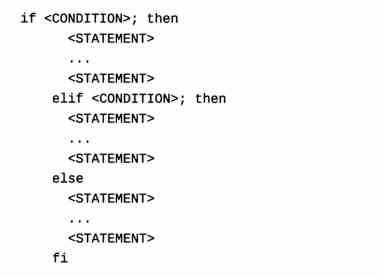
if/then The structural grammar is as follows :

also if/then/else structure :


also if/then/elif/then/else structure
Use regular expressions to match text in command output
vim、grep and less All commands can use regular expressions .
The simplest perfect match , That is, the characters in the regular expression match the type and order of the data being searched , It's a perfect match .
Match the beginning and end of a line , Search at the beginning of the line , Use the caret (^). Search at the end of the line , Use the dollar sign ($).
Regular expressions use periods (.) Or point (.) To match any single character other than a newline character .c.t Include the search for c Add any single character and t String .
c[aou]t Will match : With c start , Follow behind a or o or u, And then there was t, namely cat、cot、cut.
A mechanism that is often used with wildcards . The multiple is applied to the previous character in the expression , One of the more common multiples is the asterisk (*).
c*t, Match anything with c start , Followed by zero or more characters , Finally t Data at the end .
Another type of multiple will indicate the expected number of preceding characters in the pattern .‘c.\{2\}t’ Is an example of using display multiples , It matches with c start , Followed by any string , Finally t Any words at the end .
Regular expressions
| Options | describe |
| . | Period (.) Match any single character . |
| ? | The front item is optional , And match at most once . |
| * | The previous items will match zero or more times . |
| + | The previous items will match one or more times . |
| {n} | The front item just matches n Time . |
| {n,} | The front item matches n Times or more . |
| {,m} | The front items match at most m Time . |
| {n,m} | The front items at least match n Time , But not more than m Time . |
| [:alnum:] | Alphanumeric character :‘[:alpha:]’ and ‘[:digit:]’; stay 'C' Language environment and ASCII In character encoding , It is equivalent to ‘[0-9A-Za-z]’ |
| [:alpha:] | Alphabetic character :‘[:lower:]’ and '[:upper:]'; stay 'C' Language environment and ASCII In character encoding , It is equivalent to ‘[A-Za-z]’. |
| [:blank:] | Blank character : Spaces and tabs . |
| [:cntrl:] | Control characters . stay ASCII in , These characters correspond to octal code 000 To 037 and 177(DEL). In other character sets , They are equivalent characters . |
| [;digit;] | Numbers :0 1 2 3 4 5 6 7 8 9 . |
| [;graph;] | Image characters :‘[:alnum:]’ and '[:punct:]'. |
| [:lower:] | Lowercase letters ; stay ”C“ Language environment and ASCII In character encoding , It corresponds to a b c d e f g h i j k l m n o p q r s t u v w x y z. |
| [:print:] | Printable characters :‘[:alnum:]’、'[:punct:]' And Spaces . |
| [:punct:] | Punctuation ; stay ”C“ Language environment and ASCII In character encoding , It corresponds to !” # $ %&'()*+,-./:;<=>?@[\]^'{|}~. |
| [:space:] | Space character ; |
| [:upper:] | Capital |
| [:xdigit:] | 16 Hexadecimal Numbers : 0 1 2 3 4 5 6 7 8 9 A B C D E F a b c d e f . |
| \b | Matches the empty string on both sides of the word . |
| \B | Matches an empty string in the middle of a word . |
| \< | Matches the empty string at the beginning of the word . |
| \> | Matches the empty string at the end of the word . |
| \w | Match word components |
| \W | Match non word components |
| \s | Match spaces |
| \S | Match non spaces . |
Use grep The command matches the regular expression
The vertical line operator (|),grep Commands can be used with other commands . Example :

common grep List of options
| Options | function |
| -i | Use the provided regular expression , But it doesn't force case sensitivity . |
| -v | Show only lines that do not contain regular expression matches . |
| -r | Apply a data search that recursively matches a regular expression to a set of files or directories . |
| -A number | Shows the number of lines after a regular expression match . |
| -B number | Shows the number of lines before a regular expression match . |
| -e | You can provide multiple regular expressions , And will be associated with logic OR Use it together . |
版权声明
本文为[The shadow of rebellion 1992]所创,转载请带上原文链接,感谢
边栏推荐
猜你喜欢

K-vim installation and the ycmd server shut down (restart with ': ycmrestartserver')
心理咨询app开发所具备的优点与功能
失眠一个整晚上
Git SSH bad permissions
Python 3 operates the Jenkins module API
August 14, 2020: what are the execution engines for data tasks?
11. Service update
嘉宾专访|2020 PostgreSQL亚洲大会阿里云数据库专场:王旭
Test the necessary skill points of siege lion! This article takes you to interpret the testing technology under Devops
jenkins pipline stage 设置超时
随机推荐
谈了多年的数字化转型,为什么还有很多企业依然“口头管理”
Git remote library rollback specified version
Ora-02292: complete constraint violation (midbjdev2.sys_ C0020757) - subrecord found
RFID fixed assets management system for fire equipment
cubemx做stm32 USB开发
8.Swarm创建维护和水平扩展Service
The advantages and functions of psychological counseling app
VARCHART XGantt入门教程
Idea activation to 2089 failure
【笔记】Error while loading PyV8 binary: exit code 1解决方法
How to deploy Gantt chart quickly and correctly
Blazor 準備好為企業服務了嗎?
New features of vue3
嘉宾专访|2020 PostgreSQL亚洲大会阿里云数据库专场:王旭
9.集群之间服务通信 RoutingMesh
20 XR projects roadshows, nearly 20 capital institutions attended! We sincerely invite you to attend the 2020 qcomm XR eco Partner Conference
gitlab 持续集成开发环境之CI/CD
关于DevOps的七大误解,99%的人都曾中过招!
Git SSH bad permissions
南京标志设计,logo设计公司