当前位置:网站首页>[yolov5 practice 3] traffic sign recognition system based on yolov5 - model training
[yolov5 practice 3] traffic sign recognition system based on yolov5 - model training
2022-07-25 06:40:00 【Make progress every day】
Practical blog Guide ( Ongoing update …):
- Construction of actual combat environment
- Custom datasets
- model training
- Evaluation of results
One 、 Parameter description
After the first two steps , Start model training and testing . First, model training . The official training order is as follows :
python train.py --data coco.yaml --cfg yolov5n.yaml --weights '' --batch-size 128
                                       yolov5s                                64
                                       yolov5m                                40
                                       yolov5l                                24
                                       yolov5x                                16
We can see train.py file , It sets the parameters we need to specify during training , As shown in the figure ( This parameter has been modified by me , The initial value is different from that shown in this figure , We should modify it according to our own situation ):
Briefly introduce the parameters :
- weights: Specify the pre training model .yolov5 Several pre training models are officially provided to improve training efficiency , I'll talk about it later .
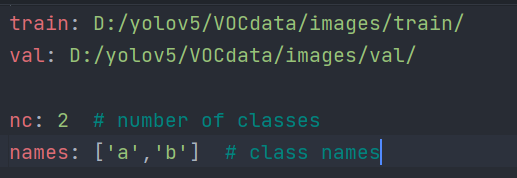
- data: Written in the last Practical Guide myvoc.yaml, Used to specify the path of training set and verification set , And the number and name you want to classify , Must be modified
- epochs: How many rounds of training , Suggest to modify
- batch-size: Batch size , Personal understanding is how many data are read and processed each time ( Modify according to your own configuration , If you report an error of insufficient memory, you can reduce the value , Suggest to modify )
- img-size: The size of the training set and the verification set , The original data set resize Set the size for . The default is [640, 640], It can be left unchanged
- resume: Break point continued training . This is mainly because if you interrupt during training , You can continue training after the last training result . The default is False
- device: Set use CPU still GPU( If GPU How many , Specify which piece to use ).
- workers: It seems to be the number of threads , The equipment can be adjusted if allowed , Because my device is too spicy, it is set to 0
Basically, the above parameters are commonly used , Other parameters can keep their default values , You can also make corresponding modifications according to your actual situation .
Two 、 Pre training model
Officials have given the following pre training models .
Commonly used n,s,m,l Four sizes , The specification gradually increases , The training accuracy is also gradually increasing , But the training time will also increase . As shown in the figure below :
In this blog I will use yolov5s.pt Model training .
3、 ... and 、 model training
After the above preparation steps are completed , Start training model . Training parameters can be in train.py The document specifies , You can also explicitly specify , The priority of the command line is higher than that in the file . I explicitly specify the parameters here , You may not specify , That is to use the parameter information in the file . We need to pay attention to , If you didn't download it at first yolov5s.pt( namely –weights Specified file ), Then he will download the corresponding file .( It seems that the default download path is not weights/ Next , Personal habit moves him to weights/ Under the table of contents ). If the download speed is too slow, it is recommended to modify pip Source , This can be changed by reading others' blogs , Then the speed will be much faster .
Open the terminal , Enter the following command :
python train.py --weights weights/yolov5s.pt --data data/myvoc.yaml --epochs 20 --batch-size 8
If no error is reported , You should get the following interface :
The storage location of this result training will be displayed , Put it in runs/train/ Next , from exp Start , Every training will add one to the number , I've got results here before , Therefore exp5/.
You can check in runs/train/ Whether the directory has been generated :
Four 、 Next up
The next blog will introduce how to use the trained model to verify and test your data set , And judge the quality of the model .
边栏推荐
- Ida Pro novice tutorial
- Baidu xirang's first yuan universe auction ended, and Chen Danqing's six printmaking works were all sold!
- MySQL index collation summary
- DOM events
- In container multicast
- How programmers write bugs
- Introduction to bridging mode and sharing mode
- It is said that screentogif is a GIF recording artifact, but I don't know that its strength is far from here
- Some interview questions collected
- ArgoCD 用户管理、RBAC 控制、脚本登录、App 同步
猜你喜欢
C#控件开源库:MetroFramework的下载

【datawhale202207】强化学习:策略梯度和近端策略优化

Labelme labels different objects, displays different colors and batch conversion

Keilc51 usage details (III)

Observer mode

Recycleview realizes horizontal sliding of overlapping items

Install, configure, and use the metroframework in the C WinForms application

Thread 类的基本用法

GIS实战应用案例100篇(十七)-基于DEM制作三维地图

健康打卡每日提醒累了?那就让自动化帮你---HiFlow,应用连接自动化助手
随机推荐
JSON、
C#读取倍福Beckhoff变量
Addition, deletion, modification and query of DOM elements
Builder pattern
机器学习两周学习成果
The LAF protocol elephant of defi 2.0 may be one of the few profit-making means in your bear market
Review of three traversal methods of map
51 timer initial value calculation
Use abp Zero builds a third-party login module (III): web side development
[C language] in depth understanding of pointers and arrays (phase I)
Tab bar toggle style
【transformer】DeiT
使用 Web API 上传和下载多个文件
ArgoCD 用户管理、RBAC 控制、脚本登录、App 同步
Developers must read: 2022 mobile application operation growth insight white paper
C#--MetroFramework框架调用metroModernUI库,并在工具栏使用
Baidu SEM bidding avoidance
JTAG debugging source level debugging of arm bare board debugging
Example demonstration of math.random() random function
在C# WinForms应用程序中安装,配置和使用MetroFramework