当前位置:网站首页>tkinter绘制组件(29)——单选组控件
tkinter绘制组件(29)——单选组控件
2022-06-21 19:52:00 【Smart-Space】
引言
其实,光看到TinUI这个控件的名称——“单选组控件”,是否想起了之前的TinUI单选框?
事实上,单选组控件(radiobox)与单选框的功能很像,都是允许使用者确定一个唯一的选项,以此让程序决定去做些什么。但是,这两者真的重复吗?不尽然,首先看看radiobutton的一些不足,或者说是特点:
固化规定了是问题类型的单选情形
竖直排列布局
样式为TinUI原创样式
当然,以上内容并不能说是单选框的缺点,而只能说它的专一项目。因此,radiobutton更像是一个封装好的控件,而单选组控件则像是一个标准控件。当然,它们两个不能互相替代,这也就是为TinUI加上radiobox控件的原因。
最近有人提议为radiobutton添加边框参数,以及加入add_image函数。但是希望大家把要求说明白些,否则我也无从下手,因为我还有自己的改进计划。
布局
函数结构
    def add_radiobox(self,pos:tuple,fontfg='black',font='微软雅黑 12',fg='#8b8b8b',bg='#ededed',activefg='#898989',activebg='#e5e5e5',onfg='#3041d8',onbg='#ffffff',content:tuple=('1','','2'),padx=10,pady=5,command=None):#绘制单选组控件
        ''' - pos::位置 - fontfg::文本颜色 - fg::标识符边框颜色 - bg::标识符背景颜色 - activefg::鼠标进入标识符边框颜色 - activebg::鼠标进入标识符背景颜色 - onfg::选定标识符边框颜色 - onbg::选定标识符背景颜色 - content::选择文本内容。如果为空字符串则代表换行 - padx::水平间距 - pady::行间距 - command::回调函数,必须接受一个参数,所选选项的文本 '''
确定固定元素
这里所说的固定元素,包括:
标识符常态直径和边框宽度
标识符激活时直径和边框宽度
boxes字典,用于放置每一个单选元素的标识符、文本、背景当前选择项目(初始化为
-1)
        #标识符内部宽度width和边框宽度line
        back_width=16
        back_line=1#16+1*2=18
        #active... = back...
        on_width=8
        on_line=4#8+(4+1)*2=18
        boxes=[]#[(sign_id,text_id,back_id),...],换行为(None,'\n',None)
        nowx,nowy=pos#x坐标为左上角插入坐标,y坐标为底部坐标
        uid='radiobox'+str(id(pos))
        select=-1#当前选定
        count=-1
        t_bbox=None
绘制单选元素
这些文本都在元组content里,但是,我们不可能只有横向布局吧,如何让TinUI知道应该在新的一行布置单选元素呢?那就是使用文本元组中的空字符。当字符串为空时,则代表新增一行。值得注意的是,当目前没有任何单选元素,也就是前面没有任何文本或全是空字符时,我们往下加行的纵坐标边行量就是pady,当本行存在单选元素时,就再加上本行高度即可。
        for i in content:
            count+=1#计数
            if i=='':
                if t_bbox==None:#没有底部坐标数据
                    nowy+=pady
                else:
                    nowy=t_bbox[3]+pady
                nowx=pos[0]
                boxes.append((None,'\n',None))
                continue
            x1=nowx+back_line
            y1=nowy+back_line
            x2=nowx+back_line+back_width
            y2=nowy+back_line+back_width
            ar=(x1,y1,x2,y2)
            sign=self.create_oval(ar,width=back_line,fill=bg,outline=fg,tags=uid)
            text=self.create_text((x2+5,nowy),text=i,font=font,fill=fontfg,anchor='nw',tags=uid)
            s_bbox=self.bbox(sign)
            t_bbox=self.bbox(text)
            back=self.create_rectangle((s_bbox[0],s_bbox[1],t_bbox[2],t_bbox[3]),width=0,fill='',tags=uid)
            boxes.append((sign,text,back))
            nowx=t_bbox[2]+padx
back元素是背景元素,其填充色为透明,但是层级在标识符元素和文本元素之上,因此虽然我们点击的是单选元素,但实际上是覆盖在其上的一层“膜”,而标识符只负责变化提示色。随着时间的推移,我对TinUI开发的逻辑正在持续优化>^<。
鼠标进入和离开
        def button_in(area,sel,sign):
            if sel==select:
                return
            self.itemconfig(sign,outline=activefg,fill=activebg)
        def button_out(area,sel,sign):
            if sel==select:
                return
            self.itemconfig(sign,outline=fg,fill=bg)
这里面也有新逻辑:记录前一个选定项目,根据这个值,也就是select的值,对前一个选定项目做出样式更改,而不是像早期一样,通过循环找到选定向。这种逻辑大大提高了运行效率。
虽然早期的逻辑代码仍然存在,有issue再改。
项目选定
        def sel_it(area,sel,sign):
            nonlocal select
            #...
项目的选定分为三个逻辑。
判断是否已经为选定项:
        def sel_it(area,sel,sign):
            nonlocal select
            if sel==select:
                return
如果有先前的选定项,则将其更换为普通样式:
            #...
            old_select=select#原先选定项目序号
            select=sel
            if old_select>=0:#恢复原先的单选组
                old_sign=boxes[old_select][0]
                self.itemconfig(old_sign,width=1)
                button_out(None,None,old_sign)
                self.update()
            #...
将当前更改为选定标识样式:
            self.itemconfig(sign,outline=onfg,fill=onbg,width=on_line)
            if command!=None:
                textid=boxes[sel][1]
                text=self.itemcget(textid,'text')
                command(text)
绑定样式:
            self.tag_bind(back,'<Enter>',lambda event,ar=ar,sel=count,sign=sign:button_in(ar,sel,sign))
            self.tag_bind(back,'<Leave>',lambda event,ar=ar,sel=count,sign=sign:button_out(ar,sel,sign))
            self.tag_bind(back,'<Button-1>',lambda event,ar=ar,sel=count,sign=sign:sel_it(ar,sel,sign))
完整代码函数
    def add_radiobox(self,pos:tuple,fontfg='black',font='微软雅黑 12',fg='#8b8b8b',bg='#ededed',activefg='#898989',activebg='#e5e5e5',onfg='#3041d8',onbg='#ffffff',content:tuple=('1','','2'),padx=10,pady=5,command=None):#绘制单选组控件
        def button_in(area,sel,sign):
            if sel==select:
                return
            self.itemconfig(sign,outline=activefg,fill=activebg)
        def button_out(area,sel,sign):
            if sel==select:
                return
            self.itemconfig(sign,outline=fg,fill=bg)
        def sel_it(area,sel,sign):
            nonlocal select
            if sel==select:
                return
            old_select=select#原先选定项目序号
            select=sel
            if old_select>=0:#恢复原先的单选组
                old_sign=boxes[old_select][0]
                self.itemconfig(old_sign,width=1)
                button_out(None,None,old_sign)
                self.update()
            self.itemconfig(sign,outline=onfg,fill=onbg,width=on_line)
            if command!=None:
                textid=boxes[sel][1]
                text=self.itemcget(textid,'text')
                command(text)
        #标识符内部宽度width和边框宽度line
        back_width=16
        back_line=1#16+1*2=18
        #active... = back...
        on_width=8
        on_line=4#8+(4+1)*2=18
        boxes=[]#[(sign_id,text_id,back_id),...],换行为(None,'\n',None)
        nowx,nowy=pos#x坐标为左上角插入坐标,y坐标为底部坐标
        uid='radiobox'+str(id(pos))
        select=-1#当前选定
        count=-1
        t_bbox=None
        for i in content:
            count+=1#计数
            if i=='':
                if t_bbox==None:#没有底部坐标数据
                    nowy+=pady
                else:
                    nowy=t_bbox[3]+pady
                nowx=pos[0]
                boxes.append((None,'\n',None))
                continue
            x1=nowx+back_line
            y1=nowy+back_line
            x2=nowx+back_line+back_width
            y2=nowy+back_line+back_width
            ar=(x1,y1,x2,y2)
            sign=self.create_oval(ar,width=back_line,fill=bg,outline=fg,tags=uid)
            text=self.create_text((x2+5,nowy),text=i,font=font,fill=fontfg,anchor='nw',tags=uid)
            s_bbox=self.bbox(sign)
            t_bbox=self.bbox(text)
            back=self.create_rectangle((s_bbox[0],s_bbox[1],t_bbox[2],t_bbox[3]),width=0,fill='',tags=uid)
            boxes.append((sign,text,back))
            self.tag_bind(back,'<Enter>',lambda event,ar=ar,sel=count,sign=sign:button_in(ar,sel,sign))
            self.tag_bind(back,'<Leave>',lambda event,ar=ar,sel=count,sign=sign:button_out(ar,sel,sign))
            self.tag_bind(back,'<Button-1>',lambda event,ar=ar,sel=count,sign=sign:sel_it(ar,sel,sign))
            nowx=t_bbox[2]+padx
        return boxes,uid
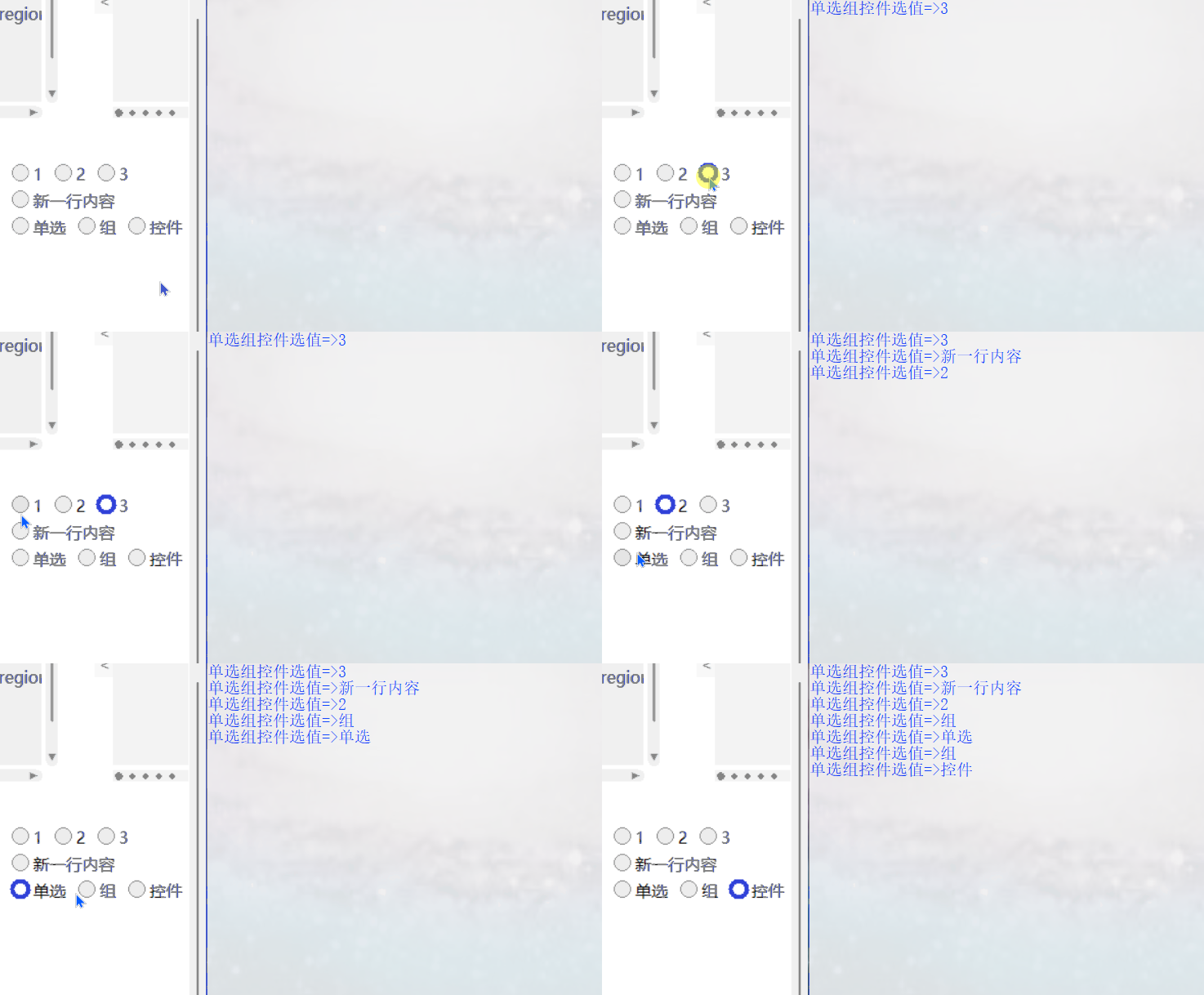
效果
测试代码
def test8(rbtext):
    print(f'单选组控件选值=>{
      rbtext}')
if __name__=='__main__':
    #...
    b.add_radiobox((320,1150),content=('1','2','3','','新一行内容','','单选','组','控件'),command=test8)
    #...
最终效果
github项目
pip下载
pip install tinui
结语
TinUI接下来的主要任务是改进控件,关于新增模块欢迎通过电子邮箱投递。
tkinter创新
边栏推荐
- matplotlib plt. Details of subplots()
- Yanyu saltalk obtained USD 8million round a financing: continue to expand team and market coverage
- Que peut faire une ligne de code?
- 杰理之开启四声道打开 EQ 后播歌卡顿问题【篇】
- Summary of intelligence problems
- 12.信号基础
- Tx9118 Synchronous Boost IC
- [applet] realize applet and background ASP through request Net data JSON transmission (post protocol text + code)
- 30组户外旅行游玩VLOG记录LUTs调色预设Moody Travel LUTs
- Scientific research cartoon | you can learn EEG by looking at the picture. Would you like to try it?
猜你喜欢

Citus 11 for Postgres is completely open source and can be queried from any node (citus official blog)

天齐锂业通过聆讯:单季净利33亿 蒋卫平夫妇身价超500亿

Fm5012d small fan integrated IC scheme

ACM. HJ61 放苹果 ●

Libtorch video memory management example
![There is no sound solution to the loopback when jerryzhi launches Bluetooth [chapter]](/img/ba/377ec19ca22c2c106f227e864f1e9e.png)
There is no sound solution to the loopback when jerryzhi launches Bluetooth [chapter]
![VLAN division based on interface: static VLAN [not perfect]](/img/ba/968b483c3ed96b283aa263dcb0ccdc.png)
VLAN division based on interface: static VLAN [not perfect]

C language array and pointer exercises (original question + analysis + original code)

The latest simulation test questions and answers of Henan construction electrician (special construction operation) in 2022

杰理之开启四声道通话近端变调问题【篇】
随机推荐
[MySQL · water drop plan] the third part - basic concepts of SQL
How to make file read only when an idea file is locked?
cv/nlp哪些小方向好发论文?
基于接口划分VLAN:静态VLAN【未完善】
The first in the industry! Krypton app has obtained the authoritative certification of China Network Security Review Technology and Certification Center
Mendeley installation, configuration and use
What can one line of code do?
英文论文的proposal怎么写?
Dedecms dream weaving background system adds its own column menu
About n before variables in SQL server and other usage analysis
二分图最大权匹配(搭个板子,粘俩题)
Basic rules of smiles
Xcode plug-in management tool Alcatraz
7.目标检测
Tx9118 Synchronous Boost IC
There is no sound solution to the loopback when jerryzhi launches Bluetooth [chapter]
ctfshow 105-127
2022年焊工(高级)考试题模拟考试题库模拟考试平台操作
潮流媒體Hypebeast擬曲線上市:作價5.3億美元 擬第三季完成
M3608 boost IC chip high efficiency 2.6a boost dc/dc converter