当前位置:网站首页>Using native JS to realize magnifying glass function
Using native JS to realize magnifying glass function
2022-07-24 16:20:00 【XIAOLINZI ˖ °】
html:
Because the style is simple , So will css Style embedded in html
	<title> Magnifier </title>
	<style type="text/css">
		.small{

			width:350px;
			height:350px;
			border:1px solid #999;
			float:left;
			position:relative;
		}
		.small .move{

			border:1px solid #999;
			background:rgba(255,225,0,0.4);
			position:absolute;
			box-sizing:border-box;
			display:none;
		}
		.big{

			width:550px;
			height:550px;
			border:1px solid #999;
			margin-left:8px;
			float:left;
			display:none;
		}
	</style>
</head>
<body>
	<div class="small">
		<div class="move"></div>
	</div>
	<div class="big"></div>
	<script type="text/javascript" src = "./javascript/ Magnifier .js"></script>
js:
var config = {

	smallBg : "http://img13.360buyimg.com/n1/jfs/t1/59964/8/5482/52239/5d397d35E56518ee9/8b7179acd6e4095f.jpg",
	bigBg : "http://img13.360buyimg.com//n0/jfs/t1/59964/8/5482/52239/5d397d35E56518ee9/8b7179acd6e4095f.jpg",
	smallDiv : document.querySelector(".small"),
	bigDiv : document.querySelector(".big"),
	moveDiv : document.querySelector(".move"),
	smallImgSize : {

		width : 350,
		height : 350
	},
	bigImgSize : {

		width : 550,
		height : 550
	},
	bigDivSize : {

		width : 900,
		height : 900
	}
};
config.moveDivSize = {

		width : config.bigImgSize.width/config.bigDivSize.width*config.smallImgSize.width,
	    height : config.bigImgSize.height/config.bigDivSize.height*config.smallImgSize.height
};
(function(){

	initDivBg();  // Initialize small div background
	initMouse();  // Initialize the mouse movement event
	initMoveDiv();
	function initMoveDiv(){

		config.moveDiv.style.width = config.moveDivSize.width + "px";
		config.moveDiv.style.height = config.moveDivSize.height + "px"
	}
	// Calculate movable div coordinate

	function initDivBg(){

        config.smallDiv.style.background = `url("${
      config.smallBg}") no-repeat left top/100% 100%`;
        config.bigDiv.style.background = `url("${
      config.bigBg}")`
	};
	function initMouse(){

		config.smallDiv.onmouseenter = function(){

	        config.moveDiv.style.display = "block";
	        config.bigDiv.style.display = "block";
		};
		config.smallDiv.onmouseleave = function(){

			config.moveDiv.style.display = "none";
			config.bigDiv.style.display = "none";
		};
		config.smallDiv.onmousemove = function(e){

			var move = getOffset(e);
			setOpsition(move);
	        bgPosition();
		}
		function getOffset(e){

			if(e.target === config.smallDiv){

				return {

					x : e.offsetX,
					y : e.offsetY
				}
			}else{

				var style = getComputedStyle(config.moveDiv);
				var left = parseFloat(style.left);
				var top = parseFloat(style.top);
				return {

					x : e.offsetX + left + 1,
					y : e.offsetY + top + 1
				}
			}
		};
		function setOpsition(move){

		    var left = move.x - config.moveDivSize.width/2;
			var top = move.y - config.moveDivSize.height/2;
			if(left < 0){

				left = 0;
			}if( top < 0){

				top = 0;
			}if(left > config.smallImgSize.width - config.moveDivSize.width){

				left = config.bigImgSize.left - config.smallImgSize.left;
			}if(top > config.smallImgSize.height - config.moveDivSize.height){

				top = config.bigImgSize.top - config.smallImgSize.top;
			}
			config.moveDiv.style.left = left + "px";
			config.moveDiv.style.top = top + "px";
	    };
	    function bgPosition(){

			var style = getComputedStyle(config.moveDiv);
			var left = parseFloat(style.left);
			var top = parseFloat(style.top);
	    	var bgleft = left/config.smallImgSize.width*config.bigImgSize.width;
	    	var bgtop = top/config.smallImgSize.height*config.bigImgSize.height;
	    	config.bigDiv.style.backgroundPosition = `-${
      bgleft}px -${
      bgtop}px`;
	    };
	}
}());
Write programs with object-oriented ideas .( The large and small pictures used in this program are from jd.com )
function :
Want to enlarge the following picture 
( Because the screenshot hides the mouse arrow , So the hand animates the white arrow up , Convenient observation ) The mouse arrow is always in the middle of the yellow transparent box , With the mouse moving , The yellow transparent box also moves . The large box on the right also shows the magnification effect of the corresponding picture position with the yellow box on the left . In this way, the magnifying glass effect is achieved .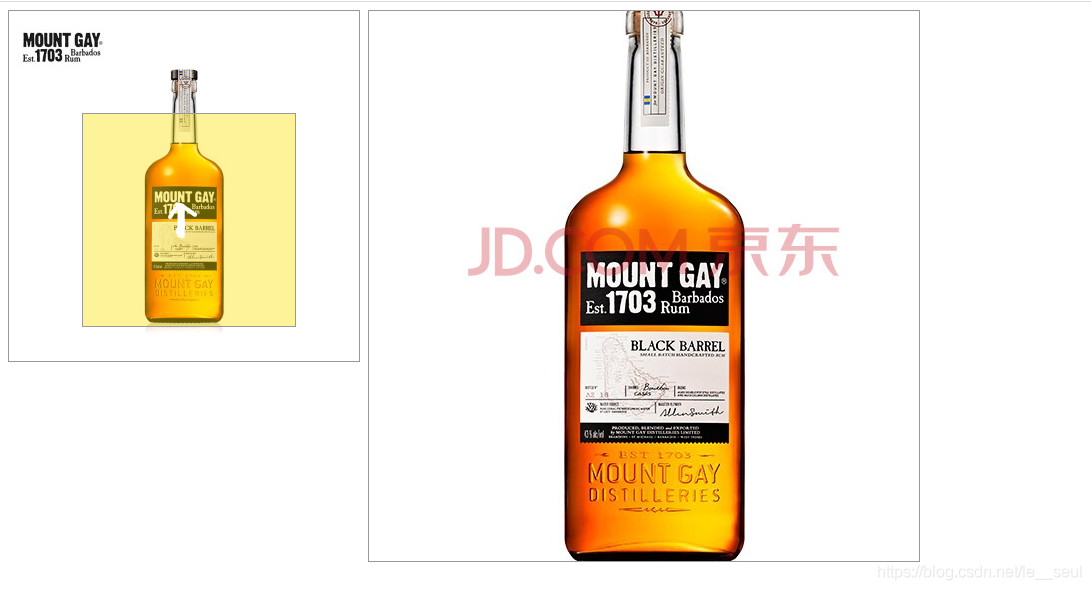
边栏推荐
- After taking aiyouteng's medicine, Naifei's condition improved
- Knowledge points of MySQL (12)
- Princeton calculus reader 02 Chapter 1 -- composition of functions, odd and even functions, function images
- Leetcode 231. 2 的幂
- Intel plans to sell baseband chip business, but Apple has given up?
- 在 PHP Web 应用程序中防止 XSS 的最佳实践
- Ligerui table control grid changes the color of rows (cells) according to the content
- The 3D sensing market is accelerating. Who will be better, TOF or structured light?
- Adaptive design and responsive design
- .net review the old and know the new: [6] what is LINQ
猜你喜欢

20. Shell programming variables

机器学习笔记 - 构建推荐系统(5) 前馈神经网络用于协同过滤

yolov6训练自己的数据集

Knowledge points of MySQL (12)

Leetcode 231. 2 的幂

Dynamics 365: explain virtual entity from 0 to 1
![[loj3247] [USACO 2020.1 platinum](/img/69/f5f7996cd1bb97c84ba381c3df55be.png)
[loj3247] [USACO 2020.1 platinum "non declining subsequences (DP, divide and conquer)

电话系统规则

After taking aiyouteng's medicine, Naifei's condition improved

How to prevent XSS in PHP
随机推荐
简易版QQ?Qt也可以实现!(一)
Four common post submission methods (application / x-www-form-urlencoded, multipart / form data, application / JSON, text / XML)
Mysql8 encountered the problem of stopping after the service was started
做完数据治理,质量依旧很差
Machine learning notes - building a recommendation system (5) feedforward neural network for collaborative filtering
双指针滑动窗口法解析及LeetCode相关题解
Mobile phone comparison redmi note8 and realm x2
多线程(基础)
机器学习笔记 - 构建推荐系统(5) 前馈神经网络用于协同过滤
Using JS to implement click events
Introduction to bermudagrass
LaneATT
22 bracket generation
[LeetCode]巧用位运算
Some understanding of the rank sum of matrix and the rank of image
deepin任务栏消失解决方法
The 3D sensing market is accelerating. Who will be better, TOF or structured light?
G026-db-gs-ins-03 openeuler deployment opengauss (1 active and 2 standby or multiple standby)
Image label processing -- converting JSON files into PNG files
How to generate complex flow chart of XMIND